Solved Win7/Pro x64 - Booting Very Slow - Cannot Save Files

Thank you, YaMoonSun

I found 12 entries and I had 2 unchecked. I decided to uncheck the hueyPRO monitor entry for now.

On further reflection and research I unchecked these, too.

Adobe Photo Downloader 4.0
Acrotray Adove distiller helper application
Catalyst Control Center (from Advanced Micro Devices)
VMonitor

It is certainly not overloaded enough to require an over 5 minute boot time.

thanks
baumgrenze
Check the non-Microsoft services that are in the services tab too while you're in there. Also do a custom scan with malwarebytes so it can detect possible rootkits. Preferably from safemode with networking.
 

My Computer My Computer

At a glance

Windows 7 Ultimate x643rd Generation i58GB GDDR3
Computer type
PC/Desktop
Computer Manufacturer/Model Number
Gateway
OS
Windows 7 Ultimate x64
CPU
3rd Generation i5
Memory
8GB GDDR3
Hard Drives
Samsung 840 Evo 250GB
Antivirus
None
Browser
Firefox Extended Support Release
Thank You YaMoonSun!

I now believe that VMonitor have been part of my problem. With it shut off, the machine boots like it did before, but it is one of 4 items.

It had the worst reputation when I searched each startup item one at a time.

Very important is that I can again use ZTreeWin.

Now I have to do some careful work comparing My Documents on my D: data drive vs the copy the jumanji helped me to make on F:, my external backup drive. I will proceed with great caution, but it appears that the folder is far more complete. If I am convinced I want to replace what is on D: with the copy on F: I want to be certain that I use the most reliable method.

I will be back this afternoon with more information.

I hope to Mark Solved sooner rather than later. I wanted to report this level of success which encourages me greatly.

Thanks again to YaMoonSun!
baumgrenze
 

My Computer My Computer

At a glance

Win 7 Pro 64Intel Core 2 Quad Q6600 (2.4 GHz) Quad Core2 x Crucial 4GB Kit (2GBx2) DDR2 CT2KIT25664A...Sapphire Radeon HD 3870 PCIe 512 Mb
Computer type
PC/Desktop
Computer Manufacturer/Model Number
Custom built by GamePC/Solid Electric - Palo Alto - on 03/10/08
OS
Win 7 Pro 64
CPU
Intel Core 2 Quad Q6600 (2.4 GHz) Quad Core
Motherboard
Gigabyte GA-P35-DS3P Intel P35 ATX (rev. 2.1)
Memory
2 x Crucial 4GB Kit (2GBx2) DDR2 CT2KIT25664AA800
Graphics Card(s)
Sapphire Radeon HD 3870 PCIe 512 Mb
Sound Card
RealTek audio on MOBO + EDIROL UA-1EX
Monitor(s) Displays
Samsung S24A450BW 24" LED monitor
Screen Resolution
1600 x 1200 at 75 Hz
Hard Drives
2 Crucial 128 Gb SSD (CT128M550SSD1)
one mounted and running Win7/Pro x64
one disconnected containing only Win10/Pro upgrade - in process
1 1TB WD Caviar Black (WD1003FZEX-00MK2A0) (Data drive)
1 2TB Seagate 2TB (PN/ 9JB1N3-576 - ST2000DM001-1ER
PSU
Seasonic S12-HT 650W 80% Efficiency Power Supply
Case
Lian Li PC-B25B
Cooling
Gigabyte Silent-Pipe
Keyboard
Dell MS Comfort
Mouse
HP x4000 wireless
Internet Speed
Sonic FTTN @ 23 Mbps
Antivirus
Avast
Browser
SeaMonkey
Other Info
BIOS: Award Software International, Inc. F6 06/18/2009

System Specs - Updated on 09//16/19
Files Visible on D: (Data Disk) and F: (Copy)

jumanji

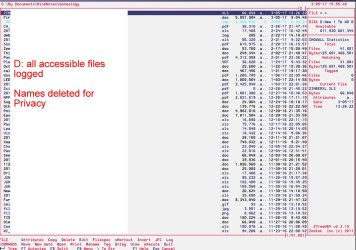
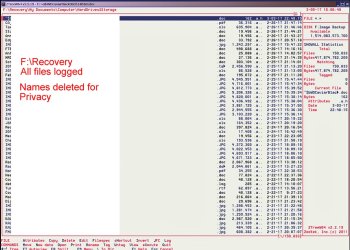
Here is where I am today. I thought I would share ZTreeWin displays of Drive D: vs Drive F:. I logged My Documents on each disk and then invoked ShowAll. I deleted the filenames for privacy's sake.

Clearly something bad happened to D: when it went to RAW and then became NTFS again so I can see it again.

On F:\Recovery - I have files saved right up until late on Monday, 2/27/17. The earliest file in this first display window is dated 2/21/17

On D: I inadvertently saved 2 files today. Otherwise there a few files dated 2/26/17 and they go back to 11/23/16 by the bottom of the window.

Clearly a lot of files were lost in the process.

I hope others can see the power of being able to do this ShowAll display.

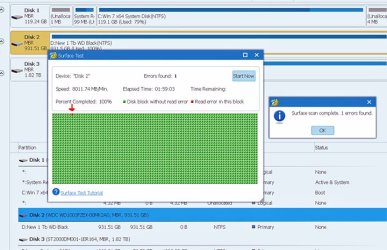
Should I reformat D: at this point and then copy and paste the F:\Recovery file structure back to D:? I ask about reformatting because of the one surface flaw found in a surface scan in "square #9" from the left of the MiniTool Partition Wizard display (Post #10).

Have I failed to consider another step before the drastic step of reformatting.

I await further advice.

thanks
baumgrenze
 

Attachments

  • D_AllFiles030517_ToShare.jpg
    D_AllFiles030517_ToShare.jpg
    133.7 KB · Views: 1
  • F_Recovery_AllFiles030517_ToShare.jpg
    F_Recovery_AllFiles030517_ToShare.jpg
    142.9 KB · Views: 0

My Computer My Computer

At a glance

Win 7 Pro 64Intel Core 2 Quad Q6600 (2.4 GHz) Quad Core2 x Crucial 4GB Kit (2GBx2) DDR2 CT2KIT25664A...Sapphire Radeon HD 3870 PCIe 512 Mb
Computer type
PC/Desktop
Computer Manufacturer/Model Number
Custom built by GamePC/Solid Electric - Palo Alto - on 03/10/08
OS
Win 7 Pro 64
CPU
Intel Core 2 Quad Q6600 (2.4 GHz) Quad Core
Motherboard
Gigabyte GA-P35-DS3P Intel P35 ATX (rev. 2.1)
Memory
2 x Crucial 4GB Kit (2GBx2) DDR2 CT2KIT25664AA800
Graphics Card(s)
Sapphire Radeon HD 3870 PCIe 512 Mb
Sound Card
RealTek audio on MOBO + EDIROL UA-1EX
Monitor(s) Displays
Samsung S24A450BW 24" LED monitor
Screen Resolution
1600 x 1200 at 75 Hz
Hard Drives
2 Crucial 128 Gb SSD (CT128M550SSD1)
one mounted and running Win7/Pro x64
one disconnected containing only Win10/Pro upgrade - in process
1 1TB WD Caviar Black (WD1003FZEX-00MK2A0) (Data drive)
1 2TB Seagate 2TB (PN/ 9JB1N3-576 - ST2000DM001-1ER
PSU
Seasonic S12-HT 650W 80% Efficiency Power Supply
Case
Lian Li PC-B25B
Cooling
Gigabyte Silent-Pipe
Keyboard
Dell MS Comfort
Mouse
HP x4000 wireless
Internet Speed
Sonic FTTN @ 23 Mbps
Antivirus
Avast
Browser
SeaMonkey
Other Info
BIOS: Award Software International, Inc. F6 06/18/2009

System Specs - Updated on 09//16/19
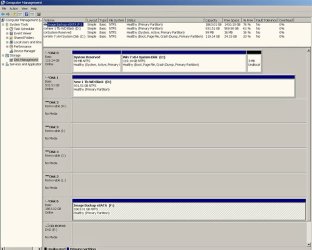
Can you post a fresh screenshot of Windows Disk Management? ( From what I understand you are able to access it - your drive D, WD 1TB disk - now in Windows)
 

My Computer My Computer

At a glance

Windows 7 Home Premium 32 bit
OS
Windows 7 Home Premium 32 bit
Thanks, jumanji,

Here's the image of Disk Management.

As I show above, the D: drive shows way fewer files than the F: drive. I've not put a lot of effort into exploring the D: drive to see if 'missing files' are there with a ~ or marked as temp files. I was just glad to see that the files I expected to find all appeared to be on the F: drive.

You were wise to counsel me to copy them to F: as a first task!

Now I believe I should move them back unless you think I should do more before I do this.

For good measure I've uploaded the surface test result again. Perhaps you know if the location of the bad sector in the display matrix correlates with where on the disk the bad sector is. Could it be in the boot sector area.

As I was shutting down applications, I noticed that drive F: is hatched with diagonal lines. Is this a bad sign? I see that it reports as NTFS and I can open files from Explorer.

Again, my bedtime approaches...

thanks
baumgrenze
 

Attachments

  • DiskManagment030517.jpg
    DiskManagment030517.jpg
    80.5 KB · Views: 1
  • SurfaceTest022817.jpg
    SurfaceTest022817.jpg
    78.9 KB · Views: 21
Last edited:

My Computer My Computer

At a glance

Win 7 Pro 64Intel Core 2 Quad Q6600 (2.4 GHz) Quad Core2 x Crucial 4GB Kit (2GBx2) DDR2 CT2KIT25664A...Sapphire Radeon HD 3870 PCIe 512 Mb
Computer type
PC/Desktop
Computer Manufacturer/Model Number
Custom built by GamePC/Solid Electric - Palo Alto - on 03/10/08
OS
Win 7 Pro 64
CPU
Intel Core 2 Quad Q6600 (2.4 GHz) Quad Core
Motherboard
Gigabyte GA-P35-DS3P Intel P35 ATX (rev. 2.1)
Memory
2 x Crucial 4GB Kit (2GBx2) DDR2 CT2KIT25664AA800
Graphics Card(s)
Sapphire Radeon HD 3870 PCIe 512 Mb
Sound Card
RealTek audio on MOBO + EDIROL UA-1EX
Monitor(s) Displays
Samsung S24A450BW 24" LED monitor
Screen Resolution
1600 x 1200 at 75 Hz
Hard Drives
2 Crucial 128 Gb SSD (CT128M550SSD1)
one mounted and running Win7/Pro x64
one disconnected containing only Win10/Pro upgrade - in process
1 1TB WD Caviar Black (WD1003FZEX-00MK2A0) (Data drive)
1 2TB Seagate 2TB (PN/ 9JB1N3-576 - ST2000DM001-1ER
PSU
Seasonic S12-HT 650W 80% Efficiency Power Supply
Case
Lian Li PC-B25B
Cooling
Gigabyte Silent-Pipe
Keyboard
Dell MS Comfort
Mouse
HP x4000 wireless
Internet Speed
Sonic FTTN @ 23 Mbps
Antivirus
Avast
Browser
SeaMonkey
Other Info
BIOS: Award Software International, Inc. F6 06/18/2009

System Specs - Updated on 09//16/19
As I was shutting down applications I noticed that F: in Disk Management has diagonal hatching across it.

I can open files from Recovery at will using Explorer.

Am I missing something?

thanks
baumgrenze
 

My Computer My Computer

At a glance

Win 7 Pro 64Intel Core 2 Quad Q6600 (2.4 GHz) Quad Core2 x Crucial 4GB Kit (2GBx2) DDR2 CT2KIT25664A...Sapphire Radeon HD 3870 PCIe 512 Mb
Computer type
PC/Desktop
Computer Manufacturer/Model Number
Custom built by GamePC/Solid Electric - Palo Alto - on 03/10/08
OS
Win 7 Pro 64
CPU
Intel Core 2 Quad Q6600 (2.4 GHz) Quad Core
Motherboard
Gigabyte GA-P35-DS3P Intel P35 ATX (rev. 2.1)
Memory
2 x Crucial 4GB Kit (2GBx2) DDR2 CT2KIT25664AA800
Graphics Card(s)
Sapphire Radeon HD 3870 PCIe 512 Mb
Sound Card
RealTek audio on MOBO + EDIROL UA-1EX
Monitor(s) Displays
Samsung S24A450BW 24" LED monitor
Screen Resolution
1600 x 1200 at 75 Hz
Hard Drives
2 Crucial 128 Gb SSD (CT128M550SSD1)
one mounted and running Win7/Pro x64
one disconnected containing only Win10/Pro upgrade - in process
1 1TB WD Caviar Black (WD1003FZEX-00MK2A0) (Data drive)
1 2TB Seagate 2TB (PN/ 9JB1N3-576 - ST2000DM001-1ER
PSU
Seasonic S12-HT 650W 80% Efficiency Power Supply
Case
Lian Li PC-B25B
Cooling
Gigabyte Silent-Pipe
Keyboard
Dell MS Comfort
Mouse
HP x4000 wireless
Internet Speed
Sonic FTTN @ 23 Mbps
Antivirus
Avast
Browser
SeaMonkey
Other Info
BIOS: Award Software International, Inc. F6 06/18/2009

System Specs - Updated on 09//16/19
1, Do not worry about the hatched drive. When you open Windows Disk Management the first drive in the Disk list is always selected and will appear hatched in the Disk Map.. In your case it is the Image Backup eSATA (F: ) 2TB drive. You can see it highlighted. It is normal and is of no consequence. If you click on the empty space below the Disk List or Disk Map it will get deselected and the hatch will disappear.

2. Whenever there is a problem in the disk and the disk turns RAW, we really do not know what has happened to the Disk or what exactly is happening to the Disk. If the Disk has developed bad sectors and is dying, it can fail totally at anytime. So my first effort is always to recover whatever data can be recovered.

You must understand, if your disk has indeed developed bad sectors, the data in the bad sectors is already lost. You can recover only the data that is still good in the good sectors. Between the time you made a TestDisk recovery and now, if more bad sectors had developed, you would have lost more data.Further in my writeup Copying files listed by TestDisk during Recovery in screen 5, you will notice that TestDisk will show even deleted files in RED ( the files that you had deleted in the D drive that still have not been overwritten by new data). If you had not pressed h to hide those deleted files and you had selected all files to copy, even those deleted files will be recovered. If you see your D drive, you won't see those files since you had deleted those in it earlier.Only these two factors can explain why you are not seeing as many as the recovered files in your problem drive .

3. Once recovery is over, we can always try to restore the drive.Even if some mishap occurs during this process, we still have the recovered files.

4. Without our making any effort to recover the disk as a whole, if your Disk has recovered on its own and has become alright showing NTFS file system, then I would think your Disk has become temperamental. Only sector 0 which contains the MBR +partition Table and sector 2048 which contains the volume boot record can do that. Those are readable sometimes and becomes unreadable sometimes. Your disk may be just gasping for breath.

You have to check the disk with manufacturer's diagnostic/repair utility. In your case WD Data Lifeguard Diagnostic for Windows Software and Firmware Downloads | WD Support

Install it and run the Quick and Extended Tests. Testing a drive for problems using Data Lifeguard Diagnostics for Windows Testing a drive for problems using Data Lifeguard Diagnostics for Windows | WD Support

If the tests fail, you have to discard the drive. Once bad sectors are detected it is only a question of time. It may be a slow death or a sudden death.Unpredictable and cannot be relied upon.

 
Last edited:

My Computer My Computer

At a glance

Windows 7 Home Premium 32 bit
OS
Windows 7 Home Premium 32 bit
Thank you for the hatching explanation.

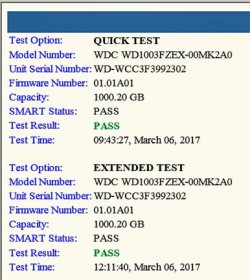
I ran the Data Lifegard Diagnostics and it reported Pass on both the Quick Test and the Extended Test.

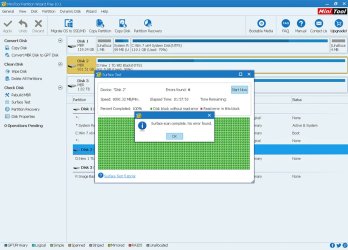
I went back and reran the Minitools surface scan again and this time it found 0 errors.

Are the attached images sufficient evidence?

thanks,
baumgrenze
 

Attachments

  • MinitoolPW_FullScanSceen1_030617.jpg
    MinitoolPW_FullScanSceen1_030617.jpg
    119.3 KB · Views: 0
  • WD_Diag_DDrive_Resusts_030617.jpg
    WD_Diag_DDrive_Resusts_030617.jpg
    59.2 KB · Views: 16

My Computer My Computer

At a glance

Win 7 Pro 64Intel Core 2 Quad Q6600 (2.4 GHz) Quad Core2 x Crucial 4GB Kit (2GBx2) DDR2 CT2KIT25664A...Sapphire Radeon HD 3870 PCIe 512 Mb
Computer type
PC/Desktop
Computer Manufacturer/Model Number
Custom built by GamePC/Solid Electric - Palo Alto - on 03/10/08
OS
Win 7 Pro 64
CPU
Intel Core 2 Quad Q6600 (2.4 GHz) Quad Core
Motherboard
Gigabyte GA-P35-DS3P Intel P35 ATX (rev. 2.1)
Memory
2 x Crucial 4GB Kit (2GBx2) DDR2 CT2KIT25664AA800
Graphics Card(s)
Sapphire Radeon HD 3870 PCIe 512 Mb
Sound Card
RealTek audio on MOBO + EDIROL UA-1EX
Monitor(s) Displays
Samsung S24A450BW 24" LED monitor
Screen Resolution
1600 x 1200 at 75 Hz
Hard Drives
2 Crucial 128 Gb SSD (CT128M550SSD1)
one mounted and running Win7/Pro x64
one disconnected containing only Win10/Pro upgrade - in process
1 1TB WD Caviar Black (WD1003FZEX-00MK2A0) (Data drive)
1 2TB Seagate 2TB (PN/ 9JB1N3-576 - ST2000DM001-1ER
PSU
Seasonic S12-HT 650W 80% Efficiency Power Supply
Case
Lian Li PC-B25B
Cooling
Gigabyte Silent-Pipe
Keyboard
Dell MS Comfort
Mouse
HP x4000 wireless
Internet Speed
Sonic FTTN @ 23 Mbps
Antivirus
Avast
Browser
SeaMonkey
Other Info
BIOS: Award Software International, Inc. F6 06/18/2009

System Specs - Updated on 09//16/19
OK, fine. Your drive seems to be in good shape and whatever happened appears to be a temporary glitch, that cured itself. But keep a watch. Periodically run a Quick Test and check.

You can do a cleanwipe Using the ERASE option in the Data Lifeguard Diagnostic for Windows and then format the drive. You may then copy all data to it and continue to use it.

But make sure that you always have a backup of all your important data ( ask Lady Fitzgerald and she will tell you that you should have not one but minimum two backups. She may even fund you to buy as many HDDs as you may want - no questions asked :p) and don't comeback here again requesting data recovery :D.
 
Last edited:

My Computer My Computer

At a glance

Windows 7 Home Premium 32 bit
OS
Windows 7 Home Premium 32 bit
If 6 days of recovery Hell doesn't want one to make backups; I don't know what will.

Great job as always jumanji!

Jack
 
Last edited:

My Computer My Computer

At a glance

Windows 10 Pro. 64/ version 1709 Windows 7 Pr...Intel i7-6800K @ 4.3Corsair Platinum 16 gig @2400EVGA GTX 1070 OC
Computer type
PC/Desktop
Computer Manufacturer/Model Number
Home made Desktop
OS
Windows 10 Pro. 64/ version 1709 Windows 7 Pro/64
CPU
Intel i7-6800K @ 4.3
Motherboard
ASUS X-99 Deluxe II
Memory
Corsair Platinum 16 gig @2400
Graphics Card(s)
EVGA GTX 1070 OC
Monitor(s) Displays
Asus 27" LED LCD/VE278Q
Screen Resolution
1920-1080 or 1280-720 HDMI
Hard Drives
INTEL SSD 730-240 Gb Sata 3.0/
PSU
EVGA Platium 1200W
Case
Phanteks Luxe Tempered Glass 8 fans/ one radiator
Cooling
XSPC/ Water Cooled CPU
Keyboard
Das 4 Professional
Mouse
Logitech M705/MX Anywhere 2-S
Internet Speed
100 mbits
Antivirus
Microsoft Security Essentials/ Malwarebytes Premium 3.0/ SAS
Browser
I.E. 11 default/Firefox/ ISP Time Warner Cable/Spectrum
Other Info
LG BluRay Burner/
Sound system-KLipsch-THX/
Icy Dock ssd Hot Swap bays.
Thank you one more time, jumanji, for patiently leading me past all the pitfalls. Jack, "great job" is an understatement.

For mysterious reasons, Win7 decided that it was important to run chkdsk on D:, F:, and C: during a boot today. At the end of each one, the scrolling display said:

"usn Journal verification completed. Windows has checked the file system and found no problems."

There is probably a log file somewhere with all the details that could be copied as a text file. I don't have the bandwidth to search for it right now.

Since I titled this "Booting Very Slow..." I want to reiterate what came to light startomg with post #39, and #41-42. I believe that my problem was associated with VMonitor.exe. Here is what file.net has to say:

"The process known as Monitor SnapShot Button belongs to software Digital microscope or Vimicro USB2.0 UVC PC Camera or Media-Tech Camera or Vimicro UVC USB2.0 PC Camera or Dolphin USB (version 2.0 Clip-on Webcam with Built-in) or Camera-H1C or Canyon USB2.0 PC Camera by Vimicro (www.vimicro.com)."

Perhaps it is OK to use on an 'as needed' basis, but I'd strongly recommend not having it in Startup.

Thanks once more,
baumgrenze
 

My Computer My Computer

At a glance

Win 7 Pro 64Intel Core 2 Quad Q6600 (2.4 GHz) Quad Core2 x Crucial 4GB Kit (2GBx2) DDR2 CT2KIT25664A...Sapphire Radeon HD 3870 PCIe 512 Mb
Computer type
PC/Desktop
Computer Manufacturer/Model Number
Custom built by GamePC/Solid Electric - Palo Alto - on 03/10/08
OS
Win 7 Pro 64
CPU
Intel Core 2 Quad Q6600 (2.4 GHz) Quad Core
Motherboard
Gigabyte GA-P35-DS3P Intel P35 ATX (rev. 2.1)
Memory
2 x Crucial 4GB Kit (2GBx2) DDR2 CT2KIT25664AA800
Graphics Card(s)
Sapphire Radeon HD 3870 PCIe 512 Mb
Sound Card
RealTek audio on MOBO + EDIROL UA-1EX
Monitor(s) Displays
Samsung S24A450BW 24" LED monitor
Screen Resolution
1600 x 1200 at 75 Hz
Hard Drives
2 Crucial 128 Gb SSD (CT128M550SSD1)
one mounted and running Win7/Pro x64
one disconnected containing only Win10/Pro upgrade - in process
1 1TB WD Caviar Black (WD1003FZEX-00MK2A0) (Data drive)
1 2TB Seagate 2TB (PN/ 9JB1N3-576 - ST2000DM001-1ER
PSU
Seasonic S12-HT 650W 80% Efficiency Power Supply
Case
Lian Li PC-B25B
Cooling
Gigabyte Silent-Pipe
Keyboard
Dell MS Comfort
Mouse
HP x4000 wireless
Internet Speed
Sonic FTTN @ 23 Mbps
Antivirus
Avast
Browser
SeaMonkey
Other Info
BIOS: Award Software International, Inc. F6 06/18/2009

System Specs - Updated on 09//16/19
My pleasure. Thank you.
 

My Computer My Computer

At a glance

Windows 7 Home Premium 32 bit
OS
Windows 7 Home Premium 32 bit
Back
Top