
Win7 refusing to acknowledge AMD Radeon Driver?

yesthatnagia

New member
Local time
7:19 PM
Messages
2
Hey all! I did a clean install of Win7 and I've been trying for about a day to install the driver for my Radeon HD 3200. I've run all the official software AMD (the auto-detector, plus the actual driver installer) provides five or six times by now, and while the installer tells me in the logs that everything was a success, when I restart, the computer persists in using the defaults, pops up a CMD window saying that AMD Video Transcoder failed to initialize, pops up a window saying that no AMD graphics driver installed (or it's not functioning properly) and then says that I have the wrong driver installed or not enabled when I try to open the Vision ENGINE control center.

I've done everything I can think of, up to running Driver Sweeper in safe mode and then reinstalling the driver.

I'm about to tear my hair out. Any suggestions?
 

Attachments
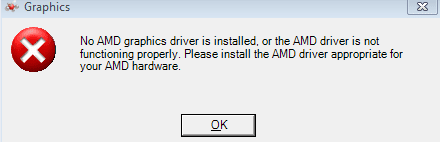
  • no-driver-1.PNG
    no-driver-1.PNG
    9.3 KB · Views: 18

My Computer

Computer type
PC/Desktop
Computer Manufacturer/Model Number
Gateway
OS
Windows 7 Home Premium x64
CPU
AMD Phenom 9100e quad-core`
Motherboard
?
Memory
8gb
Graphics Card(s)
AMD Radeon HD 3200
Antivirus
Avast
Browser
Chrome
Why not just run windows update ?

Make sure you have it set to install other software and drivers.
 
Last edited:

My Computer

Computer type
PC/Desktop
Computer Manufacturer/Model Number
Skylake Special #666
OS
Windows 10 Pro x64
CPU
Intel Core i7 6700K
Motherboard
Asus Sabertooth Z170 Mark 1
Memory
GSkill TridentZ RGB 16GB 3600 16-16-16-36
Graphics Card(s)
EVGA GTX 980 Ti SC x2
Sound Card
Realtek High Definition
Monitor(s) Displays
AOC G2460PG
Screen Resolution
1920 x 1080 144Hz
Hard Drives
Samsung 860 Pro 256GB, Seagate Barracuda 4TB x2
PSU
EVGA 1000 P2, EVGA White Custom Braided Cables
Case
Corsair Vengeance C70 Gunmetal Black
Cooling
Corsair H100i v2, Corsair ML120 x2, Thermal Grizzly Kryonaut
Keyboard
Logitech G910 Orion Spectrum
Mouse
Logitech G700s
Internet Speed
Verizon Fios Quantum Gateway 75/75
Antivirus
Windows Defender, Malwarebytes Free 3.8.3
Browser
Chrome
Other Info
Corsair SP120 x4, LG Blu-ray Drive, Durabrand HT-395 100 Watt Dolby Digital Amp, Corsair H2100 Wireless 7.1 Headset
Hi Welcome to Seven Forums ... Your problem could be related to the Chipset Driver ...

What is your Computers Model Number ? ...
 

My Computer

Computer Manufacturer/Model Number
W530-3630QM1
OS
windows 7 home 64bit
CPU
INTEL-CORE I7
Memory
16GB
Hard Drives
750GB
Browser
Chrome
Re install windows, then just run all rounds of windows updates until there is nothing left.

Post back the results, we`ll continue from there.

Also post a fully expanded device manager showing any issues.
 

My Computer

Computer type
PC/Desktop
Computer Manufacturer/Model Number
Skylake Special #666
OS
Windows 10 Pro x64
CPU
Intel Core i7 6700K
Motherboard
Asus Sabertooth Z170 Mark 1
Memory
GSkill TridentZ RGB 16GB 3600 16-16-16-36
Graphics Card(s)
EVGA GTX 980 Ti SC x2
Sound Card
Realtek High Definition
Monitor(s) Displays
AOC G2460PG
Screen Resolution
1920 x 1080 144Hz
Hard Drives
Samsung 860 Pro 256GB, Seagate Barracuda 4TB x2
PSU
EVGA 1000 P2, EVGA White Custom Braided Cables
Case
Corsair Vengeance C70 Gunmetal Black
Cooling
Corsair H100i v2, Corsair ML120 x2, Thermal Grizzly Kryonaut
Keyboard
Logitech G910 Orion Spectrum
Mouse
Logitech G700s
Internet Speed
Verizon Fios Quantum Gateway 75/75
Antivirus
Windows Defender, Malwarebytes Free 3.8.3
Browser
Chrome
Other Info
Corsair SP120 x4, LG Blu-ray Drive, Durabrand HT-395 100 Watt Dolby Digital Amp, Corsair H2100 Wireless 7.1 Headset
Re-installed, ran the updates, and when the update tool restarted, there was no OS. I booted from the install disk, ran bootrec, saw no windows installations, and start-up repair found no installations, either.

So now I've re-re-re-installed, completely clean, and I'm not sure where to go from here.
 

My Computer

Computer type
PC/Desktop
Computer Manufacturer/Model Number
Gateway
OS
Windows 7 Home Premium x64
CPU
AMD Phenom 9100e quad-core`
Motherboard
?
Memory
8gb
Graphics Card(s)
AMD Radeon HD 3200
Antivirus
Avast
Browser
Chrome
Follow these steps to get and keep a perfect Clean Reinstall Windows 7.

The steps for drivers are in red.

If you didn't delete all partitions during install to clear the partition table I would do it over correctly.
 
Is windows installed and running fine ?
 

My Computer

Computer type
PC/Desktop
Computer Manufacturer/Model Number
Skylake Special #666
OS
Windows 10 Pro x64
CPU
Intel Core i7 6700K
Motherboard
Asus Sabertooth Z170 Mark 1
Memory
GSkill TridentZ RGB 16GB 3600 16-16-16-36
Graphics Card(s)
EVGA GTX 980 Ti SC x2
Sound Card
Realtek High Definition
Monitor(s) Displays
AOC G2460PG
Screen Resolution
1920 x 1080 144Hz
Hard Drives
Samsung 860 Pro 256GB, Seagate Barracuda 4TB x2
PSU
EVGA 1000 P2, EVGA White Custom Braided Cables
Case
Corsair Vengeance C70 Gunmetal Black
Cooling
Corsair H100i v2, Corsair ML120 x2, Thermal Grizzly Kryonaut
Keyboard
Logitech G910 Orion Spectrum
Mouse
Logitech G700s
Internet Speed
Verizon Fios Quantum Gateway 75/75
Antivirus
Windows Defender, Malwarebytes Free 3.8.3
Browser
Chrome
Other Info
Corsair SP120 x4, LG Blu-ray Drive, Durabrand HT-395 100 Watt Dolby Digital Amp, Corsair H2100 Wireless 7.1 Headset
Back
Top