Win7 Taskbar hack, Can this be done?

Dira

New member
Local time
3:44 AM
Messages
5
Hey. I've wanted this look for a long time but I do not have the knowledge how to and have not been able to find a way to do it. I want to kill the lines in the win 7 taskbar. The picture will hopefully show my idea better :)

cbpg8
b4699df15194939399514aca6523cfa8.jpg


The squares around the icons are just cause I photoshopped this in a min :P But a phased out square in the background to show programs that are running is prob a good idea. Btw I normally run with with taskbar auto-hide. So this would be the look on a program alert/start menu active.

Any pointers towards programs, scripts that make it possible are welcome! Or any reactions to the change in general ;)


Cheers,
//Dira
 

My Computer

Computer type
PC/Desktop
Computer Manufacturer/Model Number
custom build
OS
Win 7 Ult x64
Welcome to the Seven Forums

I am not quite sure what you are trying to do could you post another screen shot with arrows pointing to the problem area.

Jerry
 

My Computer

Computer type
Laptop
Computer Manufacturer/Model Number
Sager NP9170
OS
Win 7 Pro x64 / Win 10 Pro
CPU
Intel(R) Core(TM) i7-3630QM CPU @ 2.40GHz
Motherboard
CLEVO P170EM
Memory
12 GB
Graphics Card(s)
(1) Intel(R) HD Graphics 4000 (2) NVIDIA GeForce GTX 675M
Sound Card
(1) Realtek High Definition Audio (2) Intel(R) Display Aud
Monitor(s) Displays
17.3
Screen Resolution
1920x1080
Hard Drives
(1) Samsung 860 EVO 500GB(OS) (1) Samsung 860 EVO 500GB(Data)
Keyboard
Backlite
Antivirus
MSE, Malwarebytes Pro
Browser
Firefox
Other Info
DESKTOP: Custom-built.
OS: Win 10 Pro x64.
CASE: Rosewill R5.
CPU: Intel I5 4670K CPU @ 3.40GHz.
CPU COOLER: Cool Master Hyper 212 EVO.
MOTHERBOARD: Asus Z87-A.
MEMORY: Kingston HyperX 2x4 GB.
GPU: Nvidia Geforce 650 TI.
PSU: Corsair TX750.
DRIVES: (1) Samsung 840 120 GB SSD (2) Western Digital blue 500 GB 7200 RPM.
Ta for the welcome :)

This is how it looks atm (This post). And what I am trying to achieve is something like the pic in the first post

6c4130734491e1a757246197f3a7d6ce.jpg


I want the line and marking gone. Just floating icons basicly :)

//Dira
 

My Computer

Computer type
PC/Desktop
Computer Manufacturer/Model Number
custom build
OS
Win 7 Ult x64
What you are trying to do is not possible, I have edited the aero.msstyles and made the images for the taskbar transparent and as you can see from the screenshot below that is as transparent as you can get it it still shows a faint line at the top and the rest of the taskbar is blurry.

Jerry
Untitled.jpg
 

My Computer

Computer type
Laptop
Computer Manufacturer/Model Number
Sager NP9170
OS
Win 7 Pro x64 / Win 10 Pro
CPU
Intel(R) Core(TM) i7-3630QM CPU @ 2.40GHz
Motherboard
CLEVO P170EM
Memory
12 GB
Graphics Card(s)
(1) Intel(R) HD Graphics 4000 (2) NVIDIA GeForce GTX 675M
Sound Card
(1) Realtek High Definition Audio (2) Intel(R) Display Aud
Monitor(s) Displays
17.3
Screen Resolution
1920x1080
Hard Drives
(1) Samsung 860 EVO 500GB(OS) (1) Samsung 860 EVO 500GB(Data)
Keyboard
Backlite
Antivirus
MSE, Malwarebytes Pro
Browser
Firefox
Other Info
DESKTOP: Custom-built.
OS: Win 10 Pro x64.
CASE: Rosewill R5.
CPU: Intel I5 4670K CPU @ 3.40GHz.
CPU COOLER: Cool Master Hyper 212 EVO.
MOTHERBOARD: Asus Z87-A.
MEMORY: Kingston HyperX 2x4 GB.
GPU: Nvidia Geforce 650 TI.
PSU: Corsair TX750.
DRIVES: (1) Samsung 840 120 GB SSD (2) Western Digital blue 500 GB 7200 RPM.
How did u get it as clean as the pic? I can't seem to get the white upper line away. Custom theme?
 

My Computer

Computer type
PC/Desktop
Computer Manufacturer/Model Number
custom build
OS
Win 7 Ult x64
Welcome to the forums!
What you are trying to do is, indeed, impossible.

However, you can make your taskbar auto-hide, so it becomes invisible when your mouse doesn't hover over it. This tutorial explains how to do it.
And when it's hidden, you can use programs like Rainmeter to create a "new" task bar where ever you like.

This tutorial will explain how Rainmeter works, and how you can apply it.

Good luck!
Nommy


EDIT: If you want your taskbar to become more "glassy", so you just can see through it, you might want to look at the Full Glass and Full Glass V2 theme's.
Both require Universal Theme Patcher, which you can get here.
 
Last edited:

My Computer

Computer type
Laptop
Computer Manufacturer/Model Number
Dell Inspiron 5547
OS
Microsoft Windows 8.1 64-bit Professional
CPU
Intel(R) Core(TM) i7-4510U CPU @ 2.00GHz
Motherboard
Dell Inc. 08KNCD
Memory
8.00 GB (2 x 4.00 GB)
Graphics Card(s)
AMD Radeon R7 M265
Screen Resolution
1366 x 768 x 4294967296 colors
Hard Drives
(1) 1TB ST1000LM024 HN-M101MBB (2) 2TB Western Digital external hard drive (3) 500GB Packard Bell external hard drive
Mouse
Corsair Vengeance M60
Antivirus
Windows Defender & Malwarebytes
Browser
Firefox, Chromium
Other Info
+ Acer TravelMate 7730G with 32bit Ubuntu 14.04 LTS Trusty Tahr.
How did u get it as clean as the pic? I can't seem to get the white upper line away. Custom theme?

I started a new custom theme(look at Post #38 Here will show how) and edited the .msstyles and made the images for the taskbar transparent.

If you want I can tell you the image #s for a new unedited custom theme so you can try it.

If you are using the default aero theme I can change that for you, using Windows Style Builder and post it here in a zip folder.
If you are using a custom theme you will need to ask the theme maker. It's not cool to change someone else work.
&
This will be a custom theme and you will need to do 1 of these 2 ways of Enabling custom themes for it to work.
http://www.sevenforums.com/tutorials/34579-enabling-custom-themes-windows-7-a.html
Or
http://www.sevenforums.com/tutorials/28377-theme-how-apply-custom-themes.html?filter

Let me know.
Jerry
 

My Computer

Computer type
Laptop
Computer Manufacturer/Model Number
Sager NP9170
OS
Win 7 Pro x64 / Win 10 Pro
CPU
Intel(R) Core(TM) i7-3630QM CPU @ 2.40GHz
Motherboard
CLEVO P170EM
Memory
12 GB
Graphics Card(s)
(1) Intel(R) HD Graphics 4000 (2) NVIDIA GeForce GTX 675M
Sound Card
(1) Realtek High Definition Audio (2) Intel(R) Display Aud
Monitor(s) Displays
17.3
Screen Resolution
1920x1080
Hard Drives
(1) Samsung 860 EVO 500GB(OS) (1) Samsung 860 EVO 500GB(Data)
Keyboard
Backlite
Antivirus
MSE, Malwarebytes Pro
Browser
Firefox
Other Info
DESKTOP: Custom-built.
OS: Win 10 Pro x64.
CASE: Rosewill R5.
CPU: Intel I5 4670K CPU @ 3.40GHz.
CPU COOLER: Cool Master Hyper 212 EVO.
MOTHERBOARD: Asus Z87-A.
MEMORY: Kingston HyperX 2x4 GB.
GPU: Nvidia Geforce 650 TI.
PSU: Corsair TX750.
DRIVES: (1) Samsung 840 120 GB SSD (2) Western Digital blue 500 GB 7200 RPM.
@Nommy. Ta for trying to help. But the info is sadly of no use. I allrdy use rainmeter and I don't want another taskbar. The glass themes don't suit me :/

@Bongo. Would be super sweet if u could :)


//Dira
 

My Computer

Computer type
PC/Desktop
Computer Manufacturer/Model Number
custom build
OS
Win 7 Ult x64
In Linux, you could do it.
 

Attachments

  • Workspace 1_001.png
    Workspace 1_001.png
    341.5 KB · Views: 12

My Computer

Computer Manufacturer/Model Number
HP, Dell, Gateway, Toshiba - 4 laptops and 2 desktops
OS
Vista, Windows7, Mint Mate, Zorin, Windows 8
CPU
from 1.6GHz Duo to i7
Monitor(s) Displays
2x HP w2207
Hard Drives
5x HDD, 7x SSD, 12x Externals
Keyboard
with trackball - no mices
Mouse
Trackball mice
Internet Speed
DSL 6000
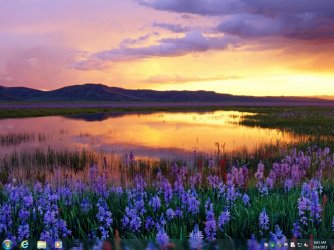
Here you go download the zipped folder at the bottom of this post to your desktop and extract it.
Put both 1 Dira theme folder and 1 Dira.theme file in C:\Windows\Resources\Themes
Dira.pngThemes.png


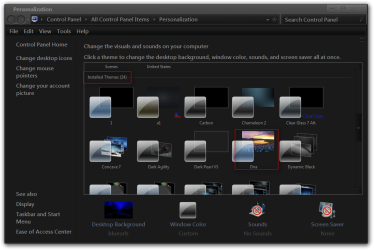
It will show up in Personalization under Installed Themes as Dira
Personalization.png

Jerry
 

Attachments

My Computer

Computer type
Laptop
Computer Manufacturer/Model Number
Sager NP9170
OS
Win 7 Pro x64 / Win 10 Pro
CPU
Intel(R) Core(TM) i7-3630QM CPU @ 2.40GHz
Motherboard
CLEVO P170EM
Memory
12 GB
Graphics Card(s)
(1) Intel(R) HD Graphics 4000 (2) NVIDIA GeForce GTX 675M
Sound Card
(1) Realtek High Definition Audio (2) Intel(R) Display Aud
Monitor(s) Displays
17.3
Screen Resolution
1920x1080
Hard Drives
(1) Samsung 860 EVO 500GB(OS) (1) Samsung 860 EVO 500GB(Data)
Keyboard
Backlite
Antivirus
MSE, Malwarebytes Pro
Browser
Firefox
Other Info
DESKTOP: Custom-built.
OS: Win 10 Pro x64.
CASE: Rosewill R5.
CPU: Intel I5 4670K CPU @ 3.40GHz.
CPU COOLER: Cool Master Hyper 212 EVO.
MOTHERBOARD: Asus Z87-A.
MEMORY: Kingston HyperX 2x4 GB.
GPU: Nvidia Geforce 650 TI.
PSU: Corsair TX750.
DRIVES: (1) Samsung 840 120 GB SSD (2) Western Digital blue 500 GB 7200 RPM.
@ WHS, Linux is not an option :) But thanx anyway ;)

@ Bongo: Thank you :) I know where to place the files :)
 

My Computer

Computer type
PC/Desktop
Computer Manufacturer/Model Number
custom build
OS
Win 7 Ult x64
@ WHS, Linux is not an option :) But thanx anyway ;)

@ Bongo: Thank you :) I know where to place the files :)
I figured that Linux was not what you were looking for. But there it is so darn easy to do. Maybe one day you want to play around with it in virtual. Here is how. It is a lot of fun.
 

My Computer

Computer Manufacturer/Model Number
HP, Dell, Gateway, Toshiba - 4 laptops and 2 desktops
OS
Vista, Windows7, Mint Mate, Zorin, Windows 8
CPU
from 1.6GHz Duo to i7
Monitor(s) Displays
2x HP w2207
Hard Drives
5x HDD, 7x SSD, 12x Externals
Keyboard
with trackball - no mices
Mouse
Trackball mice
Internet Speed
DSL 6000

My Computer

Computer type
Laptop
Computer Manufacturer/Model Number
Acer V3-551G
OS
Windows 7 Ultimate 32bit
CPU
AMD Quad-Core A8-4500M with Turbo Core up to 2.80GHz
Memory
8 GB DDR 3
Graphics Card(s)
AMD Radeon HD 7640G + 7670M (2GB dedicated VRAM)
Sound Card
AMD HD Audio device / Realtek HD Audio
Monitor(s) Displays
15.6" HD LED
Screen Resolution
1366 x 768 (32bit)
Hard Drives
1 TB HDD
Antivirus
AVG 2013 free edition
Browser
Google Chrome
Other Info
WEI scores:

Base score= 5.9

-Processor 6.7
-Memory (RAM) 7.2
-Graphics 5.9
-Gaming Graphics 6.2
-Primary hard disk 5.9
You're Welcome
 

My Computer

Computer type
Laptop
Computer Manufacturer/Model Number
Sager NP9170
OS
Win 7 Pro x64 / Win 10 Pro
CPU
Intel(R) Core(TM) i7-3630QM CPU @ 2.40GHz
Motherboard
CLEVO P170EM
Memory
12 GB
Graphics Card(s)
(1) Intel(R) HD Graphics 4000 (2) NVIDIA GeForce GTX 675M
Sound Card
(1) Realtek High Definition Audio (2) Intel(R) Display Aud
Monitor(s) Displays
17.3
Screen Resolution
1920x1080
Hard Drives
(1) Samsung 860 EVO 500GB(OS) (1) Samsung 860 EVO 500GB(Data)
Keyboard
Backlite
Antivirus
MSE, Malwarebytes Pro
Browser
Firefox
Other Info
DESKTOP: Custom-built.
OS: Win 10 Pro x64.
CASE: Rosewill R5.
CPU: Intel I5 4670K CPU @ 3.40GHz.
CPU COOLER: Cool Master Hyper 212 EVO.
MOTHERBOARD: Asus Z87-A.
MEMORY: Kingston HyperX 2x4 GB.
GPU: Nvidia Geforce 650 TI.
PSU: Corsair TX750.
DRIVES: (1) Samsung 840 120 GB SSD (2) Western Digital blue 500 GB 7200 RPM.
What you are trying to do is not possible, I have edited the aero.msstyles and made the images for the taskbar transparent and as you can see from the screenshot below that is as transparent as you can get it it still shows a faint line at the top and the rest of the taskbar is blurry.

Jerry
View attachment 259259

Hi, I have registered to this forum just to ask this. How did you change the taskbar like that? Is it possible with Registry settings? That looks neat.
 

My Computer

Computer type
Laptop
OS
Windows 7 Ultimate 64-bit

My Computer

Computer type
PC/Desktop
OS
Windows 10 Home x64
CPU
INTEL Core i5-750 Quad-Core 3.37GHz
Motherboard
ASUS P7P55D
Memory
HyperX Fury Black Series 8GB (2 x 4GB) 1866Mhz
Graphics Card(s)
EVGA GeForce GTX 750 Superclocked 1GB 128-Bit GDDR5
Monitor(s) Displays
LG 32MA68HY 32" IPS
Screen Resolution
1920 x 1080
Hard Drives
Samsung 840 Evo 120GB, SEAGATE 500GB Barracuda® 7200.12, SATA 3 Gb/s, 7200 RPM, 16MB cache
PSU
ANTEC TruePower New TP-550, 80 PLUS, 550W
Case
ANTEC Three Hundred Illusion
Cooling
COOLER MASTER Hyper 212 Plus, 4 x 120mm 1 x 140mm Noctua's
Internet Speed
85 + Mbps
Antivirus
Avast
Browser
Vivaldi
Back
Top