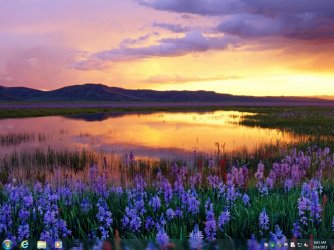
Hey. I've wanted this look for a long time but I do not have the knowledge how to and have not been able to find a way to do it. I want to kill the lines in the win 7 taskbar. The picture will hopefully show my idea better 


The squares around the icons are just cause I photoshopped this in a min But a phased out square in the background to show programs that are running is prob a good idea. Btw I normally run with with taskbar auto-hide. So this would be the look on a program alert/start menu active.
Any pointers towards programs, scripts that make it possible are welcome! Or any reactions to the change in general
Cheers,
//Dira
The squares around the icons are just cause I photoshopped this in a min
But a phased out square in the background to show programs that are running is prob a good idea. Btw I normally run with with taskbar auto-hide. So this would be the look on a program alert/start menu active.Any pointers towards programs, scripts that make it possible are welcome! Or any reactions to the change in general
Cheers,
//Dira
My Computer
At a glance
Win 7 Ult x64
- Computer type
- PC/Desktop
- Computer Manufacturer/Model Number
- custom build
- OS
- Win 7 Ult x64