Solved Win7 truncates filenames with "." in it..

Struggling7User

New member
Local time
12:44 AM
Messages
3
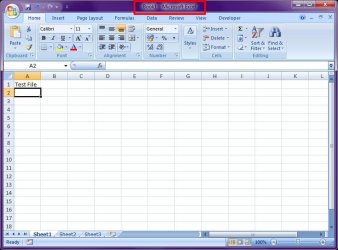
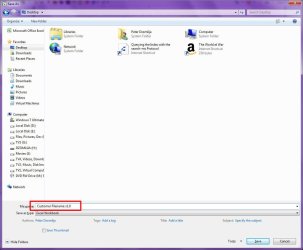
I've recently upgraded to Windows 7. My company uses files that have version numbering such as "Customer Filename v1.0.xlsx" In previous versions of Windows (Vista and XP), there's no problem with this. But with Windows 7, the filename keeps getting truncated to "Customer Filename v1", which means each time i need to go into Explorer to rename the file.

I've already turned off the "Hide extensions for known file types" but this still happens. Any idea how to get around this?

An example of when this happens is.. when printing a file to PDF, instead of saving a file named "Customer Filename v1.0.pdf", I get instead "Customer Filename v1.pdf"

Help??
 

My Computer My Computer

At a glance

Windows 7 Enterprise x32Core2Duo T7500 2.20GHz4GBNVidia Quadro FX1600M
Computer Manufacturer/Model Number
HP 8710w
OS
Windows 7 Enterprise x32
CPU
Core2Duo T7500 2.20GHz
Memory
4GB
Graphics Card(s)
NVidia Quadro FX1600M
Sound Card
SoundMAX Integrated Digital HD Audio
Monitor(s) Displays
HP LP2465 x2
Hard Drives
Western Digital 500GB SATA
Are you sure the filenames are not too long? Windows usually limits file names to 260 characters. But the file name must actually be shorter than that, since the complete path (such as C:\Program Files\filename.txt) is included in this character count.

Just to test, create a file with a smaller name and all those version numbers and see if it is saved properly.
 

My Computer My Computer

At a glance

Windows 7 x64 pro/ Windows 7 x86 Pro/ XP SP3 x86
Computer Manufacturer/Model Number
Too many to describe...
OS
Windows 7 x64 pro/ Windows 7 x86 Pro/ XP SP3 x86
I've recently upgraded to Windows 7. My company uses files that have version numbering such as "Customer Filename v1.0.xlsx" In previous versions of Windows (Vista and XP), there's no problem with this. But with Windows 7, the filename keeps getting truncated to "Customer Filename v1", which means each time i need to go into Explorer to rename the file.

I've already turned off the "Hide extensions for known file types" but this still happens. Any idea how to get around this?

An example of when this happens is.. when printing a file to PDF, instead of saving a file named "Customer Filename v1.0.pdf", I get instead "Customer Filename v1.pdf"

Help??

This is not a problem with Windows, but rather the PDF printing software you are using. I use BullZip PDF Printer. And I just ran a test by printing a tutorial page from our sister site, VistaForums:

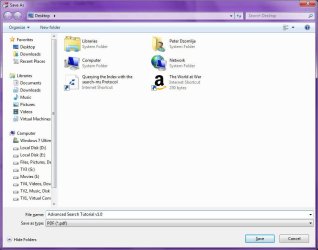
1) I issued the Print command, and selected the "Bullzip PDF Printer"
Image1.jpg

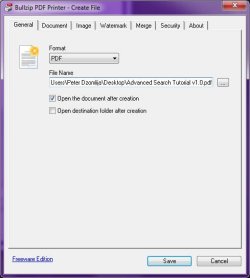
2) I clicked the icon to specify a filename, and typed "Advanced Search Tutorial v1.0" (without the quotes):
Image2.jpg

3) I then clicked Save:
Image3.jpg

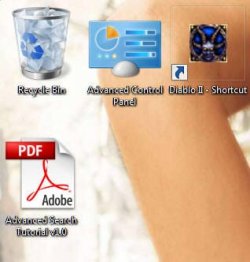
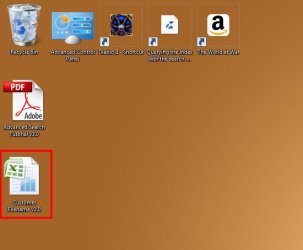
4) The file was created properly on the desktop, with the filename I specified:
Image4.jpg

So I'm thinking perhaps your PDF printing software needs to be updated?

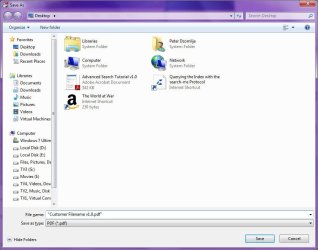
There is one workaround that you can try. When specifying the filename to save, enclose it in quotes before you click save. For example:
Image5.jpg

You can try excluding the ".pdf" from the filename "Customer Filename v1.0" in the Save As dialog, but if what I suspect is tru, the you may not be able to open it until you use explorer to re-attach the .pdf extension.
 

My Computer My Computer

At a glance

Windows 7 Professional 32-bit SP1AMD A4/A63.00GB EDOVMware SVGA 3D
Computer type
PC/Desktop
Computer Manufacturer/Model Number
Virtual Machine
OS
Windows 7 Professional 32-bit SP1
CPU
AMD A4/A6
Motherboard
Intel Corporation 440BX Desktop Reference Platform
Memory
3.00GB EDO
Graphics Card(s)
VMware SVGA 3D
Sound Card
High Definition Audio Device
Monitor(s) Displays
Generic Non-PnP Monitor on VMware SVGA 3D
Screen Resolution
1440x900
Hard Drives
1 x 60GB VMware Virtual SATA Hard Drive ATA Device
Antivirus
Kaspersky Total Security
Thanks for the replies..
@Bill2..
- its definitely not the filename length. There's no problem at all whatsoever if in Vista or XP. Its only since moving to Windows 7 that this problem is encountered.

@Domlija..
- not sure if its to do with the PDF writer (I user CutePDF) as there are other instances where this problem occurs.

More info..
My company uses a mix of machines, some have been upgraded, some not. There are still Windows XP and Windows Vista users whom i send and receive files from. I've noticed some of them have started to send me file attachments with the 'version numbering' minus the period ".".. ie.. "Customer Filename v1 0.whatever"

So far, we've been experiencing truncated filenames with all sorts of software including MS Office apps (versions 2003, 2007).

Wondering if there is any configuration somewhere that i'm missing probably in Windows Explorer or something?? As mentioned previously, have already disabled "Hide extensions for known file types".
 

My Computer My Computer

At a glance

Windows 7 Enterprise x32Core2Duo T7500 2.20GHz4GBNVidia Quadro FX1600M
Computer Manufacturer/Model Number
HP 8710w
OS
Windows 7 Enterprise x32
CPU
Core2Duo T7500 2.20GHz
Memory
4GB
Graphics Card(s)
NVidia Quadro FX1600M
Sound Card
SoundMAX Integrated Digital HD Audio
Monitor(s) Displays
HP LP2465 x2
Hard Drives
Western Digital 500GB SATA
I can confirm that it is Cute PDF that truncates the file names, not Windows 7.
I use Cute PDF and this happens all the time.
 

My Computer My Computer

At a glance

Microsoft Windows 7 Home Premium 64-bit 7601 ...Intel(R) Core(TM) i7-3770 CPU @ 3.40GHz8.00 GBIntel(R) HD Graphics 4000
Computer type
PC/Desktop
OS
Microsoft Windows 7 Home Premium 64-bit 7601 Multiprocessor Free Service Pack 1
CPU
Intel(R) Core(TM) i7-3770 CPU @ 3.40GHz
Motherboard
ASUSTeK COMPUTER INC. P8H77-M
Memory
8.00 GB
Graphics Card(s)
Intel(R) HD Graphics 4000
Sound Card
On Board
Monitor(s) Displays
Dell 24"
Screen Resolution
1920 x 1080
Hard Drives
(1) INTEL SSDSC2CT180A3 ATA Device (2) ST500DM002-1BD142 ATA Device (3) WDC WD3200AAKS-75L9A0 ATA Device (4) Generic- Compact Flash USB Device (5) Generic- MS/MS-Pro USB Device (6) Generic- SD/MMC USB Device (7) Generic- SM/xD-Picture USB
PSU
500w Corsair
Case
Cooler Master
Cooling
3 Fans
Keyboard
Logitech MK300
Mouse
Logitech WOM
Internet Speed
75Mb
Antivirus
Norton 360
Browser
Firefox, Opera, IE
If this is a problem with the virtual PDF printer, may I suggest Primo PDF? It does convert extended ASCII characters to underscores if I'm not mistaken, but multiple periods in the filename should be fine.

PrimoPDF
 

My Computer My Computer

At a glance

Win7 Pro x64Koa i5-2550K8 GBSapphire ATI 6870 1GB GDDR5
Computer Manufacturer/Model Number
Self-built rig
OS
Win7 Pro x64
CPU
Koa i5-2550K
Memory
8 GB
Graphics Card(s)
Sapphire ATI 6870 1GB GDDR5
Sound Card
RealTek HD Audio / ATI HDMI Audio
Monitor(s) Displays
Samsung HDTV Monitor T23A350
Screen Resolution
1920 x 1080
Hard Drives
- SSD (C:)
- HDD (D:)
- BD-ROM (E:)
Keyboard
Logitech G110
Internet Speed
Unifi home (5mbps)
But did the OP not state in the first post that he had an Excel file truncated aswell?
 

My Computer My Computer

At a glance

Windows 7 Home Premium x64 OEM --> RTM clean ...Intel T44004Gb? - Mobile Intel(R) 4 Series Express Chipset ...
Computer Manufacturer/Model Number
Toshiba Satellite L500
OS
Windows 7 Home Premium x64 OEM --> RTM clean install
CPU
Intel T4400
Motherboard
? - laptop inbuilt ?
Memory
4Gb
Graphics Card(s)
? - Mobile Intel(R) 4 Series Express Chipset Family ?
Sound Card
Realtek
Monitor(s) Displays
? + extended to a 42" LG55PC plasma tele!
Screen Resolution
1366 * 768
Hard Drives
320Gb 5500rpm
PSU
?
Case
?
Cooling
?
Internet Speed
3Meg, when it works.
Other Info
A LOWLY LAPTOP!
But did the OP not state in the first post that he had an Excel file truncated aswell?

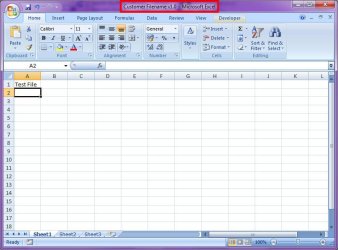
I've just tried it with Excel, and the problem does not happen. So I'm guessing there must be some sort of conflict going on here that we have not yet discovered...

Image1.jpg
Image2.jpg
Image3.jpg
Image4.jpg
 

My Computer My Computer

At a glance

Windows 7 Professional 32-bit SP1AMD A4/A63.00GB EDOVMware SVGA 3D
Computer type
PC/Desktop
Computer Manufacturer/Model Number
Virtual Machine
OS
Windows 7 Professional 32-bit SP1
CPU
AMD A4/A6
Motherboard
Intel Corporation 440BX Desktop Reference Platform
Memory
3.00GB EDO
Graphics Card(s)
VMware SVGA 3D
Sound Card
High Definition Audio Device
Monitor(s) Displays
Generic Non-PnP Monitor on VMware SVGA 3D
Screen Resolution
1440x900
Hard Drives
1 x 60GB VMware Virtual SATA Hard Drive ATA Device
Antivirus
Kaspersky Total Security
The OP stated:
An example of when this happens is.. when printing a file to PDF, instead of saving a file named "Customer Filename v1.0.pdf", I get instead "Customer Filename v1.pdf"
I gathered the name changed when he printed to PDF using Cute PDF writer. This happens with Cute that's why another poster suggested Primo. So I assumed this was a Cute PDF problem not a Windows 7 or Excel Problem!
 

My Computer My Computer

At a glance

Microsoft Windows 7 Home Premium 64-bit 7601 ...Intel(R) Core(TM) i7-3770 CPU @ 3.40GHz8.00 GBIntel(R) HD Graphics 4000
Computer type
PC/Desktop
OS
Microsoft Windows 7 Home Premium 64-bit 7601 Multiprocessor Free Service Pack 1
CPU
Intel(R) Core(TM) i7-3770 CPU @ 3.40GHz
Motherboard
ASUSTeK COMPUTER INC. P8H77-M
Memory
8.00 GB
Graphics Card(s)
Intel(R) HD Graphics 4000
Sound Card
On Board
Monitor(s) Displays
Dell 24"
Screen Resolution
1920 x 1080
Hard Drives
(1) INTEL SSDSC2CT180A3 ATA Device (2) ST500DM002-1BD142 ATA Device (3) WDC WD3200AAKS-75L9A0 ATA Device (4) Generic- Compact Flash USB Device (5) Generic- MS/MS-Pro USB Device (6) Generic- SD/MMC USB Device (7) Generic- SM/xD-Picture USB
PSU
500w Corsair
Case
Cooler Master
Cooling
3 Fans
Keyboard
Logitech MK300
Mouse
Logitech WOM
Internet Speed
75Mb
Antivirus
Norton 360
Browser
Firefox, Opera, IE
@mitchell65.. thank you. CutePDF does consistently truncate the filename. Have installed on your recommendation, BullZIP PDF and it works fine now. :D

@ALL.. Thanks for all your responses. :D:D For the time being, have solved the PDF filenames being truncated. Will monitor some more to determine exact sequence of events that leads to filenames of other apps being truncated. Suspect it might be mix of O/S and MSOffice versions in company's environment, but will confirm and post some more when more details available.
 

My Computer My Computer

At a glance

Windows 7 Enterprise x32Core2Duo T7500 2.20GHz4GBNVidia Quadro FX1600M
Computer Manufacturer/Model Number
HP 8710w
OS
Windows 7 Enterprise x32
CPU
Core2Duo T7500 2.20GHz
Memory
4GB
Graphics Card(s)
NVidia Quadro FX1600M
Sound Card
SoundMAX Integrated Digital HD Audio
Monitor(s) Displays
HP LP2465 x2
Hard Drives
Western Digital 500GB SATA
Good to hear that you have resolved this one. I think the truncated file names in the Cute PDF program might be a restriction of the free version. There is a Pro version here:
CutePDF - Create PDF for free, Save PDF Forms, Edit PDF easily;.
That MAY not truncate the file names! Not sure have only got the freebie version!
 

My Computer My Computer

At a glance

Microsoft Windows 7 Home Premium 64-bit 7601 ...Intel(R) Core(TM) i7-3770 CPU @ 3.40GHz8.00 GBIntel(R) HD Graphics 4000
Computer type
PC/Desktop
OS
Microsoft Windows 7 Home Premium 64-bit 7601 Multiprocessor Free Service Pack 1
CPU
Intel(R) Core(TM) i7-3770 CPU @ 3.40GHz
Motherboard
ASUSTeK COMPUTER INC. P8H77-M
Memory
8.00 GB
Graphics Card(s)
Intel(R) HD Graphics 4000
Sound Card
On Board
Monitor(s) Displays
Dell 24"
Screen Resolution
1920 x 1080
Hard Drives
(1) INTEL SSDSC2CT180A3 ATA Device (2) ST500DM002-1BD142 ATA Device (3) WDC WD3200AAKS-75L9A0 ATA Device (4) Generic- Compact Flash USB Device (5) Generic- MS/MS-Pro USB Device (6) Generic- SD/MMC USB Device (7) Generic- SM/xD-Picture USB
PSU
500w Corsair
Case
Cooler Master
Cooling
3 Fans
Keyboard
Logitech MK300
Mouse
Logitech WOM
Internet Speed
75Mb
Antivirus
Norton 360
Browser
Firefox, Opera, IE
Back
Top