
Win7 trying to install new usb3.0 hub

meebers

Multicomplacator
Power User
Local time
9:44 PM
Messages
327
I got a 4 port usb 3.0 hub which plugs into a pci-e slot. Win7 reports back that the device did not install correctly. It came with no instruction manual, but did come with a mini cd with "drivers on it" The drivers are marked: JMB363 Driver, USB 3.0 NEC72020x Driver, USB 3.0 VL8xx Driver, WCH382 Driver
There is a chip on the board that is marked VL805-Q6 so I assumed that I would use the VL8xx driver. It is a 65 Mb file. I run it and nothing happens, just the blue spinning circle. I am just surprised that Win7 cannot find anything to load from that file or from an internet search.
Currently downloading a later driver version from VIA (via google search) but is taking forever,

Does this sound like a hardware problem? (tried two different pci-e slots)? Stuff like this reminds me of back in the win98 days. :p
 

My Computer My Computer

At a glance

Windows 7 Professional X64 Service Pack 1AMD Phenom II X4 955 3.20GHz8GGX550 Ti
Computer type
PC/Desktop
Computer Manufacturer/Model Number
Self Build
OS
Windows 7 Professional X64 Service Pack 1
CPU
AMD Phenom II X4 955 3.20GHz
Motherboard
Gigabyte GA-MA790X-UD4P
Memory
8G
Graphics Card(s)
GX550 Ti
Sound Card
On board
Monitor(s) Displays
Asus VW246H & Syncmaster 2243swx
Screen Resolution
1920x1080 & 1920x1080
Hard Drives
M4-CT128 SSD2, Samsung 840 256GB, 1 WDC 1TB
PSU
Corsair TX750W-V2
Case
Antec
Cooling
2 120mm fan
Keyboard
Microsoft Wireless 3050
Mouse
Microsoft Wireless 5000
Internet Speed
72/6Mbs (Cable)
Other Info
Asus AC1900 router, 8 port Trendnet Switch - Logitech Webcam Pro 9000
I got a 4 port usb 3.0 hub which plugs into a pci-e slot. Win7 reports back that the device did not install correctly. It came with no instruction manual, but did come with a mini cd with "drivers on it" The drivers are marked: JMB363 Driver, USB 3.0 NEC72020x Driver, USB 3.0 VL8xx Driver, WCH382 Driver
There is a chip on the board that is marked VL805-Q6 so I assumed that I would use the VL8xx driver. It is a 65 Mb file. I run it and nothing happens, just the blue spinning circle. I am just surprised that Win7 cannot find anything to load from that file or from an internet search.
Currently downloading a later driver version from VIA (via google search) but is taking forever,

Does this sound like a hardware problem? (tried two different pci-e slots)? Stuff like this reminds me of back in the win98 days. :p
Can you please provide a screenshot of the "Hardware ID" of the unknown and probably "other device" as shown in Device Manager. Presumably the SETUP.EXE on your driver disk should have worked, but if we know the true Hardware ID of the device we might be able to find the right driver on the web.

Device Manager -> expand the "other device", right-click -> properties, select "details" tab -> click on Property dropdown and select the second item, "Hardware ID". Screenshot of the values shown.


NOTE: driver installs can typically either be (a) SETUP.EXE to be run, or (b) INF files down in a folder structure.

If you've got a driver CD included, chances are there is already an expanded folder structure on it. So if you right-click on the "other device" in Device Manager and select the "update driver automatically" option, and then navigate to the top-level folder on the CD and be sure you check the "look through sub-folders", Windows will automatically find the proper INF file wherever down-level it is in the folder structure, to match the "Hardware ID" it's looking for.

At least that's how it SHOULD run, if the drivers were distributed as already-expanded folders with the INF files.

Otherwise, if you run a SETUP.EXE and it's the wrong one, that might explain why the required hardware ID for that particular driver installer EXE is not found.

Anyway, please show us that Hardware ID first, and we can then take it from there.
 

My Computer My Computer

At a glance

Windows 7 Pro x64 (1), Win7 Pro X64 (2)i5-3350p 3.1Ghz/6MB-cache (1); E8400 3.0Ghz/6...8GB PC3-12800 DDR3 (1); 4GB PC3-10600 DDR3 (2)ATI HD7750 (1), (see TV cards); ATI R7 250 (2)
Computer type
PC/Desktop
Computer Manufacturer/Model Number
Home-built, two systems (1) and (2)
OS
Windows 7 Pro x64 (1), Win7 Pro X64 (2)
CPU
i5-3350p 3.1Ghz/6MB-cache (1); E8400 3.0Ghz/6MB-cache (2)
Motherboard
ASUS P8Z77-V Pro (1); ASUS P5Q3 (2)
Memory
8GB PC3-12800 DDR3 (1); 4GB PC3-10600 DDR3 (2)
Graphics Card(s)
ATI HD7750 (1), (see TV cards); ATI R7 250 (2)
Sound Card
Realtek ALC892 HD Audio (1); Realtek ALC1200 HD Audio (2)
Monitor(s) Displays
Eizo HD2441W LCD, Eizo S2433W (1); Eizo 24" S2433W (2)
Screen Resolution
1920x1200, 1920x1200 (1); 1920x1200 (2)
Hard Drives
(1) 1TB SATA-II (7200RPM), 2x2TB SATA-III (7200RPM), 250GB SATA-III (10000RPM) for OS; 2x2TB external USB 3.0

(2) 320GB SATA-II (7200RPM), 750GB SATA-II (7200RPM), 150GB SATA-II (10000RPM) for OS; 2TB external USB 3.0
PSU
Nesteq ECS-6001 600W (1); Nesteq ECS-5001 500W (2)
Case
Acousti-Case 360 (1) and (2)
Cooling
Noctua NH-U12P SE2 for CPU, 2x120mm case fans (1) and (2)
Keyboard
IBM PS/2 (1) and (2)
Mouse
Logitech MX Revolution wireless (1); Microsoft wired (2)
Internet Speed
100mbps down / 10mbps up
Antivirus
Microsoft Security Essentials; Malwarebyte Anti-Malware Pro
Browser
Firefox
Other Info
Ceton InfiniTV 4-tuner cablecard-enabled TV card as well as Hauppauge HVR-2250 OTA/ATSC 2-tuner TV card in (1), running under Win7 WMC
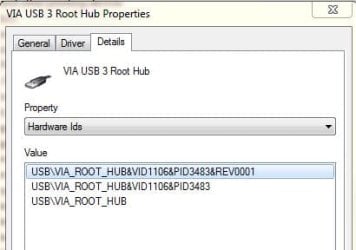
Thanks for your detailed response, appreciate it very much. The file I downloaded from VIA v4.7 seemed to make the hub install. Don't know if it was the correct file, but seems to work. I have attached the hardware id for review. (the four driver's that were on the supplied CD, 2 had their own setup up file, while the other 2 seemed to have a file similar to the one down loaded. 65mb) The CD driver for VL805 I decoded as v4.1
 

Attachments

  • usb3hubid.JPG
    usb3hubid.JPG
    21.7 KB · Views: 25
  • usb3hub2.JPG
    usb3hub2.JPG
    11.9 KB · Views: 25

My Computer My Computer

At a glance

Windows 7 Professional X64 Service Pack 1AMD Phenom II X4 955 3.20GHz8GGX550 Ti
Computer type
PC/Desktop
Computer Manufacturer/Model Number
Self Build
OS
Windows 7 Professional X64 Service Pack 1
CPU
AMD Phenom II X4 955 3.20GHz
Motherboard
Gigabyte GA-MA790X-UD4P
Memory
8G
Graphics Card(s)
GX550 Ti
Sound Card
On board
Monitor(s) Displays
Asus VW246H & Syncmaster 2243swx
Screen Resolution
1920x1080 & 1920x1080
Hard Drives
M4-CT128 SSD2, Samsung 840 256GB, 1 WDC 1TB
PSU
Corsair TX750W-V2
Case
Antec
Cooling
2 120mm fan
Keyboard
Microsoft Wireless 3050
Mouse
Microsoft Wireless 5000
Internet Speed
72/6Mbs (Cable)
Other Info
Asus AC1900 router, 8 port Trendnet Switch - Logitech Webcam Pro 9000
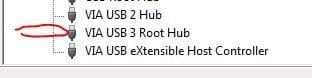
Thanks for your detailed response, appreciate it very much. The file I downloaded from VIA v4.7 seemed to make the hub install. Don't know if it was the correct file, but seems to work. I have attached the hardware id for review.
I believe you definitely got the correct driver package, from down at the bottom of this Via Download page.

Proof is in the pudding, so if your USB 3.0 ports are working correctly and you have no yellow exclamation marks on "other devices", then you should be home free.
 

My Computer My Computer

At a glance

Windows 7 Pro x64 (1), Win7 Pro X64 (2)i5-3350p 3.1Ghz/6MB-cache (1); E8400 3.0Ghz/6...8GB PC3-12800 DDR3 (1); 4GB PC3-10600 DDR3 (2)ATI HD7750 (1), (see TV cards); ATI R7 250 (2)
Computer type
PC/Desktop
Computer Manufacturer/Model Number
Home-built, two systems (1) and (2)
OS
Windows 7 Pro x64 (1), Win7 Pro X64 (2)
CPU
i5-3350p 3.1Ghz/6MB-cache (1); E8400 3.0Ghz/6MB-cache (2)
Motherboard
ASUS P8Z77-V Pro (1); ASUS P5Q3 (2)
Memory
8GB PC3-12800 DDR3 (1); 4GB PC3-10600 DDR3 (2)
Graphics Card(s)
ATI HD7750 (1), (see TV cards); ATI R7 250 (2)
Sound Card
Realtek ALC892 HD Audio (1); Realtek ALC1200 HD Audio (2)
Monitor(s) Displays
Eizo HD2441W LCD, Eizo S2433W (1); Eizo 24" S2433W (2)
Screen Resolution
1920x1200, 1920x1200 (1); 1920x1200 (2)
Hard Drives
(1) 1TB SATA-II (7200RPM), 2x2TB SATA-III (7200RPM), 250GB SATA-III (10000RPM) for OS; 2x2TB external USB 3.0

(2) 320GB SATA-II (7200RPM), 750GB SATA-II (7200RPM), 150GB SATA-II (10000RPM) for OS; 2TB external USB 3.0
PSU
Nesteq ECS-6001 600W (1); Nesteq ECS-5001 500W (2)
Case
Acousti-Case 360 (1) and (2)
Cooling
Noctua NH-U12P SE2 for CPU, 2x120mm case fans (1) and (2)
Keyboard
IBM PS/2 (1) and (2)
Mouse
Logitech MX Revolution wireless (1); Microsoft wired (2)
Internet Speed
100mbps down / 10mbps up
Antivirus
Microsoft Security Essentials; Malwarebyte Anti-Malware Pro
Browser
Firefox
Other Info
Ceton InfiniTV 4-tuner cablecard-enabled TV card as well as Hauppauge HVR-2250 OTA/ATSC 2-tuner TV card in (1), running under Win7 WMC
Is there a program that will allow me to monitor the new usb 3.0 speed (transfer rate) tx
 

My Computer My Computer

At a glance

Windows 7 Professional X64 Service Pack 1AMD Phenom II X4 955 3.20GHz8GGX550 Ti
Computer type
PC/Desktop
Computer Manufacturer/Model Number
Self Build
OS
Windows 7 Professional X64 Service Pack 1
CPU
AMD Phenom II X4 955 3.20GHz
Motherboard
Gigabyte GA-MA790X-UD4P
Memory
8G
Graphics Card(s)
GX550 Ti
Sound Card
On board
Monitor(s) Displays
Asus VW246H & Syncmaster 2243swx
Screen Resolution
1920x1080 & 1920x1080
Hard Drives
M4-CT128 SSD2, Samsung 840 256GB, 1 WDC 1TB
PSU
Corsair TX750W-V2
Case
Antec
Cooling
2 120mm fan
Keyboard
Microsoft Wireless 3050
Mouse
Microsoft Wireless 5000
Internet Speed
72/6Mbs (Cable)
Other Info
Asus AC1900 router, 8 port Trendnet Switch - Logitech Webcam Pro 9000
Quickest way unless you are trying to benchmark is to take a USB3 stick and copy a 1Gb or better file to it. After you clear the file use the same stick in a USB2 port with the same file. If all is correct the will be a big difference in time. Art.
 

My Computer My Computer

At a glance

Win7 sp1 Pro 64bit / XP sp2 Pro (games only)Intel Core 2 Duo E8400 @ 3.00GHz8.00 GB Dual-Channel DDR2 @ 400MHz (5-5-5-18)1024MB GeForce GTX 560
Computer type
PC/Desktop
Computer Manufacturer/Model Number
Home built
OS
Win7 sp1 Pro 64bit / XP sp2 Pro (games only)
CPU
Intel Core 2 Duo E8400 @ 3.00GHz
Motherboard
Intel Corporation DP35DP (CPU1)
Memory
8.00 GB Dual-Channel DDR2 @ 400MHz (5-5-5-18)
Graphics Card(s)
1024MB GeForce GTX 560
Sound Card
NVIDIA High Definition Audio
Monitor(s) Displays
SyncMaster (2048x1152@60Hz)
Hard Drives
240GB Sandisc Extreme Pro SSD
244GB Seagate ST3250410AS
488GB Seagate ST500DM002-1BD142
931GB Western Digital WDC WD1003FZEX
PSU
Corsair 720
Case
ATX
Keyboard
HID Keyboard Device Logitech
Mouse
HID-compliant mouse Microsoft
Other Info
TSSTcorp CDDVDW SH-S223L

HL-DT-ST BD-RE BH12LS35
Back
Top