Win7 ultimate installed, downgrade to Pro?

Solway

New member
Local time
7:21 PM
Messages
19
HI

i have win7 ultimate installed over previous few months, for testing purposes,

however i have brought professional edition.

the key for Pro, can't be used onon ultimate,

is there a way to downgrade without completely reinstalling win7?:cry:

due to the fact i have setup all my settings/programs etc...
 

My Computer My Computer

OS
XP - Now Win7

My Computer My Computer

Computer Manufacturer/Model Number
HP Pavillion dv-7 1005 Tx
OS
Win 8 Release candidate 8400
CPU
[email protected]
Memory
4 gigs
Graphics Card(s)
Nvidia 9600M
Sound Card
HD built-in
Monitor(s) Displays
17" Wxga
Screen Resolution
1440x900
Cooling
none
Internet Speed
45Mb down 5Mb up
Nice catch Ken... I didnt know that... ;)
 

My Computer My Computer

Computer type
PC/Desktop
Computer Manufacturer/Model Number
LENOVO K450 @3.0GHZ
OS
64-bit Windows 8.1 Pro
CPU
Core(TM) i5 CPU 4330 Haswell @ 3.20GHz
Motherboard
LENOVO
Memory
12.00 GB
Graphics Card(s)
Intel(R) HD Graphics
Sound Card
Intel HD integtrated
Monitor(s) Displays
HP 25' ISP Monitor
Screen Resolution
1900/1020
Hard Drives
(1) ST1000DM003-1CH162 (2) Generic STORAGE DEVICE USB Device (3) Generic STORAGE DEVICE USB Device
Internet Speed
100mb down/10mb up
does it work?

i'll backup and try later

thanks


ref for google searches:

the product key you have entered will not work with this edition of windows 7
 

My Computer My Computer

OS
XP - Now Win7
It works. Downgraded from Ultimate to Pro
 

My Computer My Computer

Computer Manufacturer/Model Number
HP
OS
Windows 7
CPU
Core 2 Duo
Motherboard
Intel
Memory
2GB
Graphics Card(s)
8600 GTS

My Computer My Computer

Computer Manufacturer/Model Number
HP Pavillion dv-7 1005 Tx
OS
Win 8 Release candidate 8400
CPU
[email protected]
Memory
4 gigs
Graphics Card(s)
Nvidia 9600M
Sound Card
HD built-in
Monitor(s) Displays
17" Wxga
Screen Resolution
1440x900
Cooling
none
Internet Speed
45Mb down 5Mb up
I didn't work for me...I have ultimate e and wanted to go to ultimate.
 

My Computer My Computer

OS
Windows 7 Ultimate E x64
Yes, but I can't do upgrade either from ultimate e to ultimate...that's why I was trying above method.
 

My Computer My Computer

OS
Windows 7 Ultimate E x64
I don't need IE... I'm missing my Themes page in Contro Panel/Personalisation...I can't change theme...That's my problem and that's why I want to install new windows without losing my installations and programs.
 

My Computer My Computer

OS
Windows 7 Ultimate E x64

My Computer My Computer

OS
ME/XP/Vista/Win7
Thanks...

Where can I download Windows 7 ultimate 64bit E ?
 

My Computer My Computer

OS
Windows 7 Ultimate E x64
Hello klasnic17.


The Seven Forums rules prohibit the posting of links or the discussion of said downloads.
 

My Computer My Computer

Computer Manufacturer/Model Number
* BFK Customs *
OS
W 7 64-bit Ultimate
CPU
Intel Q9550 Yorkfield
Motherboard
ASUS P5Q Pro
Memory
8GB Dominator 8500C5D
Graphics Card(s)
ATI : XFX 5870
Sound Card
Realtek HD Audio 7-1
Monitor(s) Displays
1x 47" LCD HDMI & 3x 26" LCD HDMI
Screen Resolution
1920x1080P & 1920x1200
Hard Drives
1x 80GB Intel X25-M G2 SSD : 1x 500GB & 1x 640GB WD Caviar Black(s)
PSU
Corsair 620HX
Case
Cooler Master RC-690
Cooling
Tuniq Tower 120, 2x 140mm and 3x 120mm case fans
Keyboard
Microsoft 500
Mouse
Razer Diamondback 3G
Internet Speed
14 Mb/s
Other Info
1x Koutech 3Gb/s SATA HDD Hot Swap Rack
PM me please if you know where to download Windows ultimate 64bit E... :)
 
Last edited:

My Computer My Computer

OS
Windows 7 Ultimate E x64
PM me please if you know where to download Windows ultimate 64bit E... :)

Talk to the people who you bought the computer from. Not us.
 

My Computer My Computer

Computer type
PC/Desktop
Computer Manufacturer/Model Number
Alienware Aurora ALX R4
OS
Windows 10 Pro (x64)
CPU
Intel Core i7-3930K (3.2GHz - 4.5GHz)
Motherboard
Alienware Aurora-R4 x79
Memory
4x Samsung 4GB PC3-12800 DDR3 (16GB 1600MHz)
Graphics Card(s)
Nvidia Geforce GTX 690
Sound Card
SteelSeries Siberia Elite
Monitor(s) Displays
Dell UltraSharp U3011
Screen Resolution
2560x1600
Hard Drives
Samsung 850 Pro 256 GB, Seagate 1TB Desktop Hybrid HDD, 2x Western Digital 4TB Green HDD
PSU
875W Some Dell PSU <.<
Case
Alienware Aurora ALX
Cooling
Custom Liquid Cooling (EK CPU & GPU blocks) dual EK 480RAD
Keyboard
Logitech G710+ Mechanical
Mouse
Logitech G700s
Internet Speed
Verizon Fios (50 mbps average)
Other Info
Server: Intel NUC D54250WYK: i5-4250U, 16GB, 256 GB mSATA, Windows Server 2012 R2
Hi guys

sorry to bring an old topic back, I have a laptop with windows ultimate installed (32bit) and want to install home premium 32(bit) back on to it for personal reasons and saw the link posted on here about downgrading. My query is, when i change the registry what Disc do i load into the laptop: the ultimate disc or home premium disc (both discs are 32bit discs)?

I tried to "upgrade" from a home premium disc (64bit) but got an error message saying that i cant use this disc for this pc or something.

Any help would be great, ty!
 

My Computer My Computer

OS
windows 7 ultimate 32bit
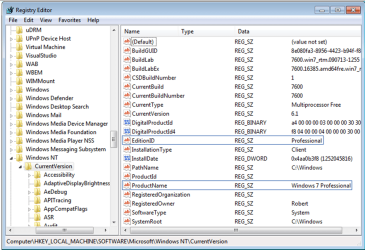
You'd use the 32 bit Home Premium installer to run the Repair Install workaround. You cannot in-place up- or downgrade from 32- to 64-bit or vice versa - it must be a clean install.

Another complication may be that you already have SP1 on the install. In that case you'd have to find a retail installer with SP1 included (slipstreamed DVD will not work) or else uninstall SP1 to do the workaround: uninstall Windows 7 Service Pack 1 (SP1)

There are other reasons the workaround may not work, but most will be tipped off when it scans compatibility at the beginning of the Repair Install or In-Place up/downgrade. Remember to set a restore point before you change the Registry Keys shown below, as they must read exactly HOMEPREMIUM for the EditionID, and Windows 7 HOMEPREMIUM for the ProductName.
 

Attachments

  • regkeys.PNG
    regkeys.PNG
    93.8 KB · Views: 168
You'd use the 32 bit Home Premium installer to run the Repair Install workaround. You cannot in-place up- or downgrade from 32- to 64-bit or vice versa - it must be a clean install.

hi thanks for the great tips. i have SP1 installed so will uninstall that tomorrow. i abit confused on the part above. could you explain that again to me please? Whats inplace? Why repair?

im a bit of a n00b.

TYVM :D
 

My Computer My Computer

OS
windows 7 ultimate 32bit
Back
Top