Win7 ultimate installed, downgrade to Pro?

Want to keep 32bit (ultimate 32bit to home premium 32bit). I tried using a home premium 32bit disc (after changing the registry) but when I clicked setup.exe, I got an error message saying I couldn't use this disc for this versions (something between those lines ). Maybe because I had SP1 still installed ?
 

My Computer My Computer

OS
windows 7 ultimate 32bit
Likely. You'll need to post back the verbatim error messages as they come up.
 
hi

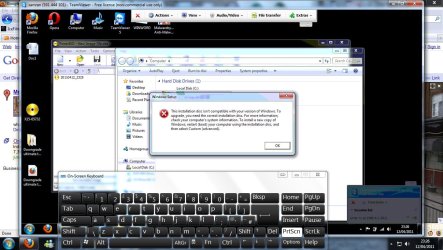
i uninstalled SP1 and tried to run home premium 32bit disc but got this error...
 

Attachments

  • Untitled.jpg
    Untitled.jpg
    140.6 KB · Views: 235

My Computer My Computer

OS
windows 7 ultimate 32bit
okay sure but il upload it tomorow mate, 2am here so gonna try get some sleep (y)
 

My Computer My Computer

OS
windows 7 ultimate 32bit
hi,

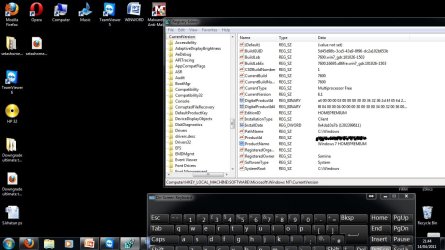
sorry for the late reply, here is a SS of my changed registry files.

also can i ask, does the 32bit windows home premium have to be burnt to disc or can it be virtually mounted?
 

Attachments

  • Untitled.jpg
    Untitled.jpg
    119.6 KB · Views: 193

My Computer My Computer

OS
windows 7 ultimate 32bit
You can run it any way you like from Win7 except booted.

The only thing I see that might be a problem is the Prod ID which I haven't seen before in this scenario so it could be the deal killer.

I would also clean up the SP 1 files using both Disk Cleanup followed by CCleaner disk and registry tabs.

It may be the rare case where the workaround doesn't work around.
 
Last edited:
I'll use disk clean up ccleaner and see how it goes.

EDIT: and going to try install from virtual mount,
 
Last edited:

My Computer My Computer

OS
windows 7 ultimate 32bit
Since you have nothing to lose, if it won't run Upgrade after cleaning up files try editing out the Product ID after setting a Restore point.

If you're really stubborn and not willing to give up (as am I) then I'd next slipstream SP1 into the ISO to try the Repair Install, as this is known to work on non-SP1 installs.

Or you can reinstall SP1 then find a Win7 installer with SP1 to try workaround.

At some point you may want to give up and clean reinstall, following these tips to get a perfect install for your trouble: Reinstalling Windows 7
 
Last edited:
Got it working! :D, did it all yesterday night, thank you very much Gregrocker couldnt have done it without you (y).
 

My Computer My Computer

OS
windows 7 ultimate 32bit
well i did disk clean up and removed all the junk I had, then mounted the disc using power iso with "auto mount" selected and the cd started to run :D!
 

My Computer My Computer

OS
windows 7 ultimate 32bit
Aha, as suspected some remnants of uninstalled SP1 were interfering until cleaned up.

Glad it worked.
 
Sorry to revive an old thread, but I'm having exactly the same issue, (it's currently running Win7 Ultimate x64 SP1, which I don't have a key for) and the workaround isn't working for some reason. I've tried the registry edit to Home Premium (which I do have a key for) but it still doesn't seem to be tricked, it still knows it's running ultimate when I try the repair install. Could it be something to do with it being 64 bit? Does that require a different name in the registry?
 

My Computer My Computer

Computer type
PC/Desktop
Computer Manufacturer/Model Number
Cyberpower
OS
Windows 7 Home Premium 64bit
CPU
AMD Phenom II X4 850 Processor
Motherboard
ASUS M5A78L-M/USB3
Memory
6GB DDR3
Graphics Card(s)
AMD Radeon HD 6670 2GB
Antivirus
Avast Antivirus
Browser
Google Chrome
There are two keys which must be changed in regedit while it is Run as Admin, and read exactly HOMEPREMIUM for the EditionID, and Windows 7 HOMEPREMIUM for the ProductName.

If there is a Product ID present I would back it up and then delete it since it is not present in any of the successful workarounds I've seen done over the years.
 
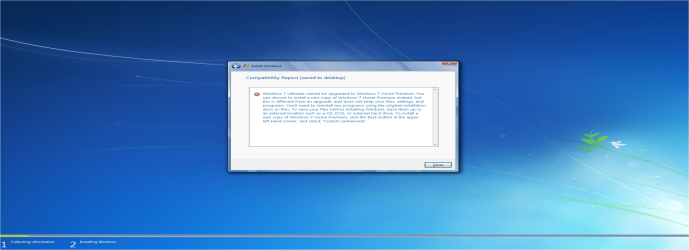
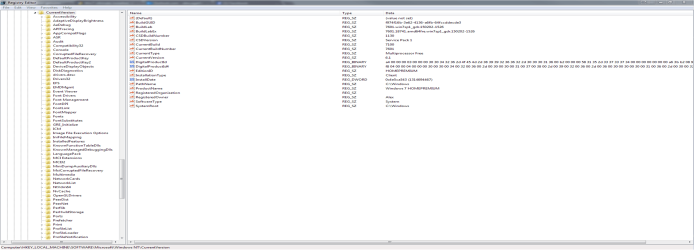
Deleted the Product ID as you said, and made the changes but I still get this:
 

Attachments

  • Picture1.png
    Picture1.png
    668.4 KB · Views: 7
  • Picture2.png
    Picture2.png
    164.6 KB · Views: 2

My Computer My Computer

Computer type
PC/Desktop
Computer Manufacturer/Model Number
Cyberpower
OS
Windows 7 Home Premium 64bit
CPU
AMD Phenom II X4 850 Processor
Motherboard
ASUS M5A78L-M/USB3
Memory
6GB DDR3
Graphics Card(s)
AMD Radeon HD 6670 2GB
Antivirus
Avast Antivirus
Browser
Google Chrome
No, should I have?
 

My Computer My Computer

Computer type
PC/Desktop
Computer Manufacturer/Model Number
Cyberpower
OS
Windows 7 Home Premium 64bit
CPU
AMD Phenom II X4 850 Processor
Motherboard
ASUS M5A78L-M/USB3
Memory
6GB DDR3
Graphics Card(s)
AMD Radeon HD 6670 2GB
Antivirus
Avast Antivirus
Browser
Google Chrome
I tried it after a restart, same problem. :(
 

My Computer My Computer

Computer type
PC/Desktop
Computer Manufacturer/Model Number
Cyberpower
OS
Windows 7 Home Premium 64bit
CPU
AMD Phenom II X4 850 Processor
Motherboard
ASUS M5A78L-M/USB3
Memory
6GB DDR3
Graphics Card(s)
AMD Radeon HD 6670 2GB
Antivirus
Avast Antivirus
Browser
Google Chrome
Back
Top