Solved win7 USB bootable creation failure

maifs

maifs
Member
VIP
Local time
6:54 AM
Messages
133
Location
Lahore
hi...
i am trying to make usb bootable. but continuously facing a problem.

i have tried both ways to make a usb bootable but each time returned with same error.

1--------> Windows7-USB-DVD-tool

2--------> by writing cmd command statement.

error is raised at the execution of this line: bootsect /nt60 D:

errror description: Bootsect has stopped working..

why it gave this error and boot process harmed?
 

My Computer

Computer Manufacturer/Model Number
Gericom/755CI
OS
windows7
CPU
mobile AMD Athlon(tm) XP-M 2600+, 1514 Mhz, 1 Core(s), 1 Log
Motherboard
Gericom 755CI 1.0,BIOS: American Megatrends Inc. 1.04G 07/09
Memory
768 MB
Monitor(s) Displays
15 inches TFT(XGA 1024x786)
Screen Resolution
1024x786
Hard Drives
40GB
Keyboard
compaq
Mouse
IBM
Internet Speed
512KB
Hello Maifs,

I'm assuming that you are referring to these tutorials below.

1) http://www.sevenforums.com/tutorials/31541-windows-7-usb-dvd-download-tool.html

2) http://www.sevenforums.com/tutorials/2432-usb-windows-7-installation-key-drive-create.html


Did you format the USB flash drive with a NTFS file system first instead of the default FAT32?

In addition:
  • You can only create a 64-bit Windows 7 bootable USB flash drive if your current Windows 7 installation is also 64-bit.
  • You can create a 32-bit Windows 7 bootable USB flash drive if your current Windows 7 installation is 32-bit or 64-bit.
 

My Computer

Computer type
PC/Desktop
Computer Manufacturer/Model Number
Self built custom
OS
64-bit Windows 11 Pro for Workstations
CPU
Intel i7-8700K OC'd to 5 GHz
Motherboard
ASUS ROG Maximus XI Formula Z390
Memory
64 GB (4x16GB) G.SKILL TridentZ RGB DDR4 3600 MHz
Graphics Card(s)
ASUS ROG-STRIX-GTX1080TI-O11G-GAMING
Sound Card
Integrated
Monitor(s) Displays
2 x Samsung Odyssey G7 27"
Screen Resolution
2560x1440
Hard Drives
1TB Samsung 990 PRO M.2,
4TB Samsung 990 PRO PRO M.2,
TerraMaster F8 SSD Plus NAS
PSU
Seasonic Prime Titanium 850W
Case
Thermaltake Core P3
Cooling
Corsair Hydro H115i
Keyboard
Logitech wireless K800
Mouse
Logitech MX Master 4
Internet Speed
2 Gb/s Download and 100 Mb/s Upload
Antivirus
Malwarebyte Anti-Malware Premium
Browser
Google Chrome
Other Info
Logitech Z625 speaker system,
Logitech BRIO 4K Pro webcam,
HP Color LaserJet Pro MFP M477fdn,
APC SMART-UPS RT 1000 XL - SURT1000XLI,
Galaxy S23 Plus phone
hello brink
bootmgr.efi is missed and this file is not available at my side. except of it, everything has been verified.
 

My Computer

Computer Manufacturer/Model Number
Gericom/755CI
OS
windows7
CPU
mobile AMD Athlon(tm) XP-M 2600+, 1514 Mhz, 1 Core(s), 1 Log
Motherboard
Gericom 755CI 1.0,BIOS: American Megatrends Inc. 1.04G 07/09
Memory
768 MB
Monitor(s) Displays
15 inches TFT(XGA 1024x786)
Screen Resolution
1024x786
Hard Drives
40GB
Keyboard
compaq
Mouse
IBM
Internet Speed
512KB

My Computer

Computer type
PC/Desktop
Computer Manufacturer/Model Number
Self built custom
OS
64-bit Windows 11 Pro for Workstations
CPU
Intel i7-8700K OC'd to 5 GHz
Motherboard
ASUS ROG Maximus XI Formula Z390
Memory
64 GB (4x16GB) G.SKILL TridentZ RGB DDR4 3600 MHz
Graphics Card(s)
ASUS ROG-STRIX-GTX1080TI-O11G-GAMING
Sound Card
Integrated
Monitor(s) Displays
2 x Samsung Odyssey G7 27"
Screen Resolution
2560x1440
Hard Drives
1TB Samsung 990 PRO M.2,
4TB Samsung 990 PRO PRO M.2,
TerraMaster F8 SSD Plus NAS
PSU
Seasonic Prime Titanium 850W
Case
Thermaltake Core P3
Cooling
Corsair Hydro H115i
Keyboard
Logitech wireless K800
Mouse
Logitech MX Master 4
Internet Speed
2 Gb/s Download and 100 Mb/s Upload
Antivirus
Malwarebyte Anti-Malware Premium
Browser
Google Chrome
Other Info
Logitech Z625 speaker system,
Logitech BRIO 4K Pro webcam,
HP Color LaserJet Pro MFP M477fdn,
APC SMART-UPS RT 1000 XL - SURT1000XLI,
Galaxy S23 Plus phone
i bought it from a software vender.
 

My Computer

Computer Manufacturer/Model Number
Gericom/755CI
OS
windows7
CPU
mobile AMD Athlon(tm) XP-M 2600+, 1514 Mhz, 1 Core(s), 1 Log
Motherboard
Gericom 755CI 1.0,BIOS: American Megatrends Inc. 1.04G 07/09
Memory
768 MB
Monitor(s) Displays
15 inches TFT(XGA 1024x786)
Screen Resolution
1024x786
Hard Drives
40GB
Keyboard
compaq
Mouse
IBM
Internet Speed
512KB
I'm not sure why the program was not able to create a bootable Windows 7 installation USB flash drive then. :confused:
 

My Computer

Computer type
PC/Desktop
Computer Manufacturer/Model Number
Self built custom
OS
64-bit Windows 11 Pro for Workstations
CPU
Intel i7-8700K OC'd to 5 GHz
Motherboard
ASUS ROG Maximus XI Formula Z390
Memory
64 GB (4x16GB) G.SKILL TridentZ RGB DDR4 3600 MHz
Graphics Card(s)
ASUS ROG-STRIX-GTX1080TI-O11G-GAMING
Sound Card
Integrated
Monitor(s) Displays
2 x Samsung Odyssey G7 27"
Screen Resolution
2560x1440
Hard Drives
1TB Samsung 990 PRO M.2,
4TB Samsung 990 PRO PRO M.2,
TerraMaster F8 SSD Plus NAS
PSU
Seasonic Prime Titanium 850W
Case
Thermaltake Core P3
Cooling
Corsair Hydro H115i
Keyboard
Logitech wireless K800
Mouse
Logitech MX Master 4
Internet Speed
2 Gb/s Download and 100 Mb/s Upload
Antivirus
Malwarebyte Anti-Malware Premium
Browser
Google Chrome
Other Info
Logitech Z625 speaker system,
Logitech BRIO 4K Pro webcam,
HP Color LaserJet Pro MFP M477fdn,
APC SMART-UPS RT 1000 XL - SURT1000XLI,
Galaxy S23 Plus phone
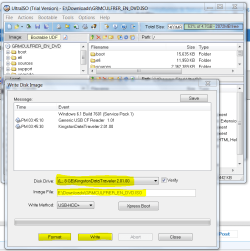
Another method that always works for me is to install UltraISO trial version: On File tab Open ISO, on Bootable tab Write Disk Image, Format, Write. Boot under USB or HD's on one-time BIOS Boot menu.
 
ok i try it
 

My Computer

Computer Manufacturer/Model Number
Gericom/755CI
OS
windows7
CPU
mobile AMD Athlon(tm) XP-M 2600+, 1514 Mhz, 1 Core(s), 1 Log
Motherboard
Gericom 755CI 1.0,BIOS: American Megatrends Inc. 1.04G 07/09
Memory
768 MB
Monitor(s) Displays
15 inches TFT(XGA 1024x786)
Screen Resolution
1024x786
Hard Drives
40GB
Keyboard
compaq
Mouse
IBM
Internet Speed
512KB
it couldnt format nor write and nor even find any usb option.
 

My Computer

Computer Manufacturer/Model Number
Gericom/755CI
OS
windows7
CPU
mobile AMD Athlon(tm) XP-M 2600+, 1514 Mhz, 1 Core(s), 1 Log
Motherboard
Gericom 755CI 1.0,BIOS: American Megatrends Inc. 1.04G 07/09
Memory
768 MB
Monitor(s) Displays
15 inches TFT(XGA 1024x786)
Screen Resolution
1024x786
Hard Drives
40GB
Keyboard
compaq
Mouse
IBM
Internet Speed
512KB
Another method that always works for me is to install UltraISO trial version: On File tab Open ISO, on Bootable tab Write Disk Image, Format, Write. Boot under USB or HD's on one-time BIOS Boot menu.

That's has been the most sure fire way for me as well it always makes good bootable usb install disks...or as greg was saying this way will work right click on the iso and open it with ultraiso it should be right at the top of the explorer menu and then follow the rest of gregs commands..
 

My Computer

Computer Manufacturer/Model Number
Alienware
OS
Windows 7 Ultimate x64
CPU
I7
Motherboard
GA-X58-USB3
Memory
6 x 1.5V DDR3 DIMM sockets supporting up to 24 GB of system
Graphics Card(s)
GeForce GTX 580
Sound Card
Realtek ALC892 codec 2/4/5.1/7.1-channel
Monitor(s) Displays
NEC Display Solutions E321 Black 32"
Screen Resolution
1366 x 768
Hard Drives
OCZ Colossus LT Series OCZSSD2-1CLSLT1T 3.5" 1TB SATA II MLC Internal Solid State Drive
PSU
XFX Black Edition XPS-850W-BES 850W ATX12V
Case
Antec
Cooling
Zalman
Keyboard
Microsoft
Mouse
Microsoft
it couldnt format nor write and nor even find any usb option.

Did it detect the Win7 ISO (as shown below in Image File box) once you loaded it in on File tab using Open? If you are using the DVD then you need to choose Open CD/DVD on File menu.

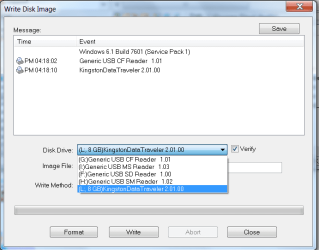
Did you have the flash stick plugged in? Did it detect it as shown below in Disk Drive dropdown menu?

Capture.PNG

If the ISO and the flash stick are loaded and detected as shown, then the Format and Write button should work.
 
i have it (ISO) in my HD's . can't i pic from it?
 

My Computer

Computer Manufacturer/Model Number
Gericom/755CI
OS
windows7
CPU
mobile AMD Athlon(tm) XP-M 2600+, 1514 Mhz, 1 Core(s), 1 Log
Motherboard
Gericom 755CI 1.0,BIOS: American Megatrends Inc. 1.04G 07/09
Memory
768 MB
Monitor(s) Displays
15 inches TFT(XGA 1024x786)
Screen Resolution
1024x786
Hard Drives
40GB
Keyboard
compaq
Mouse
IBM
Internet Speed
512KB
Yes, browse to the ISO file from the File tab by clicking Open.

Then on Bootable tab, click Write Disk Image.

The ISO file should show up in the Image File window, and the USB flash stick should show up in the Disk Drive window. If not, click on the drop-down menu in the window as shown below.
 

Attachments

  • Capture.PNG
    Capture.PNG
    17.3 KB · Views: 9
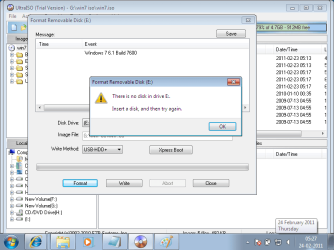
at my side , it is not picing the right usb .
my usb drive is I: but why it is showing continuously E: ?

please see the below snapshot. snapshot has been taken after loading successfully ISO.
 

Attachments

  • 2.png
    2.png
    27.1 KB · Views: 522

My Computer

Computer Manufacturer/Model Number
Gericom/755CI
OS
windows7
CPU
mobile AMD Athlon(tm) XP-M 2600+, 1514 Mhz, 1 Core(s), 1 Log
Motherboard
Gericom 755CI 1.0,BIOS: American Megatrends Inc. 1.04G 07/09
Memory
768 MB
Monitor(s) Displays
15 inches TFT(XGA 1024x786)
Screen Resolution
1024x786
Hard Drives
40GB
Keyboard
compaq
Mouse
IBM
Internet Speed
512KB
It is obviously showing the DVD drive in the window when it needs to show the USB stick.

You need to click on the window in which E drive is appearing to change it to your USB flash stick which should be listed if it is plugged in.

If not try plugging it in again to another USB port, next try rightclicking on it in Start>Computer to format it NTFS to get it detected.
 
dear gregrocker please see the below snip. E: drive is not a CD/DVD drive.
CD/DVD drive is H:

Capture.PNG
 

My Computer

Computer Manufacturer/Model Number
Gericom/755CI
OS
windows7
CPU
mobile AMD Athlon(tm) XP-M 2600+, 1514 Mhz, 1 Core(s), 1 Log
Motherboard
Gericom 755CI 1.0,BIOS: American Megatrends Inc. 1.04G 07/09
Memory
768 MB
Monitor(s) Displays
15 inches TFT(XGA 1024x786)
Screen Resolution
1024x786
Hard Drives
40GB
Keyboard
compaq
Mouse
IBM
Internet Speed
512KB
Well the popup said to insert a Disk in drive so E must be a card reader.

It looks like your USB drive is I from the map, isn't it?


Is there some reason you can't click on the dropdown menu next to Disk Drive which I can see even though it's hidden behind the popup?
 
yes i am able to clink on that dropdown list. but it doesnt have anything except two time E:.
It is not detedting my flash disk.
 

My Computer

Computer Manufacturer/Model Number
Gericom/755CI
OS
windows7
CPU
mobile AMD Athlon(tm) XP-M 2600+, 1514 Mhz, 1 Core(s), 1 Log
Motherboard
Gericom 755CI 1.0,BIOS: American Megatrends Inc. 1.04G 07/09
Memory
768 MB
Monitor(s) Displays
15 inches TFT(XGA 1024x786)
Screen Resolution
1024x786
Hard Drives
40GB
Keyboard
compaq
Mouse
IBM
Internet Speed
512KB
Try rightclicking on flash stick in Computer to reformat to see if it is detected then.
 
still not
 

My Computer

Computer Manufacturer/Model Number
Gericom/755CI
OS
windows7
CPU
mobile AMD Athlon(tm) XP-M 2600+, 1514 Mhz, 1 Core(s), 1 Log
Motherboard
Gericom 755CI 1.0,BIOS: American Megatrends Inc. 1.04G 07/09
Memory
768 MB
Monitor(s) Displays
15 inches TFT(XGA 1024x786)
Screen Resolution
1024x786
Hard Drives
40GB
Keyboard
compaq
Mouse
IBM
Internet Speed
512KB
Back
Top