Solved win7 USB bootable creation failure

Hello Maifs,

I'm assuming that you are referring to these tutorials below.

1) http://www.sevenforums.com/tutorials/31541-windows-7-usb-dvd-download-tool.html

2) http://www.sevenforums.com/tutorials/2432-usb-windows-7-installation-key-drive-create.html


Did you format the USB flash drive with a NTFS file system first instead of the default FAT32?


In addition:
  • You can only create a 64-bit Windows 7 bootable USB flash drive if your current Windows 7 installation is also 64-bit.
  • You can create a 32-bit Windows 7 bootable USB flash drive if your current Windows 7 installation is 32-bit or 64-bit.

Take a look at Shawn's tutorial: http://www.sevenforums.com/tutorials/2432-usb-windows-7-installation-key-drive-create.html

Method Two, Step 7
Replace clean with CLEAN ALL.
 

My Computer

OS
ME/XP/Vista/Win7
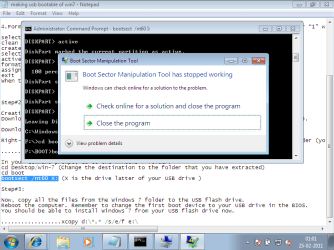
Please see the result when i try to make usb bootable from both above mentioned approaches.

usb bootable failure.png
 

My Computer

Computer Manufacturer/Model Number
Gericom/755CI
OS
windows7
CPU
mobile AMD Athlon(tm) XP-M 2600+, 1514 Mhz, 1 Core(s), 1 Log
Motherboard
Gericom 755CI 1.0,BIOS: American Megatrends Inc. 1.04G 07/09
Memory
768 MB
Monitor(s) Displays
15 inches TFT(XGA 1024x786)
Screen Resolution
1024x786
Hard Drives
40GB
Keyboard
compaq
Mouse
IBM
Internet Speed
512KB
Watch this video for another method which also works sometimes when the others won't:

 
Last edited by a moderator:
Miss out the bootsect part - it is not necessary.


More interesting is why you are getting an issue with bootsect.
 

My Computers

System One System Two

  • Computer type
    PC/Desktop
    OS
    7 X64
    CPU
    i5 8400
    Motherboard
    gigabyte b365m ds3h
    Memory
    2x8gb 3200mhz
    Hard Drives
    various
    PSU
    pure power 11 400w cm
    Case
    Coolermaster
    Cooling
    cryorig m9i
  • Computer type
    PC/Desktop
    OS
    7x64
    CPU
    g5400
    Motherboard
    ga b365m ds3h
    Memory
    8gb ddr4 2400
    PSU
    xfx pro 450w
Thanks grogrecker and all others for giving remarkable support.
Problem has been identified. It was caused of corruption windows7 ISO source. WHen i tried to install win7 on my 220 GB Harddisk, it was successfully installed each time but when i tried to make usb bootable from old Windows7 ISO then it was creating problem as i displayed in above snip.
Now USB has been successfully booted by fresh WIndows7 ISO.
 

My Computer

Computer Manufacturer/Model Number
Gericom/755CI
OS
windows7
CPU
mobile AMD Athlon(tm) XP-M 2600+, 1514 Mhz, 1 Core(s), 1 Log
Motherboard
Gericom 755CI 1.0,BIOS: American Megatrends Inc. 1.04G 07/09
Memory
768 MB
Monitor(s) Displays
15 inches TFT(XGA 1024x786)
Screen Resolution
1024x786
Hard Drives
40GB
Keyboard
compaq
Mouse
IBM
Internet Speed
512KB
Back
Top