Hello,
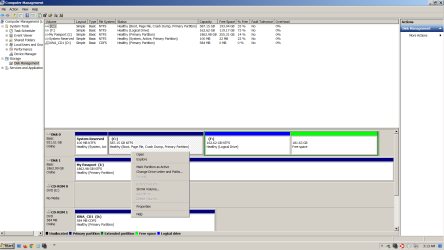
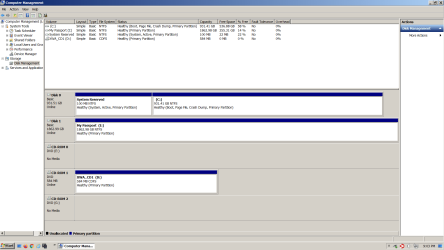
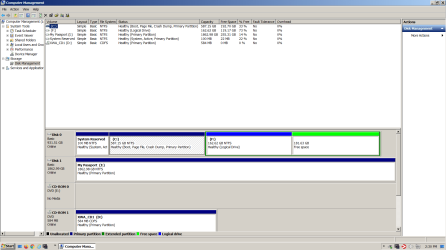
I have a desktop computer with only one hard drive disk with Windows 7 Ultimate 64-bit SP1 (primary partition) & Windows XP Pro 32-bit SP3. I will try to upload a screenshot of the Disk Management thing. The computer is described in my system specs thing at SevenForums. It is a computer I put together using separately purchased parts and installed the operating systems on using the dual boot installation tutorial here. It has the hide Windows 7 from XP thing done to it if that matters at all. C has Windows 7 and F has Windows XP. I is an external hard drive.
I would like to stop using Windows XP now and only have Windows 7 on this computer. I may change Windows 7 to Windows 10, but for now I just want to remove Windows XP and the volume (partition, whatever) that XP is on. Will someone please help me do it right? I see threads (topics, whatever) where other humans already received help doing this on their computers, but I don't want to assume I should just try to copy what they did and I don't really know how to figure out what I should do differently.
I forgot to say that I use that Macrium Reflect product, not the free version if that matters (I don't know), and I made a system image.
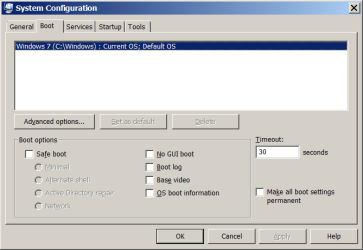
I also forgot to mention that EasyBCD is still installed on the Windows 7 OS. And here is a screenshot of System Configuration Boot tab if that matters. When I push the power button on the computer as it is a boot menu appears. If I don't click on anything Windows 7 comes on.
I don't know what other information to provide for now. Thank you for reading this.
I have a desktop computer with only one hard drive disk with Windows 7 Ultimate 64-bit SP1 (primary partition) & Windows XP Pro 32-bit SP3. I will try to upload a screenshot of the Disk Management thing. The computer is described in my system specs thing at SevenForums. It is a computer I put together using separately purchased parts and installed the operating systems on using the dual boot installation tutorial here. It has the hide Windows 7 from XP thing done to it if that matters at all. C has Windows 7 and F has Windows XP. I is an external hard drive.
I would like to stop using Windows XP now and only have Windows 7 on this computer. I may change Windows 7 to Windows 10, but for now I just want to remove Windows XP and the volume (partition, whatever) that XP is on. Will someone please help me do it right? I see threads (topics, whatever) where other humans already received help doing this on their computers, but I don't want to assume I should just try to copy what they did and I don't really know how to figure out what I should do differently.
I forgot to say that I use that Macrium Reflect product, not the free version if that matters (I don't know), and I made a system image.
I also forgot to mention that EasyBCD is still installed on the Windows 7 OS. And here is a screenshot of System Configuration Boot tab if that matters. When I push the power button on the computer as it is a boot menu appears. If I don't click on anything Windows 7 comes on.
I don't know what other information to provide for now. Thank you for reading this.
Attachments
Last edited:
My Computer
At a glance
Windows 7 Ultimate 64-bit SP1Intel Core i5-3570KCorsair Vengeance Blue 4x8 GBNvidia GTX 1060
- Computer type
- PC/Desktop
- Computer Manufacturer/Model Number
- I do not know. It was put together with separately purchased parts.
- OS
- Windows 7 Ultimate 64-bit SP1
- CPU
- Intel Core i5-3570K
- Motherboard
- ASUS P8Z77-V PRO
- Memory
- Corsair Vengeance Blue 4x8 GB
- Graphics Card(s)
- Nvidia GTX 1060
- Sound Card
- M-Audio Delta 1010LT
- Monitor(s) Displays
- 2 Asus VS247H-P 23.6-Inch LED-Lit LCD monitors
- Screen Resolution
- 1920x1080
- Hard Drives
- Western Digital WD1002FAEX Caviar Black 1TB SATA III
(no SSD)
My Passport Ultra external hard drive 2TB
- PSU
- CORSAIR RM650 650W 80 PLUS GOLD Full Modular PSU
- Case
- Corsair Obsidian Series Black 550D Mid Tower
- Cooling
- Zalman CNPS9500AT CPU Cooler
- Keyboard
- Azio Large Print Tri-Color Backlit Wired Keyboard (KB505U)
- Mouse
- Logitech Gaming Mouse G300
- Internet Speed
- 6-8Mbps down, 2Mbps up
- Antivirus
- Malwarebytes Premium
- Browser
- IE, Firefox, Chrome
- Other Info
- 2nd PC: Dell Dimension 4600
OS: Windows 7 Home Premium 32-bit SP1
PSU: EVGA 500W 80+ thingo
CPU: Intel Pentium 4
RAM: 3.00 GB Dual Channel DDR @ 199MHz
MB: Dell 02Y832
GPU: 512MB Nvidia GeForce 6200
HDD: 465GB WDC WD5000AAKS-00A7B2 ATA (SATA)
Opt Drive: HL-DT-ST DVD-ROM GDR8162B ATA Device
Opt Drive: TSSTcorp CD-RW TS-H292C ATA Device
Audio: Creative SB Live
Monitor: Asus-VS247H-P