Win7codecs

shark, why not add an option to check for updates in the installed system which would then download without having to manually having to check the website?
 

My Computer

Computer Manufacturer/Model Number
self built
OS
Windows 7 Professional 64-bit
CPU
Intel E8400 3GHz
Motherboard
Intel DX48BT2
Memory
Kingston PC3-10700H 4Gb
Graphics Card(s)
XFX Radeon HD 5850 BlackEd.
Sound Card
Asus Xonar DG
Monitor(s) Displays
2x Samsung SM-T220HD 22"
Screen Resolution
1680x1050 on two monitors
Hard Drives
OCZ Vertex 2 120gb 3.5" (OS)
Seagate Momentus XT 500gb
Samsung F3 1Tb (games)
2x Samsung F1 1Tb
PSU
Thermaltake ToughPower 850w
Case
Thermaltake Armor
Cooling
Scythe Mugen II
Keyboard
Microsoft Comfort Curve USB
Mouse
Razer Diamondback 3G
Internet Speed
8128/443
There is a such a feature already, but I don't like 'pushy' software.
It will only remind you of an update AFTER 45 days has passed.

With Windows 7 being so new,
I'm updating constantly with new features and capabilities requested by my users.
 

My Computer

Computer Manufacturer/Model Number
Selfbuilt
OS
Windows 7 Ultimate 64bit
CPU
i7 2600k
Motherboard
asus P8Z68-V LE
Memory
16GB (4x4) corsair vengeance
Graphics Card(s)
Intel HD3000 iGPU / AMD HD6870 1024MB
Sound Card
bitstreamed to an Onkyo 609
Monitor(s) Displays
Asus VE278 27" LED / Bravia EX7 60" LED
Screen Resolution
native 1080p x2
Hard Drives
4x 2TB int. + 2x 2TB external and a SSD for the boot drive.
PSU
650w Antec
Case
NZXT tempest evo
Cooling
air/stock
Keyboard
Dell
Mouse
logitech m505
Internet Speed
dual: cable/blackberry tether for travel use
Other Info
BD re-writer //
asus notebook G73Jw
Hello, Its been my experience so fa that Win7 already has every codec I need. I had the shark codec package in vista, but I will only install another as I need. I would advise against installing third party codecs this soon.
 

My Computer

Computer Manufacturer/Model Number
DELL
OS
WINDOWS 7 64-bit Ultimte
CPU
Quad Core 2
Motherboard
Dell
Memory
4 Gig
Graphics Card(s)
Nvidia 8600 GTS
Sound Card
on board
Monitor(s) Displays
22 inch HD
Hard Drives
500 gig
160 gig
Other Info
Windows experience rating of 5.9
The reason I use this one is because shark states that he doesnt mess with the existing installed codecs.
 

My Computer

Computer Manufacturer/Model Number
self built
OS
Windows 7 Professional 64-bit
CPU
Intel E8400 3GHz
Motherboard
Intel DX48BT2
Memory
Kingston PC3-10700H 4Gb
Graphics Card(s)
XFX Radeon HD 5850 BlackEd.
Sound Card
Asus Xonar DG
Monitor(s) Displays
2x Samsung SM-T220HD 22"
Screen Resolution
1680x1050 on two monitors
Hard Drives
OCZ Vertex 2 120gb 3.5" (OS)
Seagate Momentus XT 500gb
Samsung F3 1Tb (games)
2x Samsung F1 1Tb
PSU
Thermaltake ToughPower 850w
Case
Thermaltake Armor
Cooling
Scythe Mugen II
Keyboard
Microsoft Comfort Curve USB
Mouse
Razer Diamondback 3G
Internet Speed
8128/443
ive got win7 64bit, installed Win 7 Codecs and 64bit addon.

Problem is audio stutter when playing .mkv ac3\dts files, tried wmp 32 and 64 bit. I have ste it to ac3filter

Did manage to set it to use coreavc.

In MPC when coreavc and ac3filter is set to preferred theres no problems, so dont know why this affect wmp
 

My Computer

OS
win7, vista
Am I the only one getting this inconsistency with the latest version?

Here is the screenshot from the latest version:

2bbigh.jpg


Here is a screenshot from the one I have installed:

2m4skd1.jpg


I don't have the aac options.

Also, if it can hep, the Settings32.exe file I have was last modified on august the 4th and is 861 050 bytes


As a side note, for aac I was having playback problems from the start and just decided to use mpc hc's embedded aac decoder (this is probably why there are aac options now).
 
Last edited:

My Computer

OS
Windows 7 Ultimate x64 build 7600
Ok... I have to confess... I always used the k-lite codec pack but since the windows seven RTM come I tried the codec pack from shark and the final verdict is: K-Lite? Nevermore!

So I'm here to say the good job that you Shark have been doing... :thumbsup:

Ok... i installed this latest version, so what is the best codecs configurations?

Keep Windows defaults codecs or change?
 

My Computer

OS
Windows7 Enterprise SP1 x64 (Technet)
Ok... I have to confess... I always used the k-lite codec pack but since the windows seven RTM come I tried the codec pack from shark and the final verdict is: K-Lite? Nevermore!

So I'm here to say the good job that you Shark have been doing... :thumbsup:

Same here. I used CCCP for years, but now with Shark's codec pack, I can't see myself going back to it. Keep up the great work, Shark. :thumbsup:
 

My Computer

OS
Windows 7 Professional x64 SP1
CPU
Intel Core i5-2500K
Motherboard
Gigabyte P67X-UD3-B3
Memory
8 GB Corsair Vengeance Blue DDR3-1600
Graphics Card(s)
Sapphire Radeon HD 6870 1 GB GDDR5
Monitor(s) Displays
Samsung SyncMaster T220HD
Screen Resolution
1680x1050
Hard Drives
120 GB Corsair Force SSD + 320 GB Seagate Barracuda SATA2 + 2 TB My Book Elite
PSU
Corsair 650W
Internet Speed
50 Mbps
The reason I use this one is because shark states that he doesnt mess with the existing installed codecs.
:) NO decoders are changed using a default installation. I find the defaults do a good job about 90% of the time. The default installation settings are arrived at through user input.

There is always going to be a strange video thats going to give you some issue and usually for those, simply changing the splitter (to Gabests) will suffice. On rare occassions, you may need to change the decoders as well (to ffdshow) but that is rare.


Problem is audio stutter when playing .mkv ac3\dts files, tried wmp 32 and 64 bit. I have ste it to ac3filter

Did manage to set it to use coreavc.

In MPC when coreavc and ac3filter is set to preferred theres no problems, so dont know why this affect wmp

If you still have a stutter after placing CoreAVC as the H264 decoder for the Microsoft Players,
it is probably time for a new CPU.


Ok... i installed this latest version, so what is the best codecs configurations?

Keep Windows defaults codecs or change?
Why screw with a good thing? If your playback is working, don't mess with it.
The options are there for those that need it. When its working... watch a vid.
If you do screw with the settings and mess up bad, Reset All is your best friend.


Am I the only one getting this inconsistency with the latest version?

I don't have the aac options.

There are 2 reasons why I suggest people do a clean install EVERY TIME.

The 1st reason is, i do not test upgrades. I don't have time for this.
The 2nd, is to avoid issues like this.

And, just to give you a heads up to what is instore for the future; I am currently working on a new feature that will save all of your previous settings and upon a new (clean) installation, allow you to restore those settings. I am even considerring to disable upgrades and force clean installs in light of this new feature. Even if you had performed an upgrade in the past, it still set all your settings back to what a clean install would have done anyway.

hdfrango, uninstall your current version, get the latest version from MajorGeeks (because they get the installation file directly off of my server) and you should have the AAC settings.

 
Last edited:

My Computer

Computer Manufacturer/Model Number
Selfbuilt
OS
Windows 7 Ultimate 64bit
CPU
i7 2600k
Motherboard
asus P8Z68-V LE
Memory
16GB (4x4) corsair vengeance
Graphics Card(s)
Intel HD3000 iGPU / AMD HD6870 1024MB
Sound Card
bitstreamed to an Onkyo 609
Monitor(s) Displays
Asus VE278 27" LED / Bravia EX7 60" LED
Screen Resolution
native 1080p x2
Hard Drives
4x 2TB int. + 2x 2TB external and a SSD for the boot drive.
PSU
650w Antec
Case
NZXT tempest evo
Cooling
air/stock
Keyboard
Dell
Mouse
logitech m505
Internet Speed
dual: cable/blackberry tether for travel use
Other Info
BD re-writer //
asus notebook G73Jw
If you still have a stutter after placing CoreAVC as the H264 decoder for the Microsoft Players,
it is probably time for a new CPU.

Did have k-lite before reinstalled win7, and it worked fine, then used ffdshow audio with ac3/ dts pass through

Tried the the settings, but cant get wmp to use ffdshow audio, only ac3filter.

As mentioned no audio stutter when using mpc with coreavs and ac3filter. so its an wmp issue
 

My Computer

OS
win7, vista
by popular request . . .implementation of Save and Restore settings.
A restore can be performed at ANYTIME,
even after a complete uninstall and re-install of a newer version.

frontpagef.jpg


If you already have version 1.2.8 installed there is an update installer available on my
Application Development Forum
that will give you this functionality now and increment your installed version to 1.2.8.6
Although this update is still under development, testing has not revealed any abnormalities.
Hope you like the new functionality . . .
 
Last edited:

My Computer

Computer Manufacturer/Model Number
Selfbuilt
OS
Windows 7 Ultimate 64bit
CPU
i7 2600k
Motherboard
asus P8Z68-V LE
Memory
16GB (4x4) corsair vengeance
Graphics Card(s)
Intel HD3000 iGPU / AMD HD6870 1024MB
Sound Card
bitstreamed to an Onkyo 609
Monitor(s) Displays
Asus VE278 27" LED / Bravia EX7 60" LED
Screen Resolution
native 1080p x2
Hard Drives
4x 2TB int. + 2x 2TB external and a SSD for the boot drive.
PSU
650w Antec
Case
NZXT tempest evo
Cooling
air/stock
Keyboard
Dell
Mouse
logitech m505
Internet Speed
dual: cable/blackberry tether for travel use
Other Info
BD re-writer //
asus notebook G73Jw
nice, thanks.
 

My Computer

Computer Manufacturer/Model Number
self built
OS
Windows 7 Professional 64-bit
CPU
Intel E8400 3GHz
Motherboard
Intel DX48BT2
Memory
Kingston PC3-10700H 4Gb
Graphics Card(s)
XFX Radeon HD 5850 BlackEd.
Sound Card
Asus Xonar DG
Monitor(s) Displays
2x Samsung SM-T220HD 22"
Screen Resolution
1680x1050 on two monitors
Hard Drives
OCZ Vertex 2 120gb 3.5" (OS)
Seagate Momentus XT 500gb
Samsung F3 1Tb (games)
2x Samsung F1 1Tb
PSU
Thermaltake ToughPower 850w
Case
Thermaltake Armor
Cooling
Scythe Mugen II
Keyboard
Microsoft Comfort Curve USB
Mouse
Razer Diamondback 3G
Internet Speed
8128/443
Quick question. I just recently isntalled TVersity, which if you're familiar with, provides a network streaming solution for accessing and transcoding your movies on the fly to my xbox360 for example.

It obviously comes with it's own codec pack for it to function properly. Can I install the shark bundle of codecs after the fact on to my system so I can for instance have MKV playback on my PC as well?

Thanks
 

My Computer

OS
Win 7 Ultimate x64
CPU
Intel i7 950 OC'd @ 4.0Ghz (SpeedStep ON)
Motherboard
ASUS P6X58D-E BIOS 0303
Memory
3x2GB Patriot Extreme Viper II Sector 7 DDR3 @ 1600mhz
Graphics Card(s)
ATI MSI 5870 900mhz/1300mhz
Sound Card
Onboard Realtek ALC889
Monitor(s) Displays
2 X 24" BenQ G2412HD
Screen Resolution
1920x1080p
Hard Drives
Intel X25-M 80 GB (SSD)
W.D. Caviar Black 1TB (SATA)
Seagate Barricuda 1TB (SATA)
Seagate Barricuda 80GB (SATA)
PSU
Corsair AX850
Case
Antec 1200
Cooling
Lots and Lots of Air!
Keyboard
Razer Lycosa
Mouse
Microsoft Sidewinder
Internet Speed
25Mbps/1Mbps
Quick question. I just recently isntalled TVersity, which if you're familiar with, provides a network streaming solution for accessing and transcoding your movies on the fly to my xbox360 for example.

It obviously comes with it's own codec pack for it to function properly. Can I install the shark bundle of codecs after the fact on to my system so I can for instance have MKV playback on my PC as well?

Thanks

Here is a quote that you will find interesting . . .
I do not own the hardware, I cannot speak from personal experience.
Here is what worked for me...
Clean install of Win 7 Ultimate 64Bit straight from MSDN. Installed Shark007's Win7 Codecs version 1.2.7 dated 8/4/2009 and then Shark007's x64 Components version 2.0.6 (website says 2.0.5 but MajorGeeks says 2.0.6). After that I installed Tversity Pro and just accepted all the defalults until it wanted to install its codec pack, I told it not to do that and then finished up. Went into the setup of TVersity and made the normal changes, Video resolution 1920 x 1080, Wired 100 Network, Optimize for Quality, Minimum Compression, had it update the libraries every hour, also make sure that you log into the Tversity service with a local account with admin rights, thats all I can remember. It was the smoothest, cleanest, easiest install / setup of a PC and Tversity I have ever had. Went into the Library setup of Tversity added my Home Server Video, Music and Photo shares and I also made one for a directory on that pc called NewMKVs and added that. Fired up my Xbox 360 and Tversity was there, went in and watched Coraline and Breakfast Club and an episode of Philanthropist, they were are pristine, didnt matter if it was coming from the driectory on my pc or from the homeserver, results were the same. I had no buffering or stutters, it just worked, frankly I could not believe it.
The original text can be found over at TheGreenButton forums
 

My Computer

Computer Manufacturer/Model Number
Selfbuilt
OS
Windows 7 Ultimate 64bit
CPU
i7 2600k
Motherboard
asus P8Z68-V LE
Memory
16GB (4x4) corsair vengeance
Graphics Card(s)
Intel HD3000 iGPU / AMD HD6870 1024MB
Sound Card
bitstreamed to an Onkyo 609
Monitor(s) Displays
Asus VE278 27" LED / Bravia EX7 60" LED
Screen Resolution
native 1080p x2
Hard Drives
4x 2TB int. + 2x 2TB external and a SSD for the boot drive.
PSU
650w Antec
Case
NZXT tempest evo
Cooling
air/stock
Keyboard
Dell
Mouse
logitech m505
Internet Speed
dual: cable/blackberry tether for travel use
Other Info
BD re-writer //
asus notebook G73Jw
Thanks for the info. As for the Tversity setup described in the quote, I had pretty much the exact same experience. Installed it, but in my case accepted the codecs included with TVersity, made the routine setup changes for HD output and transcoding just like the quote states and had the exact same results, fired up the xbox, no hassles, and there everything was, just like when I was running XP before.

I think though I will try uninstalling TVersity AND it's associated codec pack and try doing it in the order described above. Is there anything more I need to know about making sure all codecs are completely removed or should I assume the uninstaller should clean everything. There are 2 entries in my software list in control panel for uninstall right now:

TVersity codec pack
and Tversity itself
 

My Computer

OS
Win 7 Ultimate x64
CPU
Intel i7 950 OC'd @ 4.0Ghz (SpeedStep ON)
Motherboard
ASUS P6X58D-E BIOS 0303
Memory
3x2GB Patriot Extreme Viper II Sector 7 DDR3 @ 1600mhz
Graphics Card(s)
ATI MSI 5870 900mhz/1300mhz
Sound Card
Onboard Realtek ALC889
Monitor(s) Displays
2 X 24" BenQ G2412HD
Screen Resolution
1920x1080p
Hard Drives
Intel X25-M 80 GB (SSD)
W.D. Caviar Black 1TB (SATA)
Seagate Barricuda 1TB (SATA)
Seagate Barricuda 80GB (SATA)
PSU
Corsair AX850
Case
Antec 1200
Cooling
Lots and Lots of Air!
Keyboard
Razer Lycosa
Mouse
Microsoft Sidewinder
Internet Speed
25Mbps/1Mbps
Shark,
Great project. Thank you.
Your Win7codecs are just what clients have been asking for; something that generally works at the default settings, is easy to tweak if necessary, and can be reset easily to Windows defaults.
So far its doing exactly its job on several installations of Windows 7 RTM.
Tom
 

My Computer

Computer type
PC/Desktop
Computer Manufacturer/Model Number
Dell: XPS 420 (2), XPS M1330 (several), XPS 14z, Mini 9, Mini 10v
OS
W8 Pro, W7 Ultimate, XP Pro x64, Vista x64, Ubuntu
CPU
Q6600, Q6700, T7500, T7500, N270, N270
Motherboard
Dell
Memory
8GB, 8GB, 4GB, 4GB, 2GB, 2GB
Graphics Card(s)
ATI, nVidia, nVidia, nVidia, Intel, Intel
Monitor(s) Displays
Dell 2408WFP
Hard Drives
A drawer full. OCZ Vertex's in RAID 0. Vertex 3's, Vertex 4, Samsung 830's, Samsung 840's, Intel 330. Don't use dino drives any more except for servers.
Keyboard
Logitech Wave
Internet Speed
29 Mbps DL / .95 Mbps UL
Other Info
New project(2013)...Another low power server. Zotac H67ITX, i3-2100T, Windows Server 2012 Essentials on Samsung SSD.
Previous project...Low power (38-40 watts using Kill-a-Watt) Windows Home Server. Zotac ION (Atom 330, GeForce9400), 4GB RAM, 2x2TB WD Green, IN WIM miniITX Case. Fits on a shelf in laundry closet, practically silent.
by popular request . . .implementation of Save and Restore settings.
A restore can be performed at ANYTIME,
even after a complete uninstall and re-install of a newer version.

frontpagef.jpg


If you already have version 1.2.8 installed there is an update installer available on my
Application Development Forum
that will give you this functionality now and increment your installed version to 1.2.8.6
Although this update is still under development, testing has not revealed any abnormalities.
Hope you like the new functionality . . .

Great... update here... :)
 

My Computer

OS
Windows7 Enterprise SP1 x64 (Technet)
The fact that the settings application is a 'work in progress' is reflected in the current available update, 1.2.8.7 | This update will increment your installed version accordingly. Any version of 128.(x) is required before updating. These small updates are not releases on the public servers like my full installation packages. They are only available directly from my private server through my Application Development Forum.

current changelog: Allow saving your current settings and then restoring them at anytime, even after a clean installation of a newer version. This update will increment your installed version to 1.2.8.7 | I added a warning box informing the user when current saved settings are about to be overwritten with new settings, and give the user a chance to back out before they overwite the previously saved settings. I also added an information box seen upon selecting Uninstall (from the Help TAB) asking the user If they want to delete the saved settings during the Uninstall process. The recent .7 update makes the application more user friendly by not exitting everytime an administrative right is required but is not present. Also new is that when using either of the buttons, 'Reset All' or 'Restore Settings', the application will not only perform the function requested but will reload itself displaying the default or restored settings accordingly instead of exitting like it did in the past. (the application is reloaded with full adminstrative rights in these situations)

These updates are fully tested and functional and are NOT considered to be BETA releases.

Besides my own forum,
this is the only other place that I am making the avalability of these releases known.

I happen to like the 7 forums and often seek information here.

1.2.9 was released with these updates finalized.
 
Last edited:

My Computer

Computer Manufacturer/Model Number
Selfbuilt
OS
Windows 7 Ultimate 64bit
CPU
i7 2600k
Motherboard
asus P8Z68-V LE
Memory
16GB (4x4) corsair vengeance
Graphics Card(s)
Intel HD3000 iGPU / AMD HD6870 1024MB
Sound Card
bitstreamed to an Onkyo 609
Monitor(s) Displays
Asus VE278 27" LED / Bravia EX7 60" LED
Screen Resolution
native 1080p x2
Hard Drives
4x 2TB int. + 2x 2TB external and a SSD for the boot drive.
PSU
650w Antec
Case
NZXT tempest evo
Cooling
air/stock
Keyboard
Dell
Mouse
logitech m505
Internet Speed
dual: cable/blackberry tether for travel use
Other Info
BD re-writer //
asus notebook G73Jw
Shark,
I've been using your 64-bit codecs for Vista, now for Windows 7.
Never had even a hint of a problem. Thanks for the great work! :D
 

My Computer

Computer Manufacturer/Model Number
Lenovo ThinkPad E520 / MacBook Pro 17" (mid 2010)
OS
Windows 7 Professional (64-bit) / OS X Snow Leopard
CPU
Core i5 / Core i7
Memory
4 GB / 8 GB
Sound Card
built-in
Monitor(s) Displays
internal & Samsung SyncMaster 191T / internal
Screen Resolution
1366x768 & 1280 x 1024 /1920x1200
Hard Drives
2 WD Raptors (74 G)
1 WD Caviar (250 G)
1 HP Personal Media Drive (USB, 300 G)
etc.
Cooling
none
Keyboard
built-in
Mouse
generic mouse / Wacom Intuos 3 tablet
Internet Speed
(very variable) high-speed cable
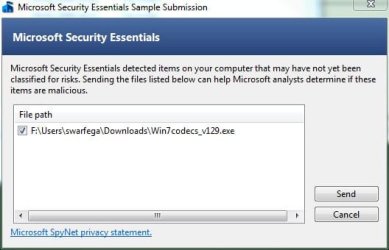
Shark, just some interesting info. The new MSE flagged 1.2.9 up as unclassified. So Ive sent it off.

win7codec.JPG
 

My Computer

Computer Manufacturer/Model Number
self built
OS
Windows 7 Professional 64-bit
CPU
Intel E8400 3GHz
Motherboard
Intel DX48BT2
Memory
Kingston PC3-10700H 4Gb
Graphics Card(s)
XFX Radeon HD 5850 BlackEd.
Sound Card
Asus Xonar DG
Monitor(s) Displays
2x Samsung SM-T220HD 22"
Screen Resolution
1680x1050 on two monitors
Hard Drives
OCZ Vertex 2 120gb 3.5" (OS)
Seagate Momentus XT 500gb
Samsung F3 1Tb (games)
2x Samsung F1 1Tb
PSU
Thermaltake ToughPower 850w
Case
Thermaltake Armor
Cooling
Scythe Mugen II
Keyboard
Microsoft Comfort Curve USB
Mouse
Razer Diamondback 3G
Internet Speed
8128/443
Back
Top