window 7 pro/premier installed help

clyde

New member
Local time
5:36 AM
Messages
7
hi guys

just bought a dell studio 1558 i5 500gb problem is their appears to be running two window 7 progammes, one premier edtion and a window 7 pro ,my saved files(d:) is full with no space left and the os(c:) has 400gb free of 451gb can / how do i unistall the premier edition without a recovery disk.

regards
 

My Computer

Computer Manufacturer/Model Number
1558
OS
windows 7 pro
Are you saying you boot up to an option between Professional and Premier? That would make me wonder where your Dell came from, because there is no Premier Edition of Windows 7.
 

My Computer

OS
Windows 7 Ultimate x64 SP1
CPU
Intel Core i7-2600
Motherboard
Gigabyte GA-P67A-UD3P-B3
Memory
12 GB Patriot Extreme DDR3-1333
Graphics Card(s)
Nvidia GTX 470
Monitor(s) Displays
Dell UltraSharp 2209WA
Hard Drives
OCZ Agility3 240 GB, WD5001AALS, WD7501AALS
PSU
OCZ ModStream 700W
Case
CoolerMaster HAF 912 Advanced
Cooling
CoolerMaster Hyper 212 Plus
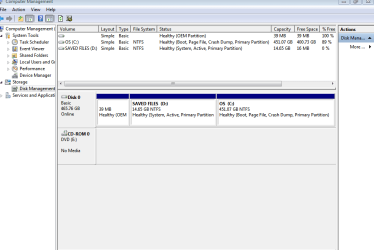
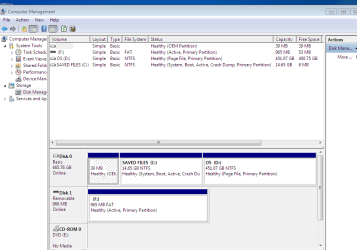
Please post back a screenshot of your full Disk Mgmt drive map, using Snipping Tool in Start menu.

What makes you think you have two installed versions of Win7? Please post some screenshots of evidence.
 
sorry its premium edtion, i'll try the snipping
 

My Computer

Computer Manufacturer/Model Number
1558
OS
windows 7 pro
There's a Home Premium. Are you saying you boot up and see Professional and Home Premium as separate choices?
 

My Computer

OS
Windows 7 Ultimate x64 SP1
CPU
Intel Core i7-2600
Motherboard
Gigabyte GA-P67A-UD3P-B3
Memory
12 GB Patriot Extreme DDR3-1333
Graphics Card(s)
Nvidia GTX 470
Monitor(s) Displays
Dell UltraSharp 2209WA
Hard Drives
OCZ Agility3 240 GB, WD5001AALS, WD7501AALS
PSU
OCZ ModStream 700W
Case
CoolerMaster HAF 912 Advanced
Cooling
CoolerMaster Hyper 212 Plus

My Computer

OS
Windows 7 pro 64 bit
Memory
2 Go
Graphics Card(s)
Nvidia
Mouse
Microsoft optical mouse

My Computer

Computer Manufacturer/Model Number
* BFK Customs *
OS
W 7 64-bit Ultimate
CPU
Intel Q9550 Yorkfield
Motherboard
ASUS P5Q Pro
Memory
8GB Dominator 8500C5D
Graphics Card(s)
ATI : XFX 5870
Sound Card
Realtek HD Audio 7-1
Monitor(s) Displays
1x 47" LCD HDMI & 3x 26" LCD HDMI
Screen Resolution
1920x1080P & 1920x1200
Hard Drives
1x 80GB Intel X25-M G2 SSD : 1x 500GB & 1x 640GB WD Caviar Black(s)
PSU
Corsair 620HX
Case
Cooler Master RC-690
Cooling
Tuniq Tower 120, 2x 140mm and 3x 120mm case fans
Keyboard
Microsoft 500
Mouse
Razer Diamondback 3G
Internet Speed
14 Mb/s
Other Info
1x Koutech 3Gb/s SATA HDD Hot Swap Rack
yes thats correct
 

My Computer

Computer Manufacturer/Model Number
1558
OS
windows 7 pro
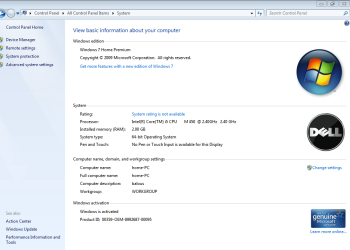
Capture.PNG

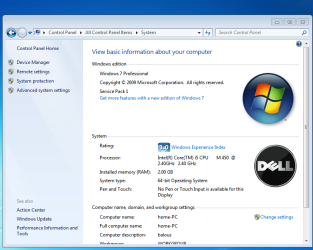
image 1.PNG

hi hope this helps
 

My Computer

Computer Manufacturer/Model Number
1558
OS
windows 7 pro

My Computer

Computer Manufacturer/Model Number
* BFK Customs *
OS
W 7 64-bit Ultimate
CPU
Intel Q9550 Yorkfield
Motherboard
ASUS P5Q Pro
Memory
8GB Dominator 8500C5D
Graphics Card(s)
ATI : XFX 5870
Sound Card
Realtek HD Audio 7-1
Monitor(s) Displays
1x 47" LCD HDMI & 3x 26" LCD HDMI
Screen Resolution
1920x1080P & 1920x1200
Hard Drives
1x 80GB Intel X25-M G2 SSD : 1x 500GB & 1x 640GB WD Caviar Black(s)
PSU
Corsair 620HX
Case
Cooler Master RC-690
Cooling
Tuniq Tower 120, 2x 140mm and 3x 120mm case fans
Keyboard
Microsoft 500
Mouse
Razer Diamondback 3G
Internet Speed
14 Mb/s
Other Info
1x Koutech 3Gb/s SATA HDD Hot Swap Rack
capture 1.PNG
 

My Computer

Computer Manufacturer/Model Number
1558
OS
windows 7 pro
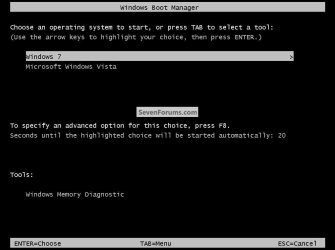
Now start the "other" version, restart the PC to start that version and post a similar snip from there; do you have a dual boot menu present at PC startup like this one below with 2 Windows 7 entries?


click to enlarge
Dual Boot2.jpg
 

My Computer

Computer Manufacturer/Model Number
* BFK Customs *
OS
W 7 64-bit Ultimate
CPU
Intel Q9550 Yorkfield
Motherboard
ASUS P5Q Pro
Memory
8GB Dominator 8500C5D
Graphics Card(s)
ATI : XFX 5870
Sound Card
Realtek HD Audio 7-1
Monitor(s) Displays
1x 47" LCD HDMI & 3x 26" LCD HDMI
Screen Resolution
1920x1080P & 1920x1200
Hard Drives
1x 80GB Intel X25-M G2 SSD : 1x 500GB & 1x 640GB WD Caviar Black(s)
PSU
Corsair 620HX
Case
Cooler Master RC-690
Cooling
Tuniq Tower 120, 2x 140mm and 3x 120mm case fans
Keyboard
Microsoft 500
Mouse
Razer Diamondback 3G
Internet Speed
14 Mb/s
Other Info
1x Koutech 3Gb/s SATA HDD Hot Swap Rack
hi not sure how to use snip at start up just have the pic you have posted
 

My Computer

Computer Manufacturer/Model Number
1558
OS
windows 7 pro
We don't need to see, do you have the 2 Windows 7 entries like the snip I posted or does Windows just auto-start to the logon screen?
 

My Computer

Computer Manufacturer/Model Number
* BFK Customs *
OS
W 7 64-bit Ultimate
CPU
Intel Q9550 Yorkfield
Motherboard
ASUS P5Q Pro
Memory
8GB Dominator 8500C5D
Graphics Card(s)
ATI : XFX 5870
Sound Card
Realtek HD Audio 7-1
Monitor(s) Displays
1x 47" LCD HDMI & 3x 26" LCD HDMI
Screen Resolution
1920x1080P & 1920x1200
Hard Drives
1x 80GB Intel X25-M G2 SSD : 1x 500GB & 1x 640GB WD Caviar Black(s)
PSU
Corsair 620HX
Case
Cooler Master RC-690
Cooling
Tuniq Tower 120, 2x 140mm and 3x 120mm case fans
Keyboard
Microsoft 500
Mouse
Razer Diamondback 3G
Internet Speed
14 Mb/s
Other Info
1x Koutech 3Gb/s SATA HDD Hot Swap Rack
Capture.PNG
 

My Computer

Computer Manufacturer/Model Number
1558
OS
windows 7 pro
Yes it seems you do indeed have 2 separate Windows 7 OSs installed; there is a way to recover all the space to the left of the big partition and do away with the dual boot issue at the same time.

If there is no data you need from the 2 small partitions to the left, you can follow this tutorial at the link below to recover all the space into a single partition, if you need anything from those partitions make back-ups of that data before you start.


Do these steps in order to complete this successfully and be sure to post back with any further questions you may have and to keep us informed.

Partition : Recover Space Used by an Older OS
 

My Computer

Computer Manufacturer/Model Number
* BFK Customs *
OS
W 7 64-bit Ultimate
CPU
Intel Q9550 Yorkfield
Motherboard
ASUS P5Q Pro
Memory
8GB Dominator 8500C5D
Graphics Card(s)
ATI : XFX 5870
Sound Card
Realtek HD Audio 7-1
Monitor(s) Displays
1x 47" LCD HDMI & 3x 26" LCD HDMI
Screen Resolution
1920x1080P & 1920x1200
Hard Drives
1x 80GB Intel X25-M G2 SSD : 1x 500GB & 1x 640GB WD Caviar Black(s)
PSU
Corsair 620HX
Case
Cooler Master RC-690
Cooling
Tuniq Tower 120, 2x 140mm and 3x 120mm case fans
Keyboard
Microsoft 500
Mouse
Razer Diamondback 3G
Internet Speed
14 Mb/s
Other Info
1x Koutech 3Gb/s SATA HDD Hot Swap Rack
You apparently overwrote your Recovery Partition with the Pro install.

Where did you get the installer and how do you plan to activate it? Were you just wanting to try it?

The correct way if you want to Upgrade Premium would be to Anytime Upgrade from Premium to Pro using an Anytime Upgrade Key (cheaper) or a Win7 Pro Retail key.

Which one do you want to keep - confirm it's drive letter. We will give you the steps to remove the other one and recover the space back into Win7.
 
Back
Top