Window appearance odd?

eduede

New member
Power User
VIP
Local time
5:23 AM
Messages
141
Location
Chicago
Hey guys.

I'm currently running a Windows7 HP 64bit. I updated from Vista64bit. My computer was only about a week old when I updated, so I just did the "upgrade" instead of doing a clean install.

Now, I made and ISO of the installer (I did the online student upgrade download) using vLite and did a clean install of Win7 in Virtual Box (just wanted to check to make sure the ISO I made actually worked [I plan on using it to do a clean install on a new Dell laptop]).

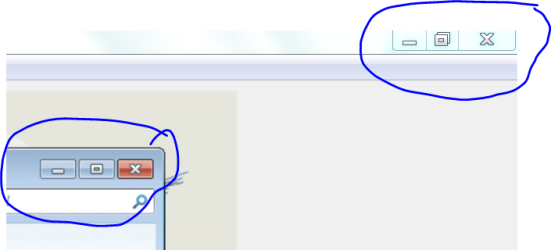
I've noticed an odd difference in appearance between Windows7 running in my Virtual Box and Windows 7 running "native". Check out this screen shot:
Capture.PNG

The active window (bottom left) is the window running in Virtual box (from a clean install). The window in the background (upper right) is the window of my real OS.

Notice that the min, restore and X buttons are separated (with some space between) in the virtual box window while the buttons in my real OS do not have any space between? What's that all about?

Key points:
Virtual box install was "clean" install (from an ISO made from an "upgrade" installer)
Real OS install was "upgrade" from Vista
Visual appearance is the only thing that seems different between them.

Thanks for any comments or feedback you might have!
 

My Computer

OS
Windows 7 Home Ultimate 64-Bit, Ubuntu 10.04 Lucid Lynx, Windows XP
CPU
Pentium i7 @fast
Memory
6GB DDR3 @fast
Graphics Card(s)
ATI Radeon HD 4600 Series (512mb) / ATI TV Wonder 650PCIe
Sound Card
Integrated
Monitor(s) Displays
32" VIZIO HDTV
Screen Resolution
1080p @super sharp
Hard Drives
Internal 500GB @7200rpm and not big enough cache
External 500GB @7200rpm and not big enough cache
Cooling
My apartment's AC / Chicago Winters
Keyboard
LG Bluetooth
Mouse
LG Bluetooth
Internet Speed
~21.50Mb/S Down, ~3.5Mb/S Up
Different themes maybe, or Aero working in one but not in the other?
 

My Computer

Computer type
PC/Desktop
Computer Manufacturer/Model Number
Home Built
OS
Windows 10 Education 64 bit
CPU
AMD Phenom II X4 980 Black Edition Deneb 3.7GHz
Motherboard
Asus M4N68T-M V2 µATX Motherboard
Memory
8GB 4GBx2 Kingston PC10600 DDR3 1333 Memory
Graphics Card(s)
Zotac NVIDIA Geforce GT640 2 Gig DDR3 PCIe
Sound Card
VIA VT1708s High Definition Audio 8-channel Onboard
Monitor(s) Displays
22" LG E2242 1080p and 2 19" I-INC AG191D
Screen Resolution
1280x1024 - 1920x1080 - 1280x1024
Hard Drives
Crucial M100 256 GB SSD and 500 GB WD Blue SATA
PSU
Thermaltake TR 620
Case
Power Up Black ATX Mid-Tower Case
Cooling
Stock heatsink and fan
Keyboard
Logitech Wireless K350 Wave
Mouse
Logitech Wireless M570 Trackman Wheel
Internet Speed
80 Mbps Down 30 Mbps Up
Antivirus
Windows Defender
Browser
Internet Explorer 11
Other Info
HP DVD1040e Lightscribe - External USB2
Hey edude,

The difference between the two windows you show is simple; One is using the Windows Aero theme, and the other is on Windows Basic. I'm not sure if Aero is not supported in Virtual Box, or whether your installation simply defaulted to Windows Basic for some reason.


e: beaten
 
Last edited:

My Computer

Computer Manufacturer/Model Number
ASUS K42Jr-A1
OS
Windows 7 Home Premium x64
CPU
Intel Core i5 430M 2.27 GHz
Motherboard
Intel HM55
Memory
4096MB DDR3 PC3-10700
Graphics Card(s)
ATI Mobility Radeon HD 5470 1GB DDR3
Sound Card
Realtek HD Audio/Altec Lansing
Monitor(s) Displays
14.1" LED Display
Screen Resolution
1366x768
Hard Drives
500GB 7200RPM SATA
PSU
6 Cell Lithium Ion Battery
This is actually becoming stranger and stranger! I am using the United States theme in both my virtual windows7 and my real OS.

In my virtual box Win7, I went to "personalize" -> "window color" and this is the window I got!

VB Color and Appearance.PNG

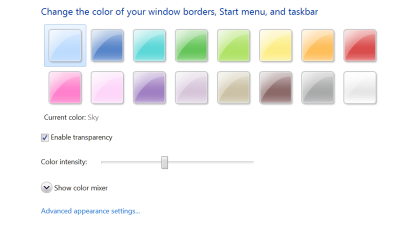
Of course, this isn't right! When I go to "window color" in my real OS, I get this window:

Win7 Color and Appearance.PNG

ODD indeed!
 

My Computer

OS
Windows 7 Home Ultimate 64-Bit, Ubuntu 10.04 Lucid Lynx, Windows XP
CPU
Pentium i7 @fast
Memory
6GB DDR3 @fast
Graphics Card(s)
ATI Radeon HD 4600 Series (512mb) / ATI TV Wonder 650PCIe
Sound Card
Integrated
Monitor(s) Displays
32" VIZIO HDTV
Screen Resolution
1080p @super sharp
Hard Drives
Internal 500GB @7200rpm and not big enough cache
External 500GB @7200rpm and not big enough cache
Cooling
My apartment's AC / Chicago Winters
Keyboard
LG Bluetooth
Mouse
LG Bluetooth
Internet Speed
~21.50Mb/S Down, ~3.5Mb/S Up
Definatly Basic on you VM, and Aero on your PC,
 

My Computer

Computer Manufacturer/Model Number
Custom Build
OS
W7 RTM Ultimate x64
CPU
Intel Q8400 @ 2.66GHZ
Motherboard
Gigabyte GA-EG45M-UD2H
Memory
4GB DDR2-800
Graphics Card(s)
Gainward GTS 450 GLH 1GB Edition
Sound Card
Integrated 8 Channel
Monitor(s) Displays
AOC 23.6 Inch Widescreen LCD
Screen Resolution
1920x1080
Hard Drives
Seagate 500GB Internal
Western Digital 1TB Internal

Hitachi 1TB External
PSU
Apevia Java Power 500W
Case
Cooler Master HAF 922 Black
Cooling
Stock Intel CPU Fan
Keyboard
HP SK-2960 Multimedia Keyboard
Mouse
Logitech M350 Wireless Gaming Mouse
Internet Speed
1.5MB
When you say "Basic" you just mean a basic appearance theme, right? Could this be caused by my not dedicating enough memory to the VM for graphics? I'll try allocating some more.

A new question arises, now: am I at risk of having this problem when I do a clean install using the same ISO on my new laptop or do we think this is being caused by either lack of VM support or lack of sufficient video memory for the VM?

Thanks
 

My Computer

OS
Windows 7 Home Ultimate 64-Bit, Ubuntu 10.04 Lucid Lynx, Windows XP
CPU
Pentium i7 @fast
Memory
6GB DDR3 @fast
Graphics Card(s)
ATI Radeon HD 4600 Series (512mb) / ATI TV Wonder 650PCIe
Sound Card
Integrated
Monitor(s) Displays
32" VIZIO HDTV
Screen Resolution
1080p @super sharp
Hard Drives
Internal 500GB @7200rpm and not big enough cache
External 500GB @7200rpm and not big enough cache
Cooling
My apartment's AC / Chicago Winters
Keyboard
LG Bluetooth
Mouse
LG Bluetooth
Internet Speed
~21.50Mb/S Down, ~3.5Mb/S Up
When you say "Basic" you just mean a basic appearance theme, right? Could this be caused by my not dedicating enough memory to the VM for graphics? I'll try allocating some more.

A new question arises, now: am I at risk of having this problem when I do a clean install using the same ISO on my new laptop or do we think this is being caused by either lack of VM support or lack of sufficient video memory for the VM?

Thanks

Some VMs don't support Aero...
That's it no mystic ;)
 

My Computer

OS
Windows 7 Ultimate x86 SP1
Ok. Just to settle this. I did a little research and it looks like it's confirmed that Sun VirtualBox does not support Aero because it does not support DirectX.

Solved.

Thanks everyone above.
 

My Computer

OS
Windows 7 Home Ultimate 64-Bit, Ubuntu 10.04 Lucid Lynx, Windows XP
CPU
Pentium i7 @fast
Memory
6GB DDR3 @fast
Graphics Card(s)
ATI Radeon HD 4600 Series (512mb) / ATI TV Wonder 650PCIe
Sound Card
Integrated
Monitor(s) Displays
32" VIZIO HDTV
Screen Resolution
1080p @super sharp
Hard Drives
Internal 500GB @7200rpm and not big enough cache
External 500GB @7200rpm and not big enough cache
Cooling
My apartment's AC / Chicago Winters
Keyboard
LG Bluetooth
Mouse
LG Bluetooth
Internet Speed
~21.50Mb/S Down, ~3.5Mb/S Up
Back
Top