Hey guys.
I'm currently running a Windows7 HP 64bit. I updated from Vista64bit. My computer was only about a week old when I updated, so I just did the "upgrade" instead of doing a clean install.
Now, I made and ISO of the installer (I did the online student upgrade download) using vLite and did a clean install of Win7 in Virtual Box (just wanted to check to make sure the ISO I made actually worked [I plan on using it to do a clean install on a new Dell laptop]).
I've noticed an odd difference in appearance between Windows7 running in my Virtual Box and Windows 7 running "native". Check out this screen shot:
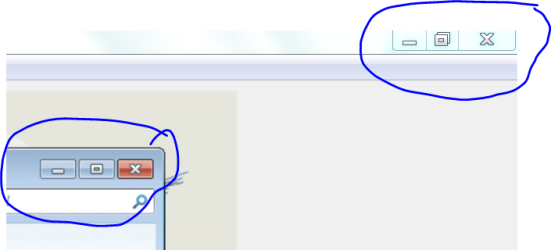
The active window (bottom left) is the window running in Virtual box (from a clean install). The window in the background (upper right) is the window of my real OS.
Notice that the min, restore and X buttons are separated (with some space between) in the virtual box window while the buttons in my real OS do not have any space between? What's that all about?
Key points:
Virtual box install was "clean" install (from an ISO made from an "upgrade" installer)
Real OS install was "upgrade" from Vista
Visual appearance is the only thing that seems different between them.
Thanks for any comments or feedback you might have!
I'm currently running a Windows7 HP 64bit. I updated from Vista64bit. My computer was only about a week old when I updated, so I just did the "upgrade" instead of doing a clean install.
Now, I made and ISO of the installer (I did the online student upgrade download) using vLite and did a clean install of Win7 in Virtual Box (just wanted to check to make sure the ISO I made actually worked [I plan on using it to do a clean install on a new Dell laptop]).
I've noticed an odd difference in appearance between Windows7 running in my Virtual Box and Windows 7 running "native". Check out this screen shot:
The active window (bottom left) is the window running in Virtual box (from a clean install). The window in the background (upper right) is the window of my real OS.
Notice that the min, restore and X buttons are separated (with some space between) in the virtual box window while the buttons in my real OS do not have any space between? What's that all about?
Key points:
Virtual box install was "clean" install (from an ISO made from an "upgrade" installer)
Real OS install was "upgrade" from Vista
Visual appearance is the only thing that seems different between them.
Thanks for any comments or feedback you might have!
My Computer
- OS
- Windows 7 Home Ultimate 64-Bit, Ubuntu 10.04 Lucid Lynx, Windows XP
- CPU
- Pentium i7 @fast
- Memory
- 6GB DDR3 @fast
- Graphics Card(s)
- ATI Radeon HD 4600 Series (512mb) / ATI TV Wonder 650PCIe
- Sound Card
- Integrated
- Monitor(s) Displays
- 32" VIZIO HDTV
- Screen Resolution
- 1080p @super sharp
- Hard Drives
- Internal 500GB @7200rpm and not big enough cache
External 500GB @7200rpm and not big enough cache
- Cooling
- My apartment's AC / Chicago Winters
- Keyboard
- LG Bluetooth
- Mouse
- LG Bluetooth
- Internet Speed
- ~21.50Mb/S Down, ~3.5Mb/S Up