Solved Window Border Line

sa3ergmx

New member
Local time
1:28 AM
Messages
4
Color of Window Border Lines

Hi,
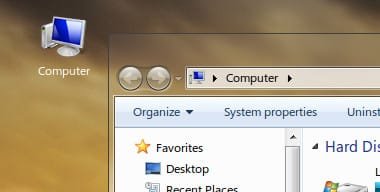
Is this possible without using any adddintional programs or applying any patches:
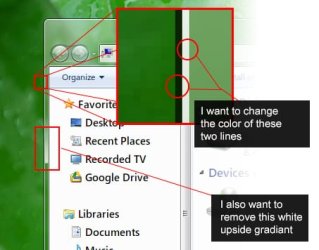
theme_question.jpg

Any lead is appreciated.
Thanks in advance.
 
Last edited:

My Computer

OS
Windows 7 Enterprise x64 SP1

My Computer

Computer type
PC/Desktop
Computer Manufacturer/Model Number
Self assembled
OS
Windows 10 Home 64Bit
CPU
Intel Core i5 10400 @ 2.90GHz
Motherboard
Intel Corporation DG41WV (PROCESSOR)
Memory
8.00GB Single-Channel Unknown @ 1329MHz (16-20-20-38)
Sound Card
Realtek High Definition Audio
Monitor(s) Displays
DELL E170S
Screen Resolution
1280x1024 pixels
Hard Drives
931GB TOSHIBA DT01ACA100 (SATA)
238GB TEAM TM8PS7256G (SATA SSD)
Case
Nothing Fancy
Cooling
Fans
Keyboard
A4 Tech Co LTD
Mouse
A4 Tech Co Ltd/Logitech
Internet Speed
25 Mbps
Thank you,
Oh sorry, I did search for image attach feature but I missed it. Now it is fixed.
 

My Computer

OS
Windows 7 Enterprise x64 SP1
Welcome to the Seven Forums

The simplest answer is no if you do not want to do any patching or use a program.

To do what you want to do some images need to be edited in the aero.msstyles, and you do not want to edit the default one so you want to use copies to do it which makes it a custom theme. You will need to do 1 of these 2 ways of Enabling custom themes for it to work.
http://www.sevenforums.com/tutorials/34579-enabling-custom-themes-windows-7-a.html
Or
http://www.sevenforums.com/tutorials/28377-theme-how-apply-custom-themes.html?filter

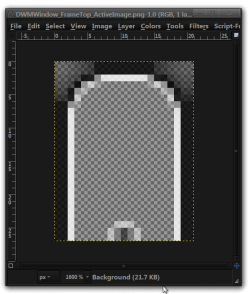
Here is an example will of the top Windows Explorer frame zoomed in 16:1
DWMWindow_FrameTop_ActiveImage.png-1.0 (RGB, 1 layer) 21x27 – GIMP.png

If all you want done is the Windows Explorer frame then I could do that for you, but if you want the Start menu and the taskbar also you will have to do it your self and I could probably explain how to do it with one or two different programs besides a image editor.

Jerry
 

My Computer

Computer type
Laptop
Computer Manufacturer/Model Number
Sager NP9170
OS
Win 7 Pro x64 / Win 10 Pro
CPU
Intel(R) Core(TM) i7-3630QM CPU @ 2.40GHz
Motherboard
CLEVO P170EM
Memory
12 GB
Graphics Card(s)
(1) Intel(R) HD Graphics 4000 (2) NVIDIA GeForce GTX 675M
Sound Card
(1) Realtek High Definition Audio (2) Intel(R) Display Aud
Monitor(s) Displays
17.3
Screen Resolution
1920x1080
Hard Drives
(1) Samsung 860 EVO 500GB(OS) (1) Samsung 860 EVO 500GB(Data)
Keyboard
Backlite
Antivirus
MSE, Malwarebytes Pro
Browser
Firefox
Other Info
DESKTOP: Custom-built.
OS: Win 10 Pro x64.
CASE: Rosewill R5.
CPU: Intel I5 4670K CPU @ 3.40GHz.
CPU COOLER: Cool Master Hyper 212 EVO.
MOTHERBOARD: Asus Z87-A.
MEMORY: Kingston HyperX 2x4 GB.
GPU: Nvidia Geforce 650 TI.
PSU: Corsair TX750.
DRIVES: (1) Samsung 840 120 GB SSD (2) Western Digital blue 500 GB 7200 RPM.
Thank you Bongo very much for your comprehensive answer. I really appreciate it.

And that's very kind offer from you to do it for me but you know, I would really like better if I could learn to do it on my own.

I would like to have something like this:
theme_wish.jpg

btw. UX patch is already applied on my system cause I used some custom themes earlier and I also downloaded ResHacker, opened the .msstyle and that's it, I'm stuck now. No idea which one of those thousound small images to edit and how to do it right.
 

My Computer

OS
Windows 7 Enterprise x64 SP1
First thing you should do is to start a new custom theme look at Post #38 of this thread will show you how to start a new custom theme http://www.sevenforums.com/customization/135985-start-menu-color-change-4.html#post1358071

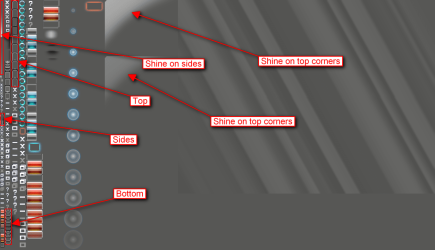
For the frame that is in Steam image #971 it is a pretty transparent image so I overlaid it on a gray background to show you what it looks like and I have marked some of the areas that you want to change. Some of the images I have highlighted include both active and inactive windows it also includes Fading, Tool , Aero Peek, Shadowless frame windows (look at my second screenshot will show you they are included in the frames these all have top, bottom, left side, right side)
971.png


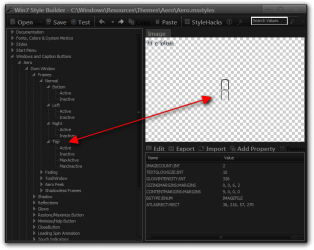
This image is very hard to edit using a resource hacker don't get me wrong it can be done but it is difficult. I use Ave's Windows7 Style Builder it breaks down that Steam image #971 into individual image (It's the only software that does that) and then you can use the edit button to start the image editor. This software is not free and does not have a trial it is only about $22.50 US.
Win7 Style Builder - CWindowsResourcesThemesAeroAero.msstyles.png

If you need more assistance let me know.
Jerry
 

My Computer

Computer type
Laptop
Computer Manufacturer/Model Number
Sager NP9170
OS
Win 7 Pro x64 / Win 10 Pro
CPU
Intel(R) Core(TM) i7-3630QM CPU @ 2.40GHz
Motherboard
CLEVO P170EM
Memory
12 GB
Graphics Card(s)
(1) Intel(R) HD Graphics 4000 (2) NVIDIA GeForce GTX 675M
Sound Card
(1) Realtek High Definition Audio (2) Intel(R) Display Aud
Monitor(s) Displays
17.3
Screen Resolution
1920x1080
Hard Drives
(1) Samsung 860 EVO 500GB(OS) (1) Samsung 860 EVO 500GB(Data)
Keyboard
Backlite
Antivirus
MSE, Malwarebytes Pro
Browser
Firefox
Other Info
DESKTOP: Custom-built.
OS: Win 10 Pro x64.
CASE: Rosewill R5.
CPU: Intel I5 4670K CPU @ 3.40GHz.
CPU COOLER: Cool Master Hyper 212 EVO.
MOTHERBOARD: Asus Z87-A.
MEMORY: Kingston HyperX 2x4 GB.
GPU: Nvidia Geforce 650 TI.
PSU: Corsair TX750.
DRIVES: (1) Samsung 840 120 GB SSD (2) Western Digital blue 500 GB 7200 RPM.
Just wow!!

Well, as it is obvious from my country flag there's no way I can buy that neat software due to heavy global money transfer sanctions. So I will try my best to do it with res hacker. I'll try my best to do it.

Thank you Jerry.
I hope someday I can return your favor.
 

My Computer

OS
Windows 7 Enterprise x64 SP1
You're welcome
 

My Computer

Computer type
Laptop
Computer Manufacturer/Model Number
Sager NP9170
OS
Win 7 Pro x64 / Win 10 Pro
CPU
Intel(R) Core(TM) i7-3630QM CPU @ 2.40GHz
Motherboard
CLEVO P170EM
Memory
12 GB
Graphics Card(s)
(1) Intel(R) HD Graphics 4000 (2) NVIDIA GeForce GTX 675M
Sound Card
(1) Realtek High Definition Audio (2) Intel(R) Display Aud
Monitor(s) Displays
17.3
Screen Resolution
1920x1080
Hard Drives
(1) Samsung 860 EVO 500GB(OS) (1) Samsung 860 EVO 500GB(Data)
Keyboard
Backlite
Antivirus
MSE, Malwarebytes Pro
Browser
Firefox
Other Info
DESKTOP: Custom-built.
OS: Win 10 Pro x64.
CASE: Rosewill R5.
CPU: Intel I5 4670K CPU @ 3.40GHz.
CPU COOLER: Cool Master Hyper 212 EVO.
MOTHERBOARD: Asus Z87-A.
MEMORY: Kingston HyperX 2x4 GB.
GPU: Nvidia Geforce 650 TI.
PSU: Corsair TX750.
DRIVES: (1) Samsung 840 120 GB SSD (2) Western Digital blue 500 GB 7200 RPM.
Back
Top