Window Color and Appearance - Enable or Disable Change

How to Allow or Prevent Changing Window Color and Appearance in Vista and Windows 7


   Information
This will show you how to allow or prevent all users from changing the current Window Color and Appearance personalization settings in Vista and Windows 7. Changing the Window Color and Appearance settings is allowed for users by default in Windows.


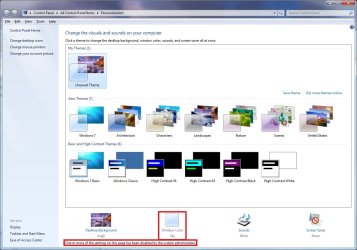
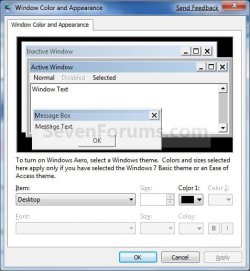
EXAMPLE: Window Color and Appearance Enabled and Disabled
NOTE: When disabled (right screenshot), Window Color is grayed out and will not open when clicked on.
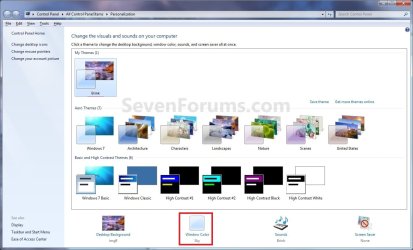
Enabled.jpg

Disabled.jpg
EXAMPLE: Window Color and Appearance settings
NOTE: When enabled, these are the settings available that you can change when the ungrayed out (blue) Window Color is clicked on above.
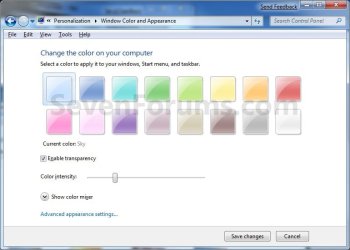
Color.jpg

Appearance.jpg


OPTION ONE

Using a REG File Download


1. To Allow Changing Window Color and Appearance
A) Click on the Download button below to download the file below.
Enable_Window_Color_and_Appearance.zip

Download


B) Go to step 3.
2. To Prevent Changing Window Color and Appearance
A) Click on the Download button below to download the file below.
Disable_Window_Color_and_Appearance.zip

Download


3. Click on Save, and save the .zip file to the desktop.

4. Open the downloaded .zip file and extract the .reg file to the desktop.

5. Right click on the extracted .reg file and click on Merge.

6. Click on Run, Yes, Yes, and OK when prompted.

7. Restart the computer to fully apply.

8. When done, you can delete the downloaded .reg and .zip files if you like.


OPTION TWO

Through the Local Group Policy Editor


1. Open the all users, specific users or groups, or all users except administrators Local Group Policy Editor for how you want this policy applied.

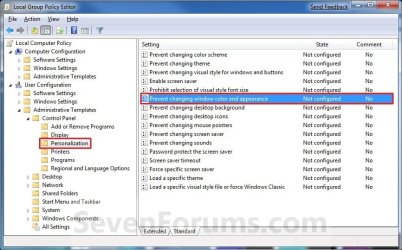
2. In the left pane, click on to expand User Configuration, Administrative Templates, Control Panel, and Personalization. (See screenshot below)
Group_Policy.jpg
3. In the right pane, right click on Prevent changing window color and appearance and click on Edit. (See screenshot above)

4. To Allow Changing Window Color and Appearance
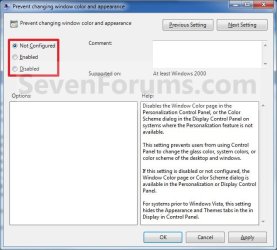
A) Select (dot) either Not Configured or Disabled. (See screenshot below step 6)

B) Go to step 6.
5. To Prevent Changing Window Color and Appearance
A) Select (dot) Enabled. (See screenshot below step 6)
6. Click on OK. (See screenshot below)
Properties.jpg
7. Close the Local Group Policy Editor window.

8. Restart the computer to fully apply.
That's it,
Shawn


Attachments

Last edited:
windows 7 background turn red

hi,
I am having a problem with windows 7 background color.
When I changed from slide show to the default windows 7 everything turn red.
I tried to change to different colors, but it windows doesn't response to my changes.
What did i do wrong and how can fix background problem
I have windows 7 professional N.
Please help.
:cry:
 

My Computer My Computer

At a glance

windows 7 32 bit
Computer Manufacturer/Model Number
lenovo laptop t510
OS
windows 7 32 bit

My Computer My Computer

At a glance

64-bit Windows 11 Pro for WorkstationsIntel i7-8700K OC'd to 5 GHz64 GB (4x16GB) G.SKILL TridentZ RGB DDR4 3600...ASUS ROG-STRIX-GTX1080TI-O11G-GAMING
Computer type
PC/Desktop
Computer Manufacturer/Model Number
Self built custom
OS
64-bit Windows 11 Pro for Workstations
CPU
Intel i7-8700K OC'd to 5 GHz
Motherboard
ASUS ROG Maximus XI Formula Z390
Memory
64 GB (4x16GB) G.SKILL TridentZ RGB DDR4 3600 MHz
Graphics Card(s)
ASUS ROG-STRIX-GTX1080TI-O11G-GAMING
Sound Card
Integrated
Monitor(s) Displays
2 x Samsung Odyssey G7 27"
Screen Resolution
2560x1440
Hard Drives
1TB Samsung 990 PRO M.2,
4TB Samsung 990 PRO PRO M.2,
TerraMaster F8 SSD Plus NAS
PSU
Seasonic Prime Titanium 850W
Case
Thermaltake Core P3
Cooling
Corsair Hydro H115i
Keyboard
Logitech wireless K800
Mouse
Logitech MX Master 4
Internet Speed
2 Gb/s Download and 100 Mb/s Upload
Antivirus
Malwarebyte Anti-Malware Premium
Browser
Google Chrome
Other Info
Logitech Z625 speaker system,
Logitech BRIO 4K Pro webcam,
HP Color LaserJet Pro MFP M477fdn,
APC SMART-UPS RT 1000 XL - SURT1000XLI,
Galaxy S23 Plus phone
i download and install Enable_Window_Color_and_Appearance.reg but i changed my entire windows apperance..how can i revert back now ?? i dont have system restore option so please give me a way to go back as it was before.
 

My Computer My Computer

At a glance

windows 7 enterprise 64 bit
OS
windows 7 enterprise 64 bit
Hello Parthysing, and welcome to Seven Forums.

Could you post a screenshot showing what you mean with more details? :)
 

My Computer My Computer

At a glance

64-bit Windows 11 Pro for WorkstationsIntel i7-8700K OC'd to 5 GHz64 GB (4x16GB) G.SKILL TridentZ RGB DDR4 3600...ASUS ROG-STRIX-GTX1080TI-O11G-GAMING
Computer type
PC/Desktop
Computer Manufacturer/Model Number
Self built custom
OS
64-bit Windows 11 Pro for Workstations
CPU
Intel i7-8700K OC'd to 5 GHz
Motherboard
ASUS ROG Maximus XI Formula Z390
Memory
64 GB (4x16GB) G.SKILL TridentZ RGB DDR4 3600 MHz
Graphics Card(s)
ASUS ROG-STRIX-GTX1080TI-O11G-GAMING
Sound Card
Integrated
Monitor(s) Displays
2 x Samsung Odyssey G7 27"
Screen Resolution
2560x1440
Hard Drives
1TB Samsung 990 PRO M.2,
4TB Samsung 990 PRO PRO M.2,
TerraMaster F8 SSD Plus NAS
PSU
Seasonic Prime Titanium 850W
Case
Thermaltake Core P3
Cooling
Corsair Hydro H115i
Keyboard
Logitech wireless K800
Mouse
Logitech MX Master 4
Internet Speed
2 Gb/s Download and 100 Mb/s Upload
Antivirus
Malwarebyte Anti-Malware Premium
Browser
Google Chrome
Other Info
Logitech Z625 speaker system,
Logitech BRIO 4K Pro webcam,
HP Color LaserJet Pro MFP M477fdn,
APC SMART-UPS RT 1000 XL - SURT1000XLI,
Galaxy S23 Plus phone
I just registered to say thank you for this post. I did seek for days to find out how to get windows background back.
People did think that I mourning because someone because my whole desktop was black. When i did turn it to pink they guessed i am queer. Finally today my Alpha Romeo 8C appear again on my desktop.
Thank you dude.
 

My Computer My Computer

At a glance

Windows 7 ProfesionalIntel Core to duo3GBintel
Computer type
PC/Desktop
Computer Manufacturer/Model Number
lenovo
OS
Windows 7 Profesional
CPU
Intel Core to duo
Motherboard
Intel
Memory
3GB
Graphics Card(s)
intel
Hard Drives
1TB
Antivirus
Sophos
Browser
Chrome
I'm glad it could help Boboo, and welcome to Seven Forums. :)
 

My Computer My Computer

At a glance

64-bit Windows 11 Pro for WorkstationsIntel i7-8700K OC'd to 5 GHz64 GB (4x16GB) G.SKILL TridentZ RGB DDR4 3600...ASUS ROG-STRIX-GTX1080TI-O11G-GAMING
Computer type
PC/Desktop
Computer Manufacturer/Model Number
Self built custom
OS
64-bit Windows 11 Pro for Workstations
CPU
Intel i7-8700K OC'd to 5 GHz
Motherboard
ASUS ROG Maximus XI Formula Z390
Memory
64 GB (4x16GB) G.SKILL TridentZ RGB DDR4 3600 MHz
Graphics Card(s)
ASUS ROG-STRIX-GTX1080TI-O11G-GAMING
Sound Card
Integrated
Monitor(s) Displays
2 x Samsung Odyssey G7 27"
Screen Resolution
2560x1440
Hard Drives
1TB Samsung 990 PRO M.2,
4TB Samsung 990 PRO PRO M.2,
TerraMaster F8 SSD Plus NAS
PSU
Seasonic Prime Titanium 850W
Case
Thermaltake Core P3
Cooling
Corsair Hydro H115i
Keyboard
Logitech wireless K800
Mouse
Logitech MX Master 4
Internet Speed
2 Gb/s Download and 100 Mb/s Upload
Antivirus
Malwarebyte Anti-Malware Premium
Browser
Google Chrome
Other Info
Logitech Z625 speaker system,
Logitech BRIO 4K Pro webcam,
HP Color LaserJet Pro MFP M477fdn,
APC SMART-UPS RT 1000 XL - SURT1000XLI,
Galaxy S23 Plus phone
Back
Top