Solved Window flashing

zeromido

New member
Local time
9:33 AM
Messages
10
Videos are better than words:
Window flahing

Note: I can open menus
 
Last edited:

My Computer

Computer type
PC/Desktop
Computer Manufacturer/Model Number
Custom build
OS
Windows 7 Ultimate x86
CPU
Pentium(R) Dual-Core CPU E5700 @ 3.00GHz
Motherboard
Gigabyte G41MT-S2P
Memory
2.00 GB
Graphics Card(s)
Intel(R) G41 Express Chipset
Hard Drives
WDC WD10EZEX-00BN5A0
Western Digital WD Blue Hard Drive 1TB WD10EZEX
7200 RPM 64MB Cache SATA 6.0Gb/s 3.5"
Antivirus
ESET Smart Security 9
Browser
Google Chrome
On the video, only some part of the calculator is flashing.
-Is it happening on other screens?
-On device manager do you have any yellow alerts?

Open a CMD window and type
sfc /scannow
 

My Computers

System One System Two

  • Computer type
    PC/Desktop
    Computer Manufacturer/Model Number
    custom build
    OS
    Windows 7 HP 64
    CPU
    i5 6600K - 800MHz to 4200MHz
    Motherboard
    GA-Z170-HD3P
    Memory
    4+4G GSkill DDR4 3000
    Graphics Card(s)
    IG - Intel 530
    Monitor(s) Displays
    Samsung 226BW
    Screen Resolution
    1680x1050
    Hard Drives
    (1) -1 SM951 – 128GB M.2 AHCI PCIe SSD drive for Windows 7 and Lubuntu
    (2) -1 WD SATA 3 - 1T for Data
    (3) -1 WD SATA 3 - 1T for backup
    PSU
    Thermaltake 450W TR2 gold
    Keyboard
    Old and good Chicony mechanical keyboard
    Mouse
    Logitech mX performance - 9 buttons (had to disable some)
    Internet Speed
    500Mb/s
    Browser
    Firefox 64
    Other Info
    TinyWall firewall
  • Computer type
    Laptop
    System Manufacturer/Model Number
    Asus Q550LF
    OS
    Windows 7 Pro
    CPU
    i7-4500U 800MHz to 3.0GHz
    Motherboard
    Asus Q550LF
    Memory
    (4+4)G DDR3 1600
    Graphics Card(s)
    IG intel 4400 + NVIDIA GeForce GT 745M
    Sound Card
    Realtek
    Monitor(s) Displays
    LG Display LP156WF4-SPH1
    Screen Resolution
    1920 x 1080
    Hard Drives
    BX500 120G SSD for Windows and programs +
    1T HDD for data
    Internet Speed
    500 Mb/s
    Browser
    Firefox
    Other Info
    TinyWall firewall
-I used calculator as a verified application example but that happens with almost all applications.
-I forgot to mention that the problem disappears after logging off or restarting.
-No alerts on device manager. All drivers are installed (even the monitor's).
-SFC found no integrity violations.
 

My Computer

Computer type
PC/Desktop
Computer Manufacturer/Model Number
Custom build
OS
Windows 7 Ultimate x86
CPU
Pentium(R) Dual-Core CPU E5700 @ 3.00GHz
Motherboard
Gigabyte G41MT-S2P
Memory
2.00 GB
Graphics Card(s)
Intel(R) G41 Express Chipset
Hard Drives
WDC WD10EZEX-00BN5A0
Western Digital WD Blue Hard Drive 1TB WD10EZEX
7200 RPM 64MB Cache SATA 6.0Gb/s 3.5"
Antivirus
ESET Smart Security 9
Browser
Google Chrome
If the problem disappears after logging off or restarting, does it only happens on fist boot of the day?
 

My Computers

System One System Two

  • Computer type
    PC/Desktop
    Computer Manufacturer/Model Number
    custom build
    OS
    Windows 7 HP 64
    CPU
    i5 6600K - 800MHz to 4200MHz
    Motherboard
    GA-Z170-HD3P
    Memory
    4+4G GSkill DDR4 3000
    Graphics Card(s)
    IG - Intel 530
    Monitor(s) Displays
    Samsung 226BW
    Screen Resolution
    1680x1050
    Hard Drives
    (1) -1 SM951 – 128GB M.2 AHCI PCIe SSD drive for Windows 7 and Lubuntu
    (2) -1 WD SATA 3 - 1T for Data
    (3) -1 WD SATA 3 - 1T for backup
    PSU
    Thermaltake 450W TR2 gold
    Keyboard
    Old and good Chicony mechanical keyboard
    Mouse
    Logitech mX performance - 9 buttons (had to disable some)
    Internet Speed
    500Mb/s
    Browser
    Firefox 64
    Other Info
    TinyWall firewall
  • Computer type
    Laptop
    System Manufacturer/Model Number
    Asus Q550LF
    OS
    Windows 7 Pro
    CPU
    i7-4500U 800MHz to 3.0GHz
    Motherboard
    Asus Q550LF
    Memory
    (4+4)G DDR3 1600
    Graphics Card(s)
    IG intel 4400 + NVIDIA GeForce GT 745M
    Sound Card
    Realtek
    Monitor(s) Displays
    LG Display LP156WF4-SPH1
    Screen Resolution
    1920 x 1080
    Hard Drives
    BX500 120G SSD for Windows and programs +
    1T HDD for data
    Internet Speed
    500 Mb/s
    Browser
    Firefox
    Other Info
    TinyWall firewall
It usually occurs after startup with a couple of hours.
 

My Computer

Computer type
PC/Desktop
Computer Manufacturer/Model Number
Custom build
OS
Windows 7 Ultimate x86
CPU
Pentium(R) Dual-Core CPU E5700 @ 3.00GHz
Motherboard
Gigabyte G41MT-S2P
Memory
2.00 GB
Graphics Card(s)
Intel(R) G41 Express Chipset
Hard Drives
WDC WD10EZEX-00BN5A0
Western Digital WD Blue Hard Drive 1TB WD10EZEX
7200 RPM 64MB Cache SATA 6.0Gb/s 3.5"
Antivirus
ESET Smart Security 9
Browser
Google Chrome

My Computers

System One System Two

  • Computer type
    PC/Desktop
    Computer Manufacturer/Model Number
    custom build
    OS
    Windows 7 HP 64
    CPU
    i5 6600K - 800MHz to 4200MHz
    Motherboard
    GA-Z170-HD3P
    Memory
    4+4G GSkill DDR4 3000
    Graphics Card(s)
    IG - Intel 530
    Monitor(s) Displays
    Samsung 226BW
    Screen Resolution
    1680x1050
    Hard Drives
    (1) -1 SM951 – 128GB M.2 AHCI PCIe SSD drive for Windows 7 and Lubuntu
    (2) -1 WD SATA 3 - 1T for Data
    (3) -1 WD SATA 3 - 1T for backup
    PSU
    Thermaltake 450W TR2 gold
    Keyboard
    Old and good Chicony mechanical keyboard
    Mouse
    Logitech mX performance - 9 buttons (had to disable some)
    Internet Speed
    500Mb/s
    Browser
    Firefox 64
    Other Info
    TinyWall firewall
  • Computer type
    Laptop
    System Manufacturer/Model Number
    Asus Q550LF
    OS
    Windows 7 Pro
    CPU
    i7-4500U 800MHz to 3.0GHz
    Motherboard
    Asus Q550LF
    Memory
    (4+4)G DDR3 1600
    Graphics Card(s)
    IG intel 4400 + NVIDIA GeForce GT 745M
    Sound Card
    Realtek
    Monitor(s) Displays
    LG Display LP156WF4-SPH1
    Screen Resolution
    1920 x 1080
    Hard Drives
    BX500 120G SSD for Windows and programs +
    1T HDD for data
    Internet Speed
    500 Mb/s
    Browser
    Firefox
    Other Info
    TinyWall firewall
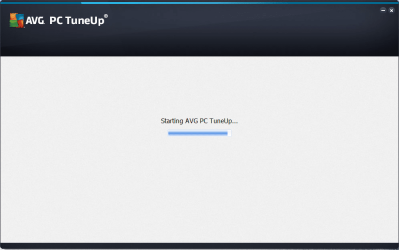
I don't know, it just randomly occurs with no introductions (but it usually happens if the PC is on for 8+ hours ) and the only way I know to fix it is to restart or log off. Also, here's a thing I noticed: it only happens with applications using the default Windows theme (like calculator and most applications) but applications with a custom theme (like the pic in the attachments) is fine.
 

Attachments

  • AVG_TuneUp.png
    AVG_TuneUp.png
    155.7 KB · Views: 0

My Computer

Computer type
PC/Desktop
Computer Manufacturer/Model Number
Custom build
OS
Windows 7 Ultimate x86
CPU
Pentium(R) Dual-Core CPU E5700 @ 3.00GHz
Motherboard
Gigabyte G41MT-S2P
Memory
2.00 GB
Graphics Card(s)
Intel(R) G41 Express Chipset
Hard Drives
WDC WD10EZEX-00BN5A0
Western Digital WD Blue Hard Drive 1TB WD10EZEX
7200 RPM 64MB Cache SATA 6.0Gb/s 3.5"
Antivirus
ESET Smart Security 9
Browser
Google Chrome
If you still have questions, just ask :)
 

My Computer

Computer type
PC/Desktop
Computer Manufacturer/Model Number
Custom build
OS
Windows 7 Ultimate x86
CPU
Pentium(R) Dual-Core CPU E5700 @ 3.00GHz
Motherboard
Gigabyte G41MT-S2P
Memory
2.00 GB
Graphics Card(s)
Intel(R) G41 Express Chipset
Hard Drives
WDC WD10EZEX-00BN5A0
Western Digital WD Blue Hard Drive 1TB WD10EZEX
7200 RPM 64MB Cache SATA 6.0Gb/s 3.5"
Antivirus
ESET Smart Security 9
Browser
Google Chrome
It seems that perhaps you computer is running out of resources & the blinking seems to be occurring at the same rate that it checks the hard drive

Leave the computer running until the problem appears then open Task Manager & click on each of the tabs to see what is running & then on the last tab click on Resources Monitor & see what memory there is allocated & available. Then please supply a screen shot of Resources Monitor so we can see how it's going.

Your System Specs show you have 2 gb of RAM installed, so it's possible that this could be the cause if you open & close a lot of programs frequently or have a lot of programs open at one time.

Your System Specs also show ESET Smart Security 9 installed & it seems that you also have AVG installed as well. Having more than one AV program also causes problems as they conflict with one another.
 

My Computer

Computer type
PC/Desktop
Computer Manufacturer/Model Number
Self built using existing case
OS
Windows 7 Home Premium 64 bit sp1
CPU
Intel i5 3570 3.4Ghz Ivy Bridge SKT 1155 quad core
Motherboard
Gigabyte Z77-HD3 SKT 1155 2xSata 3, 4x USB 3.0
Memory
G-Skill Rip Jaws 16Gb (8x2) DDR3 -1600 PC3 12800 CL 10 red
Graphics Card(s)
Gigabyte NVIDIA GT610 1Gb DDR3 810/1200 PCI-E 2.0 Silent
Sound Card
NVIDIA High Definition & Realtech High Definition Audio
Monitor(s) Displays
2 x Philips 226V4L 16:9 aspect ratio
Screen Resolution
1920 x 1080 HD
Hard Drives
Samsung 840 Pro 256gb SSD, SATA 3.
Hitachi Touro Portable 1tb, USB 3.0 HDD used for image b/ups.
PSU
Corsair VS450
Case
Codeng
Cooling
PSU fan & CPU fan
Keyboard
Logitech
Mouse
Logitech Wireless trackball M570
Internet Speed
Wireless 3G. 3mg down & 550kb up.
Antivirus
Bitdefender Internet Security 2020
Browser
Opera (Current Version) & Firefox
Other Info
MS Office 2013 Pro. Davis weather station software. MGE Nova 600 avr UPS.
I'm terribly sorry for the late reply but I was away from my computer.

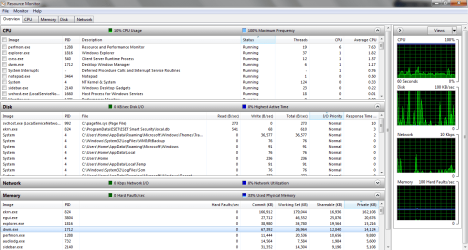
And you might be right because I noticed that the HDD LED blinks at the same time the screen blinks. But it doesn't seem that the computer is running out of resources.

And about the screenshot, it's not AVG Antivirus it's AVG PC TuneUp and it has no built in security systems. I just included it to say that the problem doesn't happen on windows that doesn't use Windows UI elements.
 

Attachments

  • Resource_Monitor.png
    Resource_Monitor.png
    46.6 KB · Views: 3

My Computer

Computer type
PC/Desktop
Computer Manufacturer/Model Number
Custom build
OS
Windows 7 Ultimate x86
CPU
Pentium(R) Dual-Core CPU E5700 @ 3.00GHz
Motherboard
Gigabyte G41MT-S2P
Memory
2.00 GB
Graphics Card(s)
Intel(R) G41 Express Chipset
Hard Drives
WDC WD10EZEX-00BN5A0
Western Digital WD Blue Hard Drive 1TB WD10EZEX
7200 RPM 64MB Cache SATA 6.0Gb/s 3.5"
Antivirus
ESET Smart Security 9
Browser
Google Chrome
It does look like you are running out of memory. This MS website explains what happens when memory is low & the computer starts accessing the page file & the hard drive. You can see this in your screen shot of Memory, 100 Hard Faults/sec graph.

You only have 2 Gb of memory installed which is the minimum for Windows 7 x86. If you frequently have a lot of programs open or open & close programs a lot, then you will stress the low memory factor. The maximum memory Windows 7 x86 will utilise is 4 Gb so there is no point in going for more that 4 Gb, unless you are prepared to install Windows 7 64 bit.

I see alot of hard faults per second. Should i do something to resolve - Microsoft Community

This website gives a lot of detail about memory usage & may help you.

What Are Hard Faults per Second (aka Page Fault), and How Many of Them Is Too Many?
 

My Computer

Computer type
PC/Desktop
Computer Manufacturer/Model Number
Self built using existing case
OS
Windows 7 Home Premium 64 bit sp1
CPU
Intel i5 3570 3.4Ghz Ivy Bridge SKT 1155 quad core
Motherboard
Gigabyte Z77-HD3 SKT 1155 2xSata 3, 4x USB 3.0
Memory
G-Skill Rip Jaws 16Gb (8x2) DDR3 -1600 PC3 12800 CL 10 red
Graphics Card(s)
Gigabyte NVIDIA GT610 1Gb DDR3 810/1200 PCI-E 2.0 Silent
Sound Card
NVIDIA High Definition & Realtech High Definition Audio
Monitor(s) Displays
2 x Philips 226V4L 16:9 aspect ratio
Screen Resolution
1920 x 1080 HD
Hard Drives
Samsung 840 Pro 256gb SSD, SATA 3.
Hitachi Touro Portable 1tb, USB 3.0 HDD used for image b/ups.
PSU
Corsair VS450
Case
Codeng
Cooling
PSU fan & CPU fan
Keyboard
Logitech
Mouse
Logitech Wireless trackball M570
Internet Speed
Wireless 3G. 3mg down & 550kb up.
Antivirus
Bitdefender Internet Security 2020
Browser
Opera (Current Version) & Firefox
Other Info
MS Office 2013 Pro. Davis weather station software. MGE Nova 600 avr UPS.
That's the maximum Hard Faults/sec. And there are many question marks like: why does it happen after a period of time (sometimes without any resource-eating activity)? And why does it disappear after a Log off? And why it doesn't affect custom designed widows?
 

My Computer

Computer type
PC/Desktop
Computer Manufacturer/Model Number
Custom build
OS
Windows 7 Ultimate x86
CPU
Pentium(R) Dual-Core CPU E5700 @ 3.00GHz
Motherboard
Gigabyte G41MT-S2P
Memory
2.00 GB
Graphics Card(s)
Intel(R) G41 Express Chipset
Hard Drives
WDC WD10EZEX-00BN5A0
Western Digital WD Blue Hard Drive 1TB WD10EZEX
7200 RPM 64MB Cache SATA 6.0Gb/s 3.5"
Antivirus
ESET Smart Security 9
Browser
Google Chrome
Ranger got to the point.
M$ says that Win 7 32 will run with minimum of 1G. That was before SP1.
Try to buy (2+2)G and replace the one you have. Don't mix two kind's of memory or you may get other problems.
Your MB use DDR3, doesn't it?
DDR3 is quite easy to find. You can use a higher speed memory type.
I would buy a DDR3 1600. 4GB (2 x 2GB), DDR3 1600 (PC3 12800), Desktop Memory, Memory, Components - Newegg.com
I have used GSkill on my computers
 

My Computers

System One System Two

  • Computer type
    PC/Desktop
    Computer Manufacturer/Model Number
    custom build
    OS
    Windows 7 HP 64
    CPU
    i5 6600K - 800MHz to 4200MHz
    Motherboard
    GA-Z170-HD3P
    Memory
    4+4G GSkill DDR4 3000
    Graphics Card(s)
    IG - Intel 530
    Monitor(s) Displays
    Samsung 226BW
    Screen Resolution
    1680x1050
    Hard Drives
    (1) -1 SM951 – 128GB M.2 AHCI PCIe SSD drive for Windows 7 and Lubuntu
    (2) -1 WD SATA 3 - 1T for Data
    (3) -1 WD SATA 3 - 1T for backup
    PSU
    Thermaltake 450W TR2 gold
    Keyboard
    Old and good Chicony mechanical keyboard
    Mouse
    Logitech mX performance - 9 buttons (had to disable some)
    Internet Speed
    500Mb/s
    Browser
    Firefox 64
    Other Info
    TinyWall firewall
  • Computer type
    Laptop
    System Manufacturer/Model Number
    Asus Q550LF
    OS
    Windows 7 Pro
    CPU
    i7-4500U 800MHz to 3.0GHz
    Motherboard
    Asus Q550LF
    Memory
    (4+4)G DDR3 1600
    Graphics Card(s)
    IG intel 4400 + NVIDIA GeForce GT 745M
    Sound Card
    Realtek
    Monitor(s) Displays
    LG Display LP156WF4-SPH1
    Screen Resolution
    1920 x 1080
    Hard Drives
    BX500 120G SSD for Windows and programs +
    1T HDD for data
    Internet Speed
    500 Mb/s
    Browser
    Firefox
    Other Info
    TinyWall firewall
Thank you all guys :)
 

My Computer

Computer type
PC/Desktop
Computer Manufacturer/Model Number
Custom build
OS
Windows 7 Ultimate x86
CPU
Pentium(R) Dual-Core CPU E5700 @ 3.00GHz
Motherboard
Gigabyte G41MT-S2P
Memory
2.00 GB
Graphics Card(s)
Intel(R) G41 Express Chipset
Hard Drives
WDC WD10EZEX-00BN5A0
Western Digital WD Blue Hard Drive 1TB WD10EZEX
7200 RPM 64MB Cache SATA 6.0Gb/s 3.5"
Antivirus
ESET Smart Security 9
Browser
Google Chrome
You are welcome & thanks for getting back. Have you installed new memory up to 4 Gb?.
 

My Computer

Computer type
PC/Desktop
Computer Manufacturer/Model Number
Self built using existing case
OS
Windows 7 Home Premium 64 bit sp1
CPU
Intel i5 3570 3.4Ghz Ivy Bridge SKT 1155 quad core
Motherboard
Gigabyte Z77-HD3 SKT 1155 2xSata 3, 4x USB 3.0
Memory
G-Skill Rip Jaws 16Gb (8x2) DDR3 -1600 PC3 12800 CL 10 red
Graphics Card(s)
Gigabyte NVIDIA GT610 1Gb DDR3 810/1200 PCI-E 2.0 Silent
Sound Card
NVIDIA High Definition & Realtech High Definition Audio
Monitor(s) Displays
2 x Philips 226V4L 16:9 aspect ratio
Screen Resolution
1920 x 1080 HD
Hard Drives
Samsung 840 Pro 256gb SSD, SATA 3.
Hitachi Touro Portable 1tb, USB 3.0 HDD used for image b/ups.
PSU
Corsair VS450
Case
Codeng
Cooling
PSU fan & CPU fan
Keyboard
Logitech
Mouse
Logitech Wireless trackball M570
Internet Speed
Wireless 3G. 3mg down & 550kb up.
Antivirus
Bitdefender Internet Security 2020
Browser
Opera (Current Version) & Firefox
Other Info
MS Office 2013 Pro. Davis weather station software. MGE Nova 600 avr UPS.
Not yet... Soon maybe :)
 

My Computer

Computer type
PC/Desktop
Computer Manufacturer/Model Number
Custom build
OS
Windows 7 Ultimate x86
CPU
Pentium(R) Dual-Core CPU E5700 @ 3.00GHz
Motherboard
Gigabyte G41MT-S2P
Memory
2.00 GB
Graphics Card(s)
Intel(R) G41 Express Chipset
Hard Drives
WDC WD10EZEX-00BN5A0
Western Digital WD Blue Hard Drive 1TB WD10EZEX
7200 RPM 64MB Cache SATA 6.0Gb/s 3.5"
Antivirus
ESET Smart Security 9
Browser
Google Chrome
Back
Top