Solved window live mail

Yes in Windows Live Mail. I should have specified that. Current help is set to online and i can't figure out how to do things.
 

My Computer

Computer Manufacturer/Model Number
HP Pavilion p7xt series)
OS
Windows 7 Home Premium (x64) Service Pack 1
CPU
3.30 gigahertz Intel Core i3-2120
Motherboard
PEGATRON CORPORATION 2AC2 2.00
Memory
128 kilobyte primary memory cache
Graphics Card(s)
enbedded Intel(R) HD Graphics
Sound Card
Realtek High Definition Audio
Monitor(s) Displays
DELL E193FP [Monitor] (19.1"vis
Hard Drives
6052 Megabytes Usable Installed Memory
PSU
?
Case
desktop
Cooling
?
Sorry for the later response. I've been busy elsewhere and though another member would pick up where I left off. Wishful thinking! LOL

You'd have to explain in detail. What are you trying to do? What can't you figure out? WLM does have a help menu.

You can also Google Windows Live Mail Video, that way you can check out some WLM videos someone made in Youtube.

I just noticed your in Virginia, US.

My GGGGGGGGGG Grandfather, father's side. My surname. Not sure how many grandfathers, ago.

Landed in Jamestown, Virginia in 1617 He was an English Duke, or Earl, or something like that.

I'd have to look it up in the old family records to be sure.

Happy Easter Sunday!

QuickDraw
 

My Computer

Computer Manufacturer/Model Number
HP/ Pavilion P6751C
OS
windows 7 home premium 64 bit
CPU
AMD Phenom(tm) II X4 830 Processor, 2800 Mhz, 4 core
Motherboard
N-Alvorix-RS880-uATX (Alvorix) motherboard
Memory
12.00 GB
Graphics Card(s)
ATI Radeon 4200
Sound Card
Creative Labs Sound Blaster Recon3D
Monitor(s) Displays
46" Sony TV KDL-46NX810
Screen Resolution
1920x1090P
Hard Drives
1 TB
PSU
Internal 250W
Case
Mid-size ATX
Cooling
1 rear case fan
Keyboard
Logitech USB Wireless K800
Mouse
Logitech USB Wireless M305
Internet Speed
22mb-28mb
I’ve tried the options previously but didn’t see any help settings. The help menu defaults to an online page and will not stay open to change it without going to the online page.
 

My Computer

Computer Manufacturer/Model Number
HP Pavilion p7xt series)
OS
Windows 7 Home Premium (x64) Service Pack 1
CPU
3.30 gigahertz Intel Core i3-2120
Motherboard
PEGATRON CORPORATION 2AC2 2.00
Memory
128 kilobyte primary memory cache
Graphics Card(s)
enbedded Intel(R) HD Graphics
Sound Card
Realtek High Definition Audio
Monitor(s) Displays
DELL E193FP [Monitor] (19.1"vis
Hard Drives
6052 Megabytes Usable Installed Memory
PSU
?
Case
desktop
Cooling
?
As I asked earlier. What are you trying to do? What can't you figure out? You need to elaborate.

If I were to make a guess, I'd say you want to use a diffent email clients? Is that it? :confused:

Quickdraw
 

My Computer

Computer Manufacturer/Model Number
HP/ Pavilion P6751C
OS
windows 7 home premium 64 bit
CPU
AMD Phenom(tm) II X4 830 Processor, 2800 Mhz, 4 core
Motherboard
N-Alvorix-RS880-uATX (Alvorix) motherboard
Memory
12.00 GB
Graphics Card(s)
ATI Radeon 4200
Sound Card
Creative Labs Sound Blaster Recon3D
Monitor(s) Displays
46" Sony TV KDL-46NX810
Screen Resolution
1920x1090P
Hard Drives
1 TB
PSU
Internal 250W
Case
Mid-size ATX
Cooling
1 rear case fan
Keyboard
Logitech USB Wireless K800
Mouse
Logitech USB Wireless M305
Internet Speed
22mb-28mb
I’ve tried the options previously but didn’t see any help settings. The help menu defaults to an online page and will not stay open to change it without going to the online page.
Are you using WLM 2009 or 2011? I'm still on 2009 and all the help links go to web pages that either no longer exist or crash IE 8. However, I believe they have always been only available online...after all it is Windows LIVE Mail (and a perfect example of the reliability of live).
 

My Computer

Computer type
PC/Desktop
Computer Manufacturer/Model Number
OQO 2+
OS
Windows 8 Pro w/MC 32-bit
CPU
Intel Atom 1.86 GHz
Motherboard
OQO 2+
Memory
2 GB
Graphics Card(s)
Intel GMA 500
Sound Card
IDT
Monitor(s) Displays
LCD
Screen Resolution
800 x 480 (portable) 1280 x 1024 (docked)
Hard Drives
64 GB SSD
PSU
9 Ah Battery (portable) or OQO Brick (docked)
Case
Shirt Pocket Sized
Cooling
Tiny Fan
Keyboard
Slide out (portable) DiNovo Edge (docked)
Mouse
Eraser head (portable) Logitech Bluetooth (docked)
Internet Speed
WWAN or 802.11G (portable) T1 (docked)
Browser
IE 10
Other Info
DVD-RW OQO Docking Station
I’m simply trying to change help so it doesn’t automatically open an online page! As I said before help doesn’t stay open long enough to change it but goes to the online page!
 

My Computer

Computer Manufacturer/Model Number
HP Pavilion p7xt series)
OS
Windows 7 Home Premium (x64) Service Pack 1
CPU
3.30 gigahertz Intel Core i3-2120
Motherboard
PEGATRON CORPORATION 2AC2 2.00
Memory
128 kilobyte primary memory cache
Graphics Card(s)
enbedded Intel(R) HD Graphics
Sound Card
Realtek High Definition Audio
Monitor(s) Displays
DELL E193FP [Monitor] (19.1"vis
Hard Drives
6052 Megabytes Usable Installed Memory
PSU
?
Case
desktop
Cooling
?
WLM 2011 upgrade?

I’m confused. What do I need to upgrade Windows Live Mail 2011 to?
 

My Computer

Computer Manufacturer/Model Number
HP Pavilion p7xt series)
OS
Windows 7 Home Premium (x64) Service Pack 1
CPU
3.30 gigahertz Intel Core i3-2120
Motherboard
PEGATRON CORPORATION 2AC2 2.00
Memory
128 kilobyte primary memory cache
Graphics Card(s)
enbedded Intel(R) HD Graphics
Sound Card
Realtek High Definition Audio
Monitor(s) Displays
DELL E193FP [Monitor] (19.1"vis
Hard Drives
6052 Megabytes Usable Installed Memory
PSU
?
Case
desktop
Cooling
?

My Computer

Computer type
PC/Desktop
Computer Manufacturer/Model Number
Self assembled
OS
Windows 10 Home 64Bit
CPU
Intel Core i5 10400 @ 2.90GHz
Motherboard
Intel Corporation DG41WV (PROCESSOR)
Memory
8.00GB Single-Channel Unknown @ 1329MHz (16-20-20-38)
Sound Card
Realtek High Definition Audio
Monitor(s) Displays
DELL E170S
Screen Resolution
1280x1024 pixels
Hard Drives
931GB TOSHIBA DT01ACA100 (SATA)
238GB TEAM TM8PS7256G (SATA SSD)
Case
Nothing Fancy
Cooling
Fans
Keyboard
A4 Tech Co LTD
Mouse
A4 Tech Co Ltd/Logitech
Internet Speed
25 Mbps
Sorry I haven't continued my help from earlier in the thread, for some reason I have not been given any notification new posts have been added. Not by email, under subscribed threads or anything. :confused: Anyway, back to your questions.

For the help information, do you get sent to a page that looks like this?
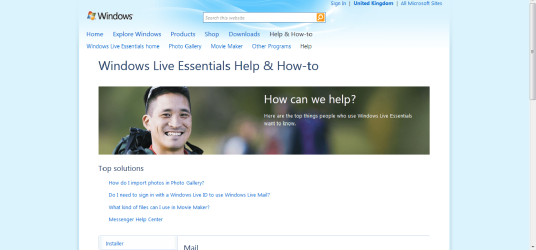
WLM 2011 Help page.png

If you get sent to the page shown in the image, this is the help page for WLM 2011 as they did not create an offline help option. As mentioned earlier, the pages for WLM 2009 do not exist and they once again did not implement an offline help option. It is all online. If you want help from Microsoft, you will need to upgrade to WLM 2011 using the links given to you by koolkat earlier.

I will now tidy up and correct the help I gave you for the earlier issue you had with adding an account as some of the directions I gave were incorrect.

Steps if using WLM 2011 (The one with the ribbon interface):

1) Open WLM

2) Click the blue button in the top left hand corner button. It is here: WLM File.PNG

3) Click options then add account.

4) Add your email account to WLM by inputting the email address and your password.

5) Make sure that works and wait for all your email to be downloaded to WLM (or not, depending on the email company's set-up)

6) Now go to file, then options and then mail

7) Go to the general tab.
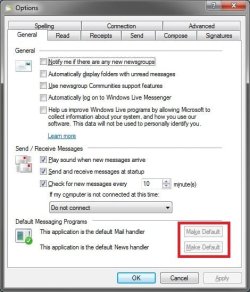
General Tab.jpg

8) Under default messaging programs, click make default for both options.


Steps if using WLM 2009 (The one without a ribbon):

1) Click the icon that is circled and labelled 1 in the image. WLM 2009 or 2010.jpg

2) Click show menu bar

3) Then click the tools button on the menu bar at the top (circled 2)

4) Click account options

5) Enter your account details

6) Save them and make sure they work

7) Go to tools again and then options

8) Go to the general tab
General Tab.jpg

9) Under default messaging programs, click make default for both options.

The issue you had creating a rule in WLM has been solved by A Guy. I do not need to give you those links again I presume.

Hope all this helps solve all the issues you were having and sorry it is so long. Also sorry about the amount of images but I wanted to make it as clear as possible to you and others
Stephen

 

My Computer

Computer Manufacturer/Model Number
Dell XPS 15 L502x
OS
Windows 7 Home Premium 64bit (O.E.M)
CPU
Intel Core i7 2630QM @2.00GHz
Memory
6GB DDR3
Graphics Card(s)
Intel Intergrated Graphics 3000, nVidia GT525M (1GB)
Screen Resolution
1366x768
Hard Drives
750GB Seagate 7200rpm
Keyboard
Backlit Dell XPS 15 L502x Keyboard
Mouse
Microsoft Wireless Mobile Mouse 4000
Internet Speed
2.5 Mb/s down, 0.36 up
Back
Top