
Solved Window movement lag problem

Node231

New member
Local time
3:28 AM
Messages
4
Hey all, I recently formatted my PC and have since come across an issue where when I drag around windows I get lag and many windows appear if I move them around, for example it looks like this:
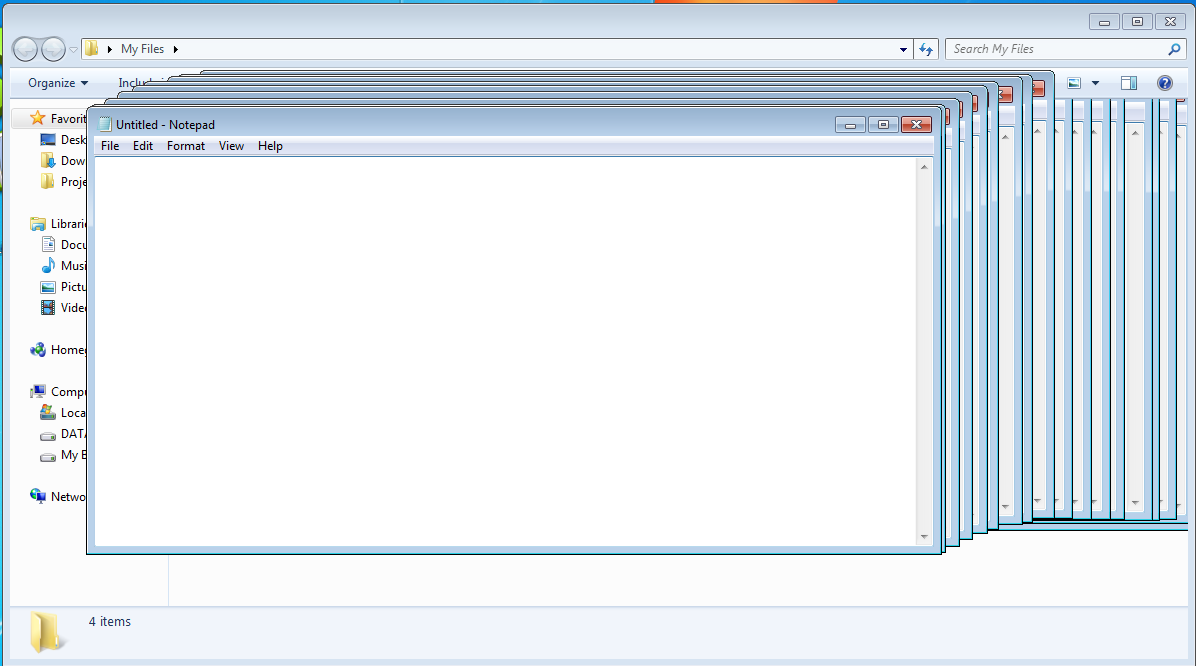
BJGBH.png

epn6uo.jpg

(not my screenshots)

note that this happens with everything: Programs, internet browsers etc.
Never had this problem before.


Anyone know how to resolve this?

Specs:
Windows 7 Home
NVIDIA GeForce GTX 550 Ti graphics card
8GB Ram
Asus p8z68-V LX mobo
 

My Computer My Computer

At a glance

Windows 7 home Premium 64bitIntel Core i7 2600 @ 3.408gbNVIDIA GeForce GTX 550 Ti
Computer type
PC/Desktop
Computer Manufacturer/Model Number
Custom Build
OS
Windows 7 home Premium 64bit
CPU
Intel Core i7 2600 @ 3.40
Motherboard
AsusTeK P8Z68-V LX (LGA1155)
Memory
8gb
Graphics Card(s)
NVIDIA GeForce GTX 550 Ti
Antivirus
AVG
Browser
Chrome & IE
looks like you may have a lack of available free ram. I only say this because I use to have the same issue on my old dell tower running windows xp. And it ended up being too much ram being used. I would try closing the programs running in the background that you know you dont need immediately and see if that helps. Also if you have not already done do i would consider adding more ram to the system if you are not already maxed out.
 

My Computer My Computer

At a glance

Windows 7 ultimate 64-bitIntel I7 2600K 3.4ghzCorsair 16gb ddr3 1600mhzNvidia Geforce gt 430
Computer type
PC/Desktop
Computer Manufacturer/Model Number
custom built
OS
Windows 7 ultimate 64-bit
CPU
Intel I7 2600K 3.4ghz
Motherboard
Asus Evo P8P67
Memory
Corsair 16gb ddr3 1600mhz
Graphics Card(s)
Nvidia Geforce gt 430
Sound Card
Sound Blaster Titanium x-fi pci express
Monitor(s) Displays
Dell E198WFP
Hard Drives
1 western digital 2TB drive.
PSU
Antec 1200 watt
Case
Inwin Dragon Rider
Cooling
6 case supplied cooling fans
Keyboard
logitech mk700
Mouse
logitech m705
Internet Speed
25-50mbps download; 10mbps upload(i think)
Antivirus
avg free 2014
Browser
mozilla firefox
Other Info
Also have a pretty bad speaker setup which is a klipsch promedia 5.1 surround speaker setup with huge subwoofer and lg blu ray player/writer. Also a hp officejet pro 8600 plus wireless all in one and a logitech s7500 webcam.
looks like you may have a lack of available free ram. I only say this because I use to have the same issue on my old dell tower running windows xp. And it ended up being too much ram being used. I would try closing the programs running in the background that you know you dont need immediately and see if that helps. Also if you have not already done do i would consider adding more ram to the system if you are not already maxed out.


This is what I thought initially too, but I'm not sure that's the issue.

If it was a ram issue it should of happened before I formatted which it never did, also it happens when I have absolutely nothing going on. For example if I turn everything off and open 1-3 'My Documents' it begins to happen.

8 GB of ram should be able to handle that, right? Maybe there is a problem in my RAM? I have no idea


Thanks for the help
 

My Computer My Computer

At a glance

Windows 7 home Premium 64bitIntel Core i7 2600 @ 3.408gbNVIDIA GeForce GTX 550 Ti
Computer type
PC/Desktop
Computer Manufacturer/Model Number
Custom Build
OS
Windows 7 home Premium 64bit
CPU
Intel Core i7 2600 @ 3.40
Motherboard
AsusTeK P8Z68-V LX (LGA1155)
Memory
8gb
Graphics Card(s)
NVIDIA GeForce GTX 550 Ti
Antivirus
AVG
Browser
Chrome & IE
looks like you may have a lack of available free ram. I only say this because I use to have the same issue on my old dell tower running windows xp. And it ended up being too much ram being used. I would try closing the programs running in the background that you know you dont need immediately and see if that helps. Also if you have not already done do i would consider adding more ram to the system if you are not already maxed out.


This is what I thought initially too, but I'm not sure that's the issue.

If it was a ram issue it should of happened before I formatted which it never did, also it happens when I have absolutely nothing going on. For example if I turn everything off and open 1-3 'My Documents' it begins to happen.

8 GB of ram should be able to handle that, right? Maybe there is a problem in my RAM? I have no idea


Thanks for the help


How many gb of ram are currently installed? Also what type of processor?
 

My Computer My Computer

At a glance

Windows 7 ultimate 64-bitIntel I7 2600K 3.4ghzCorsair 16gb ddr3 1600mhzNvidia Geforce gt 430
Computer type
PC/Desktop
Computer Manufacturer/Model Number
custom built
OS
Windows 7 ultimate 64-bit
CPU
Intel I7 2600K 3.4ghz
Motherboard
Asus Evo P8P67
Memory
Corsair 16gb ddr3 1600mhz
Graphics Card(s)
Nvidia Geforce gt 430
Sound Card
Sound Blaster Titanium x-fi pci express
Monitor(s) Displays
Dell E198WFP
Hard Drives
1 western digital 2TB drive.
PSU
Antec 1200 watt
Case
Inwin Dragon Rider
Cooling
6 case supplied cooling fans
Keyboard
logitech mk700
Mouse
logitech m705
Internet Speed
25-50mbps download; 10mbps upload(i think)
Antivirus
avg free 2014
Browser
mozilla firefox
Other Info
Also have a pretty bad speaker setup which is a klipsch promedia 5.1 surround speaker setup with huge subwoofer and lg blu ray player/writer. Also a hp officejet pro 8600 plus wireless all in one and a logitech s7500 webcam.
looks like you may have a lack of available free ram. I only say this because I use to have the same issue on my old dell tower running windows xp. And it ended up being too much ram being used. I would try closing the programs running in the background that you know you dont need immediately and see if that helps. Also if you have not already done do i would consider adding more ram to the system if you are not already maxed out.


This is what I thought initially too, but I'm not sure that's the issue.

If it was a ram issue it should of happened before I formatted which it never did, also it happens when I have absolutely nothing going on. For example if I turn everything off and open 1-3 'My Documents' it begins to happen.

8 GB of ram should be able to handle that, right? Maybe there is a problem in my RAM? I have no idea


Thanks for the help


How many gb of ram are currently installed? Also what type of processor?
8 GB ram, Intel Core i7 2600 @ 3.40
 

My Computer My Computer

At a glance

Windows 7 home Premium 64bitIntel Core i7 2600 @ 3.408gbNVIDIA GeForce GTX 550 Ti
Computer type
PC/Desktop
Computer Manufacturer/Model Number
Custom Build
OS
Windows 7 home Premium 64bit
CPU
Intel Core i7 2600 @ 3.40
Motherboard
AsusTeK P8Z68-V LX (LGA1155)
Memory
8gb
Graphics Card(s)
NVIDIA GeForce GTX 550 Ti
Antivirus
AVG
Browser
Chrome & IE
This is what I thought initially too, but I'm not sure that's the issue.

If it was a ram issue it should of happened before I formatted which it never did, also it happens when I have absolutely nothing going on. For example if I turn everything off and open 1-3 'My Documents' it begins to happen.

8 GB of ram should be able to handle that, right? Maybe there is a problem in my RAM? I have no idea


Thanks for the help


How many gb of ram are currently installed? Also what type of processor?
8 GB ram, Intel Core i7 2600 @ 3.40

Sounds like you have the exact same if not similar processor as i do. For a i7 processor I would say while 8gb should work; it will probably still be sluggish etc like you are experiencing. I would say if you can up the ram to 12gb. Either that or just close the programs you know you dont need running at any given moment and go into the task manager to make sure they are closed. Doing this will free up ram from being used. Try either of these or both and see if it doesnt resolve the issue.
 

My Computer My Computer

At a glance

Windows 7 ultimate 64-bitIntel I7 2600K 3.4ghzCorsair 16gb ddr3 1600mhzNvidia Geforce gt 430
Computer type
PC/Desktop
Computer Manufacturer/Model Number
custom built
OS
Windows 7 ultimate 64-bit
CPU
Intel I7 2600K 3.4ghz
Motherboard
Asus Evo P8P67
Memory
Corsair 16gb ddr3 1600mhz
Graphics Card(s)
Nvidia Geforce gt 430
Sound Card
Sound Blaster Titanium x-fi pci express
Monitor(s) Displays
Dell E198WFP
Hard Drives
1 western digital 2TB drive.
PSU
Antec 1200 watt
Case
Inwin Dragon Rider
Cooling
6 case supplied cooling fans
Keyboard
logitech mk700
Mouse
logitech m705
Internet Speed
25-50mbps download; 10mbps upload(i think)
Antivirus
avg free 2014
Browser
mozilla firefox
Other Info
Also have a pretty bad speaker setup which is a klipsch promedia 5.1 surround speaker setup with huge subwoofer and lg blu ray player/writer. Also a hp officejet pro 8600 plus wireless all in one and a logitech s7500 webcam.
How many gb of ram are currently installed? Also what type of processor?
8 GB ram, Intel Core i7 2600 @ 3.40

Sounds like you have the exact same if not similar processor as i do. For a i7 processor I would say while 8gb should work; it will probably still be sluggish etc like you are experiencing. I would say if you can up the ram to 12gb. Either that or just close the programs you know you dont need running at any given moment and go into the task manager to make sure they are closed. Doing this will free up ram from being used. Try either of these or both and see if it doesnt resolve the issue.

Hm, you might be right.


I'll try your suggestion, thanks for the help!

Resolved
 

My Computer My Computer

At a glance

Windows 7 home Premium 64bitIntel Core i7 2600 @ 3.408gbNVIDIA GeForce GTX 550 Ti
Computer type
PC/Desktop
Computer Manufacturer/Model Number
Custom Build
OS
Windows 7 home Premium 64bit
CPU
Intel Core i7 2600 @ 3.40
Motherboard
AsusTeK P8Z68-V LX (LGA1155)
Memory
8gb
Graphics Card(s)
NVIDIA GeForce GTX 550 Ti
Antivirus
AVG
Browser
Chrome & IE
no problem node!: let us know how it goes. :)
 

My Computer My Computer

At a glance

Windows 7 ultimate 64-bitIntel I7 2600K 3.4ghzCorsair 16gb ddr3 1600mhzNvidia Geforce gt 430
Computer type
PC/Desktop
Computer Manufacturer/Model Number
custom built
OS
Windows 7 ultimate 64-bit
CPU
Intel I7 2600K 3.4ghz
Motherboard
Asus Evo P8P67
Memory
Corsair 16gb ddr3 1600mhz
Graphics Card(s)
Nvidia Geforce gt 430
Sound Card
Sound Blaster Titanium x-fi pci express
Monitor(s) Displays
Dell E198WFP
Hard Drives
1 western digital 2TB drive.
PSU
Antec 1200 watt
Case
Inwin Dragon Rider
Cooling
6 case supplied cooling fans
Keyboard
logitech mk700
Mouse
logitech m705
Internet Speed
25-50mbps download; 10mbps upload(i think)
Antivirus
avg free 2014
Browser
mozilla firefox
Other Info
Also have a pretty bad speaker setup which is a klipsch promedia 5.1 surround speaker setup with huge subwoofer and lg blu ray player/writer. Also a hp officejet pro 8600 plus wireless all in one and a logitech s7500 webcam.
Back
Top