
I installed Win7 using a manufacturer disk on top of Vista (not clean install).
After that, I had about 200 important and 80 optional updates to install.
I installed about half of the important and none of the optional.
Now I am installing newer updates and checking which to stay away to prevent Win10. I looked and couldn't find any of the 10 updates in the important update list. I did, however, find some in the optional updates list.
I have been reading a lot how MS installs these win10 updates automatically, but in my case, they are listed as optional. I wonder why, is it because MS changed their policy or because my laptop is pretty old and w10 is not recommended?
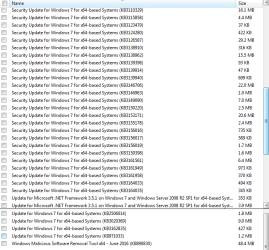
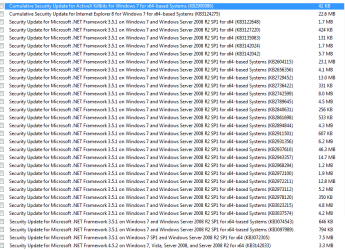
Anyways, here is the list of important updates still left to install. Could you more experienced members please take a look and tell me if I should avoid any of these?
Thank you.
After that, I had about 200 important and 80 optional updates to install.
I installed about half of the important and none of the optional.
Now I am installing newer updates and checking which to stay away to prevent Win10. I looked and couldn't find any of the 10 updates in the important update list. I did, however, find some in the optional updates list.
I have been reading a lot how MS installs these win10 updates automatically, but in my case, they are listed as optional. I wonder why, is it because MS changed their policy or because my laptop is pretty old and w10 is not recommended?
Anyways, here is the list of important updates still left to install. Could you more experienced members please take a look and tell me if I should avoid any of these?
Thank you.
Attachments
My Computer
At a glance
Windows 7 Home Premium 64Intel T6400 Core 2 Duo4GBIntel 4500MHD
- Computer type
- Laptop
- Computer Manufacturer/Model Number
- Toshiba
- OS
- Windows 7 Home Premium 64
- CPU
- Intel T6400 Core 2 Duo
- Memory
- 4GB
- Graphics Card(s)
- Intel 4500MHD


