Funky Munky
New member
- Local time
- 5:07 AM
- Messages
- 9
I've seen many of these type of threads covering these two updates, but none of them describe my particular situation.
This may be a long post so please bear with me.
I was doing a fresh install and i decided to keep track of all the steps involved because i'm a nut job like that, lol.
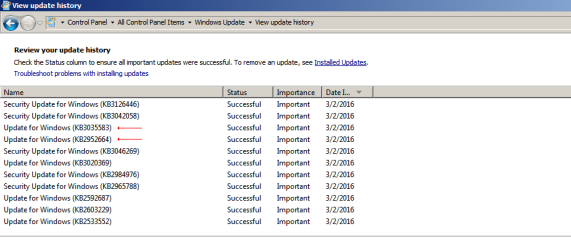
When I looked in my update history, everything looked normal as you can see in the image below.
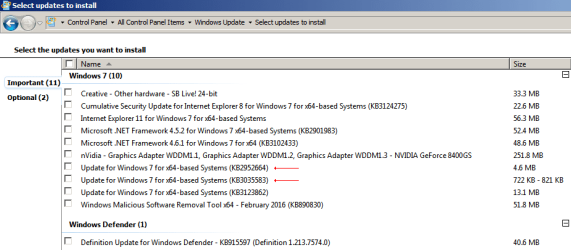
I then set windows update to check for updates, but let me decide what to download and install, and what came up is shown in the next image.
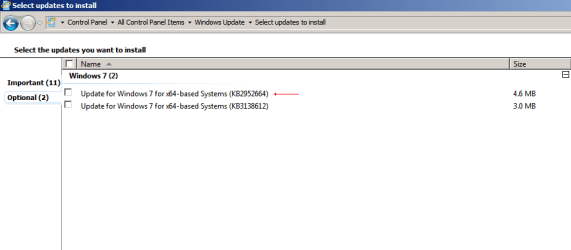
So I thought to myself, here we go again, repeat updates. But then I checked the optional updates, and things started to get a bit weird.
So since this was a test system, I decided to install them and see what would happen. I installed the two from the important tab, rebooted, and then installed the one from the optional tab, and rebooted. This was the result.
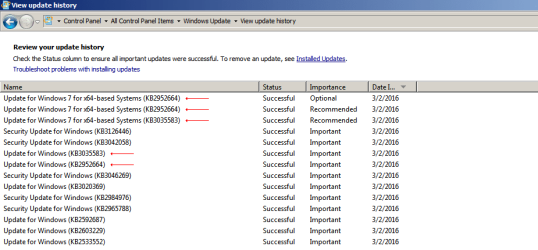
Pretty weird huh? On the installed updates list, KB2952664 and KB3035583 only show up once each.
I haven't been using Windows 7 for very long so maybe I am reading this wrong? I'm still not completely clear on the differences between the update history and the installed files. Sometimes the files in one list are not in the other.
Has anybody else noticed this stuff?
P.S. - yes I did a google search and a forum search before making this thread. lol.
This may be a long post so please bear with me.
I was doing a fresh install and i decided to keep track of all the steps involved because i'm a nut job like that, lol.
When I looked in my update history, everything looked normal as you can see in the image below.
I then set windows update to check for updates, but let me decide what to download and install, and what came up is shown in the next image.
So I thought to myself, here we go again, repeat updates. But then I checked the optional updates, and things started to get a bit weird.
So since this was a test system, I decided to install them and see what would happen. I installed the two from the important tab, rebooted, and then installed the one from the optional tab, and rebooted. This was the result.
Pretty weird huh? On the installed updates list, KB2952664 and KB3035583 only show up once each.
I haven't been using Windows 7 for very long so maybe I am reading this wrong? I'm still not completely clear on the differences between the update history and the installed files. Sometimes the files in one list are not in the other.
Has anybody else noticed this stuff?
P.S. - yes I did a google search and a forum search before making this thread. lol.
My Computer
At a glance
Windows 7 Home Premium 64 Bit
- Computer type
- PC/Desktop
- OS
- Windows 7 Home Premium 64 Bit