
Solved Windows 10 install issues / where did my system reserve partition go?

Dalumberjack03

New member
Local time
7:41 PM
Messages
3
So decided to take the plunge and try upgrading to windows 10.

Got the error that a lot of other people have been "could not install due to issues with the system reserve partition" etc.

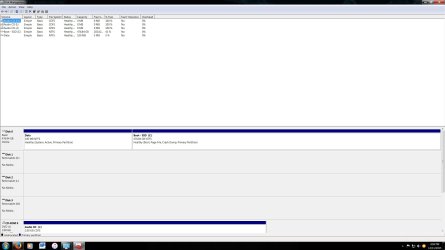
So after reading online, I open disk management expecting to find it full and needing to resize it / make room on it somehow. Surprisingly, I do not have a system reserve partition. In front of my boot drive (C) there is a 100mb "data" partition that is active and I can only assume holds my boot files and other necessary things to boot windows etc.

So my question is, is my "data" partition my system reserve partition and windows named it funky? Did windows 7 $%^& up installing and never allocated space for a system reserve and I need to make one now (how the heck do I do that)?

I disconnected all my other drives to make sure there were no issues with them. Here is a pic of disk management:
 

Attachments
  • disk managementjpg.jpg
    disk managementjpg.jpg
    130.6 KB · Views: 12

My Computer My Computer

At a glance

Windows 7 Ultimate X64Intel I7 3930K32 GB Oc'd to 2400EVGA GTX 980
Computer type
PC/Desktop
Computer Manufacturer/Model Number
Custom Build
OS
Windows 7 Ultimate X64
CPU
Intel I7 3930K
Motherboard
Asus Rampage IV
Memory
32 GB Oc'd to 2400
Graphics Card(s)
EVGA GTX 980
Hard Drives
Boot: Samsung 850 500gb
Other storage HD's
Antivirus
Avast Free
Browser
Firefox

My Computer My Computer

At a glance

Windows 7 Ultimate X64Intel I7 3930K32 GB Oc'd to 2400EVGA GTX 980
Computer type
PC/Desktop
Computer Manufacturer/Model Number
Custom Build
OS
Windows 7 Ultimate X64
CPU
Intel I7 3930K
Motherboard
Asus Rampage IV
Memory
32 GB Oc'd to 2400
Graphics Card(s)
EVGA GTX 980
Hard Drives
Boot: Samsung 850 500gb
Other storage HD's
Antivirus
Avast Free
Browser
Firefox
Welcome to the forum,

That partition labeled Data is your system reserved, I don't know why it's labeled that though.

That problem you encountered is usually fixed by making your system reserved larger,

Solved Windows 10 couldn't update system reserved partition - Windows 10 Forums

The last poster in that thread also had the system reserved labeled Data so Windows did that at some point.
 

My Computer My Computer

At a glance

Win 10 Pro x64Intel I5-2500K @3.3GHz16GB G.Skill Ripjaws X (4x4GB)EVGA GeForce 750 Ti SC 2GB
Computer type
PC/Desktop
Computer Manufacturer/Model Number
Self Built
OS
Win 10 Pro x64
CPU
Intel I5-2500K @3.3GHz
Motherboard
Asrock P67 Extreme4
Memory
16GB G.Skill Ripjaws X (4x4GB)
Graphics Card(s)
EVGA GeForce 750 Ti SC 2GB
Sound Card
ASUS Xonar DG 5.1 Channels 24-bit 96KHz PCI Interface Sound
Monitor(s) Displays
auria eq2367
Screen Resolution
1920 x 1080
Hard Drives
250GB Samsung 850 EVO SSD
1TB WD Blue
1TB Hitachi
PSU
SeaSonic X 650W 80 Plus Gold
Case
Corsair Obsidian 750D
Cooling
Corsair H60, Three 140mm case fans
Keyboard
Logitech Wireless Keyboard K520
Mouse
Logitech Wireless Mouse M310
Internet Speed
Wave Broadband ~ 100 dn 5 up
Antivirus
Windows Defender, Malwarebytes Premium
Browser
Edge, IE11, Chrome
Other Info
Laptop specs: HP g7-1365dx /
CPU: AMD A6-3420M APU with Radeon(tm) HD Graphics /
RAM: Crucial 8Gb (2x4Gb) /
SSD: Crucial M4-CT128M4SSD2 ATA Device/ FW 000F /
GFX: AMD Radeon HD 6520G /
OS: Windows 10 Pro x64
Just wanted to say thank you for answering and the link.


That was the only link I have seen so far where someone else's "system reserve" partition was named "data" instead. Once I enlarged that partition, windows 10 did go through with the installation.

Unfortunately, the problems did not stop there. Once windows 10 was done installing and booted up for the first time, I was stuck at the first walk through screen as I had no keyboard or mouse. After finding countless other threads about people with the same problem, it seems windows 10 might of disabled the USB drivers on accident. Seems you have to use a old PS/2 mouse or keyboard to finish the setup. Then you can get into device manager and reinstall or enable the USB drivers / controller.

At that point I reloaded my image backup I made before I did the update. If I'm having this many problems before I even get into windows, I can't imagine what else is going to happen once I do.

The kicker is I chatted with windows tech support. I let them have access to my system as they wanted to double check for conflicts etc. I tried to see if they would issue a key so I could use the ISO image they have on their website and install a fresh copy. Apparently, you can only do a "fresh" install after you have upgraded to windows 10 and it gives you the option. I asked what happens if I can't get that far considering all my problems, their answer "you will have to buy it".

:mad:
 

My Computer My Computer

At a glance

Windows 7 Ultimate X64Intel I7 3930K32 GB Oc'd to 2400EVGA GTX 980
Computer type
PC/Desktop
Computer Manufacturer/Model Number
Custom Build
OS
Windows 7 Ultimate X64
CPU
Intel I7 3930K
Motherboard
Asus Rampage IV
Memory
32 GB Oc'd to 2400
Graphics Card(s)
EVGA GTX 980
Hard Drives
Boot: Samsung 850 500gb
Other storage HD's
Antivirus
Avast Free
Browser
Firefox
Back
Top