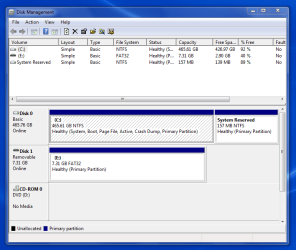
I did a clean install of Windows-7 and there was no System Reserve Partition!
I read how to create on and it worked.
The Reserve Partition however, is at the back end of the drive.
I am upgrading from an "older" system to a "not as old system".
I am doing the upgrade to increase performance and anchor PC my technology on W7.
Since I am "very" old, I do not expect to ever do this again.
I also do not like W-10 and really like W-7.
My understanding is that the front od the drive is where the fastest performance is.
The back of the drive is where the slowest performance is.
Having said that, knowing that the name System Reserve implies "perhaps" heavier usage, the front would be the best place to locate it.
Is there a way to move it from the back to the front?
Best regards,
Mike Lynch
I read how to create on and it worked.
The Reserve Partition however, is at the back end of the drive.
I am upgrading from an "older" system to a "not as old system".
I am doing the upgrade to increase performance and anchor PC my technology on W7.
Since I am "very" old, I do not expect to ever do this again.
I also do not like W-10 and really like W-7.
My understanding is that the front od the drive is where the fastest performance is.
The back of the drive is where the slowest performance is.
Having said that, knowing that the name System Reserve implies "perhaps" heavier usage, the front would be the best place to locate it.
Is there a way to move it from the back to the front?
Best regards,
Mike Lynch
My Computer
At a glance
Microsoft Windows 7 Professional 64-bit 7601 ...Intel(R) Core(TM) i7-3770 CPU @ 3.40GHz8.00 GBIntel(R) HD Graphics 4000
- Computer type
- PC/Desktop
- Computer Manufacturer/Model Number
- Two HP Desktops. One in the Laundry Room / Bed Room.
- OS
- Microsoft Windows 7 Professional 64-bit 7601 Multiprocessor Free Service Pack 1
- CPU
- Intel(R) Core(TM) i7-3770 CPU @ 3.40GHz
- Motherboard
- Hewlett-Packard 3396
- Memory
- 8.00 GB
- Graphics Card(s)
- Intel(R) HD Graphics 4000
- Sound Card
- (1) Realtek High Definition Audio (2) Intel(R) Display Aud
- Monitor(s) Displays
- Hanns-G
- Screen Resolution
- 1440 x 900 x 32 bits (4294967296 colors) @ 59 Hz
- Hard Drives
- (1) ATA WDC WD40EZRX-00S SCSI Disk Device (2) HP Officejet Pro 86 USB Device (3) WD My Book 1230 USB Device
- PSU
- Whatever came with the CMT.
- Case
- HP CMT Black.
- Cooling
- Whatever came with the CMT.
- Keyboard
- Logitech K740.
- Mouse
- Microsoft Optical Mouse 1000.
- Internet Speed
- Spectrum 25Mbs.
- Antivirus
- WebRoot, Microsoft Security Essentials.
- Browser
- EDGE
- Other Info
- HP Officejet Pro 8600 Plus.
WD MyBook 4TB.