
- Local time
- 10:40 AM
- Messages
- 43
My "work" system, which I'll call "this laptop", is Windows 7 Pro. I have another laptop with the same system and it installed updates a little while ago, so I thought I'd better check this laptop so I could install the updates in a controlled fashion.
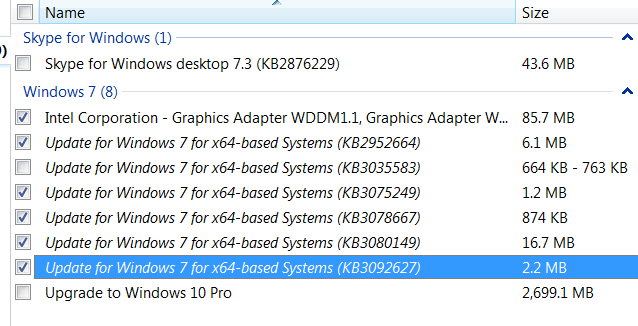
However, when I went into Windows Update in Control Panel I saw, to my horror, that Windows 10 was waiting to install and there's no option to remove it.
I have since cancelled my reservation and uninstalled KB3035583, done a system restore, everything I can think of, but every time I go into Control Panel it's still there.

The "Get Windows 10" icon has gone from Taskbar.
I do have Windows 10 on another laptop (yes, I've got a lot of them), but cannot have it on this laptop because vital software is incompatible.
Please can someone help me out of the terrifying hole I've got myself into.
However, when I went into Windows Update in Control Panel I saw, to my horror, that Windows 10 was waiting to install and there's no option to remove it.
I have since cancelled my reservation and uninstalled KB3035583, done a system restore, everything I can think of, but every time I go into Control Panel it's still there.
The "Get Windows 10" icon has gone from Taskbar.
I do have Windows 10 on another laptop (yes, I've got a lot of them), but cannot have it on this laptop because vital software is incompatible.
Please can someone help me out of the terrifying hole I've got myself into.
My Computer
At a glance
W7 Pro 64-bit | W10 Pro 64-biti7-4700MQ16GBNVIDIA GTX 765M
- Computer type
- Laptop
- Computer Manufacturer/Model Number
- Clevo W230ST | Precision M3800 | Precision M4500 | Alienware M11x-R3
- OS
- W7 Pro 64-bit | W10 Pro 64-bit
- CPU
- i7-4700MQ
- Memory
- 16GB
- Graphics Card(s)
- NVIDIA GTX 765M
- Screen Resolution
- 1920x1080
- Hard Drives
- 256GB SSD | 1TB HD
- Antivirus
- Microsoft Security Essentials, Malwarebytes Pro
- Browser
- Firefox, Chrome, Pale Moon


 If I ever come across a way of removing the update I'll post it here.


