Windows 10 on a USB stick

My Computer My Computer

At a glance

Win 7 64 UltimateAMD 8350 Bulldozer 4ghz6gbATI Radeon HD 5770 X 2
Computer type
PC/Desktop
Computer Manufacturer/Model Number
JRockZ
OS
Win 7 64 Ultimate
CPU
AMD 8350 Bulldozer 4ghz
Motherboard
Asus M5a97 R2
Memory
6gb
Graphics Card(s)
ATI Radeon HD 5770 X 2
Sound Card
Board
Monitor(s) Displays
Dual Gateway 19" and 32" TV 3 displays at once :D
Screen Resolution
1440X900
Hard Drives
OCZ Agility SSD Patriot Blaze 120
PSU
750 Watt Thermaltake Tough Power
Case
Diablotek EVO Mid Tower Case CPA-6170 - 8X 120mm case fans
Cooling
Corsair Liquid Cooled
Antivirus
NAV
Browser
Always IE
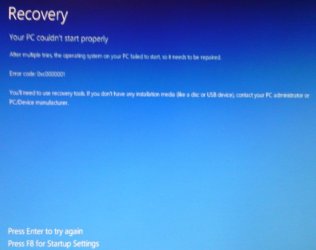
I tried copying the boot files again still the same thing but like Steve this time also got the recovery options error.
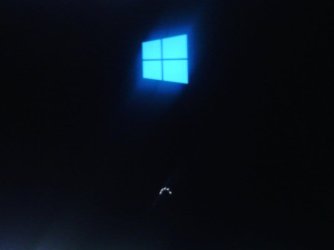
my cell takes bad pics but this is all I have been seeing on boot
Black screen with blue windows logo ad white dots rotating,,,,
And I shot a pic of the recovery options error,,, I tried both safe mode and to continue and still no go
 

Attachments

  • IMG_20150104_083313_061.jpg
    IMG_20150104_083313_061.jpg
    10.2 KB · Views: 0
  • IMG_20150104_203819_258.jpg
    IMG_20150104_203819_258.jpg
    30.7 KB · Views: 0

My Computer My Computer

At a glance

Win 7 64 UltimateAMD 8350 Bulldozer 4ghz6gbATI Radeon HD 5770 X 2
Computer type
PC/Desktop
Computer Manufacturer/Model Number
JRockZ
OS
Win 7 64 Ultimate
CPU
AMD 8350 Bulldozer 4ghz
Motherboard
Asus M5a97 R2
Memory
6gb
Graphics Card(s)
ATI Radeon HD 5770 X 2
Sound Card
Board
Monitor(s) Displays
Dual Gateway 19" and 32" TV 3 displays at once :D
Screen Resolution
1440X900
Hard Drives
OCZ Agility SSD Patriot Blaze 120
PSU
750 Watt Thermaltake Tough Power
Case
Diablotek EVO Mid Tower Case CPA-6170 - 8X 120mm case fans
Cooling
Corsair Liquid Cooled
Antivirus
NAV
Browser
Always IE
Really no idea what is happening here. Try an empty external disk. Best a SSD.
 

My Computer My Computer

At a glance

Vista, Windows7, Mint Mate, Zorin, Windows 8from 1.6GHz Duo to i7
Computer Manufacturer/Model Number
HP, Dell, Gateway, Toshiba - 4 laptops and 2 desktops
OS
Vista, Windows7, Mint Mate, Zorin, Windows 8
CPU
from 1.6GHz Duo to i7
Monitor(s) Displays
2x HP w2207
Hard Drives
5x HDD, 7x SSD, 12x Externals
Keyboard
with trackball - no mices
Mouse
Trackball mice
Internet Speed
DSL 6000
Really no idea what is happening here. Try an empty external disk. Best a SSD.
Ok that's cool! I don't have one, I had purchased the UBS drive for this but that's ok it was a poor choice anyhow, ill get another 60gb ssd when frys has them for 35 bucks again,,,,
Do you think it could have anything to do with bios settings? secure boot? fast boot? anything like that?
 

My Computer My Computer

At a glance

Win 7 64 UltimateAMD 8350 Bulldozer 4ghz6gbATI Radeon HD 5770 X 2
Computer type
PC/Desktop
Computer Manufacturer/Model Number
JRockZ
OS
Win 7 64 Ultimate
CPU
AMD 8350 Bulldozer 4ghz
Motherboard
Asus M5a97 R2
Memory
6gb
Graphics Card(s)
ATI Radeon HD 5770 X 2
Sound Card
Board
Monitor(s) Displays
Dual Gateway 19" and 32" TV 3 displays at once :D
Screen Resolution
1440X900
Hard Drives
OCZ Agility SSD Patriot Blaze 120
PSU
750 Watt Thermaltake Tough Power
Case
Diablotek EVO Mid Tower Case CPA-6170 - 8X 120mm case fans
Cooling
Corsair Liquid Cooled
Antivirus
NAV
Browser
Always IE
Right, if you have secure boot it may not work. I ran all mine on MBR systems. Just make the test and shut off secure boot and set the BIOS to legacy mode.
 

My Computer My Computer

At a glance

Vista, Windows7, Mint Mate, Zorin, Windows 8from 1.6GHz Duo to i7
Computer Manufacturer/Model Number
HP, Dell, Gateway, Toshiba - 4 laptops and 2 desktops
OS
Vista, Windows7, Mint Mate, Zorin, Windows 8
CPU
from 1.6GHz Duo to i7
Monitor(s) Displays
2x HP w2207
Hard Drives
5x HDD, 7x SSD, 12x Externals
Keyboard
with trackball - no mices
Mouse
Trackball mice
Internet Speed
DSL 6000
Right, if you have secure boot it may not work. I ran all mine on MBR systems. Just make the test and shut off secure boot and set the BIOS to legacy mode.
I did forget to change to legacy mode but I disabled secure boot fast boot and a few other things and still no go,, not worth messing with anymore I guess. Oh well thanks anyhow!
 

My Computer My Computer

At a glance

Win 7 64 UltimateAMD 8350 Bulldozer 4ghz6gbATI Radeon HD 5770 X 2
Computer type
PC/Desktop
Computer Manufacturer/Model Number
JRockZ
OS
Win 7 64 Ultimate
CPU
AMD 8350 Bulldozer 4ghz
Motherboard
Asus M5a97 R2
Memory
6gb
Graphics Card(s)
ATI Radeon HD 5770 X 2
Sound Card
Board
Monitor(s) Displays
Dual Gateway 19" and 32" TV 3 displays at once :D
Screen Resolution
1440X900
Hard Drives
OCZ Agility SSD Patriot Blaze 120
PSU
750 Watt Thermaltake Tough Power
Case
Diablotek EVO Mid Tower Case CPA-6170 - 8X 120mm case fans
Cooling
Corsair Liquid Cooled
Antivirus
NAV
Browser
Always IE
I am sorry you could not make it work. It was fun whilst I was doing it but I really don't do anything with it. I use my Windows 10 in virtual. Another fun project.
 

My Computer My Computer

At a glance

Vista, Windows7, Mint Mate, Zorin, Windows 8from 1.6GHz Duo to i7
Computer Manufacturer/Model Number
HP, Dell, Gateway, Toshiba - 4 laptops and 2 desktops
OS
Vista, Windows7, Mint Mate, Zorin, Windows 8
CPU
from 1.6GHz Duo to i7
Monitor(s) Displays
2x HP w2207
Hard Drives
5x HDD, 7x SSD, 12x Externals
Keyboard
with trackball - no mices
Mouse
Trackball mice
Internet Speed
DSL 6000
The computer booted from the USB/Removable Device and gave the same results as before, Windows 10 logo splash screen and the small spinning dots below that. Waited and waited with nothing more happening (20+ minutes)

I remember that "Windows 8.1 to Go" won't work with USB flash drives which are "Removable" type ( Win8.0 works ). Windows logo will spin forever if you try to run "8.1" from a removable type disk. Probably the same applies to "Windows 10" also.
 

My Computer My Computer

At a glance

Windows 7 Ultimate x64
Computer type
PC/Desktop
OS
Windows 7 Ultimate x64
Back
Top