
escribblings
New member
- Local time
- 8:45 PM
- Messages
- 6
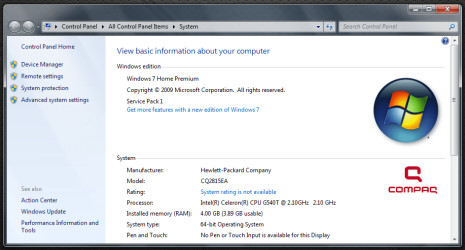
I am in charge of 2 Compaq CQ2815EA from PCWorld (*spits*) for my companies social club.
They came installed with Windows 7 Home Premium, and being a social club they were reluctant to pay to upgrade to Pro (I may have some swing with that this time). As such, and due to the environment the machines are being used in, I used some registry hacks to prevent users messing with the system where possible. (Unfortunately I cannot remember exactly what tweaks I employed).
Now it's come for the Windows 10 upgrade.
I have used the Media Creation Tool, both directly on the machine in question and to create installation media (USB).
The install starts off OK (under the administrative logon).
Then we get the first reboot, I get the black screen with the grey progress bar "Loading Files" and then nothing.
The monitors built in error message reports "Out of Range" (It would normally report "Cable Not Connected" when there is no signal).
It goes like this for ages, and as I can't leave the machine unattended I reset the machine, I got the same error and then eventually the windows 7 login.
Logging in gives me an error message as to why Windows could not install.
So far I have received 2 different messages
The installation failed in the SAFE_OS phase with an error during APPLY_IMAGE operation
The installation failed in the SAFE_OS phase with an error during INSTALL_RECOVERY_ENVIRONMENT operation
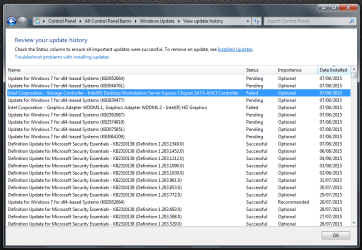
I just checked my Win 7 updates and there are 2 failures...
and
I've also just noticed that I have a DVI connector on the back of the machine too, but I am connecting via VGA.
I am going to try bringing in a DVI to VGA adapter to see if that gives me any display at all, but I am wondering if between the 2 error messages it would have installed if I had just left it.
But in the mean time, can anyone else cast any opinions on this?
They came installed with Windows 7 Home Premium, and being a social club they were reluctant to pay to upgrade to Pro (I may have some swing with that this time). As such, and due to the environment the machines are being used in, I used some registry hacks to prevent users messing with the system where possible. (Unfortunately I cannot remember exactly what tweaks I employed).
Now it's come for the Windows 10 upgrade.
I have used the Media Creation Tool, both directly on the machine in question and to create installation media (USB).
The install starts off OK (under the administrative logon).
Then we get the first reboot, I get the black screen with the grey progress bar "Loading Files" and then nothing.
The monitors built in error message reports "Out of Range" (It would normally report "Cable Not Connected" when there is no signal).
It goes like this for ages, and as I can't leave the machine unattended I reset the machine, I got the same error and then eventually the windows 7 login.
Logging in gives me an error message as to why Windows could not install.
So far I have received 2 different messages
The installation failed in the SAFE_OS phase with an error during APPLY_IMAGE operation
The installation failed in the SAFE_OS phase with an error during INSTALL_RECOVERY_ENVIRONMENT operation
I just checked my Win 7 updates and there are 2 failures...
Intel Corporation - Graphics Adapter WDDM1.1, Graphics Adapter WDDM1.2 - Intel(R) HD Graphics
Installation date: 07/08/2015 12:51
Installation status: Failed
Error details: Code 80070103
Update type: Optional
Intel Corporation Graphics Adapter WDDM1.1, Graphics Adapter WDDM1.2 software update released in December, 2012
and
Intel Corporation - Storage Controller - Intel(R) Desktop/Workstation/Server Express Chipset SATA AHCI Controller
Installation date: 07/08/2015 12:51
Installation status: Failed
Error details: Code 80070103
Update type: Optional
Intel Corporation Storage Controller software update released in September, 2012
I've also just noticed that I have a DVI connector on the back of the machine too, but I am connecting via VGA.
I am going to try bringing in a DVI to VGA adapter to see if that gives me any display at all, but I am wondering if between the 2 error messages it would have installed if I had just left it.
But in the mean time, can anyone else cast any opinions on this?
Attachments

My Computer
At a glance
Multi-Boot - Windows 8.1 Professional x64 / W...Intel i7 4770k8GB (2x4GB) DDR3 Corsiar Vengeance Pro 2133MH...Asus GeForce GTX 760 DirectCU II OC
- Computer type
- PC/Desktop
- Computer Manufacturer/Model Number
- Custom Build
- OS
- Multi-Boot - Windows 8.1 Professional x64 / Windows 7 Ultimate x64 / Other
- CPU
- Intel i7 4770k
- Motherboard
- Asus Z87 Sabertooth
- Memory
- 8GB (2x4GB) DDR3 Corsiar Vengeance Pro 2133MHz CL9
- Graphics Card(s)
- Asus GeForce GTX 760 DirectCU II OC
- Hard Drives
- 0.250 TB SSD Samsung 840 EVO
1.000 TB 07200 RPM / 8 GB SSD Hybrid Seagate ST1000DX001-1CM162
0.037 TB 10000 RPM Western Digital Raptor WD360GD-00FLA2 (x4)


