Windows 10 Tried To 'Upgrade' My PC All By Itself!

woodbine

New member
Member
VIP
Local time
3:52 AM
Messages
178
Location
Bristol, UK
Something happened to my desktop PC yesterday that concerned me a little. I had put it into sleep mode, left the room, and come back a few minutes later and was surprised that the computer was still on and 'chundering' away to itself.

I looked on the screen to find a Windows 10 box had appeared in the middle, and it said that it was preparing to 'upgrade' my computer to Windows 10 (not sure if 10 counts as an upgrade). So that appears to be the reason for my pc still being on and busy with something.

Having no real knowledge of computers, I panicked and shut my pc down. I then re-started and restored to an earlier date, just in case any changes had been made. I doubt they were, but as I say, my knowledge is limited and I wanted to be on the safe side.

Anyway, can anyone tell me why Win 10 seemed to be interfering with my pc, when there is no chance that I did anything to start the 10 installation process? How can I prevent it happening again?

It seems that Windows is determined to hassle you until you change to 10. I get fed up with having to continually refuse the offer of 10 on the never-ending blue boxes that keep appearing daily on my screen. There is even an icon on the right side of the bottom bar that says 'Get Windows 10' if I hover my mouse over it. Can I stop the Windows 10 blue screens and changes to 10 being forced on me? I'm worried my pc will have been changed when I'm away from my desk but the pc is left on. I'm sticking with what I know (Win7), as I'm familiar with it and it works.
 

My Computer My Computer

At a glance

Windows 7 Home Premium 64 bit SP1Intel i3 5403GB DDR3SD
Computer type
PC/Desktop
Computer Manufacturer/Model Number
Acer Aspire Desktop M3910
OS
Windows 7 Home Premium 64 bit SP1
CPU
Intel i3 540
Memory
3GB DDR3SD
Monitor(s) Displays
LG Flatron L1960TR
Screen Resolution
1280x1024
Keyboard
Acer
Mouse
Genius
Antivirus
Avast (Free)
Browser
I E 11

My Computer My Computer

At a glance

Win-7-Pro64bit 7-H-Prem-64biti7-5930K 2nd i9-9940x both water blocked VRM'...Trident-z 3200C14 2nd Trident-z 3600C16EVGA 1080ti ftw3 2nd Titan Xp both water blocked
Computer type
PC/Desktop
Computer Manufacturer/Model Number
Custom assembled by me :}
OS
Win-7-Pro64bit 7-H-Prem-64bit
CPU
i7-5930K 2nd i9-9940x both water blocked VRM's too
Motherboard
ASUS SABERTOOTH X99 2nd ASUS x299 Apex
Memory
Trident-z 3200C14 2nd Trident-z 3600C16
Graphics Card(s)
EVGA 1080ti ftw3 2nd Titan Xp both water blocked
Sound Card
Built-in Realtek
Monitor(s) Displays
1-AOC G2460PG 24"G-Sync 144Hz/ 2nd 1-ASUS VG248QE 24" 144Hz
Screen Resolution
1920 x 1080 144Hz
Hard Drives
2-Samsung M.2 Evo & Evo Plus
2-Samsung 850 EVO 500GB SSD's/ 3-2.5 W.D. Black 1tb-&3-1tb/3-3.5 WD Black 1tb hdd's
PSU
EVGA SuperNOVA 1000-P2 2nd 1200-P2
Case
2-Corsair Obsidian Series 450D Black ATX Mid Tower
Cooling
Custom water loops
Keyboard
Logitech G710+/ 2nd Logitech G910
Mouse
2-RedDragon M901 Perdition 16400 dpi Gaming mouse = wired
Internet Speed
Comcast Ping 19ms 89.31mbps download speed 6.12mbps upload
Antivirus
Malwarebytes Pro/ Superantispyware Pro
Browser
FireFox & Pale moon
Other Info
2nd ASUS X299 Apex/Intel i9-9940x with Custom water loop/7H-Prem-x64/Corsair 450D case/Ram Trident-z 3600C16 4x8gb / Samsung970Evo plus 500gb SSD/Dual ssd EZ swap evo/PSU EVGA SuperNova 1200w-P2 80+Platinum/GPU Titan Xp /8-ML-140 on push-pull on 2-280GTX rads

My Computer My Computer

At a glance

Windows 10 Pro x64Intel Core i7 6700KGSkill TridentZ RGB 16GB 3600 16-16-16-36EVGA GTX 980 Ti SC x2
Computer type
PC/Desktop
Computer Manufacturer/Model Number
Skylake Special #666
OS
Windows 10 Pro x64
CPU
Intel Core i7 6700K
Motherboard
Asus Sabertooth Z170 Mark 1
Memory
GSkill TridentZ RGB 16GB 3600 16-16-16-36
Graphics Card(s)
EVGA GTX 980 Ti SC x2
Sound Card
Realtek High Definition
Monitor(s) Displays
AOC G2460PG
Screen Resolution
1920 x 1080 144Hz
Hard Drives
Samsung 860 Pro 256GB, Seagate Barracuda 4TB x2
PSU
EVGA 1000 P2, EVGA White Custom Braided Cables
Case
Corsair Vengeance C70 Gunmetal Black
Cooling
Corsair H100i v2, Corsair ML120 x2, Thermal Grizzly Kryonaut
Keyboard
Logitech G910 Orion Spectrum
Mouse
Logitech G700s
Internet Speed
Verizon Fios Quantum Gateway 75/75
Antivirus
Windows Defender, Malwarebytes Free 3.8.3
Browser
Chrome
Other Info
Corsair SP120 x4, LG Blu-ray Drive, Durabrand HT-395 100 Watt Dolby Digital Amp, Corsair H2100 Wireless 7.1 Headset
in the registry, HKLM\Policies\Microsoft\Windows\GWX create a key DisableGwx value type REG_DWORD with a value of 1.

does not allow GWX to run, which is what updates to Win 10. If you want it again, change the value to 0.

You take your own risk with changing the registry, but I made a GPO for this and have not had any problems since. And do a disk clean-up.
 

My Computer My Computer

At a glance

Windows 7 Pro x64
Computer type
PC/Desktop
OS
Windows 7 Pro x64
You installed Windows 10 updates, you have to get rid of them.

Sorry, but I don't know how or where I installed anything for 10. I haven't installed anything for this, unless it was hidden in something else. Or do you mean the Win 10 updates were installed with my automatic Windows updates? Can you explain how I would have installed 10 updates please? (My PC skills aren't very advanced :confused:) And if I have somehow installed 10 updates, do they need to be removed.


Thanks to all who replied, I will look at the options, but following something straightforward like the Youtube video to change GWX may be my best solution - unless someone suggests otherwise?

Am I right in thinking that I need to get rid of the 'Get Windows 10' icon from the right side of the bottom bar to stop my pc automatically changing to 10 and also prevent pop ups for 10, etc?
 

My Computer My Computer

At a glance

Windows 7 Home Premium 64 bit SP1Intel i3 5403GB DDR3SD
Computer type
PC/Desktop
Computer Manufacturer/Model Number
Acer Aspire Desktop M3910
OS
Windows 7 Home Premium 64 bit SP1
CPU
Intel i3 540
Memory
3GB DDR3SD
Monitor(s) Displays
LG Flatron L1960TR
Screen Resolution
1280x1024
Keyboard
Acer
Mouse
Genius
Antivirus
Avast (Free)
Browser
I E 11

My Computer My Computer

At a glance

Win-7-Pro64bit 7-H-Prem-64biti7-5930K 2nd i9-9940x both water blocked VRM'...Trident-z 3200C14 2nd Trident-z 3600C16EVGA 1080ti ftw3 2nd Titan Xp both water blocked
Computer type
PC/Desktop
Computer Manufacturer/Model Number
Custom assembled by me :}
OS
Win-7-Pro64bit 7-H-Prem-64bit
CPU
i7-5930K 2nd i9-9940x both water blocked VRM's too
Motherboard
ASUS SABERTOOTH X99 2nd ASUS x299 Apex
Memory
Trident-z 3200C14 2nd Trident-z 3600C16
Graphics Card(s)
EVGA 1080ti ftw3 2nd Titan Xp both water blocked
Sound Card
Built-in Realtek
Monitor(s) Displays
1-AOC G2460PG 24"G-Sync 144Hz/ 2nd 1-ASUS VG248QE 24" 144Hz
Screen Resolution
1920 x 1080 144Hz
Hard Drives
2-Samsung M.2 Evo & Evo Plus
2-Samsung 850 EVO 500GB SSD's/ 3-2.5 W.D. Black 1tb-&3-1tb/3-3.5 WD Black 1tb hdd's
PSU
EVGA SuperNOVA 1000-P2 2nd 1200-P2
Case
2-Corsair Obsidian Series 450D Black ATX Mid Tower
Cooling
Custom water loops
Keyboard
Logitech G710+/ 2nd Logitech G910
Mouse
2-RedDragon M901 Perdition 16400 dpi Gaming mouse = wired
Internet Speed
Comcast Ping 19ms 89.31mbps download speed 6.12mbps upload
Antivirus
Malwarebytes Pro/ Superantispyware Pro
Browser
FireFox & Pale moon
Other Info
2nd ASUS X299 Apex/Intel i9-9940x with Custom water loop/7H-Prem-x64/Corsair 450D case/Ram Trident-z 3600C16 4x8gb / Samsung970Evo plus 500gb SSD/Dual ssd EZ swap evo/PSU EVGA SuperNova 1200w-P2 80+Platinum/GPU Titan Xp /8-ML-140 on push-pull on 2-280GTX rads
Hi Woodbine,
follow Addram's link to MajorGeeks Get GWX control panel, Install it, follow the directions
and hey presto no more W10

Roy
 

My Computer My Computer

At a glance

W7 home premium 32bit/W7HP 64bit/w10 tp insid...E5300 dual core3gbNvidia Geforce 7100 Nforce 630i
Computer type
PC/Desktop
Computer Manufacturer/Model Number
medionl/Aspire 6930G/acer x55a
OS
W7 home premium 32bit/W7HP 64bit/w10 tp insider ring
CPU
E5300 dual core
Motherboard
medion MS7366
Memory
3gb
Graphics Card(s)
Nvidia Geforce 7100 Nforce 630i
Monitor(s) Displays
avixc
Internet Speed
n (isp resticted to 72)
Antivirus
mse/pands
Browser
palemoon
Other Info
Belkin Fd7050 n USB using Railink RT2870 drivers, more upto date

My Computer My Computer

At a glance

Win-7-Pro64bit 7-H-Prem-64biti7-5930K 2nd i9-9940x both water blocked VRM'...Trident-z 3200C14 2nd Trident-z 3600C16EVGA 1080ti ftw3 2nd Titan Xp both water blocked
Computer type
PC/Desktop
Computer Manufacturer/Model Number
Custom assembled by me :}
OS
Win-7-Pro64bit 7-H-Prem-64bit
CPU
i7-5930K 2nd i9-9940x both water blocked VRM's too
Motherboard
ASUS SABERTOOTH X99 2nd ASUS x299 Apex
Memory
Trident-z 3200C14 2nd Trident-z 3600C16
Graphics Card(s)
EVGA 1080ti ftw3 2nd Titan Xp both water blocked
Sound Card
Built-in Realtek
Monitor(s) Displays
1-AOC G2460PG 24"G-Sync 144Hz/ 2nd 1-ASUS VG248QE 24" 144Hz
Screen Resolution
1920 x 1080 144Hz
Hard Drives
2-Samsung M.2 Evo & Evo Plus
2-Samsung 850 EVO 500GB SSD's/ 3-2.5 W.D. Black 1tb-&3-1tb/3-3.5 WD Black 1tb hdd's
PSU
EVGA SuperNOVA 1000-P2 2nd 1200-P2
Case
2-Corsair Obsidian Series 450D Black ATX Mid Tower
Cooling
Custom water loops
Keyboard
Logitech G710+/ 2nd Logitech G910
Mouse
2-RedDragon M901 Perdition 16400 dpi Gaming mouse = wired
Internet Speed
Comcast Ping 19ms 89.31mbps download speed 6.12mbps upload
Antivirus
Malwarebytes Pro/ Superantispyware Pro
Browser
FireFox & Pale moon
Other Info
2nd ASUS X299 Apex/Intel i9-9940x with Custom water loop/7H-Prem-x64/Corsair 450D case/Ram Trident-z 3600C16 4x8gb / Samsung970Evo plus 500gb SSD/Dual ssd EZ swap evo/PSU EVGA SuperNova 1200w-P2 80+Platinum/GPU Titan Xp /8-ML-140 on push-pull on 2-280GTX rads

My Computer My Computer

At a glance

Microsoft Windows 7 Home Premium 64-bit 7601 ...AMD C-60 APU with Radeon(tm) HD Graphics4.00 GBAMD Radeon HD 6290 Graphics
Computer type
Laptop
Computer Manufacturer/Model Number
ASUS
OS
Microsoft Windows 7 Home Premium 64-bit 7601 Multiprocessor Free Service Pack 1
CPU
AMD C-60 APU with Radeon(tm) HD Graphics
Motherboard
ASUSTeK COMPUTER INC. X501U
Memory
4.00 GB
Graphics Card(s)
AMD Radeon HD 6290 Graphics
Sound Card
(1) AMD High Definition Audio Device (2) Realtek High Defi
Screen Resolution
1366 x 768 x 32 bits (4294967296 colors) @ 60 Hz
Hard Drives
Hitachi HTS545050A7E380 SATA Disk Device
Antivirus
Comodo CIS & FW, SecureAplus App Whitelisting, Threatfire
Browser
Cyberfox 64bit, Opera 64bit, Airfox
Other Info
Spy-The-Spy, HitmanPro.Alert, Norton Connect Safe, MJRegWatcher, BitDefender TrafficLight, Voodoo Shield, Zemana AntiMalware
Thanks for everyone's further replies.

I have just clicked on the 'Get Windows 10' icon on the bottom right of screen and it said my 10 upgrade was scheduled for this Saturday. I have cancelled the upgrade - but am I right that this isn't a permanent solution?

I'm slightly confused as to what I need to do now to stop Win 10 permanently from upgrading me in the future and pestering me. With my basic knowledge, am I best using GWX Control Panel programme? Is it safe and reliable?

Then what? Do I need to remove the Windows 10 updates and programme (which I understand takes up a fair bit of space) from my pc - and how do I do it?

Do I also need a disc clean up as suggested by Keager? Which cleaner to use?

Would really appreciate a simple plan of action. Thanks all.
 

My Computer My Computer

At a glance

Windows 7 Home Premium 64 bit SP1Intel i3 5403GB DDR3SD
Computer type
PC/Desktop
Computer Manufacturer/Model Number
Acer Aspire Desktop M3910
OS
Windows 7 Home Premium 64 bit SP1
CPU
Intel i3 540
Memory
3GB DDR3SD
Monitor(s) Displays
LG Flatron L1960TR
Screen Resolution
1280x1024
Keyboard
Acer
Mouse
Genius
Antivirus
Avast (Free)
Browser
I E 11
Hi,
Callender's link looks good :)
 

My Computer My Computer

At a glance

Win-7-Pro64bit 7-H-Prem-64biti7-5930K 2nd i9-9940x both water blocked VRM'...Trident-z 3200C14 2nd Trident-z 3600C16EVGA 1080ti ftw3 2nd Titan Xp both water blocked
Computer type
PC/Desktop
Computer Manufacturer/Model Number
Custom assembled by me :}
OS
Win-7-Pro64bit 7-H-Prem-64bit
CPU
i7-5930K 2nd i9-9940x both water blocked VRM's too
Motherboard
ASUS SABERTOOTH X99 2nd ASUS x299 Apex
Memory
Trident-z 3200C14 2nd Trident-z 3600C16
Graphics Card(s)
EVGA 1080ti ftw3 2nd Titan Xp both water blocked
Sound Card
Built-in Realtek
Monitor(s) Displays
1-AOC G2460PG 24"G-Sync 144Hz/ 2nd 1-ASUS VG248QE 24" 144Hz
Screen Resolution
1920 x 1080 144Hz
Hard Drives
2-Samsung M.2 Evo & Evo Plus
2-Samsung 850 EVO 500GB SSD's/ 3-2.5 W.D. Black 1tb-&3-1tb/3-3.5 WD Black 1tb hdd's
PSU
EVGA SuperNOVA 1000-P2 2nd 1200-P2
Case
2-Corsair Obsidian Series 450D Black ATX Mid Tower
Cooling
Custom water loops
Keyboard
Logitech G710+/ 2nd Logitech G910
Mouse
2-RedDragon M901 Perdition 16400 dpi Gaming mouse = wired
Internet Speed
Comcast Ping 19ms 89.31mbps download speed 6.12mbps upload
Antivirus
Malwarebytes Pro/ Superantispyware Pro
Browser
FireFox & Pale moon
Other Info
2nd ASUS X299 Apex/Intel i9-9940x with Custom water loop/7H-Prem-x64/Corsair 450D case/Ram Trident-z 3600C16 4x8gb / Samsung970Evo plus 500gb SSD/Dual ssd EZ swap evo/PSU EVGA SuperNova 1200w-P2 80+Platinum/GPU Titan Xp /8-ML-140 on push-pull on 2-280GTX rads
I trust Chris and GRC so I download and used Never10.
After reading the description and article it made sense to me.
I'm going to run Clean Disk, SFC /SCANNOW and see what happens after a reboot and Windows 7 Update Search.
Then take a peak in the registry.
 

My Computer My Computer

At a glance

Windows 10 Pro. 64/ version 1709 Windows 7 Pr...Intel i7-6800K @ 4.3Corsair Platinum 16 gig @2400EVGA GTX 1070 OC
Computer type
PC/Desktop
Computer Manufacturer/Model Number
Home made Desktop
OS
Windows 10 Pro. 64/ version 1709 Windows 7 Pro/64
CPU
Intel i7-6800K @ 4.3
Motherboard
ASUS X-99 Deluxe II
Memory
Corsair Platinum 16 gig @2400
Graphics Card(s)
EVGA GTX 1070 OC
Monitor(s) Displays
Asus 27" LED LCD/VE278Q
Screen Resolution
1920-1080 or 1280-720 HDMI
Hard Drives
INTEL SSD 730-240 Gb Sata 3.0/
PSU
EVGA Platium 1200W
Case
Phanteks Luxe Tempered Glass 8 fans/ one radiator
Cooling
XSPC/ Water Cooled CPU
Keyboard
Das 4 Professional
Mouse
Logitech M705/MX Anywhere 2-S
Internet Speed
100 mbits
Antivirus
Microsoft Security Essentials/ Malwarebytes Premium 3.0/ SAS
Browser
I.E. 11 default/Firefox/ ISP Time Warner Cable/Spectrum
Other Info
LG BluRay Burner/
Sound system-KLipsch-THX/
Icy Dock ssd Hot Swap bays.
Thanks for everyone's further replies.

I have just clicked on the 'Get Windows 10' icon on the bottom right of screen and it said my 10 upgrade was scheduled for this Saturday. I have cancelled the upgrade - but am I right that this isn't a permanent solution?

I'm slightly confused as to what I need to do now to stop Win 10 permanently from upgrading me in the future and pestering me. With my basic knowledge, am I best using GWX Control Panel programme? Is it safe and reliable?

Then what? Do I need to remove the Windows 10 updates and programme (which I understand takes up a fair bit of space) from my pc - and how do I do it?

Do I also need a disc clean up as suggested by Keager? Which cleaner to use?

Would really appreciate a simple plan of action. Thanks all.

This will stop the upgrade from being offered through windows update,

Upgrade to Windows 10 Update - Enable or Disable in Windows 7 or 8.1 - Windows 10 Forums

Which is the main avenue people are getting the upgrade through, therefore, unless you manually initiate the upgrade process after using the method linked above, you can rest assured it won't start the upgrade.

I won't bother with all the other applications, I didn't use them myself so you can listen to the others.

They are mostly dealing with all the related updates that are offering you the upgrade.
 

My Computer My Computer

At a glance

Win 10 Pro x64Intel I5-2500K @3.3GHz16GB G.Skill Ripjaws X (4x4GB)EVGA GeForce 750 Ti SC 2GB
Computer type
PC/Desktop
Computer Manufacturer/Model Number
Self Built
OS
Win 10 Pro x64
CPU
Intel I5-2500K @3.3GHz
Motherboard
Asrock P67 Extreme4
Memory
16GB G.Skill Ripjaws X (4x4GB)
Graphics Card(s)
EVGA GeForce 750 Ti SC 2GB
Sound Card
ASUS Xonar DG 5.1 Channels 24-bit 96KHz PCI Interface Sound
Monitor(s) Displays
auria eq2367
Screen Resolution
1920 x 1080
Hard Drives
250GB Samsung 850 EVO SSD
1TB WD Blue
1TB Hitachi
PSU
SeaSonic X 650W 80 Plus Gold
Case
Corsair Obsidian 750D
Cooling
Corsair H60, Three 140mm case fans
Keyboard
Logitech Wireless Keyboard K520
Mouse
Logitech Wireless Mouse M310
Internet Speed
Wave Broadband ~ 100 dn 5 up
Antivirus
Windows Defender, Malwarebytes Premium
Browser
Edge, IE11, Chrome
Other Info
Laptop specs: HP g7-1365dx /
CPU: AMD A6-3420M APU with Radeon(tm) HD Graphics /
RAM: Crucial 8Gb (2x4Gb) /
SSD: Crucial M4-CT128M4SSD2 ATA Device/ FW 000F /
GFX: AMD Radeon HD 6520G /
OS: Windows 10 Pro x64
Hi,
Yea I agree Brink's tutorial is all I've used

I used GWX control panel just to see what it said so I never used anything but it's scan results.
 

My Computer My Computer

At a glance

Win-7-Pro64bit 7-H-Prem-64biti7-5930K 2nd i9-9940x both water blocked VRM'...Trident-z 3200C14 2nd Trident-z 3600C16EVGA 1080ti ftw3 2nd Titan Xp both water blocked
Computer type
PC/Desktop
Computer Manufacturer/Model Number
Custom assembled by me :}
OS
Win-7-Pro64bit 7-H-Prem-64bit
CPU
i7-5930K 2nd i9-9940x both water blocked VRM's too
Motherboard
ASUS SABERTOOTH X99 2nd ASUS x299 Apex
Memory
Trident-z 3200C14 2nd Trident-z 3600C16
Graphics Card(s)
EVGA 1080ti ftw3 2nd Titan Xp both water blocked
Sound Card
Built-in Realtek
Monitor(s) Displays
1-AOC G2460PG 24"G-Sync 144Hz/ 2nd 1-ASUS VG248QE 24" 144Hz
Screen Resolution
1920 x 1080 144Hz
Hard Drives
2-Samsung M.2 Evo & Evo Plus
2-Samsung 850 EVO 500GB SSD's/ 3-2.5 W.D. Black 1tb-&3-1tb/3-3.5 WD Black 1tb hdd's
PSU
EVGA SuperNOVA 1000-P2 2nd 1200-P2
Case
2-Corsair Obsidian Series 450D Black ATX Mid Tower
Cooling
Custom water loops
Keyboard
Logitech G710+/ 2nd Logitech G910
Mouse
2-RedDragon M901 Perdition 16400 dpi Gaming mouse = wired
Internet Speed
Comcast Ping 19ms 89.31mbps download speed 6.12mbps upload
Antivirus
Malwarebytes Pro/ Superantispyware Pro
Browser
FireFox & Pale moon
Other Info
2nd ASUS X299 Apex/Intel i9-9940x with Custom water loop/7H-Prem-x64/Corsair 450D case/Ram Trident-z 3600C16 4x8gb / Samsung970Evo plus 500gb SSD/Dual ssd EZ swap evo/PSU EVGA SuperNova 1200w-P2 80+Platinum/GPU Titan Xp /8-ML-140 on push-pull on 2-280GTX rads
I just installed Never10 by GRC on two computers.
The steps I took.

1. Check for Windows 7 Updates. Installed the ones I wanted and hid the ones I didn't want.
2. Completed a Disk Cleanup and rebooted.
3. Complete a SFC /SCANNOW. NO problems found
4. Used CCleaner clean up and check the registry. No problems found.
5. Completed scan with TFC and rebooted.
6. CCleaner again and did a cleanup again. After running TFC and rebooting I always get a lot of junk from Windows logs.
7. Installed and used Never10 and used it. Rebooted.
8. Checked Windows 7 Updates again, none found.
9. Another SFC /SCANNOW, no problems found.
10. Another Disk Cleanup. Noticed it hung longer on Windows Update Cleanup than normal. Rebooted.
11. Checked CCleaner (Registry) it found no garbage.

**Will Never10 do what is states it will do; I don't know, only time will tell.
So far Never10 has not hurt my systems in any way I can tell.

Please note:
I did not have GWX Control Panel installed and never have.

Your millage may very.

Thank you Callender for finding Never10!


Layback Bear
 

My Computer My Computer

At a glance

Windows 10 Pro. 64/ version 1709 Windows 7 Pr...Intel i7-6800K @ 4.3Corsair Platinum 16 gig @2400EVGA GTX 1070 OC
Computer type
PC/Desktop
Computer Manufacturer/Model Number
Home made Desktop
OS
Windows 10 Pro. 64/ version 1709 Windows 7 Pro/64
CPU
Intel i7-6800K @ 4.3
Motherboard
ASUS X-99 Deluxe II
Memory
Corsair Platinum 16 gig @2400
Graphics Card(s)
EVGA GTX 1070 OC
Monitor(s) Displays
Asus 27" LED LCD/VE278Q
Screen Resolution
1920-1080 or 1280-720 HDMI
Hard Drives
INTEL SSD 730-240 Gb Sata 3.0/
PSU
EVGA Platium 1200W
Case
Phanteks Luxe Tempered Glass 8 fans/ one radiator
Cooling
XSPC/ Water Cooled CPU
Keyboard
Das 4 Professional
Mouse
Logitech M705/MX Anywhere 2-S
Internet Speed
100 mbits
Antivirus
Microsoft Security Essentials/ Malwarebytes Premium 3.0/ SAS
Browser
I.E. 11 default/Firefox/ ISP Time Warner Cable/Spectrum
Other Info
LG BluRay Burner/
Sound system-KLipsch-THX/
Icy Dock ssd Hot Swap bays.
No Problem. Never 10 does block Windows 10 Upgrade - I used "Secpod Saner" on my system to fix another problem and in doing so it attempted to download and install "Get Windows 10" app as a missing update. Registry entries created by "Never 10" were respected and the update did not install.
 

My Computer My Computer

At a glance

Microsoft Windows 7 Home Premium 64-bit 7601 ...AMD C-60 APU with Radeon(tm) HD Graphics4.00 GBAMD Radeon HD 6290 Graphics
Computer type
Laptop
Computer Manufacturer/Model Number
ASUS
OS
Microsoft Windows 7 Home Premium 64-bit 7601 Multiprocessor Free Service Pack 1
CPU
AMD C-60 APU with Radeon(tm) HD Graphics
Motherboard
ASUSTeK COMPUTER INC. X501U
Memory
4.00 GB
Graphics Card(s)
AMD Radeon HD 6290 Graphics
Sound Card
(1) AMD High Definition Audio Device (2) Realtek High Defi
Screen Resolution
1366 x 768 x 32 bits (4294967296 colors) @ 60 Hz
Hard Drives
Hitachi HTS545050A7E380 SATA Disk Device
Antivirus
Comodo CIS & FW, SecureAplus App Whitelisting, Threatfire
Browser
Cyberfox 64bit, Opera 64bit, Airfox
Other Info
Spy-The-Spy, HitmanPro.Alert, Norton Connect Safe, MJRegWatcher, BitDefender TrafficLight, Voodoo Shield, Zemana AntiMalware
Hi Woodbine, I suspect that you are a Senior Brit like myself, if I'm wrong I apologise.

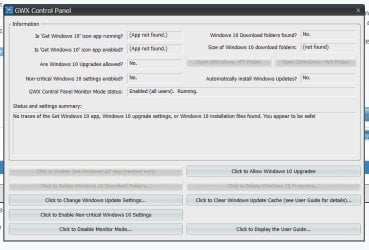
I had all the problems you describe, on both my desktop and my wife's laptop. Downloading GWX Control Panel is a simple process and it will take care of any Win10 stuff you have on your PC, just as it did with mine. I will put a screenshot here to show you what you get after download. Take time to read the Control Panel and set it as the screenshot. Good luck.
 

Attachments

  • No Ten..JPG
    No Ten..JPG
    73 KB · Views: 2

My Computer My Computer

At a glance

Windows 7/64 HPremium.AMD FX-6300.Corsair (2x4) GB DDR3 CMXGX3M2A1337CL9.NVidia/Gigabyte GT730 (2GB) GDDR5.
Computer type
PC/Desktop
Computer Manufacturer/Model Number
bertison
OS
Windows 7/64 HPremium.
CPU
AMD FX-6300.
Motherboard
Asus M5A78L-M LE/USB3.
Memory
Corsair (2x4) GB DDR3 CMXGX3M2A1337CL9.
Graphics Card(s)
NVidia/Gigabyte GT730 (2GB) GDDR5.
Sound Card
Onboard.
Monitor(s) Displays
Iiyama PLE2407HDS.
Screen Resolution
1920 x 1280
Hard Drives
Desktop: 1TB. WD10EZEX-00BN5A0.
Zyxel nsa310 NAS: 2TB Seagate Barracuda 7200.14.
Cache Drive: Sandisk SDSSDRC032G.
Laptop Lenovo B50/80 128 GB SSD.
PSU
Corsair 750M.
Case
Coolermaster N300.
Cooling
FRONT: (2X) 140mm. TOP: (1x) 120mm. REAR: (1x) 120mm.
Keyboard
Logitech K290
Mouse
Trust Optical Wired
Internet Speed
15 Mb Down, 0.55 Up.
Antivirus
Kaspersky Total Security 2017, Hitman Pro.
Browser
Firefox.
Other Info
NETWORK:
Sky "Q box" and router.
Desktop & NAS - 30 Metres Cat6 Ethernet wired, via TP-Link 4-port switch.
Lenovo B50/80 Laptop, 2x Wileyfox phones, Lenovo TAB3-8 tablet - all wireless.
Grandchildren, their parents and friends as bandwidth 'parasites' at various times!
Should have added: where the "Get Windows 10" icon was, you will get a "10" icon. There will also be an icon on the Desktop. Click them anytime and you can access the Control panel.

The reason why you got the 10 icon and the upgrade, is that you have Windows Updates set to "Automatic". To change that, go to Control Panel -> Windows Update -> Change settings -> (set it to) -> Check For Updates But Let Me Choose Whether to Download and Install Them.

That way, you can choose what to install.
 

My Computer My Computer

At a glance

Windows 7/64 HPremium.AMD FX-6300.Corsair (2x4) GB DDR3 CMXGX3M2A1337CL9.NVidia/Gigabyte GT730 (2GB) GDDR5.
Computer type
PC/Desktop
Computer Manufacturer/Model Number
bertison
OS
Windows 7/64 HPremium.
CPU
AMD FX-6300.
Motherboard
Asus M5A78L-M LE/USB3.
Memory
Corsair (2x4) GB DDR3 CMXGX3M2A1337CL9.
Graphics Card(s)
NVidia/Gigabyte GT730 (2GB) GDDR5.
Sound Card
Onboard.
Monitor(s) Displays
Iiyama PLE2407HDS.
Screen Resolution
1920 x 1280
Hard Drives
Desktop: 1TB. WD10EZEX-00BN5A0.
Zyxel nsa310 NAS: 2TB Seagate Barracuda 7200.14.
Cache Drive: Sandisk SDSSDRC032G.
Laptop Lenovo B50/80 128 GB SSD.
PSU
Corsair 750M.
Case
Coolermaster N300.
Cooling
FRONT: (2X) 140mm. TOP: (1x) 120mm. REAR: (1x) 120mm.
Keyboard
Logitech K290
Mouse
Trust Optical Wired
Internet Speed
15 Mb Down, 0.55 Up.
Antivirus
Kaspersky Total Security 2017, Hitman Pro.
Browser
Firefox.
Other Info
NETWORK:
Sky "Q box" and router.
Desktop & NAS - 30 Metres Cat6 Ethernet wired, via TP-Link 4-port switch.
Lenovo B50/80 Laptop, 2x Wileyfox phones, Lenovo TAB3-8 tablet - all wireless.
Grandchildren, their parents and friends as bandwidth 'parasites' at various times!
Do I also need a disc clean up as suggested by Keager? Which cleaner to use?

Just use the built in windows cleaner. Right click on the C drive, properties, disk cleanup there should be next to the graphic of the C drive.
 

My Computer My Computer

At a glance

Windows 7 Pro x64
Computer type
PC/Desktop
OS
Windows 7 Pro x64
Hi Woodbine, I suspect that you are a Senior Brit like myself, if I'm wrong I apologise.

No need to apologise. Yes, I'm a Brit and 50 years old later this year. Not quite a senior (although sometimes my body begs to differ), but I'm of the last generation not to be brought up with computers from birth. No bad thing, in my book. :)

Thanks for your advice, though I went for the Never 10 option in the end.
 

My Computer My Computer

At a glance

Windows 7 Home Premium 64 bit SP1Intel i3 5403GB DDR3SD
Computer type
PC/Desktop
Computer Manufacturer/Model Number
Acer Aspire Desktop M3910
OS
Windows 7 Home Premium 64 bit SP1
CPU
Intel i3 540
Memory
3GB DDR3SD
Monitor(s) Displays
LG Flatron L1960TR
Screen Resolution
1280x1024
Keyboard
Acer
Mouse
Genius
Antivirus
Avast (Free)
Browser
I E 11
Back
Top