Windows 2012 server Release Candidate fails install with vmware rel 8

jimbo45

New member
Guru
Gold Member
VIP
Local time
12:42 AM
Messages
5,941
Location
Hafnarfjörður IS
Hi there
deleted -- fixed now
 
Last edited:

My Computer My Computer

Computer type
PC/Desktop
Computer Manufacturer/Model Number
Custom built, several laptops HP/ASUS
OS
Linux CENTOS 7 / various Windows OS'es and servers
CPU
Intel i7 Intel i5
Memory
8GB, 16GB
Graphics Card(s)
On Motherboard
Sound Card
Realtek HD audio
Monitor(s) Displays
Apple Cinema display, Samsung LCD
Screen Resolution
1920 X 1080
Hard Drives
4 X 1TB SATA
Mouse
Toshiba wireless laser
Internet Speed
> 20MB up
W2012 server -- OK now --starts up in the DESKTOP !!!

Hi there

W2012 sever preview is a bit fiddly to install as a VM on a laptop -- well it IS a server OS !!!

1) after the initial install -- UNPLUG any external USB disks / sticks that you aren't using to install the VM on before the ist re-boot after all the files have been loaded.

2) for vmware specify it as a W7 x-64 machine if you are using the wizard.

3) set nr of processors to ONE and nr of Cores to 2 -- don't know why this particular combination worked but it did the trick

4) ensure vmware tools are installed

5) SOUND works but you have to enable the audio Manually -- on W8 server sound didm't work --end of.

6) you need to get IE from the Metro apps to the taskbar -- just pin to taskbar from the Metro app settings (Windows 8 users will know what I mean by this)


Note also choose the GUI install --otherwise you just get a server with the Powershell prompt at boot --fine for running a full blown server - but for testing on a laptop I suggest you use the GUI

I don't think "Themes" work -- it's a SERVER after all but at least it boots to the desktop

Ie security (usual on servers) -- very very fiddley to turn it off -- the supplied documentation in IE 10 doesn't work (Well it's microsoft so what did you expect !!)

I'm going to customize this to run as a workstation (switch off all the usual nags about re-booting servers etc --done this enough times with W2003 server) and see how I get on with this.

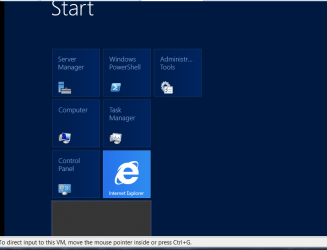
enc two screenshots

one --after boot -- to DESKTOP !!!! not metro
two the standard Metro screen.

Cheers
jimbo
 

Attachments

  • w2012_1.png
    w2012_1.png
    26.7 KB · Views: 29
  • w2012_2.png
    w2012_2.png
    17.3 KB · Views: 24

My Computer My Computer

Computer type
PC/Desktop
Computer Manufacturer/Model Number
Custom built, several laptops HP/ASUS
OS
Linux CENTOS 7 / various Windows OS'es and servers
CPU
Intel i7 Intel i5
Memory
8GB, 16GB
Graphics Card(s)
On Motherboard
Sound Card
Realtek HD audio
Monitor(s) Displays
Apple Cinema display, Samsung LCD
Screen Resolution
1920 X 1080
Hard Drives
4 X 1TB SATA
Mouse
Toshiba wireless laser
Internet Speed
> 20MB up
Good God, it looks awful! :confused:
 

My Computer My Computer

Computer type
PC/Desktop
Computer Manufacturer/Model Number
Golden Mk. I.4
OS
Windows 10 Pro x64 ; Xubuntu x64
CPU
Intel i7 860 @ 2.80 GHz O/C'ed to 4.0GHz
Motherboard
Gigabyte P55A-UD3R Rev.1. Award BIOS F13
Memory
16GB Corsair Vengance DDR3 @ 661 MHz Dual Channel (9-9-9-24)
Graphics Card(s)
EVGA NVidia GTX 560 1024MB
Sound Card
Realtek Integrated
Monitor(s) Displays
Dual Samsung SyncMaster 2494HS
Screen Resolution
1920*1080 and 1920*1080
Hard Drives
1*Samsung 840 EVO 120GB SSD;
1*OCZ Vertex 2 60GB SSD;
2*Samsung F3 SpinPoint 1TB in RAID0;
1*Samsung F1 SpinPoint 1TB;
2*Western Digital 1TB External USB 3.0
1*Western Digital 500GB External USB 3.0
1*Seagate 500GB External USB 2.0
PSU
Thermaltake ToughPower QFan 750W
Case
Thermaltake Element S VK60001W2Z
Cooling
Corsair H60 Water Cooling, 2*230mm and 2*80mm case fans
Keyboard
Logitech G110
Mouse
Logitech MX518
I'm amazed that Server 2012 allows the user to boot straight to desktop! Thought they were gonna force experienced network admins to suck the Metro down and like it...

Horrendous looking screens there, metro is completely unnecessary for a server based os...

Good work, and great write up on the required steps!
 

My Computer My Computer

Computer Manufacturer/Model Number
DELL SXPS 1640
OS
Windows 7 x64 Professional SP1
CPU
Intel C2D T9550 2.66 GHz @ 2.793 GHz (Thanks ThrottleStop!!)
Motherboard
Intel PM45
Memory
8 GB DDR3
Graphics Card(s)
ATI MOBILITY RADEON 4670
Sound Card
CREATIVE XFI AUDIO NOTEBOOK
Monitor(s) Displays
16.1 WLED
Screen Resolution
1920x1080
Hard Drives
Seagate ST9500420AS 500GB (465GiBi) 7200 RPM Drive

External Drives:-
2 TB WD Essentials x 3
1 TB WD Mybook Gen 1
1 TB WD Mybook Gen 2
1 TB Seagate
1 TB Seagate
320 GB WD Scorpio Black (enclosed)
PSU
90W Dell Power Brick
Case
Dell Chassis
Cooling
Coolermaster Cooling Pad
Keyboard
Built-in backlighted Keyboard
Mouse
Logitech Wireless Mini Mouse
Internet Speed
4/0.5
Good God, it looks awful! :confused:

Hi there
That's because I haven't done any desktop customising yet (also remember it is a SERVER -- often these run without screens at all for weeks or even years at a time so "De-Uglification" isn't the highest priority)

The "Bog standard" desktop always looks horrible. Even in W7 the basic screen was fairly hideous too.

Cheers
jimbo
 

My Computer My Computer

Computer type
PC/Desktop
Computer Manufacturer/Model Number
Custom built, several laptops HP/ASUS
OS
Linux CENTOS 7 / various Windows OS'es and servers
CPU
Intel i7 Intel i5
Memory
8GB, 16GB
Graphics Card(s)
On Motherboard
Sound Card
Realtek HD audio
Monitor(s) Displays
Apple Cinema display, Samsung LCD
Screen Resolution
1920 X 1080
Hard Drives
4 X 1TB SATA
Mouse
Toshiba wireless laser
Internet Speed
> 20MB up
Back
Top