Windows 7 64 bit memory question

k0c0s

New member
Local time
10:02 AM
Messages
9
Hi!

I have win7 x64 and 6 gb ram.
After windows starts I run everest and it says only 4,5 gb is free of the 6 gb memory.

My question is will windows free up memory if needed for applications or basically it uses only 4,5 out of 6

Thanks for your answers
 

My Computer

OS
windows 7 64 bit
4.5 free means that RAM is not being used right now - at least that is how I read it.

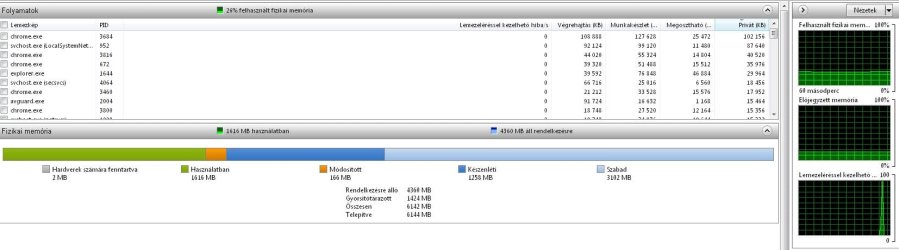
Go to Resource Monitor > Memory tab and snip the colored chart. Attach the picture with the paper clip to your post. Then we know what you have and can give you a better answer.
 

My Computer

Computer Manufacturer/Model Number
HP, Dell, Gateway, Toshiba - 4 laptops and 2 desktops
OS
Vista, Windows7, Mint Mate, Zorin, Windows 8
CPU
from 1.6GHz Duo to i7
Monitor(s) Displays
2x HP w2207
Hard Drives
5x HDD, 7x SSD, 12x Externals
Keyboard
with trackball - no mices
Mouse
Trackball mice
Internet Speed
DSL 6000
Thanks for the quick reply.
 

Attachments

  • memory.JPG
    memory.JPG
    82.6 KB · Views: 39

My Computer

OS
windows 7 64 bit
The Standby (Dark Blue) PLUS the (Free) Light Blue = Total amount of Free Memory.

The Standby are things you have used recently, or Windows thinks you will use soon pre-loaded. It can be dumped at any time if more memory is needed.

Ideally, you'll want the Free (Light Blue) as close to 0 as possible, as this means Windows is using all your available RAM to its full potential.

What your shows is that you have approx 4.5 GB of space avaialable to be used for anything.
 

My Computer

Computer Manufacturer/Model Number
Custom (Self Build)
OS
Windows 7 Home Premium 64bit
CPU
Intel Core i7 2700k
Motherboard
eVGA P67 SLI
Memory
8GB Mushkin Redline Ridgebacks @1866
Graphics Card(s)
EVGA GTX570 SC
Sound Card
XiFi Titanium HD
Monitor(s) Displays
LG W2453V
Screen Resolution
1920x1080
Hard Drives
Intel 320 80GB -- Intel X25-V 40GB --WD Black 1TB x2 -- WD Blue 640GB
PSU
Seasonic x750
Case
Corsair 600T SE White
Cooling
eVGA Superclocked CPU Cooler
Keyboard
Saitek Cyborg
Antivirus
Kaspersky
Browser
IE
Other Info
LG BD/DVD
windows 7 is a ram hog till other apps request use of the ram. It is smart about allocating ram. Do not be worried if you have no apps open and a high amount of ram being used. THis is normal.
 

My Computer

Computer Manufacturer/Model Number
Custom
OS
Windows 8 Professional
CPU
AMD Phenom II X6
Motherboard
ASUS
Memory
8 GB
Graphics Card(s)
XFX ATI Radeon 4890
Monitor(s) Displays
Dual 22" LCD
Screen Resolution
1680x1050
Hard Drives
PC Drives

HD0 = Crucial SSD 128gb Sata III
HD1 = 300gb (Seagate Barracuda)

NAS

HD0 = 1.5TB (Maxtor) Raid1
HD1 = 1.5TB (Maxtor) Raid1
HD2 = 1TB (Segate) Raid5
HD3 = 1TB (Segate) Raid5
HD4 = 1TB (Segate) Raid5
HD5 = 1TB (Segate) Raid5
PSU
750 watt
Mouse
Razr Mamba
Internet Speed
50 down 35 up FIOS
Ok. Thank you for your answers.
So windows will allocate memory if needed and I don't need to use tricks I used to , like bcdedit ?
 

My Computer

OS
windows 7 64 bit
That looks fine. Don't forget that programs (including the OS) can only execute and manipulate data in RAM. As you open/close programs, the above graph will change dynamically according to requirements. If there isn't enough free memory, data from another section that is currently not needed will be paged out to the paging file on the HDD and then new data can be stored in this area. Likewise, when that data now in the paging file is required again, it is paged back into RAM. Sometimes, more data has to be paged from the RAM first to make room.

So there is no need to worry. Windows 7 makes a very good job of dynamically managing its memory requirements at any given point in time and this appears transparent to the end user. One thing which I wouldn't advise is to disable the paging file as Windows is designed to use one.
 

My Computer

Computer type
PC/Desktop
Computer Manufacturer/Model Number
Dwarf Dwf/11/2012 r09/2013
OS
Windows 8.1 Pro RTM x64
CPU
Intel Core-i5-3570K 4-core @ 3.4GHz (Ivy Bridge) (OC 4.4GHz)
Motherboard
ASRock Z77 Extreme4-M
Memory
4 x 4GB DDR3-1600 Corsair Vengeance CMZ8GX3M2A1600C9B (16GB)
Graphics Card(s)
MSI GeForce GTX770 Gaming OC 2GB
Sound Card
Realtek High Definition on board solution (ALC 898)
Monitor(s) Displays
ViewSonic VA1912w Widescreen (VGA)
Screen Resolution
1440x900
Hard Drives
OCZ Agility 3 SSD 120GB SATA III x2 (RAID 0)
Samsung HD501LJ 500GB SATA II x2
Hitachi HDS721010CLA332 1TB SATA II
Iomega 1.5TB Ext USB 2.0
WD 2.0TB Ext USB 3.0
PSU
XFX Pro Series 850W Semi-Modular
Case
Gigabyte IF233
Cooling
1 x 120mm Front Inlet 1 x 120mm Rear Exhaust
Keyboard
Microsoft Comfort Curve Keyboard 3000 (USB)
Mouse
Microsoft Comfort Mouse 3000 for Business (USB)
Internet Speed
NetGear DG834Gv3 ADSL Modem/Router (Ethernet) ~4.0 Mb/s (O2)
Antivirus
Avast! 8.0.1497
Browser
IE 11
Other Info
Optical Drive: HL-DT-ST BD-RE BH10LS30 SATA Bluray
Lexmark S305 Printer/Scanner/Copier (USB)
WEI Score: 8.1/8.1/8.5/8.5/8.25
Asus Eee PC 1011PX Netbook (Windows 7 x86 Starter)
Ok. Thank you for your answers.
So windows will allocate memory if needed and I don't need to use tricks I used to , like bcdedit ?
Your situation is completely normal. And DO NOT INTERFERE with memory management. That will work against you - guaranteed.

windows 7 is a ram hog

That is the good part about Win7. Superfetch does an excellent job. And no storage device is faster than RAM - even an SSD is 100 times slower. The more Superfetch caches, the faster you will have access to programs previously used.
 

My Computer

Computer Manufacturer/Model Number
HP, Dell, Gateway, Toshiba - 4 laptops and 2 desktops
OS
Vista, Windows7, Mint Mate, Zorin, Windows 8
CPU
from 1.6GHz Duo to i7
Monitor(s) Displays
2x HP w2207
Hard Drives
5x HDD, 7x SSD, 12x Externals
Keyboard
with trackball - no mices
Mouse
Trackball mice
Internet Speed
DSL 6000
Back
Top