
Morning Star
New member
- Local time
- 1:14 PM
- Messages
- 1
Hello
I decided to install Windows 7 64 bit on my system as a clean install , I originally had Windows Vista 32 bit which worked and installed fine had no issues , however I wanted a 64 bit version of Windows so it would utilize my RAM to the fullest extend. However , after Windows was finished installing and all the boxes were ticked it restarted as normal to complete the installation however after the "Windows is starting screen" it gives me a BSOD for about a fraction of a second and then the system goes into a restart loop giving the same BSOD for the same amount of time "MULTI_PROCESSING_CONFIGURATION_NOT_SUPPORTED"
Now Before I posted this I have Googled and Googled this issue over and over again looking at all the different ways or issues that could cause this i.e removing ram sticks , APIC mode, checking if your system can run Windows 7 32 bit which it can , can my system/processor run 64 bit ? Yes , I will provide pictures and specs below.
Also I hear people saying it may be the "stepping" on the CPU . I am unsure of this however I will post specs and hopefully someone can point this out to me ?
I have also tried Vista 64 bit however after booting to start the setup I just get BSOD with the same error , it doesn't even start loading Windows files .
Like I said guys I have looked out there and I want to try fix this issue "in house" and not go to a repair shop . Most if not everywhere I have looked online state that Core 2 Duo can support and run Windows 64 bit .
Points to note : I am fairly computer literate , I do know some technical terminology , but not all so please forgive me . I have been booting from a USB however I installed Windows 7 32 bit from a USB and it worked fine . Please point out if I have missed any info .
Here are pictures and specs , many thanks guys for taking the time to help me out !
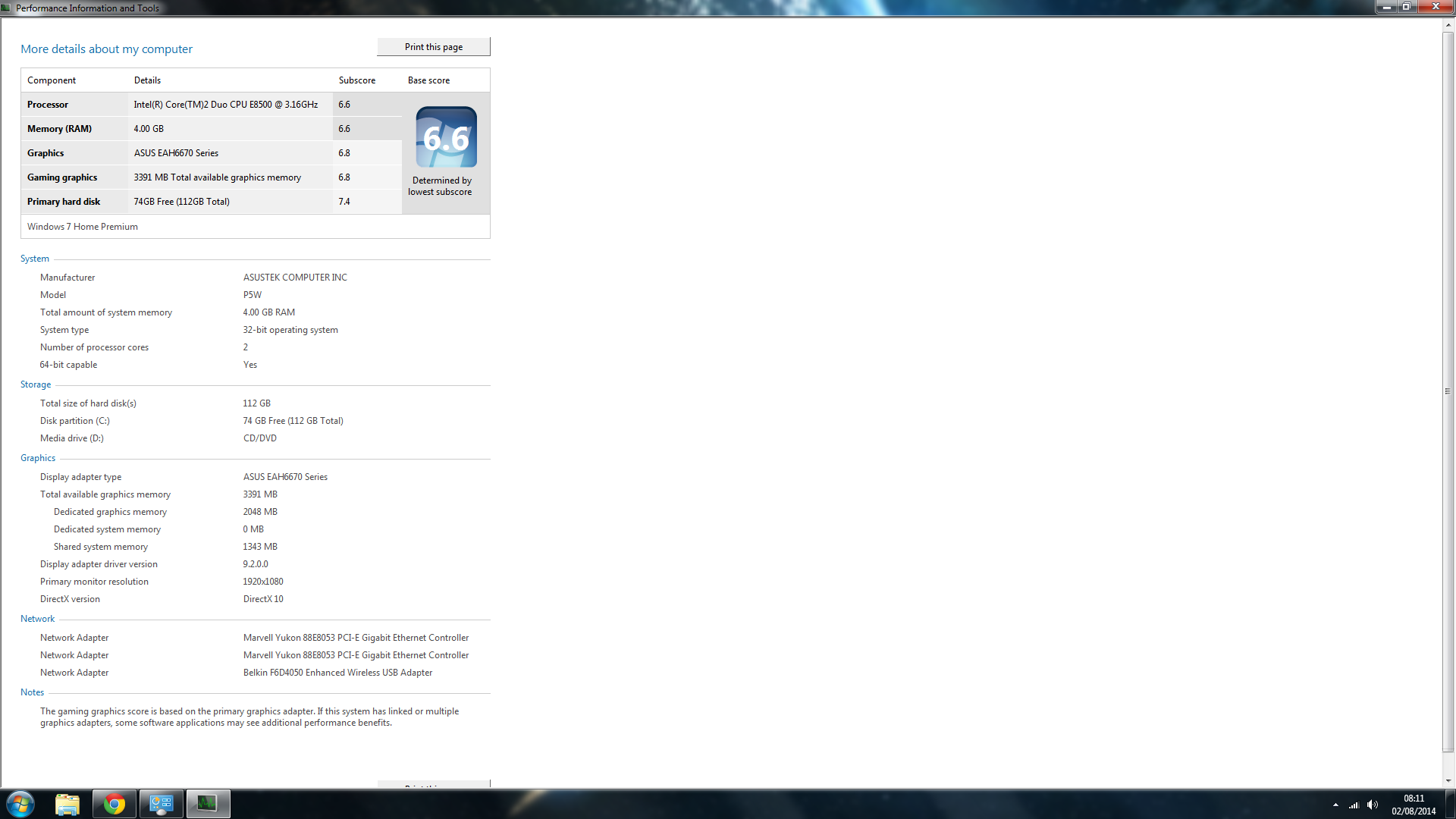

Operating System: Windows 7 Home Premium 32-bit (6.1, Build 7601) Service Pack 1
Processor: Intel(R) Core(TM)2 Duo CPU E8500 @ 3.16GHz (2 CPUs), ~3.2GHz
Memory: 4096MB RAM
Available OS Memory: 3200MB RAM
------
Card name: ASUS EAH6670 Series
Chip type: AMD Radeon Graphics Processor (0x6758)
Display Memory: 3378 MB
Dedicated Memory: 2035 MB
Shared Memory: 1343 MB
Current Mode: 1920 x 1080 (32 bit) (60Hz)
Monitor Name: Generic PnP Monitor
Native Mode: 1920 x 1080(p) (60.000Hz)
Output Type: HDMI
Cheers guys , sorry for the big post but hey , need all the info !
I decided to install Windows 7 64 bit on my system as a clean install , I originally had Windows Vista 32 bit which worked and installed fine had no issues , however I wanted a 64 bit version of Windows so it would utilize my RAM to the fullest extend. However , after Windows was finished installing and all the boxes were ticked it restarted as normal to complete the installation however after the "Windows is starting screen" it gives me a BSOD for about a fraction of a second and then the system goes into a restart loop giving the same BSOD for the same amount of time "MULTI_PROCESSING_CONFIGURATION_NOT_SUPPORTED"
Now Before I posted this I have Googled and Googled this issue over and over again looking at all the different ways or issues that could cause this i.e removing ram sticks , APIC mode, checking if your system can run Windows 7 32 bit which it can , can my system/processor run 64 bit ? Yes , I will provide pictures and specs below.
Also I hear people saying it may be the "stepping" on the CPU . I am unsure of this however I will post specs and hopefully someone can point this out to me ?
I have also tried Vista 64 bit however after booting to start the setup I just get BSOD with the same error , it doesn't even start loading Windows files .
Like I said guys I have looked out there and I want to try fix this issue "in house" and not go to a repair shop . Most if not everywhere I have looked online state that Core 2 Duo can support and run Windows 64 bit .
Points to note : I am fairly computer literate , I do know some technical terminology , but not all so please forgive me . I have been booting from a USB however I installed Windows 7 32 bit from a USB and it worked fine . Please point out if I have missed any info .
Here are pictures and specs , many thanks guys for taking the time to help me out !
Operating System: Windows 7 Home Premium 32-bit (6.1, Build 7601) Service Pack 1
Processor: Intel(R) Core(TM)2 Duo CPU E8500 @ 3.16GHz (2 CPUs), ~3.2GHz
Memory: 4096MB RAM
Available OS Memory: 3200MB RAM
------
Card name: ASUS EAH6670 Series
Chip type: AMD Radeon Graphics Processor (0x6758)
Display Memory: 3378 MB
Dedicated Memory: 2035 MB
Shared Memory: 1343 MB
Current Mode: 1920 x 1080 (32 bit) (60Hz)
Monitor Name: Generic PnP Monitor
Native Mode: 1920 x 1080(p) (60.000Hz)
Output Type: HDMI
Cheers guys , sorry for the big post but hey , need all the info !
My Computer
- Computer type
- PC/Desktop
- OS
- Windows 7 32 bit


