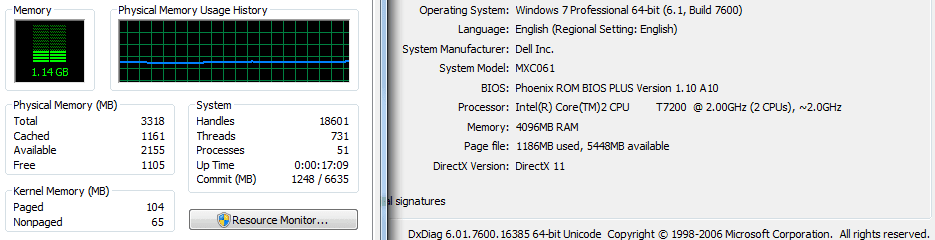
Windows 7 64 bit only using 3.24/4GB RAM.

Thatguy2007

New member
Local time
12:42 PM
Messages
14
I installed Windows 7 professional 64 bit RTM on:
Dell Inspiron E1405 with 4 GB RAM
i have the latest drivers and BIOS that came out. I know that 200MB went to help the chip-set shared video memory. But wheres the rest? i need know whats going on??

64.PNG
Attached is a picture of the system.

Thank you,

P.S. should i just downgrade to a 32bit, since almost everything runs on 32 bit, and i'm not really benefiting from 64 bit??
 

Attachments

  • 64.PNG
    64.PNG
    4.3 KB · Views: 87
Last edited:

My Computer My Computer

Computer Manufacturer/Model Number
DELL
OS
Windows 7 professional 32 bit
CPU
Intel T7200 2.0 GHz
Memory
4GB DDR2 RAM
Check in your BIOS for a feature called memory mapping, or something to that effect. Some people with this issue have resolved it by enabling that option, if it exists.
 

My Computer My Computer

OS
Windows 7 Ultimate x64 SP1
CPU
Intel Core i7-2600
Motherboard
Gigabyte GA-P67A-UD3P-B3
Memory
12 GB Patriot Extreme DDR3-1333
Graphics Card(s)
Nvidia GTX 470
Monitor(s) Displays
Dell UltraSharp 2209WA
Hard Drives
OCZ Agility3 240 GB, WD5001AALS, WD7501AALS
PSU
OCZ ModStream 700W
Case
CoolerMaster HAF 912 Advanced
Cooling
CoolerMaster Hyper 212 Plus
I have a Mobile Intel 945GM express chipset family, i will check to see if i can do that, but i doubt it, thanks tho.
 

My Computer My Computer

Computer Manufacturer/Model Number
DELL
OS
Windows 7 professional 32 bit
CPU
Intel T7200 2.0 GHz
Memory
4GB DDR2 RAM
The system may also be using more memory for video than you think, depdning on how that is configured as well.
 

My Computer My Computer

OS
Windows 7 Ultimate x64 SP1
CPU
Intel Core i7-2600
Motherboard
Gigabyte GA-P67A-UD3P-B3
Memory
12 GB Patriot Extreme DDR3-1333
Graphics Card(s)
Nvidia GTX 470
Monitor(s) Displays
Dell UltraSharp 2209WA
Hard Drives
OCZ Agility3 240 GB, WD5001AALS, WD7501AALS
PSU
OCZ ModStream 700W
Case
CoolerMaster HAF 912 Advanced
Cooling
CoolerMaster Hyper 212 Plus
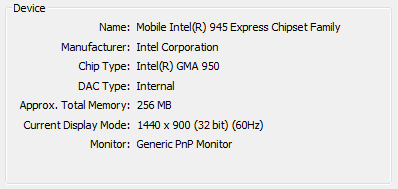
i checked the BIOS it is only using 256 of video memory:

Do you think i should just down grade to a 32 bit, since I'm not using 100% of the RAM? ( plus almost everything runs on 32 bit)

Thank you.
 

Attachments

  • video.PNG
    video.PNG
    3.4 KB · Views: 53
  • system.PNG
    system.PNG
    12.3 KB · Views: 120

My Computer My Computer

Computer Manufacturer/Model Number
DELL
OS
Windows 7 professional 32 bit
CPU
Intel T7200 2.0 GHz
Memory
4GB DDR2 RAM
Why downgrade to 32bit? Just keep 64bit so if you ever increase your installed RAM you won't have a problem. Plus, there's not a lot of programs out there any more that you can't get running on a 64bit OS!
 

My Computer My Computer

Computer type
PC/Desktop
Computer Manufacturer/Model Number
Me
OS
Windows 7 Professional SP1 64-bit
CPU
Intel Core i7-4930k @ 4.2GHz
Motherboard
ASUS Rampage IV Black Edition
Memory
16GB Corsair Dominator Platinum 1866MHz CL9 (4 x 4GB)
Graphics Card(s)
2x eVGA GeForce GTX TITAN 6GB in SLI
Sound Card
Onboard ASUS SupremeFX
Monitor(s) Displays
3x 24" ASUS PA248Q IPS in Nvidia Surround, Samsung 58" 3DTV
Screen Resolution
5760x1200, 1080p
Hard Drives
2x 256GB Samsung 840 Pro's (RAID 0)
2x Seagate 4TB ST4000DM000 (RAID 1)
PSU
Corsair AX1200i PSU
Case
Corsair 900D
Cooling
Corsair H100i w/4x 120mm, 3x 120mm front, 1x 140mm rear
Keyboard
Razer BlackWidow Ultimate 2013
Mouse
Razer DeathAdder 2013
Internet Speed
250Mbit/s Download, 15 Mbit/s Upload
True but my laptop can only handle a max of 4 GB RAM (200-pin SODIMM, DDR2 PC2-5300 • CL=5 • Unbuffered • NON-ECC • DDR2-667 • 1.8V • 256Meg x 64 { i didn't find more RAM that has these exact specs}) .but yea w.e. its all good.

Thanks guys.
 

My Computer My Computer

Computer Manufacturer/Model Number
DELL
OS
Windows 7 professional 32 bit
CPU
Intel T7200 2.0 GHz
Memory
4GB DDR2 RAM

My Computer My Computer

Computer Manufacturer/Model Number
Sony Vaio FZ21Z
OS
Windows 7 Ultimate x64 ®™
CPU
Intel Core 2 Duo (2.2 GHz)
Motherboard
Sony (Intel Chipset)
Memory
2x 2GB Corsair (667 MHz)
Graphics Card(s)
NVIDIA 8600M GS (256MB)
Sound Card
Sigmatel
Monitor(s) Displays
15.4" TFT X-Black
Screen Resolution
1280x800
Hard Drives
Western Digital 300GB Scorpio Black (7200rpm)
Mouse
Logitech Anywhere MX
Internet Speed
Sky 5MB
yes i have (BIOS A10)
 

My Computer My Computer

Computer Manufacturer/Model Number
DELL
OS
Windows 7 professional 32 bit
CPU
Intel T7200 2.0 GHz
Memory
4GB DDR2 RAM
Im writing this on a 1405 4gigs 32bit. 32 has a bunch of benifts. easier to find drivers, run cooler, takes lees HD space, uses less resources.

One way to find out is to backup first install 32 if there is enough space dual boot. then pick the one you prefer and delete the other

Hope this helps

Ken
 

My Computer My Computer

Computer Manufacturer/Model Number
HP Pavillion dv-7 1005 Tx
OS
Win 8 Release candidate 8400
CPU
[email protected]
Memory
4 gigs
Graphics Card(s)
Nvidia 9600M
Sound Card
HD built-in
Monitor(s) Displays
17" Wxga
Screen Resolution
1440x900
Cooling
none
Internet Speed
45Mb down 5Mb up
what version of windows are you using? is it ultimate or ??
 

My Computer My Computer

Computer Manufacturer/Model Number
Custom Built
OS
Windows 7 Professional x64
CPU
Intel Core i7 2600k - 3.4 GHz
Motherboard
Asus Maximus IV Z68 - Extreme
Memory
4x4 Ripjaws X79 Series 2133 MHz (9-11-10-28)
Graphics Card(s)
1x eVGA GTX 580 - 3GB Classified
Sound Card
Realtek ALC 889 HD Audio
Monitor(s) Displays
Full HD Philips TV 32"
Screen Resolution
1920x1080
Hard Drives
1x Crucial m4 SSD 512 GB
PSU
800W Coolermaster Silentpro Gold
Case
Sentey - Renegade GS-6200
Cooling
Stock
Keyboard
Logitech K800 Wireless
Mouse
Logitech Performance MX Laser
Internet Speed
10MB Internet Connection
Last edited:

My Computer My Computer

Computer Manufacturer/Model Number
Sony Vaio FZ21Z
OS
Windows 7 Ultimate x64 ®™
CPU
Intel Core 2 Duo (2.2 GHz)
Motherboard
Sony (Intel Chipset)
Memory
2x 2GB Corsair (667 MHz)
Graphics Card(s)
NVIDIA 8600M GS (256MB)
Sound Card
Sigmatel
Monitor(s) Displays
15.4" TFT X-Black
Screen Resolution
1280x800
Hard Drives
Western Digital 300GB Scorpio Black (7200rpm)
Mouse
Logitech Anywhere MX
Internet Speed
Sky 5MB
i checked the BIOS it is only using 256 of video memory:

Do you think i should just down grade to a 32 bit, since I'm not using 100% of the RAM? ( plus almost everything runs on 32 bit)

Thank you.

Why downgrade to 32bit? Just keep 64bit so if you ever increase your installed RAM you won't have a problem. Plus, there's not a lot of programs out there any more that you can't get running on a 64bit OS!

FZ

My sentiments exactly. Mine will not, really didnt think his would. Besides that 2 memory slots max memory 4gigs no upgrade so the masx usable memory is 3.25. with that memory 64bit would be thin if it can be done at all

Plus its 945 intel chipset for video and their 64bit driver s**ks.

Believe me If it could I would


Ken
 
Last edited:

My Computer My Computer

Computer Manufacturer/Model Number
HP Pavillion dv-7 1005 Tx
OS
Win 8 Release candidate 8400
CPU
[email protected]
Memory
4 gigs
Graphics Card(s)
Nvidia 9600M
Sound Card
HD built-in
Monitor(s) Displays
17" Wxga
Screen Resolution
1440x900
Cooling
none
Internet Speed
45Mb down 5Mb up
hey,

Alex: I'm running windows 7 professional 64 bit RTM (build 7600).

FZ: Thats weird, i ran the Windows 7 upgrade advisor ( Windows 7 Upgrade Advisor ) and they said it was fine.

Ken: you make a good point, it most likely would run smoother, and plus ALOT of stuff is compatible on 32 bit and not so much on a 64 bit.

ALL: Do you think i should install 32 bit windows 7 professional or stick with this? (pros and cons)


Thanks
 

My Computer My Computer

Computer Manufacturer/Model Number
DELL
OS
Windows 7 professional 32 bit
CPU
Intel T7200 2.0 GHz
Memory
4GB DDR2 RAM
hey,
FZ: Thats weird, i ran the Windows 7 upgrade advisor ( Windows 7 Upgrade Advisor ) and they said it was fine.

I think, but don't quote me, that you'll be able to run it, as you clearly are, but your bios doesn't allow it to run properly, or at least x64, evident by it only using 3.24GB, but that page would indicate that Dell won't be supporting it for use with Windows 7.
 

My Computer My Computer

Computer Manufacturer/Model Number
Sony Vaio FZ21Z
OS
Windows 7 Ultimate x64 ®™
CPU
Intel Core 2 Duo (2.2 GHz)
Motherboard
Sony (Intel Chipset)
Memory
2x 2GB Corsair (667 MHz)
Graphics Card(s)
NVIDIA 8600M GS (256MB)
Sound Card
Sigmatel
Monitor(s) Displays
15.4" TFT X-Black
Screen Resolution
1280x800
Hard Drives
Western Digital 300GB Scorpio Black (7200rpm)
Mouse
Logitech Anywhere MX
Internet Speed
Sky 5MB
win 7 32 bit

cons only able to use 3.25 gigs ram. is somewhat slower in some situations. Is an older OS

pros drivers are easier to find, it can run legacy 16 bit apps, runs cooler than 64, and is more stabile.

win 7 64

Cons drivers, heat in desktops, bigger footprint and higher ram needed. cant run 16bit, NO 64 BIT ADOBE FLASH PLAYER.

Can take tons of ram up to 192 gigs (not on destops) runs instructions more quickly so it feels faster. Is the shape of the future (2-3 years out) handles intense apps better like photoshop, and video editing.

I run both and the only time I notice a difference is when I need bleeding edge performance, like rendering, or photoshoping.

You make the call

Ken
 

My Computer My Computer

Computer Manufacturer/Model Number
HP Pavillion dv-7 1005 Tx
OS
Win 8 Release candidate 8400
CPU
[email protected]
Memory
4 gigs
Graphics Card(s)
Nvidia 9600M
Sound Card
HD built-in
Monitor(s) Displays
17" Wxga
Screen Resolution
1440x900
Cooling
none
Internet Speed
45Mb down 5Mb up
Thanks alot Ken, I'm thinking about doing what you said earlier, splitting the hard drive and installing 32 bit windows 7 and seeing how it goes.

all i do is surf the web (firefox) do some mindless work, papers, excel etc etc etc... and the occasional games, but i heard some games don't run on 64 bit, and i feel since 32 bit is going to be smoother / faster (since it uses less resources, etc) to would run it better, my system sadly can't hold more than 4 GB of ram so i think that 32 bit is the best option.


Is there an other benifits to 64 bit other than handling more RAM and "future" and heavy apps?

Thanks again
 

My Computer My Computer

Computer Manufacturer/Model Number
DELL
OS
Windows 7 professional 32 bit
CPU
Intel T7200 2.0 GHz
Memory
4GB DDR2 RAM
The 945 chipset in your laptop does not support 4GB.

From Wikipedia:

Lakeport (945xx) chipsets lacks support for remapping memory; the size of addressable memory space may be less than 4 GB, regardless whether the processor operates in 64-bit mode.

Sorry :(
 

My Computer My Computer

Computer Manufacturer/Model Number
XFX NForce 780i SLI
OS
Win7 64-bit Ultimate
CPU
Intel Core2 Extrme X9650 3.0Ghz @ 3.33Ghz
Motherboard
XFX Intel 780i
Memory
8GB DDR-2 1333Mhz
Graphics Card(s)
2x SLI NVIDIA 780GTX
Sound Card
PCI Express X-Fi Titanium Fatal1ty Champion PCI-X
Monitor(s) Displays
2x Samsung LCD
Screen Resolution
1280x1024
Hard Drives
4x Seagate Barracuda 500GB something.10
PSU
PC Power & Cooling 1000W
Case
Thermaltake
Cooling
Water - 2x Koolance EXOS 2.5
Keyboard
Logitech DiNovo
Mouse
Logitech MX1000
Internet Speed
25 Down/5 Up
The 945 chipset in your laptop does not support 4GB.

From Wikipedia:

Lakeport (945xx) chipsets lacks support for remapping memory; the size of addressable memory space may be less than 4 GB, regardless whether the processor operates in 64-bit mode.

Sorry :(
I was reading the thread and I went straight to wikipedia and was about to post this...

Chris is correct...the reason is the chipset not anything else. I would still recommend sticking with 64-bit because it takes full advantage of the processor and is faster in some situations but as Ken said it is up to you...

Just to clear a little confusion that might arise...eventhough there is no Flash Player for x64 most people use IE(32-bit) on Windows 7 x64 regardless. It is the default pinned IE on the Superbar at installation. I am making this statement to make sure folks don't take Ken's statement as "No Flash Player possible for x64 systems"
 

My Computer My Computer

Computer Manufacturer/Model Number
Compal JFT02 (Custom Build Laptop)
OS
Windows 7 Home Premium x64 - Mac OS X 10.6.4 x64
CPU
Intel Core 2 Duo T9300 2.5 GHz
Motherboard
JFT02
Memory
4GB Kingston DDR2-800
Graphics Card(s)
NVIDIA Geforce 8600M GT (512MB Model)
Sound Card
Realtek HD Audio
Monitor(s) Displays
WUXGA Standard Laptop Display
Screen Resolution
1680*1050
Hard Drives
Toshiba 320GB 5400RPM Laptop HD
PSU
Standard Laptop Power Supply
Case
Standard Laptop Case
Cooling
Standard Laptop Cooling
Keyboard
Standard Laptop 105 Key-Keyboard
Mouse
Synaptics Touchpad
Internet Speed
Verizion Online DSL 3360/864 kbs (dl/up)
Back
Top