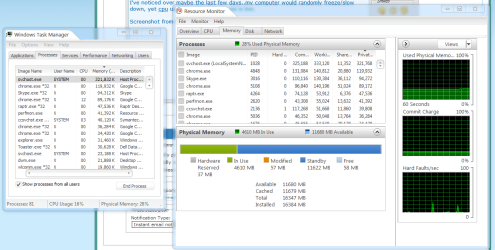
I've noticed over maybe the last few days..my computer would randomly freeze/slow down, yet cpu usage and memory in use is low.
It says all of it is cached right now..i don't know if that's normal for Windows 7 or what.
It's not freezing right now but it eventually will, yesterday i got the low memory warning and my computer completely froze up.
I really dunno what to do as my memory doesn't seem bad, neither does the hardware. I only got this computer a little over a month ago and it's been working great, infact it still does aside from these freezes over the last few days.
EDIT:
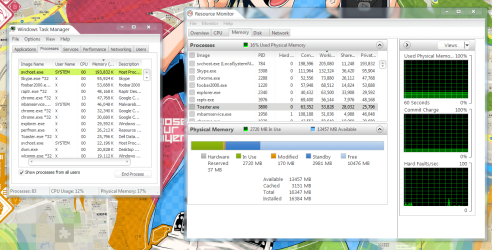
I'll post another screenshot of when it actually happens to see if there's a difference.
But i noticed my svchost file is at around 331mb of ram..i have 16gb so that shouldn't be the issue though. >.<
Attachments
MemCached.png
55.4 KB
· Views: 64
My Computer
At a glance
Windows 7 Home Premium 64bitIntel(R) Core(TM) i7-3770 CPU @ 3.40GHz (3.9 ...16GB Dual Channel DDR3 1600MHzAMD Radeon™ HD 7770 2GB GDDR5
Computer Manufacturer/Model Number
DELL
OS
Windows 7 Home Premium 64bit
CPU
Intel(R) Core(TM) i7-3770 CPU @ 3.40GHz (3.9 w/Turbo Boost)
Motherboard
DELL (Ivy Bridge)
Memory
16GB Dual Channel DDR3 1600MHz
Graphics Card(s)
AMD Radeon™ HD 7770 2GB GDDR5
Sound Card
Integrated 7.1 with WAVE MAXXAudio 4
Screen Resolution
1920x1080
Hard Drives
2TB 7200RPM, SATA Hard Drive 6.0 Gb/s + 32GB SSD SRT Enhancement
Microsoft Security Essentials and Malwarebytes Premium
Browser
Pale Moon
Other Info
All fans PWM; speeds at idle: CPU circa 500 rpm; intake circa 600 rpm; exhaust circa 600 rpm; CPU temps 27 idle and 47 C load in a warm room (27 C/81 F) when running Intel Extreme Tuning Utility stress test.
Microsoft Security Essentials and Malwarebytes Premium
Browser
Pale Moon
Other Info
All fans PWM; speeds at idle: CPU circa 500 rpm; intake circa 600 rpm; exhaust circa 600 rpm; CPU temps 27 idle and 47 C load in a warm room (27 C/81 F) when running Intel Extreme Tuning Utility stress test.
I think it was an extension i had in google chrome, i noticed my memory spiked up to 9gb usage so i closed chrome and it went down so quick a minute or two after. So i deleted two extensions and it seems to be fine now.
I'll wait a little longer to see if it happens again.
EDIT:
Well guess that wasn't the problem, It happened again but i just rebooted after the scans. Scan now said there were some problems that it fixed/Norton said no viruses and Malware also had 0.
I also noticed now the cache memory isn't constantly going up until it takes it all like last time. =/
Attachments
Scr2.png
147.5 KB
· Views: 26
Last edited:
My Computer
At a glance
Windows 7 Home Premium 64bitIntel(R) Core(TM) i7-3770 CPU @ 3.40GHz (3.9 ...16GB Dual Channel DDR3 1600MHzAMD Radeon™ HD 7770 2GB GDDR5
Computer Manufacturer/Model Number
DELL
OS
Windows 7 Home Premium 64bit
CPU
Intel(R) Core(TM) i7-3770 CPU @ 3.40GHz (3.9 w/Turbo Boost)
Motherboard
DELL (Ivy Bridge)
Memory
16GB Dual Channel DDR3 1600MHz
Graphics Card(s)
AMD Radeon™ HD 7770 2GB GDDR5
Sound Card
Integrated 7.1 with WAVE MAXXAudio 4
Screen Resolution
1920x1080
Hard Drives
2TB 7200RPM, SATA Hard Drive 6.0 Gb/s + 32GB SSD SRT Enhancement