cpu and memory usage rises dramatically

zareiramin

New member
Local time
5:24 PM
Messages
9
Hi, All.
some times when I'm working with my PC, it's memory and CPU usage rises dramatically (say from 700mb to 4GB and 70% CPU usage) and it freezes for about 2 minutes.
meanwhile my hdd is working hard (hdd led is red). after that it continues to working normally. I've takeded a picture form windows task manager screen to show you.here:

now I've enabled a performance counter so. after it countered that problem I'll post you.

any ideas?
tanks in advance.
 

Attachments

  • Untitled.png
    Untitled.png
    33.8 KB · Views: 17

My Computer

OS
Windows 7 Ultimate x64
CPU
E8400
Motherboard
Gigabyte EP31 DSL3
Check your processes list,maybe there is something that bother your cpu...
 

My Computer

Computer type
PC/Desktop
Computer Manufacturer/Model Number
Custom Build
OS
Windows 10 Pro x64
CPU
Intel Core i5 4440 @Stock
Motherboard
Gigabyte Z97 D3H
Memory
4 x 4GB HyperX Fury DDR3
Graphics Card(s)
Gigabyte GTX 1050Ti O4G
Sound Card
Integrated
Monitor(s) Displays
Dell P2417H
Screen Resolution
1920 x 1080
Hard Drives
Samsung EVO 850 120GB / Toshiba DT01ACA050 1TB 7200prm 32MB
PSU
Riotoro Onyx 750W
Case
NZXT H500 Black-Red
Cooling
Stock CPU + NZXT 120mm + 2x120mm red fans
Keyboard
Modecom Volcano Lanparty
Mouse
Asus ROG Gladius / DeepCool E-Pad Plus
Internet Speed
DOCSIS 50/3 Mbit
Browser
Google Chrome
Other Info
Asus K55VJ(i5 3210M, GT635M / 2GB, 8GB DDR3, 500GB HDD)
Hi Zareiramin - Start with a virus scan. If you dont find anything then try pining the "Task Manager" to your taskbar so you can activate it very quickly - and as suggested by "Stalker" above check under the "Processes" tab to see if you can see "who's" using your computer.

And while in the task Manager (after studying the processes) click the "performance tab", then the "resource monitor" button at the bottom of the screen and then the "disk tab" to get maybe even a clearer picture of which program or service is accessing your drive and using your computer. :):):)
 
Last edited:

My Computer

Computer Manufacturer/Model Number
Alienware Aurora
OS
Win 7 Ultimate x64
CPU
Core I7 980X O.C. to 4.0 Ghz
Motherboard
Custom Intel mATX (Bios ver A10)
Memory
12GB 1600 mhz triple channel DDR3 - Kingston
Graphics Card(s)
ATI Radeon HD 5970 2GB Video Card
Sound Card
Creative Labs Titanium sound blaster
Monitor(s) Displays
30" Dell LCD
Screen Resolution
2560 x 1600
Hard Drives
240 GB OCZ Vertex 2 SSD
256 GB Samsung V2 SSD
2TB WD Black Caviar 7200 rpm SATA3
600GB WD Velociraptor 10,000 rpm SATA3
3TB WD MyBook Essential USB 3.0 7200 rpm External
PSU
850 Watt
Case
Alienware Aurora
Cooling
Water
Keyboard
Logitech G15 (original version)
Mouse
Logitech MX1000 Laser - Wireless
Internet Speed
Cable 22 Mb/sec download
Other Info
USB 3.0,
Blue Ray DVD Read/Writer
Bose Companion 3 Speakers
WRT54G Wireless Router
Hi, sorry my late reply
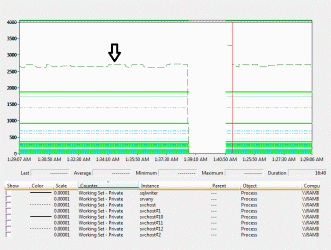
My PC freezes, and i can't run task manager (the above image was a good luck), after about 5 minutes it works normally and my memory usage become normal.
I've runned performance monitor but in middle of freeze time no thing was logged!!!. here is image, I've marked memory available bytes (green dash).


in middle of freezing i can't do any thing. i have to wait until it completed.
the freezing occurs when I'm connecting to internet via broadband connection (may be help u).
one point is that I've update my nvidia driver to last version but some times i get driver has stopped working and has recovered...


tanks
 

Attachments

  • aaa - Copy.gif
    aaa - Copy.gif
    97.4 KB · Views: 14

My Computer

OS
Windows 7 Ultimate x64
CPU
E8400
Motherboard
Gigabyte EP31 DSL3
Back
Top