
Windows 7 64bit, Memory usage rises/computer freezes over time.

Xeltos

New member
Local time
8:07 AM
Messages
3
Location
Canada
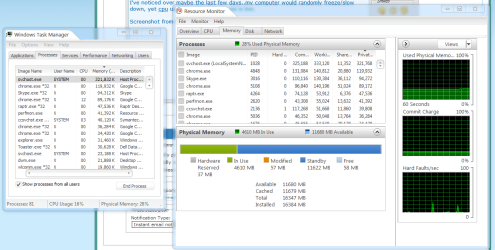
I've noticed over maybe the last few days..my computer would randomly freeze/slow down, yet cpu usage and memory in use is low.

It says all of it is cached right now..i don't know if that's normal for Windows 7 or what.
It's not freezing right now but it eventually will, yesterday i got the low memory warning and my computer completely froze up.

I really dunno what to do as my memory doesn't seem bad, neither does the hardware. I only got this computer a little over a month ago and it's been working great, infact it still does aside from these freezes over the last few days.

EDIT:
I'll post another screenshot of when it actually happens to see if there's a difference.
But i noticed my svchost file is at around 331mb of ram..i have 16gb so that shouldn't be the issue though. >.<
 

Attachments
  • MemCached.png
    MemCached.png
    55.4 KB · Views: 64

My Computer

Computer Manufacturer/Model Number
DELL
OS
Windows 7 Home Premium 64bit
CPU
Intel(R) Core(TM) i7-3770 CPU @ 3.40GHz (3.9 w/Turbo Boost)
Motherboard
DELL (Ivy Bridge)
Memory
16GB Dual Channel DDR3 1600MHz
Graphics Card(s)
AMD Radeon™ HD 7770 2GB GDDR5
Sound Card
Integrated 7.1 with WAVE MAXXAudio 4
Screen Resolution
1920x1080
Hard Drives
2TB 7200RPM, SATA Hard Drive 6.0 Gb/s + 32GB SSD SRT Enhancement
Have you run any tests on the hard drive or on the RAM?

Have you run sfc /scannow from a command prompt?

Are you virus and malware free?

What anti-virus do you use?

Will this eventually happen if you just start the PC and walk away from it, with no applications opened?
 

My Computer

Computer type
PC/Desktop
Computer Manufacturer/Model Number
Ignatz Special; 4 speed manual gearbox; factory air conditioning; one of one
OS
Windows 7 Home Premium SP1, 64-bit
CPU
Intel Skylake i5-6600K, not overclocked
Motherboard
AsRock Z170M Extreme 4, micro ATX
Memory
8 GB HyperX DDR4-2666 (2 x 4 GB)
Graphics Card(s)
none; graphics are integrated on CPU
Sound Card
onboard: Realtek ALC1150; external: USB Behringer UF0-202
Monitor(s) Displays
Dell S2340M 23 inch IPS
Screen Resolution
1600 x 900
Hard Drives
System: Crucial MX100 series SSD, 128 GB;
Data: Samsung Spinpoint 103SJ, 1 TB;
Backup: WD Caviar Green WD30EZRX-00D8PB0, 3 TB
PSU
Rosewill SilentNight 500 watt fanless, semi-modular
Case
Antec Solo II
Cooling
Noctua NH-U12S; Noctua F12 intake, Noctua S12A exhaust
Keyboard
Microsoft 200 6JH-00001 USB
Mouse
Dell or Microsoft optical wired; USB
Antivirus
Microsoft Security Essentials and Malwarebytes Premium
Browser
Pale Moon
Other Info
All fans PWM; speeds at idle: CPU circa 500 rpm; intake circa 600 rpm; exhaust circa 600 rpm; CPU temps 27 idle and 47 C load in a warm room (27 C/81 F) when running Intel Extreme Tuning Utility stress test.
I haven't run any tests yet on HDD or RAM, currently doing virus scan/sfc-scannow
What should i use to test them?

I use Norton (Internet Security 2012)

It hasn't happened when i walk away from it either.

I'm pretty sure something ends up stealing ALL of my memory. But it doesn't show up on Task Manager..
 

My Computer

Computer Manufacturer/Model Number
DELL
OS
Windows 7 Home Premium 64bit
CPU
Intel(R) Core(TM) i7-3770 CPU @ 3.40GHz (3.9 w/Turbo Boost)
Motherboard
DELL (Ivy Bridge)
Memory
16GB Dual Channel DDR3 1600MHz
Graphics Card(s)
AMD Radeon™ HD 7770 2GB GDDR5
Sound Card
Integrated 7.1 with WAVE MAXXAudio 4
Screen Resolution
1920x1080
Hard Drives
2TB 7200RPM, SATA Hard Drive 6.0 Gb/s + 32GB SSD SRT Enhancement
Use the drive manufacturer's utility to test the drive.

Use memtest86+ to test memory. Let it run for 6 or 8 passes. You have a lot of RAM, so that may take overnight or longer.

You could also start pulling random RAM sticks and see if it persists with the remaining sticks. But I'd run memtest86+ regardless.

I'd try to find out if it happened with Norton disabled.

If it doesn't happen when abandoned after a startup, it presumably has something to do with something you later start.

I'd run a malware scan from someone like Malwarebytes.
 

My Computer

Computer type
PC/Desktop
Computer Manufacturer/Model Number
Ignatz Special; 4 speed manual gearbox; factory air conditioning; one of one
OS
Windows 7 Home Premium SP1, 64-bit
CPU
Intel Skylake i5-6600K, not overclocked
Motherboard
AsRock Z170M Extreme 4, micro ATX
Memory
8 GB HyperX DDR4-2666 (2 x 4 GB)
Graphics Card(s)
none; graphics are integrated on CPU
Sound Card
onboard: Realtek ALC1150; external: USB Behringer UF0-202
Monitor(s) Displays
Dell S2340M 23 inch IPS
Screen Resolution
1600 x 900
Hard Drives
System: Crucial MX100 series SSD, 128 GB;
Data: Samsung Spinpoint 103SJ, 1 TB;
Backup: WD Caviar Green WD30EZRX-00D8PB0, 3 TB
PSU
Rosewill SilentNight 500 watt fanless, semi-modular
Case
Antec Solo II
Cooling
Noctua NH-U12S; Noctua F12 intake, Noctua S12A exhaust
Keyboard
Microsoft 200 6JH-00001 USB
Mouse
Dell or Microsoft optical wired; USB
Antivirus
Microsoft Security Essentials and Malwarebytes Premium
Browser
Pale Moon
Other Info
All fans PWM; speeds at idle: CPU circa 500 rpm; intake circa 600 rpm; exhaust circa 600 rpm; CPU temps 27 idle and 47 C load in a warm room (27 C/81 F) when running Intel Extreme Tuning Utility stress test.
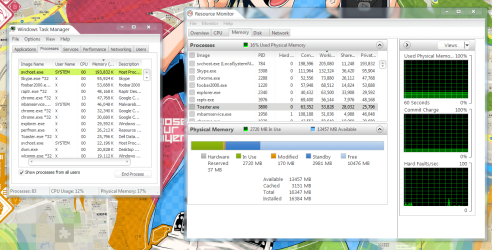
I think it was an extension i had in google chrome, i noticed my memory spiked up to 9gb usage so i closed chrome and it went down so quick a minute or two after. So i deleted two extensions and it seems to be fine now.

I'll wait a little longer to see if it happens again.

EDIT:
Well guess that wasn't the problem, It happened again but i just rebooted after the scans. Scan now said there were some problems that it fixed/Norton said no viruses and Malware also had 0.

I also noticed now the cache memory isn't constantly going up until it takes it all like last time. =/
 

Attachments

  • Scr2.png
    Scr2.png
    147.5 KB · Views: 26
Last edited:

My Computer

Computer Manufacturer/Model Number
DELL
OS
Windows 7 Home Premium 64bit
CPU
Intel(R) Core(TM) i7-3770 CPU @ 3.40GHz (3.9 w/Turbo Boost)
Motherboard
DELL (Ivy Bridge)
Memory
16GB Dual Channel DDR3 1600MHz
Graphics Card(s)
AMD Radeon™ HD 7770 2GB GDDR5
Sound Card
Integrated 7.1 with WAVE MAXXAudio 4
Screen Resolution
1920x1080
Hard Drives
2TB 7200RPM, SATA Hard Drive 6.0 Gb/s + 32GB SSD SRT Enhancement
Back
Top