Windows 7 7048- making a bootable ISO

Livin in a box

New member
Local time
7:43 AM
Messages
14
Location
A street corner.
I've been trying for ages to make a bootable ISO, but it just 'aint working. I have the Trial of UltraISO, but it's a bit useless as you can only burn up to 650MB, and I'm not paying £25 for something that I'll only use once. I've tried using ImgBurn's method of setting a boot file from vLite, but when I try and load it up from the BIOS, it just says 'CDBOOT: CANNOT BOOT FROM CD : CODE 5'. I'm currently running a 32 bit version so I can't run it from Windows itself. I also don't have a USB stick that has 4GB capacity, and I'm not buying one as I don't need it. I've also changed the autorun.inf file a bit so not it just runs setup.exe, not splaat.exe. Whatever that is...

Does anyone know how I can do it? I'm not downloading another ISO file...Thanksss.
 

My Computer

Computer Manufacturer/Model Number
Dell Inspiron 6400
OS
Windows 7 Build 7057 x86
CPU
Intel Pentium Dual-Core T2080@ 1.73 GHz
Memory
2GB
Graphics Card(s)
Intel 945GM Express Chipset Family
Sound Card
SigmaTel High Definition Audio
Screen Resolution
1280x800
Hard Drives
Standard 160GB Dell drive.
Keyboard
Standard PS/2 Kayboard
If you had a full version of ultraISO you could do it easy, could use the bootfile from another build, not sure what to suggest if your not prepared to pay for the needed tools.

Maybe there are similar free apps like ultraISO.

EDIT: i haven't tried but you can probably do it with vLite.
 

My Computer

Computer Manufacturer/Model Number
Advent Roma Laptop
OS
Windows 7 Enterprise SP1 x64 Windows 8 Enterprise RTM x64
CPU
Mobile DualCore Intel Pentium T4400, 2200 MHz (11 x 200)
Motherboard
Advent Roma (Intel Cantiga GL40)
Memory
4028 MB (DDR2-667 DDR2 SDRAM)
Graphics Card(s)
Mobile Intel(R) GMA 4500M
Sound Card
Realtek ALC662 @ Intel 82801IB ICH9 - High Definition Audio
Monitor(s) Displays
Generic PnP Monitor [NoDB]
Screen Resolution
1366x768
Hard Drives
TOSHIBA MK5065GSX ATA Device (500 GB, 5400 RPM, SATA-II)
Mouse
Mikomi 7 Button Laser Mouse w/DPi Switch
Internet Speed
Slow!!
If you had a full version of ultraISO you could do it easy, could use the bootfile from another build, not sure what to suggest if your not prepared to pay for the needed tools.

Maybe there are similar free apps like ultraISO.

EDIT: i haven't tried but you can probably do it with vLite.
I've put the boot.bin file in the root, in the boot file and...well, that's it. I'm not wasting £25 on UltraISO when I will never use it again.
 

My Computer

Computer Manufacturer/Model Number
Dell Inspiron 6400
OS
Windows 7 Build 7057 x86
CPU
Intel Pentium Dual-Core T2080@ 1.73 GHz
Memory
2GB
Graphics Card(s)
Intel 945GM Express Chipset Family
Sound Card
SigmaTel High Definition Audio
Screen Resolution
1280x800
Hard Drives
Standard 160GB Dell drive.
Keyboard
Standard PS/2 Kayboard
imgburn can do it for free. you'll need an image of a previous build.

The iso is available for download, though.
 

My Computer

Computer Manufacturer/Model Number
XPS 420
OS
Windows 7
Screen Resolution
1376x768
Hard Drives
11tb+
imgburn can do it for free. you'll need an image of a previous build.

The iso is available for download, though.

I've got build 7000 and build 7022 on my system.
 

My Computer

Computer Manufacturer/Model Number
Dell Inspiron 6400
OS
Windows 7 Build 7057 x86
CPU
Intel Pentium Dual-Core T2080@ 1.73 GHz
Memory
2GB
Graphics Card(s)
Intel 945GM Express Chipset Family
Sound Card
SigmaTel High Definition Audio
Screen Resolution
1280x800
Hard Drives
Standard 160GB Dell drive.
Keyboard
Standard PS/2 Kayboard

My Computer

Computer Manufacturer/Model Number
myself
OS
Windows 7 Ultimate 64bit
CPU
Intel Core 2 Duo E8400 3.0ghz Wolfdale
Motherboard
ASUS P5Q Pro ATX LGA775
Memory
OCZ Gold XTC PC2-6400 4GB
Graphics Card(s)
BFG Geforce 8800GT OC
Sound Card
onboard (HD)
Monitor(s) Displays
HP w2207h
Screen Resolution
1680x1050
Hard Drives
Western Digital Caviar SE16 640GB
PSU
Antec Earthwatts 500w
Case
Antec Sonata III
Cooling
Arctic Cooling Accelero S1 Rev 2 Passive VGA Cooler
Keyboard
Logitech
Mouse
Ocz equalizer
Internet Speed
750+
I had a problem similar to this except it was "CDBOOT: Cannot find NDLTR"(whatever its called lol) After burning like 5 dvd and trying to get it to boot, i read that you could open a previous version's iso(i used x64 7000 that i had) and delete the files in it and put the 7048 files back in...so..its the 7048 files in the 7000 iso..and it worked...I have no idea why none of the 7048 iso's booted for me..wierd..
 

My Computer

OS
Windows 7 Ultimate x64 7048
CPU
Intel C2Q Q6600 @ 3.0ghz
Motherboard
Gigabyte P35-DS3R
Memory
6gb DDR2 800
Graphics Card(s)
XFX Nvidia 8800GTS 640mb
Sound Card
Sound Blaster Audigy 4
Monitor(s) Displays
2x22in Samsung
Hard Drives
3x500 Seagate Barracuda 7200.11
PSU
OCZ 600w
Case
Thermaltake Armor
Cooling
Custom watercooling
Keyboard
Logitech G15
Mouse
Microsoft Trackball Explorer 1.0 =P
Internet Speed
Fast enough for me!

My Computers

System One System Two

  • Computer type
    PC/Desktop
    OS
    7 X64
    CPU
    i5 8400
    Motherboard
    gigabyte b365m ds3h
    Memory
    2x8gb 3200mhz
    Hard Drives
    various
    PSU
    pure power 11 400w cm
    Case
    Coolermaster
    Cooling
    cryorig m9i
  • Computer type
    PC/Desktop
    OS
    7x64
    CPU
    g5400
    Motherboard
    ga b365m ds3h
    Memory
    8gb ddr4 2400
    PSU
    xfx pro 450w
The free version of StarBurn will easily take care of you there if you decide not to use ImgBurn. :: RocketDivision :: CD/DVD/Blu-Ray/HD-DVD recording and mastering

CDBurnerXP and ImgBurn are both older XP programs while the newer multifeatured program there works on 7 as well as on XP and Vista without fuss. You can also use it for other things besides iso disk images and is still light on resources.
 

My Computers

System One System Two

  • Computer type
    PC/Desktop
    Computer Manufacturer/Model Number
    Custom builds = 2
    OS
    W7 Ultimate x64/W10 Pro x64/W11 Pro Triple Boot - Main PC W7 Remote PC Micro ATX W7 Pro x64/W11 Pro
    CPU
    AMD Phenom II X4 975 Deneb 3.6ghz - 965 2nd remote pc
    Motherboard
    Gigabyte GA-790XTA-UD4-Gigabyte GA-880GM-D2H remote pc
    Memory
    Kingston Hyper X DDR3 1600 1.5v 16gb - Hyper X Fury 8gb 2nd
    Graphics Card(s)
    MSI HD Radeon 5750 1gb - MSI HD Radeon 6450 on mini tower
    Sound Card
    Creative Labs X-Fi Xtreme Audio P - Realtek onooard 2nd case
    Monitor(s) Displays
    ASUS VW199T-P 19" HP 2082a Main-HP 2082a 20" remote pc
    Screen Resolution
    Asus 1440x900 - HP 1600x900
    Hard Drives
    WD Black 1TB HD per OS W7, W10, and pending W11 presently on 500gb OS Drive - Pending Triple 1TB HDs for Spanned Storage/backup volume
    Single 2TB external USB enclosure, single 1TB System 7 Host/Boot drive, Pending 8TB external HD for system image b
    PSU
    Corsair 750TX - primary / Corsair CX600 - second
    Case
    Antec 900-2 - SSD compatible / NZXT Vulcan mini tower
    Cooling
    Zalman CNPS9900A
    Keyboard
    AZIO L70 Backlit Letters Gaming - ONN Cordless/USB
    Mouse
    MSI DS200 Programmable, Logitech Cordless
    Internet Speed
    30mbps upgrade - primary hard wired - mini tower usb WiFi
    Antivirus
    GFI VIPRE Internet Security 2014 on W7 2016 beta on W10,
    Browser
    Cyberfox, WaterFox 64bit FF variants, FireFox x64, Pale Moon
    Other Info
    Accomdata fan cooled usb 2.0 PIDE/Sata II, III external enclosure.
    Sambient usb/eSata PATA/Sata II, III external enclosure.
  • Computer type
    PC/Desktop
    System Manufacturer/Model Number
    CUSTOM ASSEMBLY
    OS
    W7 Pro x64/W11 Pro
    CPU
    AMD Deneb 3.6ghz - 965
    Motherboard
    Gigabyte GA-880GM-D2H remote pc
    Memory
    Kingston Hyper X Fury 8gb
    Graphics Card(s)
    MSI HD Radeon 6450 DVI Output
    Sound Card
    Realtek onooard Creative or Other separate PENDING
    Monitor(s) Displays
    VIZIO 32" LCD TV Separate LCD Pending
    Screen Resolution
    1600x1080
    Hard Drives
    WD 500GB OS Host/Boot WD Green 1TB Storage/Backup
    PSU
    Corsair 600W - THERMALTAKE 600W spare case
    Case
    NZXT Vulcan mini tower
    Cooling
    Twin 120mm Top Fans - 240mm Side Cover
    Keyboard
    ONN Cordless/USB Logitech Cordless
    Mouse
    ONN USB/Cordless - Logitech Cordless
    Internet Speed
    DSL 5G
    Browser
    MS Edge, FireFox, WaterFox x64, FireFox Nightly
    Other Info
    OS Testing-Remote Access to Main TeamViewer
Sadly, Starburn uses the SPTD driver - will not install on 7. Same with Daemon Tools.:(
 

My Computers

System One System Two

  • Computer type
    PC/Desktop
    OS
    7 X64
    CPU
    i5 8400
    Motherboard
    gigabyte b365m ds3h
    Memory
    2x8gb 3200mhz
    Hard Drives
    various
    PSU
    pure power 11 400w cm
    Case
    Coolermaster
    Cooling
    cryorig m9i
  • Computer type
    PC/Desktop
    OS
    7x64
    CPU
    g5400
    Motherboard
    ga b365m ds3h
    Memory
    8gb ddr4 2400
    PSU
    xfx pro 450w
Thanks everyone; I managed to activate my UltraISO, I burned it with vLite's boot.bin, set it as the boot file and it booted fine. It's just that my CPU isn't compatible with 64 bit OSes, which is a bit of a bummer.
 

My Computer

Computer Manufacturer/Model Number
Dell Inspiron 6400
OS
Windows 7 Build 7057 x86
CPU
Intel Pentium Dual-Core T2080@ 1.73 GHz
Memory
2GB
Graphics Card(s)
Intel 945GM Express Chipset Family
Sound Card
SigmaTel High Definition Audio
Screen Resolution
1280x800
Hard Drives
Standard 160GB Dell drive.
Keyboard
Standard PS/2 Kayboard
Right click on the installer and select the "troubleshoot compatibility" option. Starburn is still 32bit however. You will want to try that on 32bit 7 there.

Choose the "worked on other versions option when the list of 95-Vista comes up there. It went on here that without a problem on the 7000 Ultimate and works as well as it does on Vista or XP.


In fact that's a plus for 7 seen there since you won't find that option on the previous two versions seeing quite a bit of older programs running on 7. Give that a whirl.

Don't feel too bad Livin in a box the old dsl setup lacks 64bit drivers. I'm waiting for a second router to come in seeing both 64bit and even Linux support to try out in order to get things going on the 64bit 7!
 

My Computers

System One System Two

  • Computer type
    PC/Desktop
    Computer Manufacturer/Model Number
    Custom builds = 2
    OS
    W7 Ultimate x64/W10 Pro x64/W11 Pro Triple Boot - Main PC W7 Remote PC Micro ATX W7 Pro x64/W11 Pro
    CPU
    AMD Phenom II X4 975 Deneb 3.6ghz - 965 2nd remote pc
    Motherboard
    Gigabyte GA-790XTA-UD4-Gigabyte GA-880GM-D2H remote pc
    Memory
    Kingston Hyper X DDR3 1600 1.5v 16gb - Hyper X Fury 8gb 2nd
    Graphics Card(s)
    MSI HD Radeon 5750 1gb - MSI HD Radeon 6450 on mini tower
    Sound Card
    Creative Labs X-Fi Xtreme Audio P - Realtek onooard 2nd case
    Monitor(s) Displays
    ASUS VW199T-P 19" HP 2082a Main-HP 2082a 20" remote pc
    Screen Resolution
    Asus 1440x900 - HP 1600x900
    Hard Drives
    WD Black 1TB HD per OS W7, W10, and pending W11 presently on 500gb OS Drive - Pending Triple 1TB HDs for Spanned Storage/backup volume
    Single 2TB external USB enclosure, single 1TB System 7 Host/Boot drive, Pending 8TB external HD for system image b
    PSU
    Corsair 750TX - primary / Corsair CX600 - second
    Case
    Antec 900-2 - SSD compatible / NZXT Vulcan mini tower
    Cooling
    Zalman CNPS9900A
    Keyboard
    AZIO L70 Backlit Letters Gaming - ONN Cordless/USB
    Mouse
    MSI DS200 Programmable, Logitech Cordless
    Internet Speed
    30mbps upgrade - primary hard wired - mini tower usb WiFi
    Antivirus
    GFI VIPRE Internet Security 2014 on W7 2016 beta on W10,
    Browser
    Cyberfox, WaterFox 64bit FF variants, FireFox x64, Pale Moon
    Other Info
    Accomdata fan cooled usb 2.0 PIDE/Sata II, III external enclosure.
    Sambient usb/eSata PATA/Sata II, III external enclosure.
  • Computer type
    PC/Desktop
    System Manufacturer/Model Number
    CUSTOM ASSEMBLY
    OS
    W7 Pro x64/W11 Pro
    CPU
    AMD Deneb 3.6ghz - 965
    Motherboard
    Gigabyte GA-880GM-D2H remote pc
    Memory
    Kingston Hyper X Fury 8gb
    Graphics Card(s)
    MSI HD Radeon 6450 DVI Output
    Sound Card
    Realtek onooard Creative or Other separate PENDING
    Monitor(s) Displays
    VIZIO 32" LCD TV Separate LCD Pending
    Screen Resolution
    1600x1080
    Hard Drives
    WD 500GB OS Host/Boot WD Green 1TB Storage/Backup
    PSU
    Corsair 600W - THERMALTAKE 600W spare case
    Case
    NZXT Vulcan mini tower
    Cooling
    Twin 120mm Top Fans - 240mm Side Cover
    Keyboard
    ONN Cordless/USB Logitech Cordless
    Mouse
    ONN USB/Cordless - Logitech Cordless
    Internet Speed
    DSL 5G
    Browser
    MS Edge, FireFox, WaterFox x64, FireFox Nightly
    Other Info
    OS Testing-Remote Access to Main TeamViewer
I'm downloading the Win 7 RC and plan to put it on a DVD. The problem though is that with the Win 7 Beta I tried and tried to make a bootable DVD and failed. I finally had to borrow one from a friend who gave me the impression that making it was a breeze.

I used CDBurnerXP and a couple other utilities that I can't remember and had no luck. I followed the CDBurnerXP's help on their website and other tutorials found on the web. I would follow the instructions and yet could get none of them to boot.

I'm a pretty tech savvy person but I'm not that familiar with all the ins and outs of this booting stuff and it seemed that most of the things I read left out many steps as thought they assumed you knew this and that.

For instance in CDBurnerXP there are options for the emulation type, ISO level, load segment, and platform. I don't know what these should be set at or why and I couldn't find out from the sources I looked at. They also tell you to:

"choose your boot image. You can either use one of your own, or you can download a boot image from our webpage with the most important DOS programs. As a last option, you can also create a boot image from a bootable floppy."

What the heck is a boot image? How do I know which one to use etc etc?

Are there any comprehensive directions for doing this? It seems so obvious but I can't figure it out. The only help Microsoft gives is to search downlad.com or tucows and search for isobuster or iso, bootable etc. Gee thanks.

I did consider that my DVD's were defective but I've burned data to the same batch without problems.

Any help would be appreciated.
 

My Computer

OS
win xp
Hi,

The RC should already be a bootable .iso, so you won't need to make one.

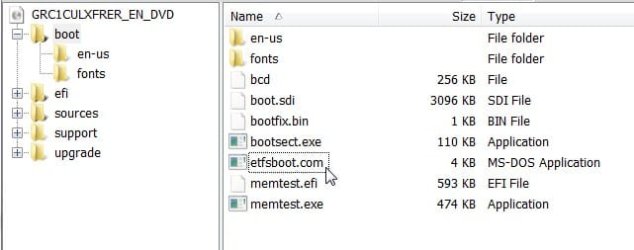
For future reference, have a look at the 7048 files - there is a folder called Boot - inside that is the file you browse to when asked for the boot image source file - it is called etfsboot.com.

etfsboot.com2009-05-06_005854.jpg

Hope it helps
 

My Computers

System One System Two

  • Computer type
    PC/Desktop
    OS
    7 X64
    CPU
    i5 8400
    Motherboard
    gigabyte b365m ds3h
    Memory
    2x8gb 3200mhz
    Hard Drives
    various
    PSU
    pure power 11 400w cm
    Case
    Coolermaster
    Cooling
    cryorig m9i
  • Computer type
    PC/Desktop
    OS
    7x64
    CPU
    g5400
    Motherboard
    ga b365m ds3h
    Memory
    8gb ddr4 2400
    PSU
    xfx pro 450w
Hi,

The RC should already be a bootable .iso, so you won't need to make one.

For future reference, have a look at the 7048 files - there is a folder called Boot - inside that is the file you browse to when asked for the boot image source file - it is called etfsboot.com.

View attachment 9797

Hope it helps

Thanks for responding.

So 7048 ( that was the beta correct?) was not a bootable ISO? How is one to know one way or the other? This is the problem I've been facing.

I don't need to make what?

Do I just burn the 7100 ISO to DVD and all is done?
 

My Computer

OS
win xp
Hi,

You can tell if it is a bunch of files - yellow folders - you may then want to make a bootable .iso.

If it looks like this, then it is already an .iso:

ISO-7-2009-05-06_011746.jpg

Just burn it as an image file to dvd - do not format the dvd. If you are on 7 now, there is a built in isoburner - otherwise, use this:

View attachment Burn CDCC.zip

Then boot from the dvd to install.

If you are downloading the official M$ release - it is already a bootable .iso - burn to dvd as above.

Previous builds often came split into a lot of .rar files. Extracting those - using Winrar or 7 zip would result either in an .iso ready to go, or just the installation files from which you could make your own iso.
 

My Computers

System One System Two

  • Computer type
    PC/Desktop
    OS
    7 X64
    CPU
    i5 8400
    Motherboard
    gigabyte b365m ds3h
    Memory
    2x8gb 3200mhz
    Hard Drives
    various
    PSU
    pure power 11 400w cm
    Case
    Coolermaster
    Cooling
    cryorig m9i
  • Computer type
    PC/Desktop
    OS
    7x64
    CPU
    g5400
    Motherboard
    ga b365m ds3h
    Memory
    8gb ddr4 2400
    PSU
    xfx pro 450w
Hi,

You can tell if it is a bunch of files - yellow folders - you may then want to make a bootable .iso.

If it looks like this, then it is already an .iso:

View attachment 9798

Just burn it as an image file to dvd - do not format the dvd. If you are on 7 now, there is a built in isoburner - otherwise, use this:

View attachment 9799

Then boot from the dvd to install.

If you are downloading the official M$ release - it is already a bootable .iso - burn to dvd as above.

Ok thanks.

I know that the beta and RC1 come as ISO's that's not the problem. I had the ISO and burned it to DVD but it would not boot. I read and searched and used this and that and changed these settings and what not but could not get a DVD to boot to the installation app. I burned about a half dozen DVD's with no luck. And not once anywhere did I see anything that said "f you are downloading the official M$ release - it is already a bootable .iso". That would have been helpful to know but as I recall I did just burn my Win 7 Beta ISO to DVD and it would not boot.

I'll try it again with the RC1 and see if it works this time. I'll try that app you linked also. Thanks.
 

My Computer

OS
win xp
That app. will burn the iso as an image file - not as data - the dvd should boot . You may have burned the previous iso the wrong way.

After you have burned the dvd, you need to set your machine to boot from the cdrom drive :

Start the machine, watch the white writing on the black screen.

It will say something like:
F2 for setup
F11 for boot menu

Select F11 ( you may have different F number , or you may select DEL - whatever it tells you for boot menu)

A pop - up boot menu appears in a few seconds. Arrow down to cdrom drive - put the dvd in the drive - press Enter.

It will ask again "press any key to boot from cdrom drive " - press Enter again.

That's it.
 

My Computers

System One System Two

  • Computer type
    PC/Desktop
    OS
    7 X64
    CPU
    i5 8400
    Motherboard
    gigabyte b365m ds3h
    Memory
    2x8gb 3200mhz
    Hard Drives
    various
    PSU
    pure power 11 400w cm
    Case
    Coolermaster
    Cooling
    cryorig m9i
  • Computer type
    PC/Desktop
    OS
    7x64
    CPU
    g5400
    Motherboard
    ga b365m ds3h
    Memory
    8gb ddr4 2400
    PSU
    xfx pro 450w
That app. will burn the iso as an image file - not as data - the dvd should boot . You may have burned the previous iso the wrong way.

Yes. I realize I must have done it the wrong way but nobody's answered yet how to to it the right way. What is the right way? What makes it the 'right' way etc. If I use CDBurnerXP to burn the ISO will it burn it the 'right' way? It's failed to work for me so far and I can't get a clear explanation of what settings to set and why.

If I make no changes to the settings it doesn't work. If I go in and change the boot settings it doesn't work.

After you have burned the dvd, you need to set your machine to boot from the cdrom drive :

Start the machine, watch the white writing on the black screen.

It will say something like:
F2 for setup
F11 for boot menu

Select F11 ( you may have different F number , or you may select DEL - whatever it tells you for boot menu)

A pop - up boot menu appears in a few seconds. Arrow down to cdrom drive - put the dvd in the drive - press Enter.

It will ask again "press any key to boot from cdrom drive " - press Enter again.

That's it.

I am not new to booting from discs or installing Windows, I do so frequently. I am well familiar with everything you wrote here. My one and only problem is taking an ISO of a windows installation from Microsoft, burning it to a DVD and successfully getting it to boot.
 

My Computer

OS
win xp
It needs to be burned as an image , if burned as a data file, it loses it's bootability.

I don't use CDBurnerXP so I don't know where the burn as image option would be hiding on that.

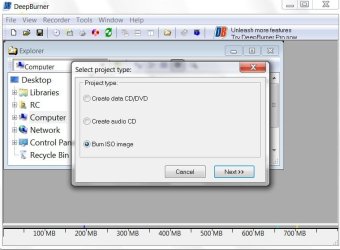
Here is a shot of Deep Burner - it makes the options obvious - maybe they are not so clear on the app. you used.

ISO-8-2009-05-06_022257.jpg

BURNCDCC will automatically do it - that's all it does.

There is a slight possibility your dvd burner is failing to recognise the dvd correctly - I have seen one or two cases when a driver/ firmware update was needed.
 

My Computers

System One System Two

  • Computer type
    PC/Desktop
    OS
    7 X64
    CPU
    i5 8400
    Motherboard
    gigabyte b365m ds3h
    Memory
    2x8gb 3200mhz
    Hard Drives
    various
    PSU
    pure power 11 400w cm
    Case
    Coolermaster
    Cooling
    cryorig m9i
  • Computer type
    PC/Desktop
    OS
    7x64
    CPU
    g5400
    Motherboard
    ga b365m ds3h
    Memory
    8gb ddr4 2400
    PSU
    xfx pro 450w
Back
Top