Windows 7 access to a shared printer on XP

Montanaro

New member
Local time
10:02 PM
Messages
3
I am having what seems to be a very common issue - Windows 7 computer unable to access a shared printer connected to an XP Home machine.

I have tried tried several of the "fixes" suggested in this forum but no luck.

Here is the configuration. I have an HP printer connected to an XP Home machine.

The printer is shared and I can access it from another desktop (XP Home) connected to the local network via a cable and a laptop (XP Professional) connected via a wireless connection.

I have another Windows 7 laptop (Lenovo X61 tablet) where I am having trouble. First, I can see the computer and printer in the networking section. When I click on the printer to access it I get an "Windows cannot connect to the printer, Access is denied"

I have gone through the procedure of installing a printer on a local port using the configuration \\hostcomputer\sharedprintername. This allowed me to install the printer and driver. The printer show up on my list of device. I can print to it from applications - it will move through the printer queue but nothing will happen on the printer.

Any suggestions would be welcome.

thanks,
David
 

My Computer

Computer Manufacturer/Model Number
Lenovo
OS
windows 7
CPU
Centrino Pro
Monitor(s) Displays
Tablet
Hard Drives
500G
Thanks for the reply. I checked all the settings as you suggested. The only one that was not correct was the one to use passwords and user accounts to connect.

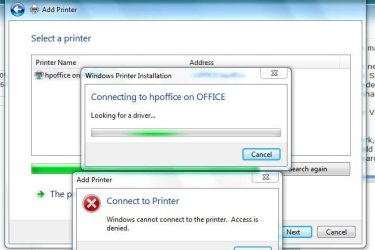
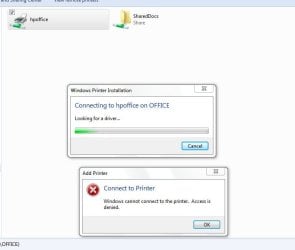
When I use the add printer wizard it sees the printer but then gives me the access denied. See snapshot below. Also, I can see all the computer connected the network. When I click on the computer with the shared printer I can see the printer. If I click to connect I get the same error - please see snapshots.
 

Attachments

  • Printer Issue.JPG
    Printer Issue.JPG
    37.9 KB · Views: 363
  • printer issue 2.JPG
    printer issue 2.JPG
    33.1 KB · Views: 366

My Computer

Computer Manufacturer/Model Number
Lenovo
OS
windows 7
CPU
Centrino Pro
Monitor(s) Displays
Tablet
Hard Drives
500G
Could be the xp printer is blocking it - check the printer settings in control panel in host xp machine right click printer - properties - sharing and see its turned on - i guess it would be - try logging off on the w7 pc and loging back on and see if its any different - i had troubles like this with my setup as i have a laptop with xp pro on the network, and 5 different OS's on my main pc which has the printer connected, and i wanted the printer to be able to print to any of the OS'S (xp x2 vista x1 and w7 x 2) but i was gettin access denied when i changed to another os, and had to run the network wizard again on the xp pro laptop.
After reading help you can use the workgroup officially.
:geek:
I have just found the official instructions for sharing in help - firstly download the complete help from windows update for easier access in your w7 laptop, and, or just type this in the search "connecting a printer to a home network" ok then all the options are on the right .
Networking home computers running different versions of Windows :
Much the same as i suggested, but following to the word may help, also try restarting the pc's concerned if nothing else works
 
Last edited:

My Computer

OS
XP, Vista, W7 64bit Home Premium
CPU
Intel Core Duo 6850 3.0 ghz @ 3.7 ghz
Motherboard
Asus P5E
Memory
4GB Corsair DDR 2 PC-6400
Graphics Card(s)
Ati 4870 1ghz
Sound Card
Supreme FX 11
Monitor(s) Displays
View Sonic VX1962wm
Screen Resolution
1680 X1050
Hard Drives
3 Seagate Sata Drives 160gb 250gb 500gb
PSU
Thermaltake 600 watt
Case
NZXT Alpha
Cooling
3X120cm Fans
Keyboard
Microsoft Digital Media Pro Keyboard
Mouse
Microsoft Wheel Mouse Optical
Internet Speed
1.5Mb to 8Mb/384k
Do this if the line where you say you got it works to a certain extent refers to the w7 laptop -
"I have gone through the procedure of installing a printer on a local port using the configuration \\hostcomputer\sharedprintername. This allowed me to install the printer and driver. The printer show up on my list of device. I can print to it from applications - it will move through the printer queue but nothing will happen on the printer".

The only other thing i can think of is did you install the latest vista driver for it on the laptop? Reconnect it the way you had it originally configured. Uninstall the driver you installed - Go here firstly and download the latest vista driver for it by typing in your hp model name - http://www.hp.com/#Support
If it wont install because of an OS mismatch do the following -
To install a driver OR program in compatibility mode - right click the setup.exe file - click properties - click compatibility - check run in compatibility with vista/xp etc - check run as administrator - leave the rest blank. Start setup.exe and install.
 

My Computer

OS
XP, Vista, W7 64bit Home Premium
CPU
Intel Core Duo 6850 3.0 ghz @ 3.7 ghz
Motherboard
Asus P5E
Memory
4GB Corsair DDR 2 PC-6400
Graphics Card(s)
Ati 4870 1ghz
Sound Card
Supreme FX 11
Monitor(s) Displays
View Sonic VX1962wm
Screen Resolution
1680 X1050
Hard Drives
3 Seagate Sata Drives 160gb 250gb 500gb
PSU
Thermaltake 600 watt
Case
NZXT Alpha
Cooling
3X120cm Fans
Keyboard
Microsoft Digital Media Pro Keyboard
Mouse
Microsoft Wheel Mouse Optical
Internet Speed
1.5Mb to 8Mb/384k
Printer still does not work

I have the latest driver from HP. XP is the latest operating system they list.

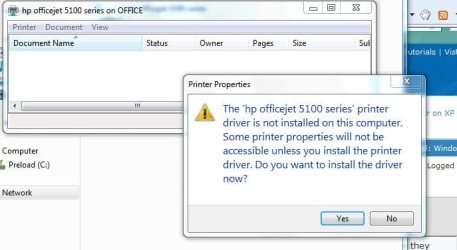
I have installed it on the machine in compatability mode. When I install the printer using a local port it installs the driver.

When I locate the printer via the network window I get access denied.

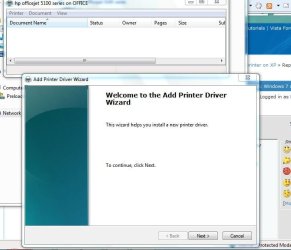
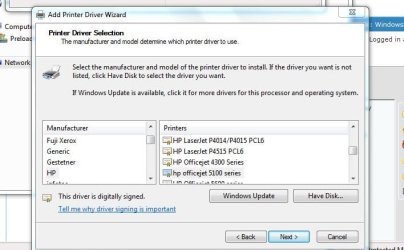
If I pull up the properties and try to chage it to sharing I get the drive wizard. (see thumbnail below). When I try to print a test page this way it knows that it did not print. The troubleshooter cannot find anything.
 

Attachments

  • Printer B.JPG
    Printer B.JPG
    48 KB · Views: 215
  • Printer c.JPG
    Printer c.JPG
    50.4 KB · Views: 153
  • Printer  D.JPG
    Printer D.JPG
    31 KB · Views: 102
  • Printer E.JPG
    Printer E.JPG
    38.8 KB · Views: 112
  • Printer BB.JPG
    Printer BB.JPG
    41.1 KB · Views: 134

My Computer

Computer Manufacturer/Model Number
Lenovo
OS
windows 7
CPU
Centrino Pro
Monitor(s) Displays
Tablet
Hard Drives
500G
I think you need to install this printer on the computer that has Windows Seven and share it to the equipment that is running XP, because in Server Properties you don't have a possibilty to add Seven drivers.
 

My Computer

OS
Seven Ultimate x86
CPU
Athlon X2 3600+
Motherboard
ASUS M2N-MX
Memory
2 GB
Graphics Card(s)
Sapphire HD4830
Sound Card
Onboard
Monitor(s) Displays
LG M198WA
Screen Resolution
1440x900
Hard Drives
500GB
Keyboard
Logitech
Mouse
Logitech
Internet Speed
3 MB
When I locate the printer via the network window I get access denied.

Access denied means you don't have permission to access the computer given the current logon credentials. If you set a password for your user account in Windows 7, then create that same user account in XP, you should be able to login provided that you have Simple file sharing disabled.

Before you connect to the printer, connect by

\\ip _address_of_XP_computer

and make sure you can successfully browse the file shares. If you can't access the fileshares you probably can't access the printer either.
 

My Computer

Computer Manufacturer/Model Number
Too many to list.
OS
XP, Seven, 2008R2
CPU
AMD, Intel, VIA
Motherboard
Various
Memory
Corsair, Kingston, etc.
Graphics Card(s)
ATI, NVIDIA
Monitor(s) Displays
Samsung
Hard Drives
Maxtor, Western Digital
Keyboard
qwerty
Internet Speed
22 Mb/s @ home, 1 Gb/s @ server
Other Info
All of my systems still run fastest on XP 32-bit for the most part. Win7 is fun to play with, but I still prefer XP for raw speed, security, and functionality.
I am having what seems to be a very common issue - Windows 7 computer unable to access a shared printer connected to an XP Home machine.

I have tried tried several of the "fixes" suggested in this forum but no luck.

Here is the configuration. I have an HP printer connected to an XP Home machine.

The printer is shared and I can access it from another desktop (XP Home) connected to the local network via a cable and a laptop (XP Professional) connected via a wireless connection.

I have another Windows 7 laptop (Lenovo X61 tablet) where I am having trouble. First, I can see the computer and printer in the networking section. When I click on the printer to access it I get an "Windows cannot connect to the printer, Access is denied"

I have gone through the procedure of installing a printer on a local port using the configuration \\hostcomputer\sharedprintername. This allowed me to install the printer and driver. The printer show up on my list of device. I can print to it from applications - it will move through the printer queue but nothing will happen on the printer.

Any suggestions would be welcome.

thanks,
David

It won't work unless you have the printer drivers installed on the Win7 machine. This assumes that those printer drivers are made for Win7 which they probably aren't. I've been through this a million times and it won't work unless you have print drivers for the OP system that you are printing from.

Easy work around is to use the network sharing folders to slide the file you need to print over to the XP machine and just print from there.

I've been going through this since the XP days because Dell being the lazy ass's they are refuse to make Vista 64 bit drivers for their own printer. Needless to say there will never be Win7 64 bit drivers either.
 

My Computer

Computer type
PC/Desktop
Computer Manufacturer/Model Number
Home built
OS
Windows 7 Ult, Windows 8.1 Pro,
CPU
Q9650-4.275GHz, E8600 4.5GHz, E6750-3.8GHz
Motherboard
Evga 780i FTW
Memory
G.Skill PC2 9600 1200Mhz 5 5 5 15 2T
Graphics Card(s)
GTX480
Sound Card
Asus Xonar D2
Monitor(s) Displays
HannsG
Screen Resolution
1680X1050
Hard Drives
GSkill Phoenix Pro 120GB SSD
PSU
ThermalTake Toughpower 1000Watt modular
Case
ThermalTake XaserV
Cooling
Xigmatek S1283
Keyboard
Logitech G15
Mouse
Logitech G9
Internet Speed
T1
Well if your still gettin access denied its obviously the xp PC.S at fault - can you try this with one of them - re run the network wizard etc and renable everthing and see if it will then connect.
 

My Computer

OS
XP, Vista, W7 64bit Home Premium
CPU
Intel Core Duo 6850 3.0 ghz @ 3.7 ghz
Motherboard
Asus P5E
Memory
4GB Corsair DDR 2 PC-6400
Graphics Card(s)
Ati 4870 1ghz
Sound Card
Supreme FX 11
Monitor(s) Displays
View Sonic VX1962wm
Screen Resolution
1680 X1050
Hard Drives
3 Seagate Sata Drives 160gb 250gb 500gb
PSU
Thermaltake 600 watt
Case
NZXT Alpha
Cooling
3X120cm Fans
Keyboard
Microsoft Digital Media Pro Keyboard
Mouse
Microsoft Wheel Mouse Optical
Internet Speed
1.5Mb to 8Mb/384k
I agree with chev65 and would take his advice and use the workaround, or treat yourself to a new printer.
 

My Computer

OS
XP, Vista, W7 64bit Home Premium
CPU
Intel Core Duo 6850 3.0 ghz @ 3.7 ghz
Motherboard
Asus P5E
Memory
4GB Corsair DDR 2 PC-6400
Graphics Card(s)
Ati 4870 1ghz
Sound Card
Supreme FX 11
Monitor(s) Displays
View Sonic VX1962wm
Screen Resolution
1680 X1050
Hard Drives
3 Seagate Sata Drives 160gb 250gb 500gb
PSU
Thermaltake 600 watt
Case
NZXT Alpha
Cooling
3X120cm Fans
Keyboard
Microsoft Digital Media Pro Keyboard
Mouse
Microsoft Wheel Mouse Optical
Internet Speed
1.5Mb to 8Mb/384k
I was having a similar problem getting the access denied error on my Windows 7 64-bit machine trying to share an Epson Photo 925 printer on my XP machine. When I looked at the printer configuration on the XP machine I noticed that the driver was printing directly to the printer and not using a print spooler. I changed it to use the print spooler, then rebooted my XP machine. The access denied error went away and I was able to install and print to it from my Windows 7 machine.
 

My Computer

OS
Windows 7 64-bit
Did this issue ever get solved?

I am having the same exact issue. I don't want to waste my time with all the file sharing, etc. if it hasn't worked.

Thanks,
Lorla
 

My Computer

Computer Manufacturer/Model Number
Acer Aspire 9410
OS
Win 7 Home Premium
Losing My Mind!

It would seem that Microsoft is in the envious position of being able to sell a product that doesn't work (big surprise), and then wants to charge an obscene amount of money to tell you it isn't their fault, it's the hardware manufacturers' problem.
I have a small network with Xp, just added a new box with Win7, and followed all the directions to install my network printer, an HP Laserjet 3030. I found a universal driver on HPs' website, loaded it on the Win7 machine and the server...no luck. When prompted to look for drivers, I point them to the folder with the drivers, I even see the driver, but there is no file extension and Win7 sez no drivers could be found. These same drivers work on the Win7 machine with the HP printer plugged in locally, but it all changes when trying a network connection.

I personally had the pleasure of telling a customer at a local office supply store to put the 5 (FIVE!) copies of Win7 back on the shelf and to stay with Xp, he did just that. I never forget when I have been burned or mistreated, and the $1,500.00 sale of Win7 I prevented today is only the beginning. When Microsoft steps up to the plate with decent customer service and a quality product (read "Works as well as Apple"), I will stop my campaign.

My solution is a Microsoft based program; I have located the network printer near the Win7 machine and will plug it in whenever there is a print job for that machine, problem solved, without buying another printer! Of course if there is a braintrust that can figure a less than mechanical solution, I would love to hear it!
 

My Computer

OS
windows 7/XP/Vista
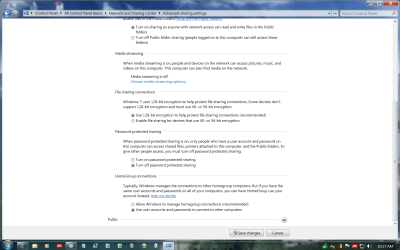
Which way have you got it setup is the printer installed on the w7 pc or the xp pc ? In w7 you have to firstly set it up - dont use a homegroup. Change the Workgroup name to the same as the one on XP eg MSHOME (right click computer -properties - change settings).
Open network and sharing in control panel go to advanced setting : see pics below.
Open devices and Printers - right click the printer (assuming its installed on W7) - you may have to connect the printer to the W7 pc and install the W7 drivers, firstly, then disconnect it back to the xp printer if thats the way you want it connected. After right clicking the printer in devices and printers- Select - printer properties Select - sharing - Tick share this printer, and Tick render print jobs on client computers.

You need to run the network wizard on xp - printer sharing only needs to be enabled on the host machine. When you open a document to print and select print you may need to make sure you select the printer if its on the other machine - it will have the name of the printer plus the name of the host pc tagged on the end of it - select it - eg auto hp photosmart 7150 series on harry-PC
 

Attachments

  • Advanced Settings 1.jpg
    Advanced Settings 1.jpg
    125.7 KB · Views: 370
  • Advanced Settings 2.png
    Advanced Settings 2.png
    97.9 KB · Views: 292

My Computer

OS
XP, Vista, W7 64bit Home Premium
CPU
Intel Core Duo 6850 3.0 ghz @ 3.7 ghz
Motherboard
Asus P5E
Memory
4GB Corsair DDR 2 PC-6400
Graphics Card(s)
Ati 4870 1ghz
Sound Card
Supreme FX 11
Monitor(s) Displays
View Sonic VX1962wm
Screen Resolution
1680 X1050
Hard Drives
3 Seagate Sata Drives 160gb 250gb 500gb
PSU
Thermaltake 600 watt
Case
NZXT Alpha
Cooling
3X120cm Fans
Keyboard
Microsoft Digital Media Pro Keyboard
Mouse
Microsoft Wheel Mouse Optical
Internet Speed
1.5Mb to 8Mb/384k
UAC Group Policy error

This error was caused by Group Policy for me. I had administratively attempted to disable UAC, but it caused issues like this to arise.

-Bob:geek:
 

My Computer

OS
Windows 7 Ultimate x64
CPU
i7
Back
Top