
Solved Windows 7 Advice on Registry Key Removals

RE: PrivaZer PC Cleaner vs. Shell Bag Analyzer.

Shell Bag Analyzer - you can delete everything it finds but that would reset folder view settings and possibly folder template settings for all existing folders. It's best to use it only for deleted folders.

PrivaZer PC Cleaner - if you go ahead with a full clean without configuring settings it will delete stuff that you might want to keep including jump lists and maybe cookies if you use them to save logins or site preferences. The shell bag cleanup has been improved so that currently it only removes traces of deleted folders.

Some people had issues with it. Personally I've configured it to meet my needs and it works fine. I actually run the portable version direct from RAMdisk to speed things up.

RE: Problems. See this:

http://www.sevenforums.com/software/370958-privazer-safe-use.html

http://www.sevenforums.com/browsers...how-clear-delete-post2630563.html#post2630563

http://www.sevenforums.com/browsers...how-clear-delete-post2628948.html#post2628948
 

My Computer My Computer

At a glance

Microsoft Windows 7 Home Premium 64-bit 7601 ...AMD C-60 APU with Radeon(tm) HD Graphics4.00 GBAMD Radeon HD 6290 Graphics
Computer type
Laptop
Computer Manufacturer/Model Number
ASUS
OS
Microsoft Windows 7 Home Premium 64-bit 7601 Multiprocessor Free Service Pack 1
CPU
AMD C-60 APU with Radeon(tm) HD Graphics
Motherboard
ASUSTeK COMPUTER INC. X501U
Memory
4.00 GB
Graphics Card(s)
AMD Radeon HD 6290 Graphics
Sound Card
(1) AMD High Definition Audio Device (2) Realtek High Defi
Screen Resolution
1366 x 768 x 32 bits (4294967296 colors) @ 60 Hz
Hard Drives
Hitachi HTS545050A7E380 SATA Disk Device
Antivirus
Comodo CIS & FW, SecureAplus App Whitelisting, Threatfire
Browser
Cyberfox 64bit, Opera 64bit, Airfox
Other Info
Spy-The-Spy, HitmanPro.Alert, Norton Connect Safe, MJRegWatcher, BitDefender TrafficLight, Voodoo Shield, Zemana AntiMalware
More to consider:

After running shell bag clean up try running this:

You might be in for a surprise. Also read through the info on registry locations covered.
 

My Computer My Computer

At a glance

Microsoft Windows 7 Home Premium 64-bit 7601 ...AMD C-60 APU with Radeon(tm) HD Graphics4.00 GBAMD Radeon HD 6290 Graphics
Computer type
Laptop
Computer Manufacturer/Model Number
ASUS
OS
Microsoft Windows 7 Home Premium 64-bit 7601 Multiprocessor Free Service Pack 1
CPU
AMD C-60 APU with Radeon(tm) HD Graphics
Motherboard
ASUSTeK COMPUTER INC. X501U
Memory
4.00 GB
Graphics Card(s)
AMD Radeon HD 6290 Graphics
Sound Card
(1) AMD High Definition Audio Device (2) Realtek High Defi
Screen Resolution
1366 x 768 x 32 bits (4294967296 colors) @ 60 Hz
Hard Drives
Hitachi HTS545050A7E380 SATA Disk Device
Antivirus
Comodo CIS & FW, SecureAplus App Whitelisting, Threatfire
Browser
Cyberfox 64bit, Opera 64bit, Airfox
Other Info
Spy-The-Spy, HitmanPro.Alert, Norton Connect Safe, MJRegWatcher, BitDefender TrafficLight, Voodoo Shield, Zemana AntiMalware
RE: PrivaZer PC Cleaner vs. Shell Bag Analyzer.

Shell Bag Analyzer - you can delete everything it finds but that would reset folder view settings and possibly folder template settings for all existing folders. It's best to use it only for deleted folders.

PrivaZer PC Cleaner - if you go ahead with a full clean without configuring settings it will delete stuff that you might want to keep including jump lists and maybe cookies if you use them to save logins or site preferences. The shell bag cleanup has been improved so that currently it only removes traces of deleted folders.

Some people had issues with it. Personally I've configured it to meet my needs and it works fine. I actually run the portable version direct from RAMdisk to speed things up.

RE: Problems. See this:

http://www.sevenforums.com/software/370958-privazer-safe-use.html

http://www.sevenforums.com/browsers...how-clear-delete-post2630563.html#post2630563

http://www.sevenforums.com/browsers...how-clear-delete-post2628948.html#post2628948

Sorry I haven't been able to get back to this post. I'm on a camping trip. How bad is that! I can't stay away from my tech even when camping.. quick question. If Shell Bag Analyzer only only removes traces of deleted folders why are there other options in the drop down menu? I't still early and I'm only on my first coffee.
 

Attachments

  • Untitled.png
    Untitled.png
    3.1 KB · Views: 36

My Computer My Computer

At a glance

Windows 10 Pro 64 bitAMD FX 9590 8 Core Black EditionCorsair Vengeance 16GB DDR3AMD Radeon (TM) R9 380 Gaming Series
Computer type
PC/Desktop
Computer Manufacturer/Model Number
Custom Built By Me.
OS
Windows 10 Pro 64 bit
CPU
AMD FX 9590 8 Core Black Edition
Motherboard
MSI 990FXA GAMING (MS-7893)
Memory
Corsair Vengeance 16GB DDR3
Graphics Card(s)
AMD Radeon (TM) R9 380 Gaming Series
Sound Card
AMD High Definition
Monitor(s) Displays
Samsung 32" 60Hz 4ms Curved PLS LED
Screen Resolution
1920 X 1080
Hard Drives
C: 223 GB SSD = E: 465 GB HDD = F: 931 GB HDD = G: 149 GB HDD = H: 931 GB HDD
PSU
EVGA Supernova NEX750B 750W ATX EPS12V 80PLUS Bronze
Case
Cool Master
Cooling
Noctua NH-D15 Premium Cooler with 2x NF-A15 PWM 140mm Fan
Internet Speed
Fiber Optic: Download 332.7 Mbps / Upload 331.5 Mbps
Antivirus
Windows Defender
Browser
Slimjet (64bit)
We are talking about two different softwares here.

1) PrivaZer - PC Cleaner
2) PrivaZer - Shell Bags Analyzer and Cleaner

The reason there are different types in the drop down lists id so that the user can easily filter results by type if required.

It doesn't just delete shell bags for deleted folders. If you run a scan and check all items for deletion it deletes shell bags for all folders in much the same way as if you selected the shell bags cleanup option in Ccleaner with CCEnhancer installed.

If you only check (tick) deleted folders them that shell bags for those folders only are removed.

Many users to not want or intend to reset folder template/ view settings for all current folders and are only interested in removing stored shell bag information for deleted folders.

299883d1388613828t-privazer-pc-cleaner-2014-01-01-21_51_46-piriform-ccleaner.jpg
 

My Computer My Computer

At a glance

Microsoft Windows 7 Home Premium 64-bit 7601 ...AMD C-60 APU with Radeon(tm) HD Graphics4.00 GBAMD Radeon HD 6290 Graphics
Computer type
Laptop
Computer Manufacturer/Model Number
ASUS
OS
Microsoft Windows 7 Home Premium 64-bit 7601 Multiprocessor Free Service Pack 1
CPU
AMD C-60 APU with Radeon(tm) HD Graphics
Motherboard
ASUSTeK COMPUTER INC. X501U
Memory
4.00 GB
Graphics Card(s)
AMD Radeon HD 6290 Graphics
Sound Card
(1) AMD High Definition Audio Device (2) Realtek High Defi
Screen Resolution
1366 x 768 x 32 bits (4294967296 colors) @ 60 Hz
Hard Drives
Hitachi HTS545050A7E380 SATA Disk Device
Antivirus
Comodo CIS & FW, SecureAplus App Whitelisting, Threatfire
Browser
Cyberfox 64bit, Opera 64bit, Airfox
Other Info
Spy-The-Spy, HitmanPro.Alert, Norton Connect Safe, MJRegWatcher, BitDefender TrafficLight, Voodoo Shield, Zemana AntiMalware
Thanks Callender! Good info.
 

My Computer My Computer

At a glance

Windows 10 Pro 64 bitAMD FX 9590 8 Core Black EditionCorsair Vengeance 16GB DDR3AMD Radeon (TM) R9 380 Gaming Series
Computer type
PC/Desktop
Computer Manufacturer/Model Number
Custom Built By Me.
OS
Windows 10 Pro 64 bit
CPU
AMD FX 9590 8 Core Black Edition
Motherboard
MSI 990FXA GAMING (MS-7893)
Memory
Corsair Vengeance 16GB DDR3
Graphics Card(s)
AMD Radeon (TM) R9 380 Gaming Series
Sound Card
AMD High Definition
Monitor(s) Displays
Samsung 32" 60Hz 4ms Curved PLS LED
Screen Resolution
1920 X 1080
Hard Drives
C: 223 GB SSD = E: 465 GB HDD = F: 931 GB HDD = G: 149 GB HDD = H: 931 GB HDD
PSU
EVGA Supernova NEX750B 750W ATX EPS12V 80PLUS Bronze
Case
Cool Master
Cooling
Noctua NH-D15 Premium Cooler with 2x NF-A15 PWM 140mm Fan
Internet Speed
Fiber Optic: Download 332.7 Mbps / Upload 331.5 Mbps
Antivirus
Windows Defender
Browser
Slimjet (64bit)
Many users to not want or intend to reset folder template/ view settings for all current folders and are only interested in removing stored shell bag information for deleted folders.


Which is why I was taking time to pick and chose the marks. This is a tactical strike on the BAG entries as I simply don't want to delete everything in there but only certain entries besides the old deleted folders. I use CCleaner and OTL and a few other software programs to reduce my footprints through the system itself but the registry is another story.

So I think my best option would be to CAREFULLY use "Shell Bags Analyzer and Cleaner" and strike at just the entries I want removed verses "PrivaZer - PC Cleaner" as that will only delete the old folders and not active folder locations as I need to remove entries to my external drives.

**Note** Folder view layout for the entries I'm removing is not important as I don't use the folders daily and can reset them when needed and as for things like Cookies, Temp Folders, Last MRU....ect I have other programs set up to clean those out.

What I don't know about the program though is what registry keys it's targeting besides the main BAG folders as if it doesn't touch those other two locations for a 64bit system its a moot point as those are mirrors of the main Bag folders. :confused:

@Callender

I see your using an older version of CCleaner. Did they remove the bags option in the newer versions as I can't seem to find that option in version v.5.19.5633 or are you using a PRO version?
 

My Computer My Computer

At a glance

Windows 7 Pro 64bit SP1+UpdatesIntel I3 6100G.Skill Ripjaws V Series 16GB (2 x 8GB) DDR4 ...MSI GTX 960 GAMING 100ME 2GB
Computer type
PC/Desktop
Computer Manufacturer/Model Number
Custom Build
OS
Windows 7 Pro 64bit SP1+Updates
CPU
Intel I3 6100
Motherboard
MSI Z170a Gaming 3 Bios ver a.4
Memory
G.Skill Ripjaws V Series 16GB (2 x 8GB) DDR4 2133mhz
Graphics Card(s)
MSI GTX 960 GAMING 100ME 2GB
Sound Card
X-Fi xtremegamer fatal1ty pro series
Monitor(s) Displays
LG 32MP58HQ-P 32"
Screen Resolution
1920X1080
Hard Drives
Samsung 850EVO SSD 250GB
4 WD HD
PSU
EVGA SuperNova 650 G2 650w
Case
Thermaltake Armor II Tower
Cooling
6 Fan air cooled modded case
Keyboard
Logitech G15
Mouse
Logitech G5
Internet Speed
Cable 120MB/3MB
Antivirus
Avast Ver 12.1.2272
Browser
Chrome
@Callender

I see your using an older version of CCleaner. Did they remove the bags option in the newer versions as I can't seem to find that option in version v.5.19.5633 or are you using a PRO version?

That's an old screenshot showing the version I used at the time. I use Ccleaner Free with CCEnhacer add on.

Those extra entries marked with an asterisk are added to Ccleaner by CCEnhancer.

Some more info here on Ccleaner - adding extra cleaners via winapp2.ini

http://www.sevenforums.com/software/712-latest-ccleaner-version-released-84.html#post2947947

But CCEnjancer does it for you and trims unused cleaners from winapp2.ini if you don't need them and so reduces time taken to scan / clean.

http://www.sevenforums.com/software/393567-where-most-recently-used-lists.html#post3231312

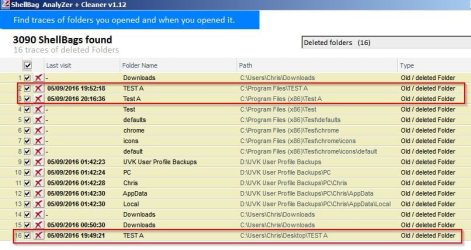
RE: 64bit Shell Bags. It's not clear to me but as a quick test I created folders named TEST A in a few locations including 64bit program files and monitored using a registry watcher.

Code:
REGWatcher log shows on creation of TEST A folders:
** Monday 05/09/2016 19:53:13 **
Additional Security
Registry Key hkey_users\S-1-5-21-165181766-1597162493-719806621-1000\software\classes\local settings\software\microsoft\windows\shell\bags\
Subkey 5506 has been added
=======================================================
** Monday 05/09/2016 20:12:22 **
Additional Security
Registry Key hkey_users\S-1-5-21-165181766-1597162493-719806621-1000\software\classes\local settings\software\microsoft\windows\shell\bags
Subkey 5507 has been added
=======================================================
** Monday 05/09/2016 20:17:22 **
Additional Security
Registry Key hkey_users\S-1-5-21-165181766-1597162493-719806621-1000\software\classes\local settings\software\microsoft\windows\shell\bags
Subkey 5508 has been added

Deleted the folders and the shell bags were picked up by the scan:

ShellBag AnalyZer + Cleaner Test.jpg
 

My Computer My Computer

At a glance

Microsoft Windows 7 Home Premium 64-bit 7601 ...AMD C-60 APU with Radeon(tm) HD Graphics4.00 GBAMD Radeon HD 6290 Graphics
Computer type
Laptop
Computer Manufacturer/Model Number
ASUS
OS
Microsoft Windows 7 Home Premium 64-bit 7601 Multiprocessor Free Service Pack 1
CPU
AMD C-60 APU with Radeon(tm) HD Graphics
Motherboard
ASUSTeK COMPUTER INC. X501U
Memory
4.00 GB
Graphics Card(s)
AMD Radeon HD 6290 Graphics
Sound Card
(1) AMD High Definition Audio Device (2) Realtek High Defi
Screen Resolution
1366 x 768 x 32 bits (4294967296 colors) @ 60 Hz
Hard Drives
Hitachi HTS545050A7E380 SATA Disk Device
Antivirus
Comodo CIS & FW, SecureAplus App Whitelisting, Threatfire
Browser
Cyberfox 64bit, Opera 64bit, Airfox
Other Info
Spy-The-Spy, HitmanPro.Alert, Norton Connect Safe, MJRegWatcher, BitDefender TrafficLight, Voodoo Shield, Zemana AntiMalware
I wasn't aware of CCEnhancer. It gave me a lot more options to work with. Thanks Callender.
 

Attachments

  • Untitled.png
    Untitled.png
    73.4 KB · Views: 1

My Computer My Computer

At a glance

Windows 10 Pro 64 bitAMD FX 9590 8 Core Black EditionCorsair Vengeance 16GB DDR3AMD Radeon (TM) R9 380 Gaming Series
Computer type
PC/Desktop
Computer Manufacturer/Model Number
Custom Built By Me.
OS
Windows 10 Pro 64 bit
CPU
AMD FX 9590 8 Core Black Edition
Motherboard
MSI 990FXA GAMING (MS-7893)
Memory
Corsair Vengeance 16GB DDR3
Graphics Card(s)
AMD Radeon (TM) R9 380 Gaming Series
Sound Card
AMD High Definition
Monitor(s) Displays
Samsung 32" 60Hz 4ms Curved PLS LED
Screen Resolution
1920 X 1080
Hard Drives
C: 223 GB SSD = E: 465 GB HDD = F: 931 GB HDD = G: 149 GB HDD = H: 931 GB HDD
PSU
EVGA Supernova NEX750B 750W ATX EPS12V 80PLUS Bronze
Case
Cool Master
Cooling
Noctua NH-D15 Premium Cooler with 2x NF-A15 PWM 140mm Fan
Internet Speed
Fiber Optic: Download 332.7 Mbps / Upload 331.5 Mbps
Antivirus
Windows Defender
Browser
Slimjet (64bit)
Callender said:
RE: 64bit Shell Bags. It's not clear to me but as a quick test I created folders named TEST A in a few locations including 64bit program files and monitored using a registry watcher.

That's interesting as your test did not list the Wow6432Node key which is a mirror of the other Bag keys as being added to.

HKEY_CURRENT_USER\Software\Classes\Wow6432Node\LocalSettings\Software\Microsoft\Windows\
Shell\Bags

Really not sure it depends on folder location to add to that key since my Bag key in Wow6432Node holds the same entries as in the normal Shell\Bags key and I have entries for other hard drive locations that was never in the 64 bit Program Files locations.

I guess the only way to know is for a real world test and use "Shell Bags Analyzer and Cleaner" and see if it touch's those other keys in the removal process. Be kind of pointless if it doesn't as that means it's still listed in the registry but under another key name and to top that off (tough I haven't confirmed yet as I only spotted it yesterday) there is a Cache folder key that lists these same Bag entries in the registry.

Damn this is getting complicated! :shock:

BTW.... BIG Thanks for the info on CCEnhancer and I'll add that to my toolkit!
 

My Computer My Computer

At a glance

Windows 7 Pro 64bit SP1+UpdatesIntel I3 6100G.Skill Ripjaws V Series 16GB (2 x 8GB) DDR4 ...MSI GTX 960 GAMING 100ME 2GB
Computer type
PC/Desktop
Computer Manufacturer/Model Number
Custom Build
OS
Windows 7 Pro 64bit SP1+Updates
CPU
Intel I3 6100
Motherboard
MSI Z170a Gaming 3 Bios ver a.4
Memory
G.Skill Ripjaws V Series 16GB (2 x 8GB) DDR4 2133mhz
Graphics Card(s)
MSI GTX 960 GAMING 100ME 2GB
Sound Card
X-Fi xtremegamer fatal1ty pro series
Monitor(s) Displays
LG 32MP58HQ-P 32"
Screen Resolution
1920X1080
Hard Drives
Samsung 850EVO SSD 250GB
4 WD HD
PSU
EVGA SuperNova 650 G2 650w
Case
Thermaltake Armor II Tower
Cooling
6 Fan air cooled modded case
Keyboard
Logitech G15
Mouse
Logitech G5
Internet Speed
Cable 120MB/3MB
Antivirus
Avast Ver 12.1.2272
Browser
Chrome
That's interesting as your test did not list the Wow6432Node key which is a mirror of the other Bag keys as being added to.

HKEY_CURRENT_USER\Software\Classes\Wow6432Node\LocalSettings\Software\Microsoft\Windows\
Shell\Bags

I did test WOW6432Node but the registry watcher detected no changes there. I'm not sure that I configured it correctly so I didn't post the results. I might do another test on that but not today.

Really not sure it depends on folder location to add to that key since my Bag key in Wow6432Node holds the same entries as in the normal Shell\Bags key and I have entries for other hard drive locations that was never in the 64 bit Program Files locations.

I guess the only way to know is for a real world test and use "Shell Bags Analyzer and Cleaner" and see if it touch's those other keys in the removal process. Be kind of pointless if it doesn't as that means it's still listed in the registry but under another key name and to top that off (tough I haven't confirmed yet as I only spotted it yesterday) there is a Cache folder key that lists these same Bag entries in the registry.

Don't know about cache folder but I know something about:

webcachev01.dat and [Drive Letter:]\$Extend\$UsnJrnl:

$UsnJrnl: in particular records all changes made to files and directories. I managed to get a look at mine (some time ago) by using software that force copies locked system files then I looked at the copy.

I don't know why you want to remove stuff but in my experience it's hard to remove all traces.
 

My Computer My Computer

At a glance

Microsoft Windows 7 Home Premium 64-bit 7601 ...AMD C-60 APU with Radeon(tm) HD Graphics4.00 GBAMD Radeon HD 6290 Graphics
Computer type
Laptop
Computer Manufacturer/Model Number
ASUS
OS
Microsoft Windows 7 Home Premium 64-bit 7601 Multiprocessor Free Service Pack 1
CPU
AMD C-60 APU with Radeon(tm) HD Graphics
Motherboard
ASUSTeK COMPUTER INC. X501U
Memory
4.00 GB
Graphics Card(s)
AMD Radeon HD 6290 Graphics
Sound Card
(1) AMD High Definition Audio Device (2) Realtek High Defi
Screen Resolution
1366 x 768 x 32 bits (4294967296 colors) @ 60 Hz
Hard Drives
Hitachi HTS545050A7E380 SATA Disk Device
Antivirus
Comodo CIS & FW, SecureAplus App Whitelisting, Threatfire
Browser
Cyberfox 64bit, Opera 64bit, Airfox
Other Info
Spy-The-Spy, HitmanPro.Alert, Norton Connect Safe, MJRegWatcher, BitDefender TrafficLight, Voodoo Shield, Zemana AntiMalware
You are really paranoid you can use Truecrypt or Veracrypt and do a complete system disk encryption. Either will even make a decoy OS that you can keep your activities restricted on. The other remains hidden and is only accessible using a special password. I just tried it today on a test VM with Veracrypt. It's a fork of Truecrypt created after the Truecrypt developers stopped supporting it in 2014. It is more up to date on settings and encryption algorithms but it took incredibly long to validate the password and boot either system and even longer for the hidden one. I'm going to see how Truecrypt does and post back. The short story is that it isn't for the faint of heart. I only tried it on a small partition without any data on it and it took most of the day. It requires a complete reinstall of windows-the decoy system-which I didn't even attempt to update or install too many programs.
 

My Computers My Computers

  • At a glance

    Windows 7 pro/Windows 10 ProIntel i7 860 Quad core 2.8 ghz8 gbATI Radeon HD 5770 1 gb ram
    Computer type
    PC/Desktop
    Computer Manufacturer/Model Number
    HP Pavillion Elite HPE-250f
    OS
    Windows 7 pro/Windows 10 Pro
    CPU
    Intel i7 860 Quad core 2.8 ghz
    Memory
    8 gb
    Graphics Card(s)
    ATI Radeon HD 5770 1 gb ram
    Monitor(s) Displays
    Alienware 25 AW2521HF & Viewsonic
    Screen Resolution
    1920 x1080 & 1680x1050
    Hard Drives
    WD blue 1 tb & 500 gb.
    Browser
    FF of course.
    Other Info
    https://www.bestbuy.com/site/hp-pavilion-elite-desktop-intel-core-i7-processor-8gb-memory-1tb-hard-drive/9921493.p?skuId=9921493
  • At a glance

    Windows 2012 R2 Data center/Linux Minti3 9100 3.6GHz, 8M cache, 4C/4T8GB 2666MT/s DDR4 ECC UDIMM
    Computer type
    PC/Desktop
    System Manufacturer/Model Number
    Dell Poweredge T140
    OS
    Windows 2012 R2 Data center/Linux Mint
    CPU
    i3 9100 3.6GHz, 8M cache, 4C/4T
    Memory
    8GB 2666MT/s DDR4 ECC UDIMM
    Monitor(s) Displays
    Viewsonic
    Screen Resolution
    1680x1050
    Hard Drives
    1 TB & 750 GB
    Other Info
    https://www.dell.com/en-us/work/shop/productdetailstxn/poweredge-t140?~ck=bt
You are really paranoid you can use Truecrypt or Veracrypt and do a complete system disk encryption. Either will even make a decoy OS that you can keep your activities restricted on. The other remains hidden and is only accessible using a special password. I just tried it today on a test VM with Veracrypt. It's a fork of Truecrypt created after the Truecrypt developers stopped supporting it in 2014. It is more up to date on settings and encryption algorithms but it took incredibly long to validate the password and boot either system and even longer for the hidden one. I'm going to see how Truecrypt does and post back. The short story is that it isn't for the faint of heart. I only tried it on a small partition without any data on it and it took most of the day. It requires a complete reinstall of windows-the decoy system-which I didn't even attempt to update or install too many programs.


Point taken but for the system I'm dealing with total encryption is not an option as this PC is used for about 90% home use and 10% work related. As you saw by encryption of the small partition you can really muck up the system and depending on how big a drive your encrypting you have to figure both encrypt-decrypt times which can also effect other things like read/write times for games, limited access to files..etc

So really I'm just dealing with cleaning up leftovers from the 10% of work stuff so once I have those locations tagged I can just include them in my standard clean up to remove them. Most of the programs and files that are work related to that 10% are already protected by encryption on another hard drive.

@Callender

It's not about totally removing everything as I think that's an impossible task but I'm trying to reduce the size of the footprint left in the registry. I do appreciate all of your help and info as I'm continuing to learn new things, tools and such.

As for the webcachev01.dat file it seams that can be disabled so it doesn't run by disabling the task and removing a registry key. I saw a small program that does this for you some time ago and although I'm not positive I think that file relates to IE and since I don't use IE that file is not present on my system or in the hidden AppData folder.


EDIT: Ok.

I pulled the trigger and removed the Bag entries using the program then rebooted and it did remove the 2nd set of sub keys that point to the file/folder locations in these keys:

HKEY_CURRENT_USER\Software\Classes\Local Settings\Software\Microsoft\Windows\Shell\Bags\
HKEY_CURRENT_USER\Software\Classes\Local Settings\Software\Microsoft\Windows\Shell\BagsMRU\


It did however leave the numbered folder keys under Bags and BagsMRU but the keys contain "NO Data" which I confirmed manually. Not a total success as it still shows something was opened (leaving a numbered folder) but enough that it doesn't show what was opened.

As for the Bag under "Wow6432Node" IDK what the heck is going on as now I don't have that folder listed in the follow keys

HKEY_CURRENT_USER\Software\Classes\Wow6432Node\LocalSettings\Software\Microsoft\Windows\
Shell\Bags

HKEY_CURRENT_USER\Software\Classes\Wow6432Node\LocalSettings\Software\Microsoft\Windows\
Shell\BagMRU


Anyway that's were things stand now so I'll poke around in registry and see if I can locate that Cache key again "Kicking myself in ass for not writing it down at the time"
 
Last edited:

My Computer My Computer

At a glance

Windows 7 Pro 64bit SP1+UpdatesIntel I3 6100G.Skill Ripjaws V Series 16GB (2 x 8GB) DDR4 ...MSI GTX 960 GAMING 100ME 2GB
Computer type
PC/Desktop
Computer Manufacturer/Model Number
Custom Build
OS
Windows 7 Pro 64bit SP1+Updates
CPU
Intel I3 6100
Motherboard
MSI Z170a Gaming 3 Bios ver a.4
Memory
G.Skill Ripjaws V Series 16GB (2 x 8GB) DDR4 2133mhz
Graphics Card(s)
MSI GTX 960 GAMING 100ME 2GB
Sound Card
X-Fi xtremegamer fatal1ty pro series
Monitor(s) Displays
LG 32MP58HQ-P 32"
Screen Resolution
1920X1080
Hard Drives
Samsung 850EVO SSD 250GB
4 WD HD
PSU
EVGA SuperNova 650 G2 650w
Case
Thermaltake Armor II Tower
Cooling
6 Fan air cooled modded case
Keyboard
Logitech G15
Mouse
Logitech G5
Internet Speed
Cable 120MB/3MB
Antivirus
Avast Ver 12.1.2272
Browser
Chrome
Also note that Microsoft's answer for clearing the Bag folder's is to actually delete the main Key and then add them back and on a 64bit system you have to clean both locations I posted and these ones.

HKEY_CURRENT_USER\Software\Classes\Wow6432Node\LocalSettings\Software\Microsoft\Windows\
Shell\Bags

HKEY_CURRENT_USER\Software\Classes\Wow6432Node\LocalSettings\Software\Microsoft\Windows\
Shell\BagMRU

Okay I'm using a different machine (at work) currently and all I see for the above is:

Code:
Windows Registry Editor Version 5.00

[HKEY_LOCAL_MACHINE\SOFTWARE\Classes\Local Settings]

[HKEY_LOCAL_MACHINE\SOFTWARE\Classes\Local Settings\Software]

[HKEY_LOCAL_MACHINE\SOFTWARE\Classes\Local Settings\Software\Microsoft]

[HKEY_LOCAL_MACHINE\SOFTWARE\Classes\Local Settings\Software\Microsoft\Windows]

[HKEY_LOCAL_MACHINE\SOFTWARE\Classes\Local Settings\Software\Microsoft\Windows\Shell]

[HKEY_LOCAL_MACHINE\SOFTWARE\Classes\Local Settings\Software\Microsoft\Windows\Shell\Bags]

[HKEY_LOCAL_MACHINE\SOFTWARE\Classes\Local Settings\Software\Microsoft\Windows\Shell\Bags\[B]66[/B]]

[HKEY_LOCAL_MACHINE\SOFTWARE\Classes\Local Settings\Software\Microsoft\Windows\Shell\Bags\[B]66\ComDlg]
"ScrollPos1280x1024(2).y"=dword:00000009[/B]

Just one entry under Bags so it would appear to be of little concern.
 

My Computer My Computer

At a glance

Microsoft Windows 7 Home Premium 64-bit 7601 ...AMD C-60 APU with Radeon(tm) HD Graphics4.00 GBAMD Radeon HD 6290 Graphics
Computer type
Laptop
Computer Manufacturer/Model Number
ASUS
OS
Microsoft Windows 7 Home Premium 64-bit 7601 Multiprocessor Free Service Pack 1
CPU
AMD C-60 APU with Radeon(tm) HD Graphics
Motherboard
ASUSTeK COMPUTER INC. X501U
Memory
4.00 GB
Graphics Card(s)
AMD Radeon HD 6290 Graphics
Sound Card
(1) AMD High Definition Audio Device (2) Realtek High Defi
Screen Resolution
1366 x 768 x 32 bits (4294967296 colors) @ 60 Hz
Hard Drives
Hitachi HTS545050A7E380 SATA Disk Device
Antivirus
Comodo CIS & FW, SecureAplus App Whitelisting, Threatfire
Browser
Cyberfox 64bit, Opera 64bit, Airfox
Other Info
Spy-The-Spy, HitmanPro.Alert, Norton Connect Safe, MJRegWatcher, BitDefender TrafficLight, Voodoo Shield, Zemana AntiMalware
You are really paranoid you can use Truecrypt or Veracrypt

I've got both. I just use encryption for important private stuff as I remember a few years back (using XP) when I saw my entire documents folder got zipped and sent who knows where by some malware!
 

My Computer My Computer

At a glance

Microsoft Windows 7 Home Premium 64-bit 7601 ...AMD C-60 APU with Radeon(tm) HD Graphics4.00 GBAMD Radeon HD 6290 Graphics
Computer type
Laptop
Computer Manufacturer/Model Number
ASUS
OS
Microsoft Windows 7 Home Premium 64-bit 7601 Multiprocessor Free Service Pack 1
CPU
AMD C-60 APU with Radeon(tm) HD Graphics
Motherboard
ASUSTeK COMPUTER INC. X501U
Memory
4.00 GB
Graphics Card(s)
AMD Radeon HD 6290 Graphics
Sound Card
(1) AMD High Definition Audio Device (2) Realtek High Defi
Screen Resolution
1366 x 768 x 32 bits (4294967296 colors) @ 60 Hz
Hard Drives
Hitachi HTS545050A7E380 SATA Disk Device
Antivirus
Comodo CIS & FW, SecureAplus App Whitelisting, Threatfire
Browser
Cyberfox 64bit, Opera 64bit, Airfox
Other Info
Spy-The-Spy, HitmanPro.Alert, Norton Connect Safe, MJRegWatcher, BitDefender TrafficLight, Voodoo Shield, Zemana AntiMalware
Thank you all for the help you provided. I have another issue but I'll start a new thread as I'm not sure it's related to this cleaning tool. Thanks again!!
 

My Computer My Computer

At a glance

Windows 7 Pro 64bit SP1+UpdatesIntel I3 6100G.Skill Ripjaws V Series 16GB (2 x 8GB) DDR4 ...MSI GTX 960 GAMING 100ME 2GB
Computer type
PC/Desktop
Computer Manufacturer/Model Number
Custom Build
OS
Windows 7 Pro 64bit SP1+Updates
CPU
Intel I3 6100
Motherboard
MSI Z170a Gaming 3 Bios ver a.4
Memory
G.Skill Ripjaws V Series 16GB (2 x 8GB) DDR4 2133mhz
Graphics Card(s)
MSI GTX 960 GAMING 100ME 2GB
Sound Card
X-Fi xtremegamer fatal1ty pro series
Monitor(s) Displays
LG 32MP58HQ-P 32"
Screen Resolution
1920X1080
Hard Drives
Samsung 850EVO SSD 250GB
4 WD HD
PSU
EVGA SuperNova 650 G2 650w
Case
Thermaltake Armor II Tower
Cooling
6 Fan air cooled modded case
Keyboard
Logitech G15
Mouse
Logitech G5
Internet Speed
Cable 120MB/3MB
Antivirus
Avast Ver 12.1.2272
Browser
Chrome
Back
Top