Solved Windows 7 and C++ issue

AirPower4ever

New member
Member
VIP
Local time
6:15 PM
Messages
269
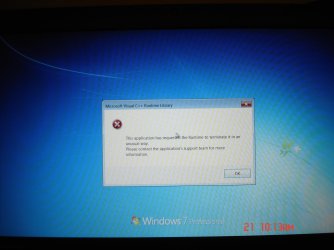
So I am stumped on this issue. I have a laptop (Lenovo T540p) that my friends dad owns and is now not starting. Limited information on when this occurred (he does not remember well), but this is what it is doing. BIOS part starts fine, get the "Starting Windows" with the flags no prob, then the welcome screen and then that's it. At the bottom it says Windows 7 Professional, the light blue background with the leaves; but it just sits here for about 1 minute. Then a pop up shows up (see attached pic)

I can however get in to "Safe Mode". When the pop up shows up, if I click OK, the screen flashes and it just reappears after about 20 seconds so it is stuck in some loop I guess.

Now what I have done (not in this order though):
* Reboot, F8, select Last Known Good Configuration", gets past the Windows Start, but hangs at a black screen
* In Safe Mode I ran sfc /scannow, results say everything is fine
* In Safe Mode I did a clean system boot, same results after rebooting
* I saw he had some programs way outdated, so updated some (i.e. Flash Player, Firefox) However, some I cannot uninstall nor install the new one in Safe Mode (i.e. Adobe Reader, Java, C++ 2005, 2008 and 2010)
* Cleared out the temp and %temp% folders
* During boot up pressed F8, selected Repair Computer. Tried to repair but it says it did not find any problems
* They are using Avast and it is the current version, but in safe mode the service is not on.
* I ran Malwarebytes, nothing found
* I ran AdwCleaner, nothing found
* I looked for the last system restore and there is only one entry; date 9-18-2014 but have not tried this

So I am kind of stumped as what else I can do. Any help would be greatly appreciated
 

Attachments
  • DSC04483.jpg
    DSC04483.jpg
    195.6 KB · Views: 1

My Computer

Computer type
PC/Desktop
Computer Manufacturer/Model Number
Home Built
OS
Windows 10 Pro 64-bit
CPU
Core I7-6700
Motherboard
Asus Maximus VIII Hero
Memory
8GB Corsair Dominator
Graphics Card(s)
Asus STRIX GTX 980Ti
Monitor(s) Displays
Asus PG278Q, Dell U2410
Screen Resolution
2560 x 1440, 1920 x 1200
Hard Drives
1 x Samsung 950 Pro 512GB
1 x 1TB HGST
PSU
750W Seasonic
Case
Antec 900 v3
Cooling
Stock
Internet Speed
Cable Internet

My Computer

Computer Manufacturer/Model Number
HP Media Center
OS
Windows 7 32 bit
CPU
AMD 5200+ dual core
Memory
2 GB
Graphics Card(s)
NVidia GeForce 6150SE 128 MB
Monitor(s) Displays
CRT
Screen Resolution
1280x1024
Hard Drives
500 GB Sata internal :

SIIG USB 3.0 docking stations w/WD Caviar Black 6 Gb/s drives
Keyboard
PS/2
Mouse
PS/2 Wheel Mouse
Other Info
SIIG USB 3.0 PCIexpress card.

My Computer

Computer type
Laptop
Computer Manufacturer/Model Number
HP Pavilion dv6-6c10us
OS
x64 (6.3.9600) Win8.1 Pro & soon dual boot x64 (6.1.7601) Win7_SP1 HomePrem
CPU
AMD A6-3420M APU with Radeon(tm) HD Graphics
Motherboard
Hewlett-Packard 1805
Memory
6.00 GB
Graphics Card(s)
AMD Radeon(TM) HD 6520G
Sound Card
(1) AMD High Definition Audio Device (2) IDT High Definiti
Monitor(s) Displays
HP W2072a 20" LCD (1600 x 900) @ 60 Hz
Screen Resolution
1366 x 768 x 32 bits (4294967296 colors) @ 60 Hz
Hard Drives
ST640LM0 00 HM641JI SATA Disk Device
Keyboard
Logitech k520 wireless KB
Mouse
Logitech m320 wireless mouse (bundled with KB)
Internet Speed
15/5 | 54 MB Wireless 'n'
Antivirus
Realtime: Defender or Avast | On-demand: Malwarebytes, ESET
Browser
IE 11 on Win8, IE 10 on win 7
Other Info
Media: [Gimp, Audacity, VLC] || Comm: [WEmail 2012, Skype] || Productivity: [OpenOffice,| Textpad] || Utils: [Sysinternals, cCleaner, Speccy, Defraggler]
@Miles - Let me call them. In the control panel for printers there is nothing there, but I will double check

@Slart - No it was not downgraded. Not dual boot either. I will get the screenshot.
 

My Computer

Computer type
PC/Desktop
Computer Manufacturer/Model Number
Home Built
OS
Windows 10 Pro 64-bit
CPU
Core I7-6700
Motherboard
Asus Maximus VIII Hero
Memory
8GB Corsair Dominator
Graphics Card(s)
Asus STRIX GTX 980Ti
Monitor(s) Displays
Asus PG278Q, Dell U2410
Screen Resolution
2560 x 1440, 1920 x 1200
Hard Drives
1 x Samsung 950 Pro 512GB
1 x 1TB HGST
PSU
750W Seasonic
Case
Antec 900 v3
Cooling
Stock
Internet Speed
Cable Internet
I have seen that error when programming in C++ but it has been a few years. One thing it could be is if a run time got overwritten by a different version. I also seem to remember it can happen if the program does not ensure the proper destruction of objects on termination. But it's one of those things that can have many causes. In C++ I tried to program using stand-alone exe files because the run-time is more hassle than it is worth(who cares about saving 1/4 MB now with TB drives?)

In .NET it's another matter altogether. :)
 

My Computer

Computer Manufacturer/Model Number
HP Media Center
OS
Windows 7 32 bit
CPU
AMD 5200+ dual core
Memory
2 GB
Graphics Card(s)
NVidia GeForce 6150SE 128 MB
Monitor(s) Displays
CRT
Screen Resolution
1280x1024
Hard Drives
500 GB Sata internal :

SIIG USB 3.0 docking stations w/WD Caviar Black 6 Gb/s drives
Keyboard
PS/2
Mouse
PS/2 Wheel Mouse
Other Info
SIIG USB 3.0 PCIexpress card.
OK, the printer is a Canon MX870 and he hooks this up via USB

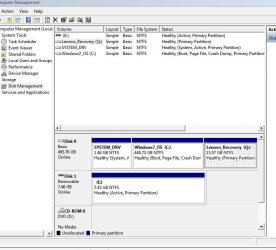
For the drives, here is the screenshot. The 7.45GB is my thumb

I just did a Kaspersky scan and nothing as well.
 

Attachments

  • Capture1.JPG
    Capture1.JPG
    69.5 KB · Views: 0

My Computer

Computer type
PC/Desktop
Computer Manufacturer/Model Number
Home Built
OS
Windows 10 Pro 64-bit
CPU
Core I7-6700
Motherboard
Asus Maximus VIII Hero
Memory
8GB Corsair Dominator
Graphics Card(s)
Asus STRIX GTX 980Ti
Monitor(s) Displays
Asus PG278Q, Dell U2410
Screen Resolution
2560 x 1440, 1920 x 1200
Hard Drives
1 x Samsung 950 Pro 512GB
1 x 1TB HGST
PSU
750W Seasonic
Case
Antec 900 v3
Cooling
Stock
Internet Speed
Cable Internet
Now that you mention NET, I see that he has 4.5 installed, but I do not see any other lower version which seems odd.

What do you think, if I try to reinstall the C++ versions?
 

My Computer

Computer type
PC/Desktop
Computer Manufacturer/Model Number
Home Built
OS
Windows 10 Pro 64-bit
CPU
Core I7-6700
Motherboard
Asus Maximus VIII Hero
Memory
8GB Corsair Dominator
Graphics Card(s)
Asus STRIX GTX 980Ti
Monitor(s) Displays
Asus PG278Q, Dell U2410
Screen Resolution
2560 x 1440, 1920 x 1200
Hard Drives
1 x Samsung 950 Pro 512GB
1 x 1TB HGST
PSU
750W Seasonic
Case
Antec 900 v3
Cooling
Stock
Internet Speed
Cable Internet
First thing is I would look in the logs. It should say which exe dll or service had a fatal error. If you have the specific program the fix should be nearly in hand(famous last words.) :)
 

My Computer

Computer Manufacturer/Model Number
HP Media Center
OS
Windows 7 32 bit
CPU
AMD 5200+ dual core
Memory
2 GB
Graphics Card(s)
NVidia GeForce 6150SE 128 MB
Monitor(s) Displays
CRT
Screen Resolution
1280x1024
Hard Drives
500 GB Sata internal :

SIIG USB 3.0 docking stations w/WD Caviar Black 6 Gb/s drives
Keyboard
PS/2
Mouse
PS/2 Wheel Mouse
Other Info
SIIG USB 3.0 PCIexpress card.
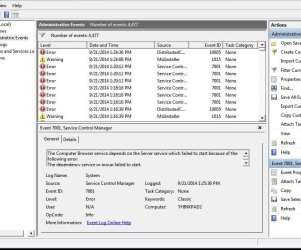
Here is the current event viewer. All the 7001 say the same thing, except the 10005.

Capture1 - 10005 I am not sure if that is what is causing this or it is being caused because the laptop is in my home and not his.

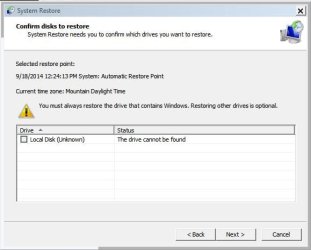
Capture2 - I looked at doing the system restore and I got this once I selected the only one available. Never scene that.
 

Attachments

  • Capture.JPG
    Capture.JPG
    82.5 KB · Views: 0
  • Capture1.JPG
    Capture1.JPG
    76.8 KB · Views: 0
  • Capture2.JPG
    Capture2.JPG
    33 KB · Views: 11

My Computer

Computer type
PC/Desktop
Computer Manufacturer/Model Number
Home Built
OS
Windows 10 Pro 64-bit
CPU
Core I7-6700
Motherboard
Asus Maximus VIII Hero
Memory
8GB Corsair Dominator
Graphics Card(s)
Asus STRIX GTX 980Ti
Monitor(s) Displays
Asus PG278Q, Dell U2410
Screen Resolution
2560 x 1440, 1920 x 1200
Hard Drives
1 x Samsung 950 Pro 512GB
1 x 1TB HGST
PSU
750W Seasonic
Case
Antec 900 v3
Cooling
Stock
Internet Speed
Cable Internet

My Computer

Computer type
Laptop
Computer Manufacturer/Model Number
HP Pavilion dv6-6c10us
OS
x64 (6.3.9600) Win8.1 Pro & soon dual boot x64 (6.1.7601) Win7_SP1 HomePrem
CPU
AMD A6-3420M APU with Radeon(tm) HD Graphics
Motherboard
Hewlett-Packard 1805
Memory
6.00 GB
Graphics Card(s)
AMD Radeon(TM) HD 6520G
Sound Card
(1) AMD High Definition Audio Device (2) IDT High Definiti
Monitor(s) Displays
HP W2072a 20" LCD (1600 x 900) @ 60 Hz
Screen Resolution
1366 x 768 x 32 bits (4294967296 colors) @ 60 Hz
Hard Drives
ST640LM0 00 HM641JI SATA Disk Device
Keyboard
Logitech k520 wireless KB
Mouse
Logitech m320 wireless mouse (bundled with KB)
Internet Speed
15/5 | 54 MB Wireless 'n'
Antivirus
Realtime: Defender or Avast | On-demand: Malwarebytes, ESET
Browser
IE 11 on Win8, IE 10 on win 7
Other Info
Media: [Gimp, Audacity, VLC] || Comm: [WEmail 2012, Skype] || Productivity: [OpenOffice,| Textpad] || Utils: [Sysinternals, cCleaner, Speccy, Defraggler]
OK, so I did step one and I still get the problem. I moved to step 2; checking various services, still same problem

Any other ideas we can try?
 

My Computer

Computer type
PC/Desktop
Computer Manufacturer/Model Number
Home Built
OS
Windows 10 Pro 64-bit
CPU
Core I7-6700
Motherboard
Asus Maximus VIII Hero
Memory
8GB Corsair Dominator
Graphics Card(s)
Asus STRIX GTX 980Ti
Monitor(s) Displays
Asus PG278Q, Dell U2410
Screen Resolution
2560 x 1440, 1920 x 1200
Hard Drives
1 x Samsung 950 Pro 512GB
1 x 1TB HGST
PSU
750W Seasonic
Case
Antec 900 v3
Cooling
Stock
Internet Speed
Cable Internet
Follow Option ONE in http://www.sevenforums.com/bsod-help-support/96879-blue-screen-death-bsod-posting-instructions.html

That will give a full picture of the machine.

I can look at the events logs and services in the output

The Computer Browser and Server event log might be nothing - I disable the Server Service on my machine and get a few dependency event logs.

The DCOM entry say the MSIServer is being passed "" - not sure about this one.

You could try reinstalling the C++ runtimes as you suggested in post # 7.

.NET is quite a bear to install - lots of binds. If it comes to that you might consider a Repair install.

Post the DM collector stuff and I'll take a look.

Bill
.


Sysinternals Process Monitor would tell you the origin, but I'm really rusty on their use.
 

My Computer

Computer type
Laptop
Computer Manufacturer/Model Number
HP Pavilion dv6-6c10us
OS
x64 (6.3.9600) Win8.1 Pro & soon dual boot x64 (6.1.7601) Win7_SP1 HomePrem
CPU
AMD A6-3420M APU with Radeon(tm) HD Graphics
Motherboard
Hewlett-Packard 1805
Memory
6.00 GB
Graphics Card(s)
AMD Radeon(TM) HD 6520G
Sound Card
(1) AMD High Definition Audio Device (2) IDT High Definiti
Monitor(s) Displays
HP W2072a 20" LCD (1600 x 900) @ 60 Hz
Screen Resolution
1366 x 768 x 32 bits (4294967296 colors) @ 60 Hz
Hard Drives
ST640LM0 00 HM641JI SATA Disk Device
Keyboard
Logitech k520 wireless KB
Mouse
Logitech m320 wireless mouse (bundled with KB)
Internet Speed
15/5 | 54 MB Wireless 'n'
Antivirus
Realtime: Defender or Avast | On-demand: Malwarebytes, ESET
Browser
IE 11 on Win8, IE 10 on win 7
Other Info
Media: [Gimp, Audacity, VLC] || Comm: [WEmail 2012, Skype] || Productivity: [OpenOffice,| Textpad] || Utils: [Sysinternals, cCleaner, Speccy, Defraggler]
Well, great news. I went back and ran the "Repair Windows", but something very weird happened. The first one I saw a screen that listed about 8 to 10 items like Safe Mode, Safe Mode with Networking, etc. Rebooted and went back to do another repair, but this time the screen only had 4 options. So I did the repair again and then rebooted and now the laptop is up and running. I have started removing, rebooting and then installing programs slowly. I am on the 5th reboot and still it is working fine.

I will dig in to the logs afterwards to see what the errors look like now since the laptop is running. I don't know why it was so "constipated", but it appears to be unplugged so far. I'll report back what the logs say after I get the computer updated; included the Microsoft ones.
 

My Computer

Computer type
PC/Desktop
Computer Manufacturer/Model Number
Home Built
OS
Windows 10 Pro 64-bit
CPU
Core I7-6700
Motherboard
Asus Maximus VIII Hero
Memory
8GB Corsair Dominator
Graphics Card(s)
Asus STRIX GTX 980Ti
Monitor(s) Displays
Asus PG278Q, Dell U2410
Screen Resolution
2560 x 1440, 1920 x 1200
Hard Drives
1 x Samsung 950 Pro 512GB
1 x 1TB HGST
PSU
750W Seasonic
Case
Antec 900 v3
Cooling
Stock
Internet Speed
Cable Internet
Cool. Glad you got it working.

b0225.gif
 

My Computer

Computer Manufacturer/Model Number
HP Media Center
OS
Windows 7 32 bit
CPU
AMD 5200+ dual core
Memory
2 GB
Graphics Card(s)
NVidia GeForce 6150SE 128 MB
Monitor(s) Displays
CRT
Screen Resolution
1280x1024
Hard Drives
500 GB Sata internal :

SIIG USB 3.0 docking stations w/WD Caviar Black 6 Gb/s drives
Keyboard
PS/2
Mouse
PS/2 Wheel Mouse
Other Info
SIIG USB 3.0 PCIexpress card.
Thank you to all who helped too as well as 7F!!
 

My Computer

Computer type
PC/Desktop
Computer Manufacturer/Model Number
Home Built
OS
Windows 10 Pro 64-bit
CPU
Core I7-6700
Motherboard
Asus Maximus VIII Hero
Memory
8GB Corsair Dominator
Graphics Card(s)
Asus STRIX GTX 980Ti
Monitor(s) Displays
Asus PG278Q, Dell U2410
Screen Resolution
2560 x 1440, 1920 x 1200
Hard Drives
1 x Samsung 950 Pro 512GB
1 x 1TB HGST
PSU
750W Seasonic
Case
Antec 900 v3
Cooling
Stock
Internet Speed
Cable Internet
Glad you got it sorted Steve, wish I could say that anything I posted actually helped, but alas ... no

Not to drag this thread out, but when you say "went back to Repair Windows" you're talking about the Recovery disc option - yes? I'm a little confused because you then say that you're removing and installing programs slowly. It almost sounds more like a Repair install ... almost, but you wouldn't have to remove programs, only install them.

Anyway, as Miles said -
b0225.gif
 

My Computer

Computer type
Laptop
Computer Manufacturer/Model Number
HP Pavilion dv6-6c10us
OS
x64 (6.3.9600) Win8.1 Pro & soon dual boot x64 (6.1.7601) Win7_SP1 HomePrem
CPU
AMD A6-3420M APU with Radeon(tm) HD Graphics
Motherboard
Hewlett-Packard 1805
Memory
6.00 GB
Graphics Card(s)
AMD Radeon(TM) HD 6520G
Sound Card
(1) AMD High Definition Audio Device (2) IDT High Definiti
Monitor(s) Displays
HP W2072a 20" LCD (1600 x 900) @ 60 Hz
Screen Resolution
1366 x 768 x 32 bits (4294967296 colors) @ 60 Hz
Hard Drives
ST640LM0 00 HM641JI SATA Disk Device
Keyboard
Logitech k520 wireless KB
Mouse
Logitech m320 wireless mouse (bundled with KB)
Internet Speed
15/5 | 54 MB Wireless 'n'
Antivirus
Realtime: Defender or Avast | On-demand: Malwarebytes, ESET
Browser
IE 11 on Win8, IE 10 on win 7
Other Info
Media: [Gimp, Audacity, VLC] || Comm: [WEmail 2012, Skype] || Productivity: [OpenOffice,| Textpad] || Utils: [Sysinternals, cCleaner, Speccy, Defraggler]
Back
Top