
You are using an out of date browser. It may not display this or other websites correctly.
You should upgrade or use an alternative browser.
You should upgrade or use an alternative browser.
Windows 7 and Frontpage 2002
- Thread starter ITLeroy
- Start date

I've got 03 on with no issues.
My Computer
- Computer Manufacturer/Model Number
- Sony Vaio FZ21Z
- OS
- Windows 7 Ultimate x64 ®™
- CPU
- Intel Core 2 Duo (2.2 GHz)
- Motherboard
- Sony (Intel Chipset)
- Memory
- 2x 2GB Corsair (667 MHz)
- Graphics Card(s)
- NVIDIA 8600M GS (256MB)
- Sound Card
- Sigmatel
- Monitor(s) Displays
- 15.4" TFT X-Black
- Screen Resolution
- 1280x800
- Hard Drives
- Western Digital 300GB Scorpio Black (7200rpm)
- Mouse
- Logitech Anywhere MX
- Internet Speed
- Sky 5MB
Frontpage Frustrations
Yes me!
It opens and loads my website but if I try to change the font on a single page it crashes every time. It appears that it cannot read the new Windows 7 fonts, which in turn results in an application error.
Are you experiencing a similar problem?
[LEFT said:ITLeroy[/LEFT];370052]Has anyone tried usingFp2002 on 7 yet???
Yes me!
It opens and loads my website but if I try to change the font on a single page it crashes every time. It appears that it cannot read the new Windows 7 fonts, which in turn results in an application error.
Are you experiencing a similar problem?
My Computer
- OS
- Windows 7
Have you updated it?
My Computer
- Computer Manufacturer/Model Number
- Sony Vaio FZ21Z
- OS
- Windows 7 Ultimate x64 ®™
- CPU
- Intel Core 2 Duo (2.2 GHz)
- Motherboard
- Sony (Intel Chipset)
- Memory
- 2x 2GB Corsair (667 MHz)
- Graphics Card(s)
- NVIDIA 8600M GS (256MB)
- Sound Card
- Sigmatel
- Monitor(s) Displays
- 15.4" TFT X-Black
- Screen Resolution
- 1280x800
- Hard Drives
- Western Digital 300GB Scorpio Black (7200rpm)
- Mouse
- Logitech Anywhere MX
- Internet Speed
- Sky 5MB
You should yes, especially if you're having issues...Updated Frontpage? No. Should I? Sorry...I'm clueless about this stuff.
http://office.microsoft.com/search/redir.aspx?AssetID=XT101374411033&Origin=HH101871421033&CTT=5
My Computer
- Computer Manufacturer/Model Number
- Sony Vaio FZ21Z
- OS
- Windows 7 Ultimate x64 ®™
- CPU
- Intel Core 2 Duo (2.2 GHz)
- Motherboard
- Sony (Intel Chipset)
- Memory
- 2x 2GB Corsair (667 MHz)
- Graphics Card(s)
- NVIDIA 8600M GS (256MB)
- Sound Card
- Sigmatel
- Monitor(s) Displays
- 15.4" TFT X-Black
- Screen Resolution
- 1280x800
- Hard Drives
- Western Digital 300GB Scorpio Black (7200rpm)
- Mouse
- Logitech Anywhere MX
- Internet Speed
- Sky 5MB
Want to use Frontpage with Windows 7 here is how...
Like me, want to use Frontpage with Windows 7?
Hello,
I have Windows 7 Ultimate and have finally found that if you can get Frontpage 2003 and get it to update this version 11.8164.8221 SP3 it works fine. I have been use to using Frontpage 2002 with xp for years.
This is what I've found out to work. Get Frontpage 2003 to update to version 11.8164.8221 SP3.
hitek
Has anyone tried using Fp 2002 on 7 yet???
Like me, want to use Frontpage with Windows 7?
Hello,
I have Windows 7 Ultimate and have finally found that if you can get Frontpage 2003 and get it to update this version 11.8164.8221 SP3 it works fine. I have been use to using Frontpage 2002 with xp for years.
This is what I've found out to work. Get Frontpage 2003 to update to version 11.8164.8221 SP3.
hitek
My Computer
- Computer Manufacturer/Model Number
- Dell Inspiron 1501
- OS
- Windows 7
- Memory
- 2 Gig
VictoryGSDS
New member
- Local time
- 8:09 AM
- Messages
- 1
Can't insert photo , and runs out of memory?
I too cannot insert a photo from file, and when I try to publish any change it says
I don't have enough memory and I have to close programs.
This is a brand new computer, and even with no other programs open, still wont' work.
AAAAACk. Can't even close FP without using Task Mgr
Very frustrating
Hey FZ21Z!
I'm running Frontpage 03 with Windows 7 as well, but every time I try to insert a photo, the dialog box flashes for a second and disappears.. Any suggestions?
I too cannot insert a photo from file, and when I try to publish any change it says
I don't have enough memory and I have to close programs.
This is a brand new computer, and even with no other programs open, still wont' work.
AAAAACk. Can't even close FP without using Task Mgr
Very frustrating
My Computer
- Computer Manufacturer/Model Number
- HP 2009
- OS
- Windows 7
I to cannot do the photo from file, plus when i did the updates it put in a second Office tools 2003 when I already have Office 2010 tools plus updates for Office 2003 plus another for Work Suite 2005, I would think it would not pick up these updates but it did and i installed them which is my fault but no issues with system. I was trying to do the audio learning lesson for web page design and the help portion of the learning guide does not show up. Which is part of the instructions for the lesson. I heard that a new web design software is suppose to be released by Microsoft sometime in the future. Web Impressions i think might be the name.
My Computer
- Computer Manufacturer/Model Number
- Custom Build
- OS
- Window's 7 Ultimate 64bit
- CPU
- E8400 Lapped
- Motherboard
- P5Q Pro Turbo Asus
- Memory
- Kingston 4 gig
- Graphics Card(s)
- 2=ATI 5670Video Crossfire / HVR2250 TV Tuner Card
- Sound Card
- HDMI sound
- Monitor(s) Displays
- Sony 46"
- Screen Resolution
- 1280x720
- Hard Drives
- 1 WD 160gig YS, 1 Black Edition 320gig and one 250gig WD YS Model plus external Caviar Black 640gig Drives
- PSU
- Antec 550 Modular
- Case
- Antec Custom 180B
- Cooling
- X-1283 Lapped Artic Silver 5
- Keyboard
- Wave Combo Logitech
- Mouse
- Logitech LX-8
- Internet Speed
- 5mb down 768 up
- Other Info
- Custom side fan in case, plus moved middle lower fan to the front of hard drives , also installed a second intake fan in lower two optical drive slots. Rear fans are controlled by Fan mate controllers. temps inside case are monitored by probe and temps coming out the top exhaust are also monitored, temps as of right now 20c inside and 22.7 out the exhaust. Front intake fans are controlled by Asu

Ihad FP 2003 installed as I use it as a quick wysiwyg editor for static pages but installing Office 2010 DEMANDED that FP be compeltely inunstalled before it would install :/
I didn't have anything that /depended/ on FP specifically wo I was able to switch over to Trellian WebPage. I actally have not used it too much but it seems to work well as a three view editor like FP was.
I didn't have anything that /depended/ on FP specifically wo I was able to switch over to Trellian WebPage. I actally have not used it too much but it seems to work well as a three view editor like FP was.
My Computer
- Computer Manufacturer/Model Number
- Scratch built
- OS
- Windows 7 x64 Ultimate
- CPU
- i7 960
- Motherboard
- Asus P6X58D
- Memory
- 12 Gig Corsair Dominator
- Graphics Card(s)
- Nvidia 480
- Sound Card
- Maudio Delta 44 + breakout box
- Monitor(s) Displays
- Dell UltraSharp U2410 24in and Samsung 21 dual monitors
- Screen Resolution
- 1920x1200 and 1280x1024
- Hard Drives
- Primary: Intel X-25M G2 160G SSD
Secondary: Segate baracuda 1.0 TB
HDs in AHCI mode.
- PSU
- Corasair TX850
- Case
- Cooler Master HAF
- Cooling
- Corsair H50
- Keyboard
- Logitech G15 + N52 game pad
- Mouse
- Logitech MX518
- Internet Speed
- 15kbs down 4.5kbps up
- Other Info
- WEI 7.6
CPU & RAM 7.6
Graphics 7.9
Hard disk 7.7
Actually, there is an easy fix for this "Out of Memory" error that I just discovered.
1) Right click on the Frontpage 2002 icon and go to Properties.
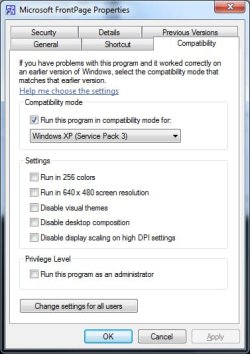
2) When the window pops up, click on the Compatibility tab. (photo attached here)
3) Checkmark the box that says "Run this program in compatibility mode for:" and then choose Windows XP or whatever Windows version worked for you before.
4) Click Apply.
I did this and haven't had any problems since. Not sure why Microsoft is ignoring this super easy fix other than to hit you up for upgrades. Hope it works for you.

1) Right click on the Frontpage 2002 icon and go to Properties.
2) When the window pops up, click on the Compatibility tab. (photo attached here)
3) Checkmark the box that says "Run this program in compatibility mode for:" and then choose Windows XP or whatever Windows version worked for you before.
4) Click Apply.
I did this and haven't had any problems since. Not sure why Microsoft is ignoring this super easy fix other than to hit you up for upgrades. Hope it works for you.
Attachments
My Computer
- Computer Manufacturer/Model Number
- HP
- OS
- Windws 7 Professional
- Sound Card
- Beats Audio
Similar threads
- Replies
- 2
- Views
- 2K
- Replies
- 1
- Views
- 5K

- Replies
- 3
- Views
- 7K
- Replies
- 4
- Views
- 1K

