Windows 7 and trying to do the simplest of file search

jagman55

New member
Member
VIP
Local time
8:54 PM
Messages
115
Microsoft, what can you say? Talk about ignoring "user friendly"? Anyone out there happy with the NEW search in Windows Explorer in Win 7 and Vista?
Any simpleton could do a simple search in XP or windows 3 or ALLL of the previous versions but then, came Vista. You can spend hours trying to figure out how to do the simplest of searches. Dont thinks so? google vista and search and you will find millions of unhappy customers.

ALL I wanted to do is take the dups files out of a folder in my Windows 7 Ultimate.

Like (1) or (2), etc. In XP you entered (1) and it FOUND ALL the (1) and NOTHING else. (2 would even find just the EXACT sequence of characters (2

With Vista and Win 7, you can go to Folder options, then SEARCH tab and try ALL the damn combinations and what you will find is:

(1) and EVERY OCCURANCE of 1.
or
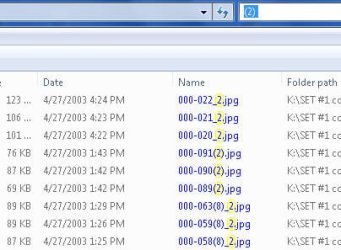
(2) and as a FREE gift from Microsoft, all the _2, $2 and any other "2" it can find.

Last night i spent over an hour trying to remove a simple (2), even tried "(2)" so say leave my damn (2) alone but did it? hell no.

Now I have got it to work before and I wrote down the option needed on the search tab but last night THOSE would NOT work again.

You find some telling you how to do the "wonderful" new search feature but their insturction DO NOT MATCH what my WINDOW EXPLORER LOOKS LIKE. I simple dont have those buttons or options, all i have is in the pull down TOOLS and the SEARCH tab.

CAN anyone out there tell me how to make Microsoft leave my damn (2) alone and JUST FIND IT with out all the other crappy "2"'s???
 

My Computer My Computer

At a glance

windows 7 ultimate2 quads @ 2.43gb
Computer Manufacturer/Model Number
HP pavilion
OS
windows 7 ultimate
CPU
2 quads @ 2.4
Memory
3gb
Monitor(s) Displays
tv
Hard Drives
many vendors
Agree that Windows 7 search sucks, yet I have to wonder how you manage to create duplicates...
 

My Computer My Computer

At a glance

Windows 7 Ultimate (64)i7-2600KG.SKILL Ripjaws X Series 8GB (2 x 4GB)ATI 5750
Computer Manufacturer/Model Number
Home Grown
OS
Windows 7 Ultimate (64)
CPU
i7-2600K
Motherboard
Asus P8P67-M Pro
Memory
G.SKILL Ripjaws X Series 8GB (2 x 4GB)
Graphics Card(s)
ATI 5750
Sound Card
On-Board
Monitor(s) Displays
LG W2486L
Screen Resolution
1920X1080
Hard Drives
Intel X-25M 80 Gig SSD | Intel X-25M 160 Gig SSD | WD Black 500MB - External eSata
PSU
Zalman ZM770-XT 770 Watts
Case
Antec 180 mini
Cooling
Cooler Master V8
Internet Speed
15MB - Cable
Other Info
Sissy OC - 4.6 @ 1.3175 24/7 | 18' Idle - 55' Load

My Computer My Computer

At a glance

Win7 HP (x64)/Win7 Ultimate (x64)Core i7 9206 x 2GB Corsair XMS3CF HD4890
Computer Manufacturer/Model Number
Custom
OS
Win7 HP (x64)/Win7 Ultimate (x64)
CPU
Core i7 920
Motherboard
Intel X58
Memory
6 x 2GB Corsair XMS3
Graphics Card(s)
CF HD4890
Sound Card
Asus Xonar
Monitor(s) Displays
Dell 2408WFP
Screen Resolution
1920 x 1200
Hard Drives
2 x 150GB WDC Velociraptors (Raid 0)
1 x 1TB Seagate
1 x 1.5TB Seagate
PSU
Corsair HX1000W
Case
Antec 1200
Keyboard
Razer Lycosa/N52te
Mouse
Razer Lachesis
Just my opinion, I think the W7 and WVista search are far superior to previous OS's.
In the search options, you obviously missed "Find partial matches". The advantage of this is that if you cant remember the exact file name, it will list all the options that could be the files you were looking for. If you don't want that, just uncheck "Find partial matches".
 

My Computer My Computer

At a glance

Windows Seven UltimateAMD Piledriver FX 8320 @ 3.5GHzCrucial Ballistix 8GB 1600 MHz DDR3ASUS GeForce GTX 970 Strix Edition @ 1.114 GHz
Computer type
PC/Desktop
Computer Manufacturer/Model Number
The Dominator?
OS
Windows Seven Ultimate
CPU
AMD Piledriver FX 8320 @ 3.5GHz
Motherboard
ASUS M5A97 EVO R2.0
Memory
Crucial Ballistix 8GB 1600 MHz DDR3
Graphics Card(s)
ASUS GeForce GTX 970 Strix Edition @ 1.114 GHz
Sound Card
Integrated
Monitor(s) Displays
LG 23EA63V 23" IPS 1080p Monitor
Screen Resolution
1920x1080
Hard Drives
Samsung SSD 840 EVO 120 GB
1x WD GreenPower 500GB 7200RPM
1 External HDD 1TB
PSU
Corsair CX500
Case
Zalman Z9 Plus
Cooling
CPU - Corsair Hydro H80i, Case - 3x Aerocool Shark Edition
Keyboard
Xenta Backlit Keyboard (Not very good!)
Mouse
Logitech G400
Internet Speed
Download: 7 mb/s Upload: 0.76 mb/s
Antivirus
Microsoft Security Essentials
Browser
Google Chrome
Other Info
Overclockers UK Desk Pad 89 x 45 cm
1200x730x600mm Desk
Using Virtual Audio Cable to split stereo sound into Audio Technica ATH-M50 headphones and Logitech X-530 speakers.
1. Lots of program create duplicates when they download first one file then the next with the same name, they put _1 and (1), etc at the end before the suffix, quite common actually.

2. Yes, it is more advanced but they missed leaving in the SIMPLE search which according to Google, most of us use. FINE xxx in a file or folder name but Vista and windows does not do that, they find xxx, x xx, etc when all you wanted was xxx.

HOW to seach has 4 boxes:
1. include subfolders? no, check, just what you see on the screen
2. Find partial matches? LOVE this one, this one appears to find what I was discussing about finding xxx,,xx,x etc NO GOOd if all you want is xxx.
3. Use natual language search, WHAT in the hell does this mean but I check and unckecked it anyway.
4. Dont use index.... Dont think this applies.

That leaves 2 and 3 to determine what you are looking for, all partial or natual language. I have tried for about an hour ALL POSSIBLE combo and STILL, will not just find xxx or in my case (1) as if there is a "ONE" any place else in the file name, it finds that one too.

So, anyone still know how to just find xxx or (1)???

Thanks for the link, will check it out.

Now Vista used to have an AVDVANCED search but do NOT see that option in Windows 7 on my WE in Windows 7 ultimate.
 

My Computer My Computer

At a glance

windows 7 ultimate2 quads @ 2.43gb
Computer Manufacturer/Model Number
HP pavilion
OS
windows 7 ultimate
CPU
2 quads @ 2.4
Memory
3gb
Monitor(s) Displays
tv
Hard Drives
many vendors
Thanks guys but

1. i checked and "find partial match" is not checked

2. I went thru the process to RESTORE DEFAULTS and it gave me:

a. checked partail matches and look in sub-folders.

So, tried unchecking the sub folder, NO GO
So, uncheck PARTIAL MATCHES, no go.

SO will ALL unchecked, in a folder i put seach for (2) and it found belive it or not,

ALL (2), ALL 2, and ALL _2. which is not what i wanted, ALL I want is the (2) so is the search incapable of DOING WHAT YOU ASK OR IS IT microsoft thinking it knows more than I do or i am incapable of know that all i want is the (2) and am so dumb that the microsoft programmer, "just knows I expected to see all the "2"?

i have tried the old try and true " " to make it literal but still Microsoft says, "screw you, i am giving you all the '2', so forget it"

I think the last OS that did as i asked in a search was XP. Hell OS2 was better at doing a search if you only want what YOU want.

SOMEBODY please write a search program for Win 7 that does what you tell it and i will buy it.
 

My Computer My Computer

At a glance

windows 7 ultimate2 quads @ 2.43gb
Computer Manufacturer/Model Number
HP pavilion
OS
windows 7 ultimate
CPU
2 quads @ 2.4
Memory
3gb
Monitor(s) Displays
tv
Hard Drives
many vendors
here is what i am talking about

see attached, see what i asked for '(2)'

See what windows gave me? (2) and _2
 

Attachments

  • 2 err.jpg
    2 err.jpg
    24.5 KB · Views: 12

My Computer My Computer

At a glance

windows 7 ultimate2 quads @ 2.43gb
Computer Manufacturer/Model Number
HP pavilion
OS
windows 7 ultimate
CPU
2 quads @ 2.4
Memory
3gb
Monitor(s) Displays
tv
Hard Drives
many vendors

My Computer My Computer

At a glance

Windows 10 Pro x64 EN-GB1.6 GHz Intel Core i7-720QM Processor6 GBATI Mobility Radeon HD 5850 Graphics
Computer type
Laptop
Computer Manufacturer/Model Number
HP ENVY 17-1150eg
OS
Windows 10 Pro x64 EN-GB
CPU
1.6 GHz Intel Core i7-720QM Processor
Memory
6 GB
Graphics Card(s)
ATI Mobility Radeon HD 5850 Graphics
Sound Card
Beats sound system with integrated subwoofer
Monitor(s) Displays
17" laptop display, 22" LED and 32" Full HD TV through HDMI
Screen Resolution
1600*900 (1), 1920*1080 (2&3)
Hard Drives
Internal: 2 x 500 GB SATA Hard Disk Drive 7200 rpm
External: 2TB for backups, 3TB USB3 network drive for media
Cooling
As Envy runs a bit warm, I have it on a Cooler Master pad
Keyboard
Logitech diNovo Media Desktop Laser (bluetooth)
Mouse
Logitech Performance Mouse MX
Internet Speed
50/10 Mbps VDSL
Antivirus
Windows Defender 4.3.9431.0
Browser
Maxthon 3.5.2., IE11
see attached, see what i asked for '(2)'

See what windows gave me? (2) and _2

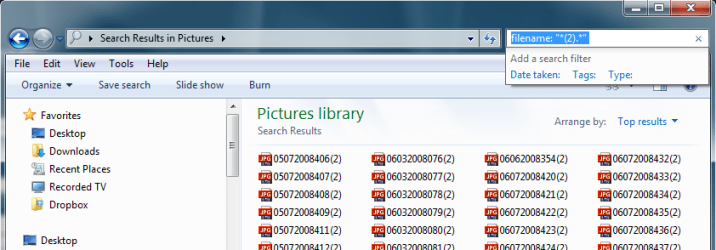
Have you tried the following?:

filename:"*(2).*"


My Computer My Computer

At a glance

Windows 7 Professional 32-bit SP1AMD A4/A63.00GB EDOVMware SVGA 3D
Computer type
PC/Desktop
Computer Manufacturer/Model Number
Virtual Machine
OS
Windows 7 Professional 32-bit SP1
CPU
AMD A4/A6
Motherboard
Intel Corporation 440BX Desktop Reference Platform
Memory
3.00GB EDO
Graphics Card(s)
VMware SVGA 3D
Sound Card
High Definition Audio Device
Monitor(s) Displays
Generic Non-PnP Monitor on VMware SVGA 3D
Screen Resolution
1440x900
Hard Drives
1 x 60GB VMware Virtual SATA Hard Drive ATA Device
Antivirus
Kaspersky Total Security
  • Like
Reactions: Dom
see attached, see what i asked for '(2)'

See what windows gave me? (2) and _2

Have you tried the following?:

filename:"*(2).*"


Advanced Search Query finds anything. Using the query syntax as Dzomlija told above, you'll find exactly what you are looking for (see the screenshot).

Kari

Search.png
 

My Computer My Computer

At a glance

Windows 10 Pro x64 EN-GB1.6 GHz Intel Core i7-720QM Processor6 GBATI Mobility Radeon HD 5850 Graphics
Computer type
Laptop
Computer Manufacturer/Model Number
HP ENVY 17-1150eg
OS
Windows 10 Pro x64 EN-GB
CPU
1.6 GHz Intel Core i7-720QM Processor
Memory
6 GB
Graphics Card(s)
ATI Mobility Radeon HD 5850 Graphics
Sound Card
Beats sound system with integrated subwoofer
Monitor(s) Displays
17" laptop display, 22" LED and 32" Full HD TV through HDMI
Screen Resolution
1600*900 (1), 1920*1080 (2&3)
Hard Drives
Internal: 2 x 500 GB SATA Hard Disk Drive 7200 rpm
External: 2TB for backups, 3TB USB3 network drive for media
Cooling
As Envy runs a bit warm, I have it on a Cooler Master pad
Keyboard
Logitech diNovo Media Desktop Laser (bluetooth)
Mouse
Logitech Performance Mouse MX
Internet Speed
50/10 Mbps VDSL
Antivirus
Windows Defender 4.3.9431.0
Browser
Maxthon 3.5.2., IE11
Back
Top