
Windows 7 and UEFI BIOS Boot Manager error 0xc000000e

AnthonyP

New member
Local time
4:20 PM
Messages
17
I just flashed a UEFI BIOS and did a clean install. I'm getting the error 0xc000000e only on reboot. If i shut down and turn on again it boots windows no problem. Please help!
 
Last edited:

My Computer My Computer

At a glance

Windows 7 Home Premium x64 SP1Intel Core i5 2500K 3.3GHz8GB (2 x 4GB) Patriot G series ‘Sector 5’ (PC...GIGABYTE GV-R685OC-1GD
Computer type
PC/Desktop
Computer Manufacturer/Model Number
Custom
OS
Windows 7 Home Premium x64 SP1
CPU
Intel Core i5 2500K 3.3GHz
Motherboard
Gigabyte Z68XP-UD3P [rev 1.3] F7 BIOS
Memory
8GB (2 x 4GB) Patriot G series ‘Sector 5’ (PC3 12800)
Graphics Card(s)
GIGABYTE GV-R685OC-1GD
Sound Card
Onboard
Monitor(s) Displays
Dell 1707FP(Digital)
Screen Resolution
1280x1024
Hard Drives
2x OCZ Agility 3 60GB [FW 2.50]
1x Hitachi Travelstar HTS541616J9SA00 160GB 5400 RPM
PSU
OCZ600MXSP ModXStream Pro 600W
Cooling
Stock
Keyboard
Logitech G15 (2004)
Mouse
Gigabye m6880 gaming mouse
Internet Speed
Cable 2Mb/s Download 1Mb/s Upload
Antivirus
ESET Smart Security 7
Browser
Chrome
Other Info
ASUS DRW-24B3LT DVD-RW Drive
Vantec Multi-Memory Internal Card Reader w/USB 2.0
Rosewill USB 2.0 4-Port Hub
Trendnet Wireless N Router
RCA modem
What are the exact UEFI, CSM and Legacy BIOS settings in BIOS setup? Did you do a UEFI install, booting from a UEFI device to install, or did you install to Legacy MBR disk?

Unplug all peripherals and try again.

If you can get into Safe Mode, establish a Clean Boot from Troubleshooting steps in picture below. Then test your hard drive, RAM and work through the other steps to go over your install and hardware.
 
I installed in Legacy but the BIOS had both the Legacy and UEFI options activated so it could boot to either. I am missing the 100MB system reserved partition and there is no other FAT32 EFI partition. The whole disk is just formatted for the OS.
 

My Computer My Computer

At a glance

Windows 7 Home Premium x64 SP1Intel Core i5 2500K 3.3GHz8GB (2 x 4GB) Patriot G series ‘Sector 5’ (PC...GIGABYTE GV-R685OC-1GD
Computer type
PC/Desktop
Computer Manufacturer/Model Number
Custom
OS
Windows 7 Home Premium x64 SP1
CPU
Intel Core i5 2500K 3.3GHz
Motherboard
Gigabyte Z68XP-UD3P [rev 1.3] F7 BIOS
Memory
8GB (2 x 4GB) Patriot G series ‘Sector 5’ (PC3 12800)
Graphics Card(s)
GIGABYTE GV-R685OC-1GD
Sound Card
Onboard
Monitor(s) Displays
Dell 1707FP(Digital)
Screen Resolution
1280x1024
Hard Drives
2x OCZ Agility 3 60GB [FW 2.50]
1x Hitachi Travelstar HTS541616J9SA00 160GB 5400 RPM
PSU
OCZ600MXSP ModXStream Pro 600W
Cooling
Stock
Keyboard
Logitech G15 (2004)
Mouse
Gigabye m6880 gaming mouse
Internet Speed
Cable 2Mb/s Download 1Mb/s Upload
Antivirus
ESET Smart Security 7
Browser
Chrome
Other Info
ASUS DRW-24B3LT DVD-RW Drive
Vantec Multi-Memory Internal Card Reader w/USB 2.0
Rosewill USB 2.0 4-Port Hub
Trendnet Wireless N Router
RCA modem
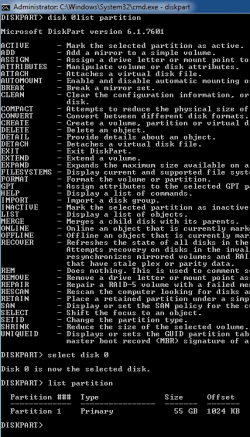
Again the problem could be in the UEFI settings which is why I asked for what they offer exactly. Camera snaps of everything pertaining to and in the area of UEFI, CSM, Legacy BIOS and related settings would be good. Screenshots and Files - Upload and Post in Seven Forums - Windows 7 Forums

If you were not issued a System Reserved partition then you had to pre-format the partition. Is this correct? How did you do this exactly?

Please also post back a screenshot of Disk Management - Post a Screen Capture Image.

Establish a Clean Boot, check the System Resources and logs, test your hardware and go over the other Troubleshooting Steps for Windows 7 which normally uncover the problem.
 
There is nothing wrong with my hardware, I did not pre-format the partition. I installed like a clean install. I set my mobo to defaults in UEFI changed the SATA controller from IDE to AHCI and booted the Windows DVD. Installed it to the unreserved SSD nothing special.
 

Attachments

  • Untitled2.png
    Untitled2.png
    15.7 KB · Views: 2
  • Untitled.jpg
    Untitled.jpg
    29.8 KB · Views: 14

My Computer My Computer

At a glance

Windows 7 Home Premium x64 SP1Intel Core i5 2500K 3.3GHz8GB (2 x 4GB) Patriot G series ‘Sector 5’ (PC...GIGABYTE GV-R685OC-1GD
Computer type
PC/Desktop
Computer Manufacturer/Model Number
Custom
OS
Windows 7 Home Premium x64 SP1
CPU
Intel Core i5 2500K 3.3GHz
Motherboard
Gigabyte Z68XP-UD3P [rev 1.3] F7 BIOS
Memory
8GB (2 x 4GB) Patriot G series ‘Sector 5’ (PC3 12800)
Graphics Card(s)
GIGABYTE GV-R685OC-1GD
Sound Card
Onboard
Monitor(s) Displays
Dell 1707FP(Digital)
Screen Resolution
1280x1024
Hard Drives
2x OCZ Agility 3 60GB [FW 2.50]
1x Hitachi Travelstar HTS541616J9SA00 160GB 5400 RPM
PSU
OCZ600MXSP ModXStream Pro 600W
Cooling
Stock
Keyboard
Logitech G15 (2004)
Mouse
Gigabye m6880 gaming mouse
Internet Speed
Cable 2Mb/s Download 1Mb/s Upload
Antivirus
ESET Smart Security 7
Browser
Chrome
Other Info
ASUS DRW-24B3LT DVD-RW Drive
Vantec Multi-Memory Internal Card Reader w/USB 2.0
Rosewill USB 2.0 4-Port Hub
Trendnet Wireless N Router
RCA modem
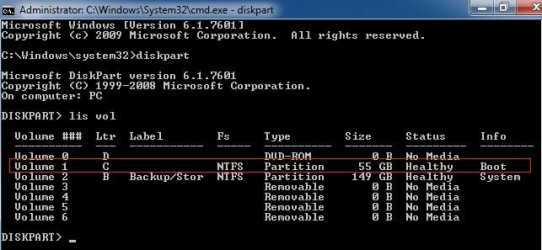
I thought you indicated in first post it would still boot so that's why I asked for Disk Mgmt screenshot (twice). Is there something preventing this? We've done this thousands of times here so know what is needed and expect close cooperation as these are critical operations.

It placed the System boot files on the 149gb Backup/Storage partition, as you can see in the DIskpart screenshot showing all Volumes. The Boot label on C only means it is the presently-booted partition.

This is why it didn't issue a System Reserved partition during install to a blank HD, because you had not unplugged all other drives so it will place the System boot files on the first available Primary partition.

To remedy this, Mark Win7 Partition Active then power down to unplug all other drives, swap the cable for drive labeled Disk0 in Disk Mgmt to Win7 drive, boot into Win7 installation media System Recovery Options to run Startup Repair - Run 3 Separate Times until Win7 boots and holds the System flag.

When you plug back in the other drives make sure Win7 drive remains set first hard drive to boot in BIOS setup, then mark the Storage partition Inactive: Partition - Mark as Inactive - Windows 7 Forums.
 
Back
Top