Windows 7 Backup and Restore blank screen

JimWin7

New member
Member
Local time
11:58 PM
Messages
25
Location
Michigan
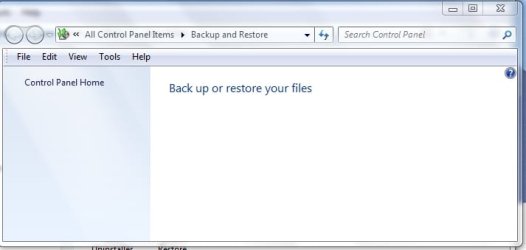
When trying to open Backup and Restore I get an almost blank screen. There are no options to backup,schedule, create or anything. A screen shot is attached. Any idea what's wrong?
 

Attachments

  • Backup and Restore screen.jpg
    Backup and Restore screen.jpg
    18.8 KB · Views: 63

My Computer My Computer

At a glance

Microsoft Windows 7 Professional 32 BitIntel Corei3 m330 @2.13GHZ4.00 GBIntel Graphics Media Accelerator HD
Computer Manufacturer/Model Number
Toshiba Satellite l500
OS
Microsoft Windows 7 Professional 32 Bit
CPU
Intel Corei3 m330 @2.13GHZ
Motherboard
Toshiba
Memory
4.00 GB
Graphics Card(s)
Intel Graphics Media Accelerator HD
Sound Card
Intel
Screen Resolution
1366 x 768 x59 hertz
Hard Drives
TI105774WOB
PSU
Standard Laptop Supply
Case
Standard Laptop Case
Cooling
Standard Laptop Cooling
Keyboard
Integrated Laptop
Mouse
Mitsumi
Internet Speed
52kbps

My Computer My Computer

At a glance

Windows 10, Home Clean InstallIntel Core2 processsor Q8200(2.33Ghz 1333FSB)...6 gbATI Radeon 256MB HD3650
Computer type
PC/Desktop
Computer Manufacturer/Model Number
Dell XPS 420
OS
Windows 10, Home Clean Install
CPU
Intel Core2 processsor Q8200(2.33Ghz 1333FSB) Quad Core Tech
Motherboard
Dell
Memory
6 gb
Graphics Card(s)
ATI Radeon 256MB HD3650
Sound Card
Intergrated 7.1 Channel Audio
Monitor(s) Displays
Dell SP2009W 20"
Hard Drives
640 GB Serial ATA Hard drive
Cooling
Fan
Keyboard
Dell USB Keyboard
Mouse
Dell Premium Optical USB
Internet Speed
DSL 2.85
Have you disbaled any services or Cleaned the registry?

-- Open a CMD prompt as Administartor and type:

sfc /scannow


See if that turns up anything.
 

My Computer My Computer

At a glance

Windows 7 Home Premium 64bitIntel Core i7 2700k8GB Mushkin Redline Ridgebacks @1866EVGA GTX570 SC
Computer Manufacturer/Model Number
Custom (Self Build)
OS
Windows 7 Home Premium 64bit
CPU
Intel Core i7 2700k
Motherboard
eVGA P67 SLI
Memory
8GB Mushkin Redline Ridgebacks @1866
Graphics Card(s)
EVGA GTX570 SC
Sound Card
XiFi Titanium HD
Monitor(s) Displays
LG W2453V
Screen Resolution
1920x1080
Hard Drives
Intel 320 80GB -- Intel X25-V 40GB --WD Black 1TB x2 -- WD Blue 640GB
PSU
Seasonic x750
Case
Corsair 600T SE White
Cooling
eVGA Superclocked CPU Cooler
Keyboard
Saitek Cyborg
Antivirus
Kaspersky
Browser
IE
Other Info
LG BD/DVD
I ran System File Checker but it reported everything as verified ok.
 

My Computer My Computer

At a glance

Microsoft Windows 7 Professional 32 BitIntel Corei3 m330 @2.13GHZ4.00 GBIntel Graphics Media Accelerator HD
Computer Manufacturer/Model Number
Toshiba Satellite l500
OS
Microsoft Windows 7 Professional 32 Bit
CPU
Intel Corei3 m330 @2.13GHZ
Motherboard
Toshiba
Memory
4.00 GB
Graphics Card(s)
Intel Graphics Media Accelerator HD
Sound Card
Intel
Screen Resolution
1366 x 768 x59 hertz
Hard Drives
TI105774WOB
PSU
Standard Laptop Supply
Case
Standard Laptop Case
Cooling
Standard Laptop Cooling
Keyboard
Integrated Laptop
Mouse
Mitsumi
Internet Speed
52kbps

My Computer My Computer

At a glance

MS Windows 7 Ultimate SP1 64-bitAMD A10-4600M6.00 GB Dual-Channel DDR3 @ 798MHz (11-11-12-28)AMD Radeon HD 7660G
Computer Manufacturer/Model Number
Toshiba Satellite S875D-S7239 laptop
OS
MS Windows 7 Ultimate SP1 64-bit
CPU
AMD A10-4600M
Motherboard
AMD Pumori (Socket FT1)
Memory
6.00 GB Dual-Channel DDR3 @ 798MHz (11-11-12-28)
Graphics Card(s)
AMD Radeon HD 7660G
Sound Card
High Definition Audio Device
Monitor(s) Displays
Generic PnP Monitor (1600x900@60Hz)
Screen Resolution
1600x900@60Hz
Hard Drives
SSD 119GB Corsair CSSD-V128GB2 ATA Device
Keyboard
Standard PS/2 Keyboard
Mouse
HP Wireless Optical Mobile Mouse Model FHA-3410
Internet Speed
What the local pub, local coffee shop offers.
Other Info
Optical Drive:MATSHITA BD-CMB UJ160B ATA Device


Also have an Asus ha1002xp netbook with Win 7 Ultimate installed.
Karlsnooks,
I ran Backup and Restore. That's how I got to the blank screen.
 

My Computer My Computer

At a glance

Microsoft Windows 7 Professional 32 BitIntel Corei3 m330 @2.13GHZ4.00 GBIntel Graphics Media Accelerator HD
Computer Manufacturer/Model Number
Toshiba Satellite l500
OS
Microsoft Windows 7 Professional 32 Bit
CPU
Intel Corei3 m330 @2.13GHZ
Motherboard
Toshiba
Memory
4.00 GB
Graphics Card(s)
Intel Graphics Media Accelerator HD
Sound Card
Intel
Screen Resolution
1366 x 768 x59 hertz
Hard Drives
TI105774WOB
PSU
Standard Laptop Supply
Case
Standard Laptop Case
Cooling
Standard Laptop Cooling
Keyboard
Integrated Laptop
Mouse
Mitsumi
Internet Speed
52kbps
I had the same problem -- Backup just showed a blank screen. I found that the Windows Backup service was disabled. Setting it to Automatic fixed the problem.

Robert
 

My Computer My Computer

At a glance

Windows 7
OS
Windows 7
Same problem but Computer Management - Services doesn't show any Widows Backup service.
 

My Computer My Computer

At a glance

Microsoft Windows 7 Professional 32 BitIntel Corei3 m330 @2.13GHZ4.00 GBIntel Graphics Media Accelerator HD
Computer Manufacturer/Model Number
Toshiba Satellite l500
OS
Microsoft Windows 7 Professional 32 Bit
CPU
Intel Corei3 m330 @2.13GHZ
Motherboard
Toshiba
Memory
4.00 GB
Graphics Card(s)
Intel Graphics Media Accelerator HD
Sound Card
Intel
Screen Resolution
1366 x 768 x59 hertz
Hard Drives
TI105774WOB
PSU
Standard Laptop Supply
Case
Standard Laptop Case
Cooling
Standard Laptop Cooling
Keyboard
Integrated Laptop
Mouse
Mitsumi
Internet Speed
52kbps
This should fix the blank Windows Backup screen

  1. Log in as an administrator.
  2. Open Command Prompt (cmd.exe) or click the Run... command in the Windows Start Menu (orb).
    By default, the Run... option is not shown. But you can right-click the Start Menu, select Properties -> Start Menu -> Customize... and tick the Run command check box to show the option.
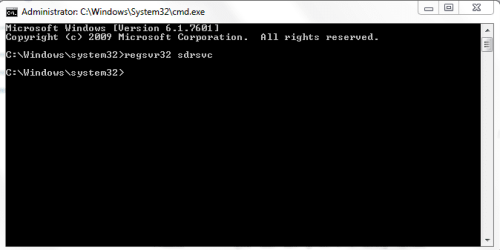
  3. Type "regsvr32 sdrsvc" without the double quotes and press the ENTER key (return).
    This adds the registry entries that are contained within sdrsvc.dll (Windows Backup service core file) and should fix your problem.
 

My Computer My Computer

At a glance

Windows 7 Professional 32-bit
Computer type
PC/Desktop
OS
Windows 7 Professional 32-bit
I had the same problem -- Backup just showed a blank screen. I found that the Windows Backup service was disabled. Setting it to Automatic fixed the problem.

Robert


I had the same issue, your solution worked perfectly, thanks!
 

My Computer My Computer

At a glance

Window 7
Computer type
PC/Desktop
OS
Window 7
The registry command line fix worked for me, too!

Muchos Gracias!

:D
 

My Computer My Computer

At a glance

Windows 7 64-bit Home Premium
Computer type
PC/Desktop
Computer Manufacturer/Model Number
Custom
OS
Windows 7 64-bit Home Premium
thankyou so very much

  1. Log in as an administrator.
  2. Open Command Prompt (cmd.exe) or click the Run... command in the Windows Start Menu (orb).
    By default, the Run... option is not shown. But you can right-click the Start Menu, select Properties -> Start Menu -> Customize... and tick the Run command check box to show the option.
  3. Type "regsvr32 sdrsvc" without the double quotes and press the ENTER key (return).
    This adds the registry entries that are contained within sdrsvc.dll (Windows Backup service core file) and should fix your problem.
Nearly two years old and still relevant today. Samsung magician took away the restore page and your easy to do fix has solved my problem. Much appreciated. Thankyou.
 

My Computer My Computer

At a glance

windows 7 home premium 64bitinte(R) core i7-2760 QM [email protected] 4Cores8.0GB 2 modulesIntel(R) HD graphics 3000 / NVIDiA GeForce GT...
Computer type
Laptop
Computer Manufacturer/Model Number
alienware M17x R3
OS
windows 7 home premium 64bit
CPU
inte(R) core i7-2760 QM [email protected] 4Cores
Motherboard
M17x R3
Memory
8.0GB 2 modules
Graphics Card(s)
Intel(R) HD graphics 3000 / NVIDiA GeForce GTX 580M
Hard Drives
M17x_RAID0 2x750gig
Mouse
logitech trackball
Internet Speed
satellite ie slow
Antivirus
McAfee
Browser
firefox
Other Info
serial no. HGXV6R1
Start, Run, services.msc, scroll down to & dbl-clk on Windows Backup, set to Manual or Automatic, click Apply.
Backup and Restore window no longer blank!:)
I backup to an 1TB external usb drive and find that I have to safely remove that drive after backup in order to prevent annoying system hangups (e.g. mouse cursor wont move, Alt-Tab switching hang up). I also Stop the service in services.msc.
 

My Computer My Computer

At a glance

Win7 Home Premium SP1 64bitIntel Core i5-4670 Haswell Quad-Core 3.4GHz L...8GBnone
Computer type
PC/Desktop
Computer Manufacturer/Model Number
custom
OS
Win7 Home Premium SP1 64bit
CPU
Intel Core i5-4670 Haswell Quad-Core 3.4GHz LGA 1150 84W Des
Motherboard
Gigabyte GA-B85M-DS3H LGA 1150 Intel B85 HDMI SATA 6Gb/sUSB3
Memory
8GB
Graphics Card(s)
none
Hard Drives
Samsung 840 EVO 2.5" 250GB SATA
Antivirus
emsisoft, malwarebytes
Browser
firefox
  1. Log in as an administrator.
  2. Open Command Prompt (cmd.exe) or click the Run... command in the Windows Start Menu (orb).
    By default, the Run... option is not shown. But you can right-click the Start Menu, select Properties -> Start Menu -> Customize... and tick the Run command check box to show the option.
  3. Type "regsvr32 sdrsvc" without the double quotes and press the ENTER key (return).
    This adds the registry entries that are contained within sdrsvc.dll (Windows Backup service core file) and should fix your problem.
Nearly two years old and still relevant today. Samsung magician took away the restore page and your easy to do fix has solved my problem. Much appreciated. Thankyou.

almost adding another year and this fixed it for me too. I also recently installed Samsung Magician.
 

My Computer My Computer

At a glance

Windows 7 32-bitIntel T2600 @ 2.16GHz, dual core4GNVIDIA Quadro NVS 120M
Computer type
Laptop
Computer Manufacturer/Model Number
Dell
OS
Windows 7 32-bit
CPU
Intel T2600 @ 2.16GHz, dual core
Motherboard
Latitude D820
Memory
4G
Graphics Card(s)
NVIDIA Quadro NVS 120M
Sound Card
SigmaTel
Monitor(s) Displays
ASUS PA248Q
Screen Resolution
1920 x 1200
Internet Speed
~55M
Antivirus
AVG
Browser
Firefox / IE 8
Didn't help me


384741d1459998791-windows-7-backup-restore-blank-screen-windowsproblem1.png


Than I tried this

By default, the Run... option is not shown. But you can right-click the Start Menu, select Properties -> Start Menu -> Customize... and tick the Run command check box to show the option.
than this

Type "regsvr32 sdrsvc" without the double quotes and press the ENTER key (return).
result was this:

384742d1459999366-windows-7-backup-restore-blank-screen-windowsproblem2.png


How to solve this now?
 

My Computer My Computer

At a glance

Windows 7 Home Premium 64bit
Computer type
Laptop
Computer Manufacturer/Model Number
HP
OS
Windows 7 Home Premium 64bit
I should have kept better track of what I did, but as best I can remember, it didn't seem to work at first for me.

I can't tell you the state of the service as I was looking for something named Backup (which doesn't exist) instead of Windows Backup

I ran the "regsvr32 sdrsvc" but it didn't seem to help.

Finally I ran "regsvr32 /u sdrsvc" . I got an uninstall completion message. I don't think I got any message on the previous "regsvr32 sdrsvc" command.

Then I ran "regsvr32 sdrsvc" again and this time got the completion message. It started working after that.

Assuming I remember what I did correctly, I am guessing that the service was registered so the first time nothing happened. But when I uninstalled then installed, it fixed something that was messed up.

I did run "regsvr32 sdrsvc" on different 'good' machine and verified that no message is generated when the dll is already in place.
 

My Computer My Computer

At a glance

Windows 7 32-bitIntel T2600 @ 2.16GHz, dual core4GNVIDIA Quadro NVS 120M
Computer type
Laptop
Computer Manufacturer/Model Number
Dell
OS
Windows 7 32-bit
CPU
Intel T2600 @ 2.16GHz, dual core
Motherboard
Latitude D820
Memory
4G
Graphics Card(s)
NVIDIA Quadro NVS 120M
Sound Card
SigmaTel
Monitor(s) Displays
ASUS PA248Q
Screen Resolution
1920 x 1200
Internet Speed
~55M
Antivirus
AVG
Browser
Firefox / IE 8
Now I solved my first error message. I did enter the command "regsvr32 sdrsvc" into run window, probably it runs there without administration rights, now I tried it in CMD with Admin rights and it worked
1NXFiwggy8sAAAAASUVORK5CYII=
"
Wproblem2b.PNG
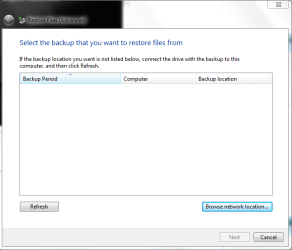
But it creates another problem, it doesn't show location of backup files which are at USB-Stick. If I push refresh button, nothing get changed.


Wproblem3.PNG


Some one knows how to solve the problem?:rolleyes::huh:
 

My Computer My Computer

At a glance

Windows 7 Home Premium 64bit
Computer type
Laptop
Computer Manufacturer/Model Number
HP
OS
Windows 7 Home Premium 64bit
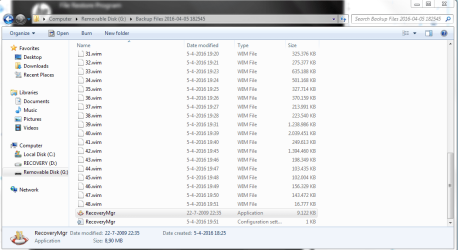
Man I found solution. Just open your Backupfiles, click to file Application and it restores.

solution.PNG
 

My Computer My Computer

At a glance

Windows 7 Home Premium 64bit
Computer type
Laptop
Computer Manufacturer/Model Number
HP
OS
Windows 7 Home Premium 64bit
Back
Top