
Windows 7 backup crash ? Dual Boot

jlm86

New member
Member
Local time
10:29 AM
Messages
30
I CAN perform a data backup using the Windows7 backup utility. But I really want the complete system backup to another HD that i have (internal)

When it almost finishes, it stops and has "access violation" or some type of sector unable to read??

can anyone assist?
thanks


I have WinXP on Partition 1, Win7 on Partition 2. So only want to image partition 2....

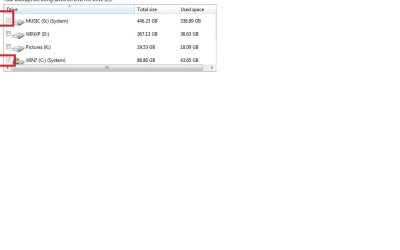
Here is screenshot os setup: Why is partition G:\WinXP always selected? is it because the system image needs the boot.ini for dual boot?
 

Attachments
  • win7image issue.jpg
    win7image issue.jpg
    15.8 KB · Views: 104

My Computer My Computer

Computer Manufacturer/Model Number
gigabyte
OS
winxp
CPU
Intel Dual Core 7300
Memory
2G
I CAN perform a data backup using the Windows7 backup utility. But I really want the complete system backup to another HD that i have (internal)

When it almost finishes, it stops and has "access violation" or some type of sector unable to read??

can anyone assist?
thanks


I have WinXP on Partition 1, Win7 on Partition 2. So only want to image partition 2....

Here is screenshot os setup: Why is partition G:\WinXP always selected? is it because the system image needs the boot.ini for dual boot?

I assume xp installed first then win 7. on dual boot win 7 puts a hidden boot folder in root of XP. If you are trying to back up the system state you do need those.

Ken J
 

My Computer My Computer

Computer Manufacturer/Model Number
HP Pavillion dv-7 1005 Tx
OS
Win 8 Release candidate 8400
CPU
[email protected]
Memory
4 gigs
Graphics Card(s)
Nvidia 9600M
Sound Card
HD built-in
Monitor(s) Displays
17" Wxga
Screen Resolution
1440x900
Cooling
none
Internet Speed
45Mb down 5Mb up
Hi jlm,

The full error message would be useful.

Please post a screenshot of Disk Management window - so we can advise further.


I CAN perform a data backup using the Windows7 backup utility. But I really want the complete system backup to another HD that i have (internal)

When it almost finishes, it stops and has "access violation" or some type of sector unable to read??

can anyone assist?
thanks


I have WinXP on Partition 1, Win7 on Partition 2. So only want to image partition 2....

Here is screenshot os setup: Why is partition G:\WinXP always selected? is it because the system image needs the boot.ini for dual boot?
 

My Computers My Computers

System One System Two

  • Computer type
    PC/Desktop
    OS
    7 X64
    CPU
    i5 8400
    Motherboard
    gigabyte b365m ds3h
    Memory
    2x8gb 3200mhz
    Hard Drives
    various
    PSU
    pure power 11 400w cm
    Case
    Coolermaster
    Cooling
    cryorig m9i
  • Computer type
    PC/Desktop
    OS
    7x64
    CPU
    g5400
    Motherboard
    ga b365m ds3h
    Memory
    8gb ddr4 2400
    PSU
    xfx pro 450w
Back
Top