Windows 7 Backup Error 0x8078012D

cehanlon

New member
Local time
1:11 AM
Messages
4
Anyone get this error code? Received this on first attempt at backup.. The error suggests it's a disk problem...I'll try chkdsk in the meantime...I'm running a SATA 2+0 Raid array...Thanks for your help:(
 

My Computer

Computer Manufacturer/Model Number
Self Built
OS
windows 7
CPU
Intel pentium 4
Motherboard
ASUS p4c800-e
Memory
200gb
Graphics Card(s)
ATI Radeon x1600
Sound Card
SoundMax integrated audio
Monitor(s) Displays
Samsun SyncMaster 206BW
Hard Drives
2 Standard Maxtor SATA disk drives in RAID 2+0 Array
PSU
Antec True Power ATX 12v
Case
Antec P160
Hi cehanlon, welcome to the forums.

Any chance you could post the entire message so we can properly aid you with this issue?

Thanks

added sorry just seen it in the title LOL


Jeff
 

My Computer

Computer Manufacturer/Model Number
Compaq Desktop
OS
Windows 7 Ultimate x64
CPU
AMD Sempron Dual Core
Memory
3GB
Graphics Card(s)
NVIDIA GeForce 6150SE nForce 430
Screen Resolution
1024x768
Hard Drives
150GB Sata
I am getting this same error message when attempting to make my first Win7 backup. Another forum I read suggested disabling AV software. But I did that and still get this error. The error seems to indicate a problem with the disk (I am using an external 1TB drive). I have run chkdsk against it (took hours:sleepy:) and it found no problems. Ideas?
 

My Computer

OS
Windows 7 Ultimate x64
I hope you can get it working properly. I gave up on the built in Windows Backup app.

My solution was to go with a 3rd party backup app. There are some highly regarded free ones as well as the venerable Acronis TIH which just recently came out with the 2010 version which is pretty awesome, imo.
 

My Computer

Computer Manufacturer/Model Number
HP DV8t quad
OS
Windows 7 Ultimate x64 (Retail)
CPU
i7-Q 720
Motherboard
Motherboard Chipset Intel Ibex Peak-M PM55, Intel Lynnfield
Memory
6 GB
Graphics Card(s)
nVidia GeForce GT 230M (1GB)
Sound Card
IDT High Definition Audio CODEC
Monitor(s) Displays
18.4 inch HP Infinity FHD (Samsung 184HT03-001)
Screen Resolution
1920 x 1080
Hard Drives
Hitachi 500GB 7200 rpm (x2)
Seagate FreeAgent 1.5 TB External USB (x2)
Thermaltake BlacX eSATA/USB 2.0 3.5/2.5 HD dock
Cooling
Zalman NC-2000 notebook cooling pad
Keyboard
laptop
Mouse
Logitech VX Revolution
Other Info
Backup Unit: Lenovo T61p
I am getting this error today too, my backup has been working so far, I backup to an esata drive. It works for awhile and dosent complete. I can't believe all the information you get is this code. you can't even cut and paste the code out and you have to click details to even see it, is there an error log somewhere I can refer to for the backup ?
 

My Computer

Computer Manufacturer/Model Number
sager notebook
OS
windows 7 and rhel 5
CPU
i7 920
Motherboard
clevo D900F notebook with on intel X58 chipset
Memory
3GB
Graphics Card(s)
geforce GTX 280M
Sound Card
logitech usb headset ( AC97 )
Monitor(s) Displays
built in 17" lcd & 2 dell 22" displays
Hard Drives
intel SSD SA2MH0800G1GC 80GB
seagate freeagent 1.5TB
WDC WD2500BEVT-00ZCT0 25GB
PSU
power brick 220watt
Case
Clevo D900F / Sager NP9820
Cooling
4 underside fans. Doubles as hovercraft
The same error by me.

captur10.png


I check the HDD's with CHKDSK. There is no problems found!
Any solution?
 

My Computer

Computer Manufacturer/Model Number
HP IQ522
OS
Windows 7 Ultimate x64
CPU
Intel Core 2 (Penryn) T6400 2.0GHz
Motherboard
Asus IMIMV-CF (Maureen)
Memory
Samsung M4 70T5663QZ3-CF7 - 2x2GB
Graphics Card(s)
PCI Express 1.0 x16: nVIDIA GeForce 9300M GS (Pegatron)
Sound Card
Analog Devices AD1984A
ok ladies and gentlemen, i came bearing some good news, i think i found the problem (or solution) i think, after almost pulling my hair from getting that error and checking the back up disk and it kept coming back clean, i had an intuition to run the check disk on the source disk (i.e. C:/ or whatever your main drive is called, the one that is being backed up), and i found two bad cluster files, after the clean was done and windows rebooted, i ran the backup again and had success.

now i am assuming this could be the problem because if you think about it, it is also involved in backup process as an I/O (or input output). i hope this helps

Fun Fact: i joined this forum just to post that, i found this site so helpful i thought it was about time i repaid the favor :D good luck
 

My Computer

OS
Windows 7 32 bit enterprise
Backup Error 0x8078012D

I have also had the problems with backing up in Windows 7 Pro. I also get 2 other codes. One of which refered to file types. It suggested that backup would have problems with Jpeg, Gif, Mpeg, Zip, RAR files.

I did the CHKDSK /R on both the C: and my backup disk (WD My Passport 500GB USB Portable HDD). Neither of which had any errors. I reverted back to just a System image, and libraries backup. Even after that, It would not to an automatic backup, I had to do a manual backup first, and to test this, I set it to do an automatic backup about 2 hours after the manual one was completed. Finally a sucessful automatic backup of just the system image and libraries. I did try to do a manual backup before reverting, and after the chkdsk step including the other files, but again it failed.

Seems backup is very selective, not much of a backup program from what I can see.
 

My Computer

Computer Manufacturer/Model Number
Gigabyte
OS
Windows 7 Pro
CPU
AMD Sempron
Motherboard
MA74GMT-S2
Memory
2GB
Graphics Card(s)
Built in
Sound Card
Built in
Monitor(s) Displays
Dell
Hard Drives
2 x Samsung HD502HI ATA
PSU
450 Watt
Case
Generic
Cooling
Standard CPU fan and power supply fan
Backup Error 0x8078012D

After several instances of the above error, I finally got Back Up to run successfully from a year-old laptop (HP TouchSmart TM2-t, Win7 Home Premium) to a brand new HP (really WD) 1TB external drive.

Note: it did look as if the back-up part occurred, as the external drive's used/free space numbers changed correctly; but the System Image process errored out about halfway through.

It was CHKDSK that did the trick for me. I ran it from Tools rather than via command prompt and just made sure to check the box that offers to "scan for and attempt recovery of bad sectors." I've read elsewhere that one needs to run it as Administrator, but that wasn't an issue for me.

The first time through, at least a dozen "bad cluster" errors were found in all kinds of places, mostly WinSxS. Then I ran Back Up and it failed again when creating the System Image, even though it did get a little farther. I re-ran CHKDSK exactly as above, and it found one more bad cluster -- in a funny song!

Ran Back Up again, and this time got all the way through it, including the System Image and a "success" message. I haven't checked yet to see if Back Up will obey the schedule I set, but it is displaying the correct next time.
 

My Computer

Computer Manufacturer/Model Number
HP TouchSmart TM2-t
OS
Win 7 Home Premium 64 bit
I am running Windows 7 Home Premium (64-Bit) and I have the exact same problem.

However, running CHKDSK several times have not solved my problem. The first time CHKDSK found a bad cluster in WinSxS, but ever since CHKDSK reports no issues.

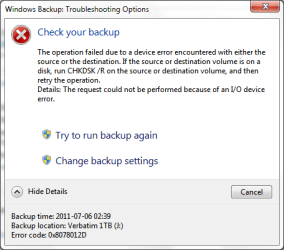
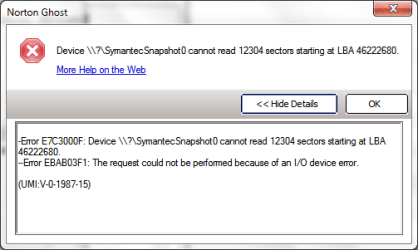
I am trying with the built-in Backup & Restore in Windows 7, but also with Norton Ghost 15, but none of them completes the backup as illustrated in the screenshots.

windows_7_x64_backup_and_restore.png

windows_7_x64_norten_ghost_15.png

My laptop has one physical hard drive divided into two partitions. The one without the OS always manages to backup, but my C-drive always fails.

Kind regards,

/Glenn
 

My Computer

Computer Manufacturer/Model Number
Sony VAIO VGN-NW21SF/T
OS
Windows 10 x64
CPU
2,13 GHz Intel Core 2 Duo-Processor P7450
Motherboard
Mobil Intel® PM45 Express
Memory
DDR2 SDRAM (2 x 2 GB)
Graphics Card(s)
ATI Mobility™ Radeon® HD 4570
Sound Card
Realtek
Monitor(s) Displays
X-Black LCD
Screen Resolution
1366 x 768 (WXGA)
Windows 7 Backup Error Code 0x8078012D - System Image - fails to compl

I have been able to work on this fix and it worked.

  • Click Start.
  • Type Services in the Start Search.
  • SELECT "VIEW LOCAL SERVICES" under CONTROL PANEL
  • In the Services Windows search for Volume Shadow Copy in the list.
  • Right click on the Service.
  • Click on Properties.
  • Select the Startup Type to Manual.
  • MAKE SURE UNDER THE "STATUS COLUMN" that it is "STARTED" (can be done by clicking on the "Start Button" when you are in the properties interface)
  • Click OK.
  • Now repeat the same for Windows Backup service.

This has certainly worked for me, the guys at Microsoft might need to visit this page.

You may have to continually go into this area and "Start" the volume shodow copy as it seems to return to blank or stopped. There is a warning under the description that says if this service is stopped, shadow copies will be unavailable for backup and the backup may fail.

As Windows has a few things running automatically by default (System Restore - seems to be at 2 am every day on mine, Windows update - every day at 2 am, Defrag, etc), these could also interfere with the backup service as they can make changes to the system image, so I have rescheduled the services to run at different times and different days, to each other AND to the scheduled Backup also, ensure your antivirus is not doing a scan.

In addition if you are like me and want to keep all of your emails (pst files) in outlook in a backup, you should have Outlook shut down during the backup process, as it "may" interfere with the process, as it can make changes when a scheduled search for emails occurs, and as Windows can be a bit finiky, its best to reduce all possible causes of problems.

Do not have anything open and have minimal programs running in background or (at startup) look in msconfig and select startup tag, de-select unnesessary programs, this will also speed up your bootup.

 

My Computer

Computer Manufacturer/Model Number
Gigabyte
OS
Windows 7 Pro
CPU
AMD Sempron
Motherboard
MA74GMT-S2
Memory
2GB
Graphics Card(s)
Built in
Sound Card
Built in
Monitor(s) Displays
Dell
Hard Drives
2 x Samsung HD502HI ATA
PSU
450 Watt
Case
Generic
Cooling
Standard CPU fan and power supply fan
Here the solution for Windows 7 Backup Error 0x8078012D, you get this error during the Backup after you have rearranged the C drive in large by the partition resize,, as a solution, you must assign a new Computer name if you want to keep the previous Backups, restart the computer after the name change back, then return the Backup restart. You can just type your external HD format and create a new Backup, but then you're lost, all the other and previous Backups to you the choice what decision you take.
 

My Computer

OS
Windows 8 Pro 64bit
I am going to try this as I have indeed changed my partition size. If you are right I must say that the built-in backup function in Windows 7 is very badly programmed and not something to expect from Microsoft.

Now I am using Allway Sync to backup on file level. Not the best solution, but at least a solution.
 

My Computer

Computer Manufacturer/Model Number
Sony VAIO VGN-NW21SF/T
OS
Windows 10 x64
CPU
2,13 GHz Intel Core 2 Duo-Processor P7450
Motherboard
Mobil Intel® PM45 Express
Memory
DDR2 SDRAM (2 x 2 GB)
Graphics Card(s)
ATI Mobility™ Radeon® HD 4570
Sound Card
Realtek
Monitor(s) Displays
X-Black LCD
Screen Resolution
1366 x 768 (WXGA)
Let me know if this worked for you
I am going to try this as I have indeed changed my partition size. If you are right I must say that the built-in backup function in Windows 7 is very badly programmed and not something to expect from Microsoft.

Now I am using Allway Sync to backup on file level. Not the best solution, but at least a solution.
 

My Computer

OS
Windows 8 Pro 64bit
You may have to continually go into this area and "Start" the volume shodow copy as it seems to return to blank or stopped. There is a warning under the description that says if this service is stopped, shadow copies will be unavailable for backup and the backup may fail.

That's working as designed. It starts up only when needed and shuts down after you close the GUI or it finishes the backup/restore process. You'll see this in event viewer or the first time you go into backup and restore it takes a bit as this service is starting. Then if you go out and come back in quickly, your first GUI request will now be much faster.
 

My Computer

Computer type
PC/Desktop
Computer Manufacturer/Model Number
Custom
OS
Windows 7
CPU
AMD Phenom II X2 (dual-core)
Motherboard
GA-MA785GM-US2H
Memory
4G
Graphics Card(s)
integrated ATI HD 4200
Sound Card
integrated
Monitor(s) Displays
Samsung 24"
Screen Resolution
1920x1080
Hard Drives
1 SSD - Samsung 840 - 500 GB - OS and DATA partitions
1 SSD - Intel 320 - 120 GB (used for backups) - Misc/BACKUP
1 SATA HD - WD, 500 GB - BACKUP
PSU
Ultra X4 500W
Case
Ultra X-blaster
Keyboard
Microsoft Digital Media Pro
Mouse
Logitech WIRED!
Internet Speed
15 Mbps FIOS
Let me know if this worked for you
I am going to try this as I have indeed changed my partition size. If you are right I must say that the built-in backup function in Windows 7 is very badly programmed and not something to expect from Microsoft.

Now I am using Allway Sync to backup on file level. Not the best solution, but at least a solution.

It was worth a try, but it did not work out as I am still having the same issues. It looks like a complete re-install of Windows might be needed in order to get this fixed. I have also tried replacing the external backup drive, but the error is always the same.
 

My Computer

Computer Manufacturer/Model Number
Sony VAIO VGN-NW21SF/T
OS
Windows 10 x64
CPU
2,13 GHz Intel Core 2 Duo-Processor P7450
Motherboard
Mobil Intel® PM45 Express
Memory
DDR2 SDRAM (2 x 2 GB)
Graphics Card(s)
ATI Mobility™ Radeon® HD 4570
Sound Card
Realtek
Monitor(s) Displays
X-Black LCD
Screen Resolution
1366 x 768 (WXGA)
solved 0x8078012d

in my os(win 7 home premium x64) it was due to shark007 i installed already.
i did this following:
1- chkdsk /b (after this i found the problem is due to shark007 codec.)
2- uninstall shark007 codec
the problem was solved.
 

My Computer

Computer type
Laptop
Computer Manufacturer/Model Number
sony
OS
Windows 7 Home Premium x64
CPU
intel
Back
Top