Windows 7-Boot problem

zungul

New member
Member
VIP
Local time
9:03 AM
Messages
176
Hi,

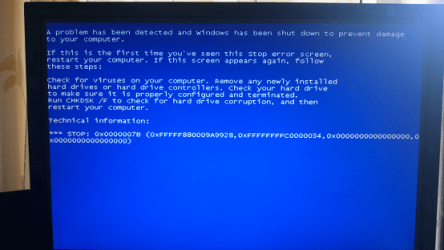
Something happened and I'm not able to boot my Windows 7 x 64 hard drives.
I tried to fix this with Windows 7 install disk, Easy Recovery Essentials and some other ways but nothing helped.
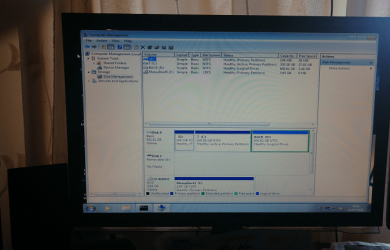
I'm not professional but I think that is something wrong with my Windows 7 System Reserved and Windows 7 partition contents. First of all I think my System Reserve partition didn't have a letter before and now is called E, secondly contents on the SR partition and Windows 7 partition (I think).
Both they have a boot folder. Is there any chance to fix it without reinstalling Windows?
 

Attachments

  • 1.png
    1.png
    1.6 MB · Views: 3

My Computer

OS
Windows 7 Ultimate x64
CPU
Intel(R) Core(TM)2 Quad Q6600
Motherboard
ASUS P5K Deluxe/WiFi-AP
Memory
4.00 GB
Graphics Card(s)
NVIDIA GEForce 8800 GTX
Sound Card
SoundMAX Intergrated Digital HD Audio
Monitor(s) Displays
LG Flatron Wide 22"
Can you post a screenshot from disk manager so we can see
 

My Computer

Computer type
PC/Desktop
OS
win 8 32 bit
What You want me to show?
 

My Computer

OS
Windows 7 Ultimate x64
CPU
Intel(R) Core(TM)2 Quad Q6600
Motherboard
ASUS P5K Deluxe/WiFi-AP
Memory
4.00 GB
Graphics Card(s)
NVIDIA GEForce 8800 GTX
Sound Card
SoundMAX Intergrated Digital HD Audio
Monitor(s) Displays
LG Flatron Wide 22"
zungul, What error messages are you getting at boot up? What exactly have you tried to fix this?
 
Last edited:

My Computer

Computer type
PC/Desktop
Computer Manufacturer/Model Number
Custom Built By Me.
OS
Windows 10 Pro 64 bit
CPU
AMD FX 9590 8 Core Black Edition
Motherboard
MSI 990FXA GAMING (MS-7893)
Memory
Corsair Vengeance 16GB DDR3
Graphics Card(s)
AMD Radeon (TM) R9 380 Gaming Series
Sound Card
AMD High Definition
Monitor(s) Displays
Samsung 32" 60Hz 4ms Curved PLS LED
Screen Resolution
1920 X 1080
Hard Drives
C: 223 GB SSD = E: 465 GB HDD = F: 931 GB HDD = G: 149 GB HDD = H: 931 GB HDD
PSU
EVGA Supernova NEX750B 750W ATX EPS12V 80PLUS Bronze
Case
Cool Master
Cooling
Noctua NH-D15 Premium Cooler with 2x NF-A15 PWM 140mm Fan
Internet Speed
Fiber Optic: Download 332.7 Mbps / Upload 331.5 Mbps
Antivirus
Windows Defender
Browser
Slimjet (64bit)
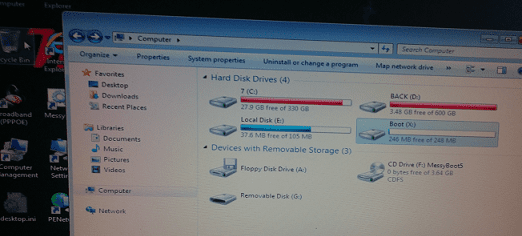
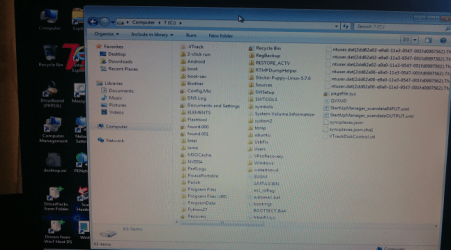
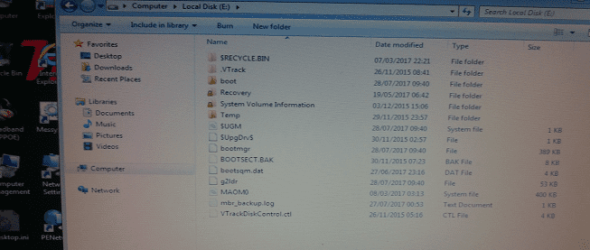
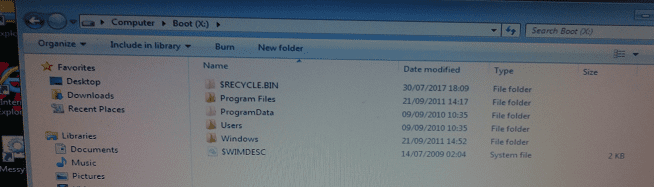
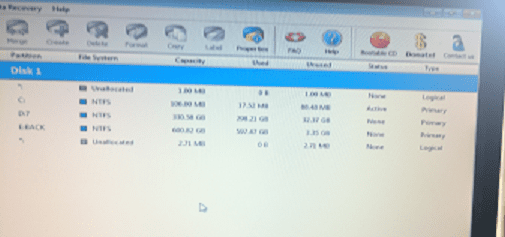
This is what I've got (I used MessyBoot 5 to see it):

P.S.
What about these 2 boot folders in the Windows 7 System Reserved and Windows 7 partitions which I mentioned in my first message.?
 

Attachments

  • 2.png
    2.png
    296.6 KB · Views: 37
  • 3.png
    3.png
    519.6 KB · Views: 37
Last edited:

My Computer

OS
Windows 7 Ultimate x64
CPU
Intel(R) Core(TM)2 Quad Q6600
Motherboard
ASUS P5K Deluxe/WiFi-AP
Memory
4.00 GB
Graphics Card(s)
NVIDIA GEForce 8800 GTX
Sound Card
SoundMAX Intergrated Digital HD Audio
Monitor(s) Displays
LG Flatron Wide 22"
this is what I see when I use MessBoot 5:
 

Attachments

  • 5.png
    5.png
    225.6 KB · Views: 36
  • 6.png
    6.png
    482.9 KB · Views: 36
  • 7.png
    7.png
    313.4 KB · Views: 36
  • 8.png
    8.png
    213.9 KB · Views: 36

My Computer

OS
Windows 7 Ultimate x64
CPU
Intel(R) Core(TM)2 Quad Q6600
Motherboard
ASUS P5K Deluxe/WiFi-AP
Memory
4.00 GB
Graphics Card(s)
NVIDIA GEForce 8800 GTX
Sound Card
SoundMAX Intergrated Digital HD Audio
Monitor(s) Displays
LG Flatron Wide 22"
This could be a possible fix. I found it at MS Support. The post was very long so I copied this post by a member there called HugoCore. This seemed to help a number of folks there. Hope it helps you as well. By the way you only have 27GB available on your C:\ This can cause problems as well.

I had also Windows 7 with 0x0000007B blue screen while loading Windows 7.
It's turn out that the BIOS had been change to another disk mode, IDE, ex-raid. For now I wanted IDE, to be simple.
Here's what works with me:
In the BIOS, i went change the SATA to IDE mode (NOT RAID, NOT AHCI)
1.Boot Win7 DVD
2.Choose the Language Selection.
3.Choose Repair.
4.On the recovery tools choose the Command Line Console
5.Type:regedit <ENTER>
7.Highlight HKEY_LOCAL_MACHINE
8.File > Load Hive
9.Select < windows partition with problem > \Windows\System32\config\system (Backup this first, it's advised)
10.Regedit will ask for a Key name: Name it something like "temp"
11.Located HKEY_LOCAL_MACHINE/temp/Select/Current
12.Searched for every key containing the value “SCSI Miniport” where the "Start" value was a "3" and changed the "Start" value to a "0". (F3 to search next result).
13.Highlight "temp"
14.File > Unload Hive
15.Restart
16.Enter in Win7 :)

Based on: http://www.askvg.com/how-to-change-...o-ahci-raid-in-bios-after-installing-windows/
 

My Computer

Computer type
PC/Desktop
Computer Manufacturer/Model Number
Custom Built By Me.
OS
Windows 10 Pro 64 bit
CPU
AMD FX 9590 8 Core Black Edition
Motherboard
MSI 990FXA GAMING (MS-7893)
Memory
Corsair Vengeance 16GB DDR3
Graphics Card(s)
AMD Radeon (TM) R9 380 Gaming Series
Sound Card
AMD High Definition
Monitor(s) Displays
Samsung 32" 60Hz 4ms Curved PLS LED
Screen Resolution
1920 X 1080
Hard Drives
C: 223 GB SSD = E: 465 GB HDD = F: 931 GB HDD = G: 149 GB HDD = H: 931 GB HDD
PSU
EVGA Supernova NEX750B 750W ATX EPS12V 80PLUS Bronze
Case
Cool Master
Cooling
Noctua NH-D15 Premium Cooler with 2x NF-A15 PWM 140mm Fan
Internet Speed
Fiber Optic: Download 332.7 Mbps / Upload 331.5 Mbps
Antivirus
Windows Defender
Browser
Slimjet (64bit)
Is this a OEM (Dell, HP, Lenovo...) or it is one you build ed?
Who has installed the Win 7 U?
Did the HDD came from another computer?

You have 3 partitions
- Fist one is a System partition with the Boot loader. It is normally from a OEM and shouldn't be there on a clean install. As far I can see, it's useless.
- Second one is the C: for windows and is very short on free space. That is why is red.
- Third one is D: and is full. If it is for backup is completely useless in case of a HDD failure. Backup should always be done on another disk (internal or external) that you only connect when ready for backup.

You must make some free space on C:
- Delete all files on C:\windows\temp
- Delete all files on C:\Users"name"\AppData\Local\Temp
 

My Computers

System One System Two

  • Computer type
    PC/Desktop
    Computer Manufacturer/Model Number
    custom build
    OS
    Windows 7 HP 64
    CPU
    i5 6600K - 800MHz to 4200MHz
    Motherboard
    GA-Z170-HD3P
    Memory
    4+4G GSkill DDR4 3000
    Graphics Card(s)
    IG - Intel 530
    Monitor(s) Displays
    Samsung 226BW
    Screen Resolution
    1680x1050
    Hard Drives
    (1) -1 SM951 – 128GB M.2 AHCI PCIe SSD drive for Windows 7 and Lubuntu
    (2) -1 WD SATA 3 - 1T for Data
    (3) -1 WD SATA 3 - 1T for backup
    PSU
    Thermaltake 450W TR2 gold
    Keyboard
    Old and good Chicony mechanical keyboard
    Mouse
    Logitech mX performance - 9 buttons (had to disable some)
    Internet Speed
    500Mb/s
    Browser
    Firefox 64
    Other Info
    TinyWall firewall
  • Computer type
    Laptop
    System Manufacturer/Model Number
    Asus Q550LF
    OS
    Windows 7 Pro
    CPU
    i7-4500U 800MHz to 3.0GHz
    Motherboard
    Asus Q550LF
    Memory
    (4+4)G DDR3 1600
    Graphics Card(s)
    IG intel 4400 + NVIDIA GeForce GT 745M
    Sound Card
    Realtek
    Monitor(s) Displays
    LG Display LP156WF4-SPH1
    Screen Resolution
    1920 x 1080
    Hard Drives
    BX500 120G SSD for Windows and programs +
    1T HDD for data
    Internet Speed
    500 Mb/s
    Browser
    Firefox
    Other Info
    TinyWall firewall
First I'll try what Lance1 told me but I lost after point 11. because when I selected "Current", how and where I supposed to searched for every key containing the value “SCSI Miniport”
11.Located HKEY_LOCAL_MACHINE/temp/Select/Current
12.Searched for every key containing the value “SCSI Miniport” where the "Start" value was a "3" and changed the "Start" value to a "0". (F3 to search next result).
Lance1, please help me with this !!!
=======
This is to Megahertz07
I did:
- Delete all files on C:\windows\temp
- Delete all files on C:\Users"name"\AppData\Local\Temp
I can make free space on C: when I boot to Windows
Partition D: is not Backup. It has just name Back
When I delete these Temp folders what I am supposed to do because when I restarted nothing change.
P.S.
Is there any chance to rebuild Windows 7 System Reserved Partition contents because I'm still thinking that something is wrong with this.
 
Last edited:

My Computer

OS
Windows 7 Ultimate x64
CPU
Intel(R) Core(TM)2 Quad Q6600
Motherboard
ASUS P5K Deluxe/WiFi-AP
Memory
4.00 GB
Graphics Card(s)
NVIDIA GEForce 8800 GTX
Sound Card
SoundMAX Intergrated Digital HD Audio
Monitor(s) Displays
LG Flatron Wide 22"
Don't delete the Temp folders. Delete all files in the folders. They are temp files that are useless. Just to make some space.
I think the System Reserved Partition is useless as it's not active (C: is).
You didn't answer my questions. See post #8.
 

My Computers

System One System Two

  • Computer type
    PC/Desktop
    Computer Manufacturer/Model Number
    custom build
    OS
    Windows 7 HP 64
    CPU
    i5 6600K - 800MHz to 4200MHz
    Motherboard
    GA-Z170-HD3P
    Memory
    4+4G GSkill DDR4 3000
    Graphics Card(s)
    IG - Intel 530
    Monitor(s) Displays
    Samsung 226BW
    Screen Resolution
    1680x1050
    Hard Drives
    (1) -1 SM951 – 128GB M.2 AHCI PCIe SSD drive for Windows 7 and Lubuntu
    (2) -1 WD SATA 3 - 1T for Data
    (3) -1 WD SATA 3 - 1T for backup
    PSU
    Thermaltake 450W TR2 gold
    Keyboard
    Old and good Chicony mechanical keyboard
    Mouse
    Logitech mX performance - 9 buttons (had to disable some)
    Internet Speed
    500Mb/s
    Browser
    Firefox 64
    Other Info
    TinyWall firewall
  • Computer type
    Laptop
    System Manufacturer/Model Number
    Asus Q550LF
    OS
    Windows 7 Pro
    CPU
    i7-4500U 800MHz to 3.0GHz
    Motherboard
    Asus Q550LF
    Memory
    (4+4)G DDR3 1600
    Graphics Card(s)
    IG intel 4400 + NVIDIA GeForce GT 745M
    Sound Card
    Realtek
    Monitor(s) Displays
    LG Display LP156WF4-SPH1
    Screen Resolution
    1920 x 1080
    Hard Drives
    BX500 120G SSD for Windows and programs +
    1T HDD for data
    Internet Speed
    500 Mb/s
    Browser
    Firefox
    Other Info
    TinyWall firewall
Hi Megahertz07,
Is this a OEM (Dell, HP, Lenovo...) or it is one you build ed? I'm not sure(long time ago) but I think OEM.
Who has installed the Win 7 U? Myself.
Did the HDD came from another computer? I took this HD with OS out of the computer and I installed new HD with OS on this computer, but now ( I mean 8 months ago) I put this old HD back to my computer and everything was Ok to now ( now)
 

My Computer

OS
Windows 7 Ultimate x64
CPU
Intel(R) Core(TM)2 Quad Q6600
Motherboard
ASUS P5K Deluxe/WiFi-AP
Memory
4.00 GB
Graphics Card(s)
NVIDIA GEForce 8800 GTX
Sound Card
SoundMAX Intergrated Digital HD Audio
Monitor(s) Displays
LG Flatron Wide 22"
OK, I now have the big picture.
- The drive E: (system partition) was created by the OEM (Dell, HP, Lenovo...) and use to have the boot loader (an Active partition) and the program to do a Factory recover with the recover partition (that you don't have it now).
- When you installed Win 7, you should have deleted all partitions, including the system partition, then created a new one and installed Win 7. Now you have a useless System partition.
- Now you moved the disk back to the computer, it didn't work and you try a boot repair, that didn't work as you have two boot loaders.
- Try this:
open disk manager and set C: as un active
make E: as active and don't assign a letter to it.

Try to boot.
 
Last edited:

My Computers

System One System Two

  • Computer type
    PC/Desktop
    Computer Manufacturer/Model Number
    custom build
    OS
    Windows 7 HP 64
    CPU
    i5 6600K - 800MHz to 4200MHz
    Motherboard
    GA-Z170-HD3P
    Memory
    4+4G GSkill DDR4 3000
    Graphics Card(s)
    IG - Intel 530
    Monitor(s) Displays
    Samsung 226BW
    Screen Resolution
    1680x1050
    Hard Drives
    (1) -1 SM951 – 128GB M.2 AHCI PCIe SSD drive for Windows 7 and Lubuntu
    (2) -1 WD SATA 3 - 1T for Data
    (3) -1 WD SATA 3 - 1T for backup
    PSU
    Thermaltake 450W TR2 gold
    Keyboard
    Old and good Chicony mechanical keyboard
    Mouse
    Logitech mX performance - 9 buttons (had to disable some)
    Internet Speed
    500Mb/s
    Browser
    Firefox 64
    Other Info
    TinyWall firewall
  • Computer type
    Laptop
    System Manufacturer/Model Number
    Asus Q550LF
    OS
    Windows 7 Pro
    CPU
    i7-4500U 800MHz to 3.0GHz
    Motherboard
    Asus Q550LF
    Memory
    (4+4)G DDR3 1600
    Graphics Card(s)
    IG intel 4400 + NVIDIA GeForce GT 745M
    Sound Card
    Realtek
    Monitor(s) Displays
    LG Display LP156WF4-SPH1
    Screen Resolution
    1920 x 1080
    Hard Drives
    BX500 120G SSD for Windows and programs +
    1T HDD for data
    Internet Speed
    500 Mb/s
    Browser
    Firefox
    Other Info
    TinyWall firewall
I did everything like You said and it helped. I boot into windows, but after restarting I've got stuck in "Verifying DMI Pool Data".
What can I do to fix it?
P.S.
Thanks for your previous help !!!
 

My Computer

OS
Windows 7 Ultimate x64
CPU
Intel(R) Core(TM)2 Quad Q6600
Motherboard
ASUS P5K Deluxe/WiFi-AP
Memory
4.00 GB
Graphics Card(s)
NVIDIA GEForce 8800 GTX
Sound Card
SoundMAX Intergrated Digital HD Audio
Monitor(s) Displays
LG Flatron Wide 22"
Zangul, witch computer you are trying to boot? Give us the hardware specs.
Check the BIOS settings. On disk options, it should be set as AHCI.

Is the ASUS P5K working well?
Do you have space on ASUS P5K disk to make a disk image of the 1T HDD?
 

My Computers

System One System Two

  • Computer type
    PC/Desktop
    Computer Manufacturer/Model Number
    custom build
    OS
    Windows 7 HP 64
    CPU
    i5 6600K - 800MHz to 4200MHz
    Motherboard
    GA-Z170-HD3P
    Memory
    4+4G GSkill DDR4 3000
    Graphics Card(s)
    IG - Intel 530
    Monitor(s) Displays
    Samsung 226BW
    Screen Resolution
    1680x1050
    Hard Drives
    (1) -1 SM951 – 128GB M.2 AHCI PCIe SSD drive for Windows 7 and Lubuntu
    (2) -1 WD SATA 3 - 1T for Data
    (3) -1 WD SATA 3 - 1T for backup
    PSU
    Thermaltake 450W TR2 gold
    Keyboard
    Old and good Chicony mechanical keyboard
    Mouse
    Logitech mX performance - 9 buttons (had to disable some)
    Internet Speed
    500Mb/s
    Browser
    Firefox 64
    Other Info
    TinyWall firewall
  • Computer type
    Laptop
    System Manufacturer/Model Number
    Asus Q550LF
    OS
    Windows 7 Pro
    CPU
    i7-4500U 800MHz to 3.0GHz
    Motherboard
    Asus Q550LF
    Memory
    (4+4)G DDR3 1600
    Graphics Card(s)
    IG intel 4400 + NVIDIA GeForce GT 745M
    Sound Card
    Realtek
    Monitor(s) Displays
    LG Display LP156WF4-SPH1
    Screen Resolution
    1920 x 1080
    Hard Drives
    BX500 120G SSD for Windows and programs +
    1T HDD for data
    Internet Speed
    500 Mb/s
    Browser
    Firefox
    Other Info
    TinyWall firewall
Hi,
I don't have anymore ASUS P5K computer. When in BIOS is setup is to AHCI is not showing HD, when is IDE is showing. When I a setup boot from cd/dvd is in restarting loop, when boot is setup from hard drive stuck in Verifying DMI Pool Data. When I remove letter from this 106 MG partition after few times trying to restart computer when I checked using MessyBoot disk I've got this picture (letter is back).
 

Attachments

  • 55.png
    55.png
    170.1 KB · Views: 18

My Computer

OS
Windows 7 Ultimate x64
CPU
Intel(R) Core(TM)2 Quad Q6600
Motherboard
ASUS P5K Deluxe/WiFi-AP
Memory
4.00 GB
Graphics Card(s)
NVIDIA GEForce 8800 GTX
Sound Card
SoundMAX Intergrated Digital HD Audio
Monitor(s) Displays
LG Flatron Wide 22"
go to website and DOWNLOAD SHADOW PROTECT apps, burn into DVD and boot with it!
down there, U CAN RE-CREATE BOOTLOADER AS WELL AS BACKUP, those are actually abling ur windows to works! believe it..
 

My Computer

Computer type
PC/Desktop
OS
windows 7 32 64
Informative thread.
 

My Computer

Computer type
PC/Desktop
Computer Manufacturer/Model Number
Dell
OS
windows 8.1
Back
Top