Windows 7 boot problem

tmgerlach

New member
Local time
6:10 PM
Messages
4
After dual booting Windows XP and Windows 7 for about a month, I decided that I was finished with my migration and that it was time to delete the XP partition and reclaim the space.

I booted a gparted live cd to format the partition and grow my windows 7 drive. After the operations completed with no errors I rebooted the machine. On start up the BIOS loads fine and I am greeted by a black screen with a blinking cursor that drops 3 carriage returns and allows no input.

When I load with windows 7 dvd and try to repair the OS, no os appears in the dialog that asks which installation I would like to repair. When I use the recovery console and run bootrec /ScanOs it finds my windows install on E:\ which is the second partition of 3 on a 1Tb drive.

I assume that there is an issue with the MBR. Also What steps do I take within the recovery console make my OS install bootable with reinstalling being an absolute last resort.
 

My Computer

OS
Windows 7
I am not familar with Gparted but use free Partition Wizard bootable CD which is fully compatible with Win7 and has helped remove over 150 dual boots here.

I would boot into PW, check partitioning is correct as you resized it. Then rightclick Win7>Modify>Set to Active, OK, Apply step(s)

Now boot into Win7 DVD Repair console to run Startup Repair up to 3 separate times with reboots to write System MBR to Win7.
 
Doesn't GParted allow you to take a snapshot of the partition/drive map? If so, please attach one if you can.

You can set a partition active in GParted by setting a boot flag.
 

My Computer

Computer Manufacturer/Model Number
Homebuilt
OS
Windows 7 x64
CPU
i7-2600K
Motherboard
Asus P8Z77-v Pro
Memory
8 G
Graphics Card(s)
GTX 480
Sound Card
Onboard
Monitor(s) Displays
LG W2753V
Screen Resolution
1920x1080
Hard Drives
Crucial M4 128 G SSD
Not sure what you would like to see in a partition or drive map snapshot. But I can give a screen shot.

Basically what I had was:
Partition | System | Label | Size | Used | Unused | Flags
/dev/sdb1/ | NTFS | MEDA | 390.63 GiB| 235.36 GiB |155.27 |
/dev/sdb2/ | NTFS | WINXP | 30.02GiB | 8.23 GiB | 21.99 |boot
/dev/sdb3/ | NTFS | WIN7 | 45.13 GiB | 18.70GiB | 26.43 |

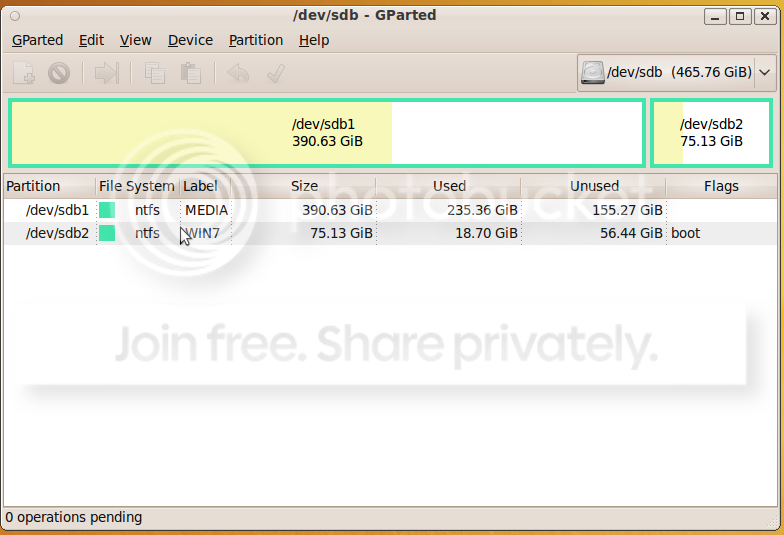
What I have now looks like this
Screenshot.png


The notation sdb1 refers to 2nd drive in the system pimary partition 1 sdb2 is 2nd drive Partition 2, and so forth.

All the formatting operations were successful and had no issues. Like I said.

I would love to try doing a startup repair any number of times but this dialog contains nothing when I use the windows 7 dvd.

962d1227431645-system-recovery-options-select_os.jpg
 

My Computer

OS
Windows 7
I am going to go try startup repair a few more times to see if I get anywhere with that. Hopefully somebody can come up with something here.
 

My Computer

OS
Windows 7
I don't see the Active flag on Win7 partition. Can you set it first? All of this would be much easier using Partition Wizard bootable CD.

Then boot Win7 DVD Repair console, click through to run Startup Repair up to 3 separate times with reboots until Win7 starts, no matter what it says.
 
gregrocker. Thanks for the help. Setting the boot flag in gparted is the same as making it active.

The following made the OS bootable again

from the repair console

bootrec /fixmbr
bootsect.exe /nt60 all /force

after a restart my windows install was active in the repair window and the install dvd automatically told me there was something wrong with my install and auto fixed the problem. One more reboot repaired the boot manager. And here I am replying to your post from Win 7. Thank you for the input. I will try and get a Partition Wizard live disc in the future. All I had here at my disposal was Ubuntu or Fedora Live CDs.
 

My Computer

OS
Windows 7
Nice work.

BTW those commands are automated in Win7 Startup Repair, but you have to run it up to 3 separate times as it first attempts to repair and then rewrites the MBR - assuming each fix works until you come back for another.

However I have had to jumpstart it a few times myself by entering the commands manually if an installation isn't found. So you were spot on.
 
Back
Top