Solved Windows 7 can not recognize my logitech speakers.

microblocks

New member
Local time
4:42 PM
Messages
5
I have recently done a clean installation of windows 7, I have notice on my computer that only my monitor speakers are working which is hooked up to my graphics card using an hdmi. And when I look at my playback devices my Logitech speakers do not show up. Also I had to move my computer to a different location when reinstalling windows 7 can the wires be my problem.(I have looked into device manger and there are no yellow exclamation.)
 

My Computer My Computer

OS
windows 7 premium 64bit
Hello and welcome to the forums microblocks,

Please fill up your complete system specs using this following tutorial:-

http://www.sevenforums.com/tutorials/180324-system-info-see-your-system-specs.html

Next, please post a screenshot of the Audio devices you have at these locations, using the following tutorials:-

(To take the screenshot:-

http://www.vistax64.com/tutorials/148532-how-use-snipping-tool-vista.html

To upload the screenshot:-

http://www.sevenforums.com/tutorials/9733-screenshots-files-upload-post-seven-forums.html)

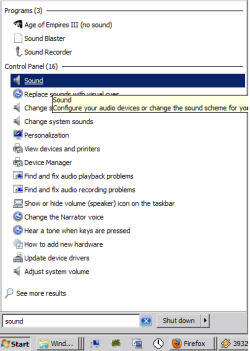
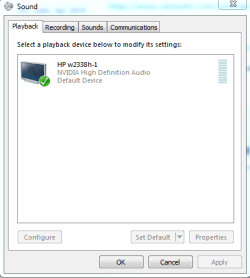
1) the Sound entry in the Control Panel (start, type in sound, and click on the Sound entry in the Start box)


Capture3.PNG Capture1.PNG


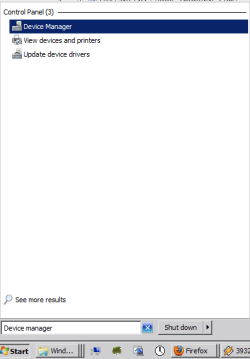
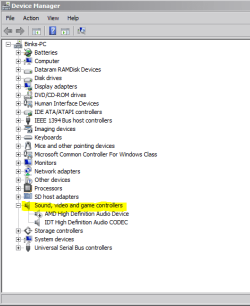
2) The Sound,video and game controllers entry in the Device Manager (start|type in Device Manager|Enter)


Capture4.PNG Capture2.PNG


Thanks in advance for your cooperation.
 

My Computer My Computer

Computer Manufacturer/Model Number
DELL SXPS 1640
OS
Windows 7 x64 Professional SP1
CPU
Intel C2D T9550 2.66 GHz @ 2.793 GHz (Thanks ThrottleStop!!)
Motherboard
Intel PM45
Memory
8 GB DDR3
Graphics Card(s)
ATI MOBILITY RADEON 4670
Sound Card
CREATIVE XFI AUDIO NOTEBOOK
Monitor(s) Displays
16.1 WLED
Screen Resolution
1920x1080
Hard Drives
Seagate ST9500420AS 500GB (465GiBi) 7200 RPM Drive

External Drives:-
2 TB WD Essentials x 3
1 TB WD Mybook Gen 1
1 TB WD Mybook Gen 2
1 TB Seagate
1 TB Seagate
320 GB WD Scorpio Black (enclosed)
PSU
90W Dell Power Brick
Case
Dell Chassis
Cooling
Coolermaster Cooling Pad
Keyboard
Built-in backlighted Keyboard
Mouse
Logitech Wireless Mini Mouse
Internet Speed
4/0.5
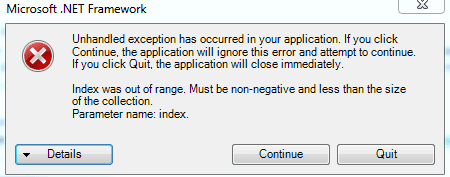
I am having a bit of trouble with my system specs it show a complete blank when I try to run it. I post some screenshots of what it says when I run it.Also posted the screenshot of the device manager and the sound playback.

Screenshot.PNG screen shot 2.PNG screenshot 3.PScreenshot.PNG

screen shot 2.PNG

screenshot 3.PNGNG
 

My Computer My Computer

OS
windows 7 premium 64bit
About the system specs software, it requires .NET Framework 4.0 which you can get from this link:-

http://www.microsoft.com/en-us/download/details.aspx?id=17851

Install it, and try to run the software provided by that tutorial about system specs once again.


Now, onwards to your audio devices.

It seems that there is a generic High Defininition Audio Device in that list shown in your Device Manager.

It is this device that your Logitech Speakers are connected to, but somehow, that entry is not appearing in the Playback box in the Sound entry of the Control Panel.

This is why it would be useful to know the rest of your system specs; based on the motherboard you have we can then supply the right update for the integrated sound card that is supposed to supply your Logitech Speakers.

We'll do this the other way for now:-

Right click on that entry and click Properties, click on the details tab and under Property, click on the dropdown menu, and select Hardware Ids.

In the value section, click select all and paste it into your next reply please.

You also have 4 NVIDIA High Definition Audio entries, which is quite abnormal. Have you recently reinstalled/uninstalled your graphics card drivers several times?

 

My Computer My Computer

Computer Manufacturer/Model Number
DELL SXPS 1640
OS
Windows 7 x64 Professional SP1
CPU
Intel C2D T9550 2.66 GHz @ 2.793 GHz (Thanks ThrottleStop!!)
Motherboard
Intel PM45
Memory
8 GB DDR3
Graphics Card(s)
ATI MOBILITY RADEON 4670
Sound Card
CREATIVE XFI AUDIO NOTEBOOK
Monitor(s) Displays
16.1 WLED
Screen Resolution
1920x1080
Hard Drives
Seagate ST9500420AS 500GB (465GiBi) 7200 RPM Drive

External Drives:-
2 TB WD Essentials x 3
1 TB WD Mybook Gen 1
1 TB WD Mybook Gen 2
1 TB Seagate
1 TB Seagate
320 GB WD Scorpio Black (enclosed)
PSU
90W Dell Power Brick
Case
Dell Chassis
Cooling
Coolermaster Cooling Pad
Keyboard
Built-in backlighted Keyboard
Mouse
Logitech Wireless Mini Mouse
Internet Speed
4/0.5
And I have not reinstalled my graphic card only thing I reinstalled was my windows 7 also I still receive the same error even after I have installed the .NET Framework 4.0 ,windows update is telling me about Microsoft.net framework 4.0. I can install the update if that would help. HDAUDIO\FUNC_01&VEN_1106&DEV_4397&SUBSYS_18490397&REV_1000
HDAUDIO\FUNC_01&VEN_1106&DEV_4397&SUBSYS_18490397
 
Last edited:

My Computer My Computer

OS
windows 7 premium 64bit
Also I have found A motherboard CD that came with my computer when I first received it I can install if that will help.
 

My Computer My Computer

OS
windows 7 premium 64bit
Also I have found A motherboard CD that came with my computer when I first received it I can install if that will help.

Definitely try that out, it may contain superior drivers to the default ones that Windows installed on your device when you reinstalled Windows...

Based on the Hardware IDs you've provided me, we can determine that the onboard sound card on your system is a VIA High Definition Audio Device..

The CD should have a driver for it which you can install onto the system...

Alternatively you can download and install these latest VIA drivers for your system:-

http://www.viaarena.com/Driver/v8700a_20100923.zip

Thanks for the follow up, and I await your feedback.
 

My Computer My Computer

Computer Manufacturer/Model Number
DELL SXPS 1640
OS
Windows 7 x64 Professional SP1
CPU
Intel C2D T9550 2.66 GHz @ 2.793 GHz (Thanks ThrottleStop!!)
Motherboard
Intel PM45
Memory
8 GB DDR3
Graphics Card(s)
ATI MOBILITY RADEON 4670
Sound Card
CREATIVE XFI AUDIO NOTEBOOK
Monitor(s) Displays
16.1 WLED
Screen Resolution
1920x1080
Hard Drives
Seagate ST9500420AS 500GB (465GiBi) 7200 RPM Drive

External Drives:-
2 TB WD Essentials x 3
1 TB WD Mybook Gen 1
1 TB WD Mybook Gen 2
1 TB Seagate
1 TB Seagate
320 GB WD Scorpio Black (enclosed)
PSU
90W Dell Power Brick
Case
Dell Chassis
Cooling
Coolermaster Cooling Pad
Keyboard
Built-in backlighted Keyboard
Mouse
Logitech Wireless Mini Mouse
Internet Speed
4/0.5
Sorry for taking a while to respond... but the motherboard CD worked and I have officially got my speakers back.Thank you for all your help!
 

My Computer My Computer

OS
windows 7 premium 64bit
Sorry for taking a while to respond... but the motherboard CD worked and I have officially got my speakers back.Thank you for all your help!

Thanks for the feedback. Was wondering whether you resolved the problem or not.
 

My Computer My Computer

Computer Manufacturer/Model Number
DELL SXPS 1640
OS
Windows 7 x64 Professional SP1
CPU
Intel C2D T9550 2.66 GHz @ 2.793 GHz (Thanks ThrottleStop!!)
Motherboard
Intel PM45
Memory
8 GB DDR3
Graphics Card(s)
ATI MOBILITY RADEON 4670
Sound Card
CREATIVE XFI AUDIO NOTEBOOK
Monitor(s) Displays
16.1 WLED
Screen Resolution
1920x1080
Hard Drives
Seagate ST9500420AS 500GB (465GiBi) 7200 RPM Drive

External Drives:-
2 TB WD Essentials x 3
1 TB WD Mybook Gen 1
1 TB WD Mybook Gen 2
1 TB Seagate
1 TB Seagate
320 GB WD Scorpio Black (enclosed)
PSU
90W Dell Power Brick
Case
Dell Chassis
Cooling
Coolermaster Cooling Pad
Keyboard
Built-in backlighted Keyboard
Mouse
Logitech Wireless Mini Mouse
Internet Speed
4/0.5
Back
Top