Windows 7 can’t access Windows 2000 share

oidelon

New member
Local time
4:53 AM
Messages
2
Windows 7 can’t access Windows 2000 share

Good morning, I have a big problem: I bought for my company 4 brand new pc with Windows 7 Professional installed. I added my pc’s to my domain but I can’t access to the share on the windows 2000 server. When I try to connect to the server appears a message that ask for my credential. I can’t access also if I insert my credential. I tried to google a little bit for a solution and everywhere I found that I have to change the Lan Manager authentication level but it still doesn’t work… does anyone have an idea? How can I fix the problem? I have access on windows 2003 share without any problem… Thank you for your help, best regards
 

My Computer

OS
Windows 7 Professional 32 bit
Hi, welcome to the forums :)

I have had similar issues networking Windows 7 & Vista. 1 thing I tend to try is to remove the password requirement on Vista, in your case 2000. If your router is secured and no other traffic gets onto the network it may be worth a try to see if it temporarily solves the issue, allowing for time to look into the credentials issue.


OS
 

My Computer

Computer Manufacturer/Model Number
Compaq Desktop
OS
Windows 7 Ultimate x64
CPU
AMD Sempron Dual Core
Memory
3GB
Graphics Card(s)
NVIDIA GeForce 6150SE nForce 430
Screen Resolution
1024x768
Hard Drives
150GB Sata
Hi, thank you for your reply. Unfortunately I can’t remove the password requirements, I absolutely can’t let everyone enter folder shared they’re not supposed to enter… I think the problem it’s something linked to local policy group… all the other client works perfectly…
 

My Computer

OS
Windows 7 Professional 32 bit
You may have already done the following but could be worth a try...
  • Click Start
  • Settings
  • Network and dialup connections
  • Click "Make New Connect"
  • Click Next
  • Select "Accept incoming connections"
accept-incoming.gif

  • Select a Modem if you don't have broadband else select nothing of a VPN.
  • Select "Allow virtual private connections"
  • Select an existing user of click "add" to add a new user with password.
The following is optional but recommended especially if you need to access more than one machine which are networked.
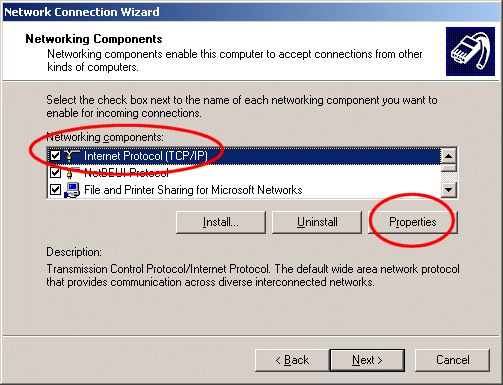
  • Select "Internet Protocol (TCP/IP)
  • tcpip.gif
  • Click "Properties"
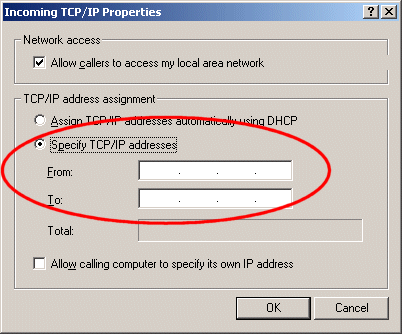
  • Select "Specify TCP/IP address"
  • specify.gif
  • Input "From" I.E. 192.168.1.50
  • Input "To" I.E. 192.168.1.100
  • Click "OK"
  • Click "Finish"
The steps are slightly different for Windows XP but basically the same.
If you PC is connected to the internet via a router instead of a modem then you will have to forward the following ports:-
1723 TCP
1701 UDP
500 TCP
These ports will need to be forward to the IP Address your machine.

Once this is done you will be able to either dial in or create a VPN connection.
Then you will be able to map a drive to any shared folders on the machine.
If you wish to control the machine you can do this by using program such as Radmin (Remote
administrator) , PCAnywhere or Remote Assistance in Windows XP.
 

My Computer

Computer Manufacturer/Model Number
Compaq Desktop
OS
Windows 7 Ultimate x64
CPU
AMD Sempron Dual Core
Memory
3GB
Graphics Card(s)
NVIDIA GeForce 6150SE nForce 430
Screen Resolution
1024x768
Hard Drives
150GB Sata
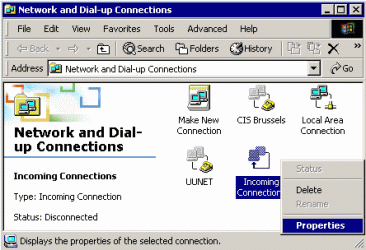
Failing that you could try...

w2rasc01.gif

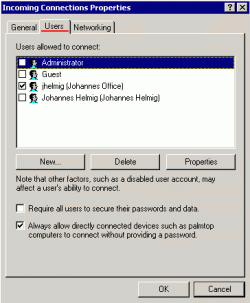
w2rasc04.gif

and add a new user
 

My Computer

Computer Manufacturer/Model Number
Compaq Desktop
OS
Windows 7 Ultimate x64
CPU
AMD Sempron Dual Core
Memory
3GB
Graphics Card(s)
NVIDIA GeForce 6150SE nForce 430
Screen Resolution
1024x768
Hard Drives
150GB Sata
windows 7 cannot access shared folder in windows xp authentication failure
 

My Computer

OS
windows 7 ultimate x32
Back
Top