jordanmaster
New member
- Local time
- 7:24 AM
- Messages
- 3
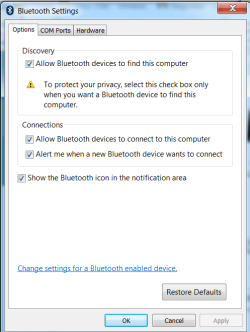
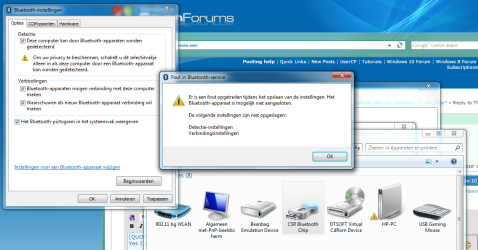
So, I've been having this problem for a few years now. I tried every possible solution on the internet, but I just can't do it. Bluetooth will not work on my Windows 7 64-bit. It just doesn't. I attached my bluetooth dongle. Windows installs the driver for it (CSR Bluetooth Chip) and that's where my story ends. I have never gotten beyond this point. It seems like I should be able to detect bluetooth devices now, but no it does not. There are no bluetooth option on PC whatsoever. The only thing I can find is the driver in Device Manager. I can see it's listed under Bluetooth-radios. I can find the dongle in Devices and Printers. When I right-click it, there is an option for Bluetooth-settings. In these settings is an option for visibility (this PC can be detected by other devices), but every time I check the box and click apply, it gives me an error. I thought this was the problem, or it had something to do with the dongle.
BUT, then I installed the Windows 10 Technical Preview. I saw the option for bluetooth. I thought I should try it out. I clicked the button and immediately I found all bluetooth devices. It has never been this easy.
I'm wondering, why can't Windows 7 find my devices? As far as I now, there is no Bluetooth button to click on Windows 7. Yes, there is an add a device option, but it's not Bluetooth specific.
So, what am I dealing with here? I'm starting to suspect that somethings wrong with my Windows 7. Does it not have any bluetooth options built-in at all? Please, I want to solve this problem after all this time. Thank you in advance.
BUT, then I installed the Windows 10 Technical Preview. I saw the option for bluetooth. I thought I should try it out. I clicked the button and immediately I found all bluetooth devices. It has never been this easy.
I'm wondering, why can't Windows 7 find my devices? As far as I now, there is no Bluetooth button to click on Windows 7. Yes, there is an add a device option, but it's not Bluetooth specific.
So, what am I dealing with here? I'm starting to suspect that somethings wrong with my Windows 7. Does it not have any bluetooth options built-in at all? Please, I want to solve this problem after all this time. Thank you in advance.
My Computer
At a glance
Windows 7 64-bit
- Computer type
- PC/Desktop
- OS
- Windows 7 64-bit